Introduction
Welcome to the user manual for your TCL Breeva A2 Air Purifier. This device is designed to provide cleaner, fresher air in your home by utilizing an advanced 4-stage filtration system. Please read this manual thoroughly to ensure proper operation and maintenance of your air purifier.
Key Features
Breeva Shield™ 4-Stage Filtration System
The Breeva A2 incorporates a comprehensive filtration system to capture various airborne particles and odors:
- Pre-Filter: Captures large particles such as dust, pet hair, and lint.
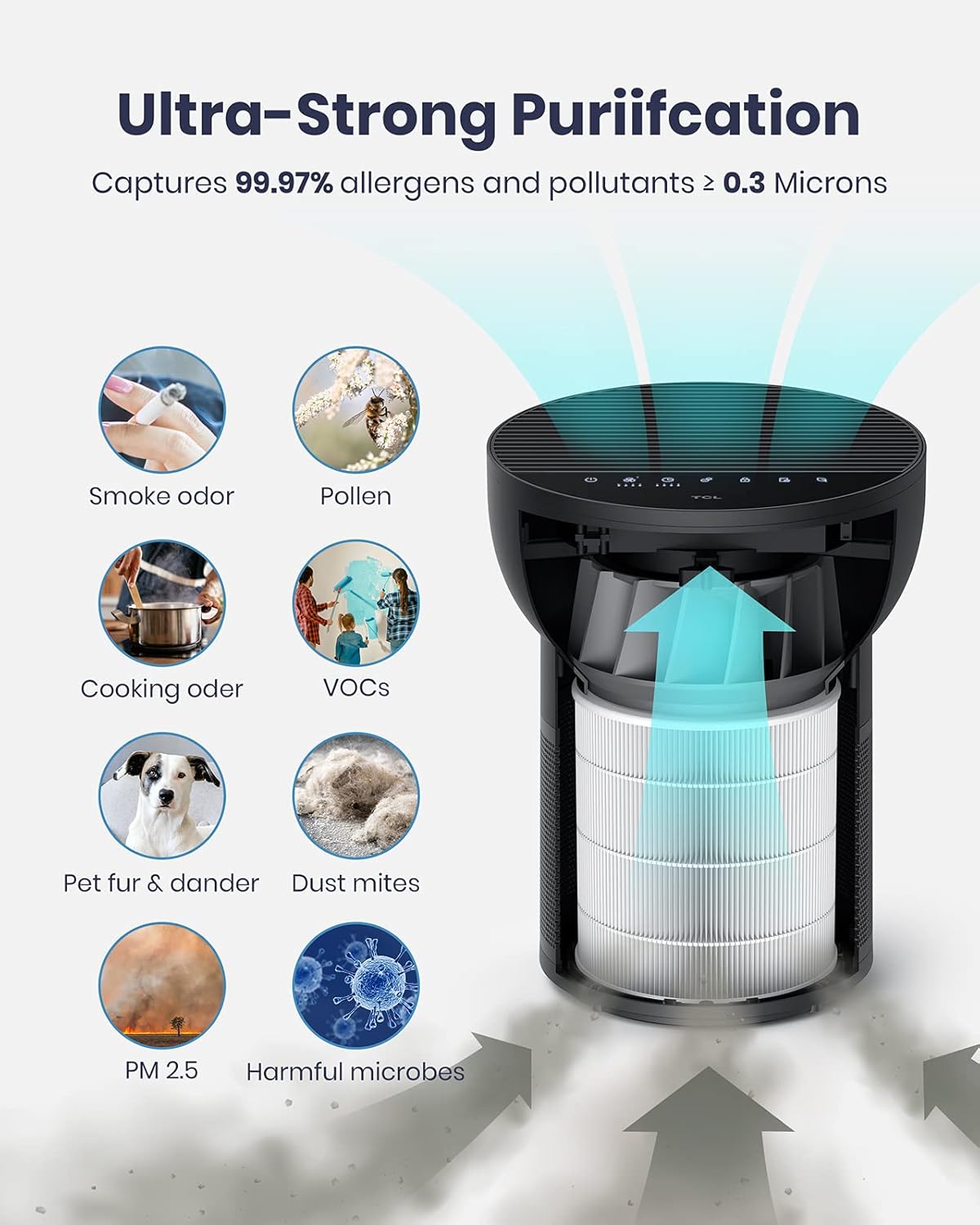
- True HEPA (H13) Filter: Eliminates 99.97% of airborne particles as small as 0.3 microns, including pollen, dust mites, mold spores, and pet dander.
- Activated Carbon Filter: Absorbs odors, smoke, and volatile organic compounds (VOCs) from household cleaning supplies.
- Anion Technology: Releases negative ions to help fine particles condense and settle, further purifying the air.
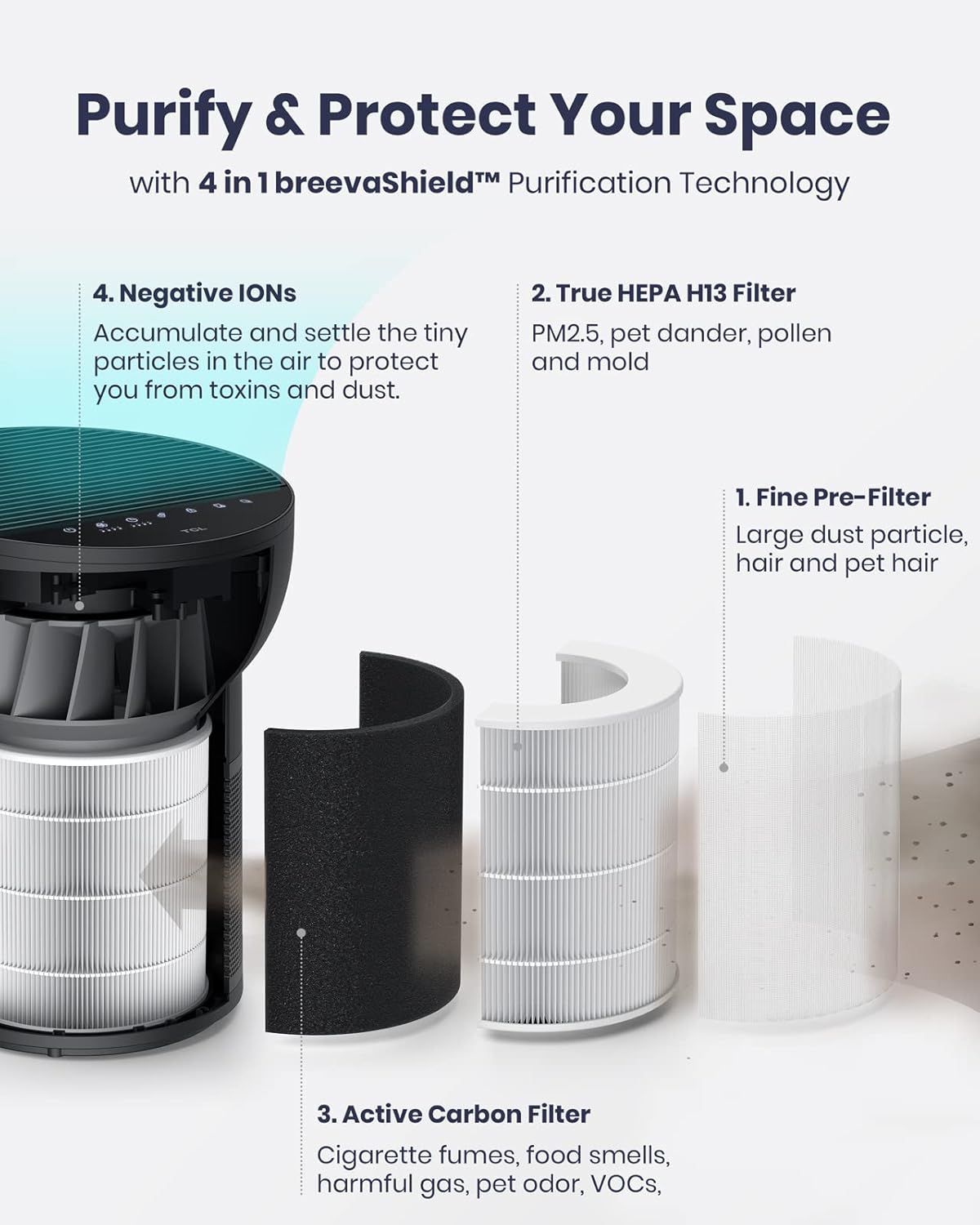
This image illustrates the internal components of the Breeva Shield™ 4-stage filtration system, highlighting each filter layer and its function in purifying the air.

The image visually represents the air purifier's ability to capture 99.97% of allergens and pollutants, including various common indoor contaminants.
Auto Shield Mode with Smart Sensors
The Auto Shield mode intelligently monitors your indoor air quality in real-time using advanced sensors:
- VOC Sensor: Detects volatile organic compounds and odors.
- Infrared Dust Sensor: Identifies airborne particulate matter.
Based on sensor readings, the air purifier automatically adjusts its fan speed to optimize purification, ensuring continuous clean air without manual intervention. Air quality is indicated by LED lights (Good, Moderate, Unhealthy).

This image shows the air purifier's Auto Mode in action, with colored LEDs providing an immediate visual cue of the current air quality in the room.
Quiet Sleep Mode
Designed for undisturbed rest, the Sleep Mode operates at an ultra-quiet 26dB, ensuring a peaceful environment while purifying the air. You can also choose to turn off all panel lights for complete darkness.
The image highlights the air purifier's quiet operation in Sleep Mode, making it suitable for bedrooms and ensuring a comfortable night's sleep.
Wide Coverage
The Breeva A2 is effective in rooms up to 182 sq. ft., circulating clean air up to 5 times per hour. It can clean 441 sq. ft. in as little as 30 minutes and 882 sq. ft. in an hour, thanks to its 360° air intake design.

This graphic demonstrates the air purifier's efficiency in covering various room sizes and its rapid air circulation capability.
Official Product Video
This official overview video provides a visual demonstration of the TCL Breeva A2 air purifier's features, including its filtration system, smart sensors, and quiet operation.
Setup Guide
Unpacking and Placement
- Carefully remove the air purifier from its packaging.
- Place the unit on a firm, level surface. Ensure there is at least 6 inches (15 cm) of space around all sides for optimal air intake and circulation.
- Avoid placing the unit near heat sources, direct sunlight, or areas with excessive moisture.
Power Connection
Connect the power adapter to the air purifier's power input port, then plug the adapter into a standard electrical outlet. The unit is now ready for operation.
Operating Instructions
The TCL Breeva A2 features an intuitive touch control panel on its top surface.

This image displays the user-friendly control panel, allowing easy access to all functions of the air purifier.
Control Panel Functions
- Power Button (⏻): Press to turn the unit On or Off.
- Fan Speed Button (💨): Cycle through different fan speeds (Low, Medium, High) or activate Auto Mode.
- Timer Button (⏱): Set the operating timer for 1, 2, 4, or 8 hours. The unit will automatically turn off after the set time.
- Child Lock Button (🔒): Press and hold for 3 seconds to activate or deactivate the child lock, preventing accidental changes to settings.
- Filter Reset Button (🗑): After replacing the filter, press and hold this button for 3 seconds to reset the filter life indicator.
- Air Quality Indicator (🍃): Displays current air quality (Green: Good, Yellow: Moderate, Red: Unhealthy).
Modes of Operation
- Auto Mode: The air purifier automatically adjusts fan speed based on real-time air quality detected by its sensors.
- Sleep Mode: Activates the lowest fan speed for quiet operation and turns off panel lights for an undisturbed sleeping environment.
Maintenance
Filter Replacement
The filter typically lasts 3-6 months, depending on air quality and usage. The filter replacement indicator light will illuminate when it's time to replace the filter.
- Unplug the air purifier from the power outlet.
- Gently turn the unit upside down.
- Twist the base cover counter-clockwise to unlock and remove it.
- Carefully pull out the old filter.
- Insert the new filter (TCL Breeva A2 replacement filter, UPC: 846042022347, search for "B09CWFWY4G") into the unit.
- Replace the base cover and twist clockwise to lock it securely.
- Plug the air purifier back in.
- Press and hold the Filter Reset Button (🗑) for 3 seconds to reset the filter life indicator.
Cleaning the Unit
Wipe the exterior of the air purifier with a soft, dry cloth. Do not use abrasive cleaners or solvents. For the air intake and output vents, use a soft brush or vacuum cleaner with a brush attachment to remove dust.
Troubleshooting
| Problem | Possible Cause | Solution |
|---|---|---|
| Unit does not turn on. | Not plugged in; Power outage; Power button not pressed. | Ensure the power cord is securely plugged into a working outlet; Check circuit breaker; Press the Power Button. |
| Airflow is weak or noisy. | Filter is dirty or clogged; Air intake/output blocked. | Replace the filter; Ensure no obstructions are blocking the vents. |
| Air quality indicator always red. | High pollution levels; Sensor is dirty. | Increase fan speed; Clean the sensor area (refer to detailed manual for sensor cleaning). |
| Child Lock is active. | Child Lock feature enabled. | Press and hold the Child Lock Button (🔒) for 3 seconds to deactivate. |
Specifications
| Feature | Detail |
|---|---|
| Model | A2 |
| Brand | TCL |
| Color | Black |
| Product Dimensions (D x W x H) | 1"D x 1"W x 1"H |
| Item Weight | 7.57 pounds |
| Noise Level | 26 dB (Sleep Mode) |
| Coverage Area (CADR) | Up to 182 sq. ft. (5x air changes/hour); 441 sq. ft. (30 min); 882 sq. ft. (1 hour) |
| Filtration Type | Breeva Shield™ 4-Stage (Pre-filter, True HEPA H13, Activated Carbon, Anion) |
| Filter Life | 3-6 months (average) |
| Controller Type | Button Control |
| Certifications | AHAM, CARB, Energy Star, Reddot, CE, CETL, UKCA, CB, RoHS, WEEE, FCC, ETL listed |
Warranty and Support
For warranty information, please refer to the warranty card included with your product or visit the official TCL support website. For technical assistance, troubleshooting, or to purchase replacement filters, please contact TCL customer support.
Replacement filters can be found by searching for "B09CWFWY4G" or "TCL Breeva A2 filter".