
1. Introduction
Thank you for choosing the Belaco 12-inch Blue Desk Fan. This manual provides important information regarding the safe operation, assembly, maintenance, and troubleshooting of your fan. Please read it thoroughly before use and retain it for future reference.

Figure 1.1: Belaco 12-inch Blue Desk Fan Overview
This fan is designed to provide efficient and quiet cooling for your home or office environment. Its compact and stylish design ensures it blends seamlessly into any room.
2. Safety Instructions
Always follow basic safety precautions when using electrical appliances to reduce the risk of fire, electric shock, and personal injury.
- Ensure the power supply voltage matches the fan's requirements (220-240V, 50Hz).
- Do not operate the fan with a damaged cord or plug. If damaged, contact qualified service personnel.
- Keep fingers, hair, and loose clothing away from the fan blades during operation.
- Do not immerse the fan, cord, or plug in water or other liquids.
- Unplug the fan from the outlet when not in use, when moving it, or before cleaning.
- Place the fan on a stable, flat surface to prevent it from tipping over. The fan features a strong resistant base to prevent slipping.
- Do not operate the fan in areas with high humidity or where flammable liquids or gases are present.
- This appliance is not intended for use by persons (including children) with reduced physical, sensory or mental capabilities, or lack of experience and knowledge, unless they have been given supervision or instruction concerning use of the appliance by a person responsible for their safety.

Figure 2.1: High Protective Mesh Net for Safety
The fan is equipped with a high-resistance protective metal mesh and durable plastic blades to ensure safe operation and optimal air quality with reduced risk.
3. Setup and Assembly
The Belaco Desk Fan requires minimal assembly. Follow these steps carefully:
- Carefully unpack all components from the box. Ensure all parts are present: fan motor unit, front and rear mesh guards, fan blades, and base.
- Attach the fan base to the main motor unit. Ensure it clicks securely into place or is fastened with provided screws, if any.
- Mount the rear mesh guard onto the motor unit, aligning the notches. Secure it with the retaining nut or clips.
- Slide the fan blades onto the motor shaft. Ensure they are pushed firmly until they lock into position.
- Place the front mesh guard over the rear guard, aligning the clips. Secure the two mesh guards together using the provided clips or screws around the rim.
- Ensure all parts are securely fastened before plugging in the fan.

Figure 3.1: Fan Components and Assembly Overview
4. Operating Instructions
Your Belaco Desk Fan is designed for ease of use. Follow these steps to operate your fan:
- Power On/Off: Plug the fan into a suitable electrical outlet. Use the power button located on the base to turn the fan on or off.
- Speed Control: The fan offers 3 speed options. Press the speed control buttons on the base to cycle through low, medium, and high settings. The fan operates quietly even at higher speeds.
- Oscillation: To activate the oscillation feature, press down the oscillation pin located on top of the motor housing. To stop oscillation, pull the pin up. The fan oscillates up to 85 degrees to cover a wider area.
- Tilt Adjustment: The fan head is adjustable and can be tilted up to 30 degrees up or down to direct airflow precisely where needed. Simply manually adjust the fan head to your desired angle.

Figure 4.1: Fan Oscillation Feature
5. Maintenance
Regular cleaning and proper storage will ensure the longevity and optimal performance of your fan.
- Cleaning: Always unplug the fan before cleaning. Use a soft, damp cloth to wipe the exterior surfaces. Do not use abrasive cleaners or immerse the fan in water. For dust accumulation on the blades or inside the mesh, use a vacuum cleaner with a brush attachment or a dry cloth.
- Storage: When not in use for extended periods, store the fan in its original packaging or a clean, dry place.
6. Troubleshooting
If you encounter any issues with your Belaco Desk Fan, refer to the following common problems and solutions:
| Problem | Possible Cause | Solution |
|---|---|---|
| Fan does not turn on. | No power supply. | Check if the power cord is securely plugged into a working outlet. Test the outlet with another device. |
| Weak airflow. | Incorrect speed setting or obstructions. | Increase the fan speed. Ensure there are no obstructions blocking the air intake or output. |
| Unusual noise during operation. | Loose parts or foreign objects. | Unplug the fan and check for any loose components or foreign objects caught in the blades or mesh. Ensure the fan is assembled correctly. Note: A slight click may be heard when the fan oscillates and reaches 90 degrees as it resets. |
7. Specifications
Detailed technical specifications for your Belaco 12-inch Desk Fan:
- Brand: Belaco
- Model Number: BEL12BB
- Color: Black and Blue
- Diameter: 12 inches (30.48 cm)
- Power/Wattage: 40 watts
- Voltage: 220-240 volts
- Frequency: 50 Hz
- Material: Acrylonitrile Butadiene Styrene (ABS)
- Automatic Shut-off: No
- Number of Speeds: 3
- Noise Level: 30 decibels (dB)
- Airflow: 894 CFM
- Product Dimensions: 490 x 340 x 265 mm
- Item Weight: 2.2 Kilograms
- Power Source: Corded Electric (Three-pin British plug)
- Special Features: Oscillating, Portable, Stable Base, Multi-use
- Recommended Uses: Bedroom, Living Room, Home Office
- Mounting Type: Tabletop
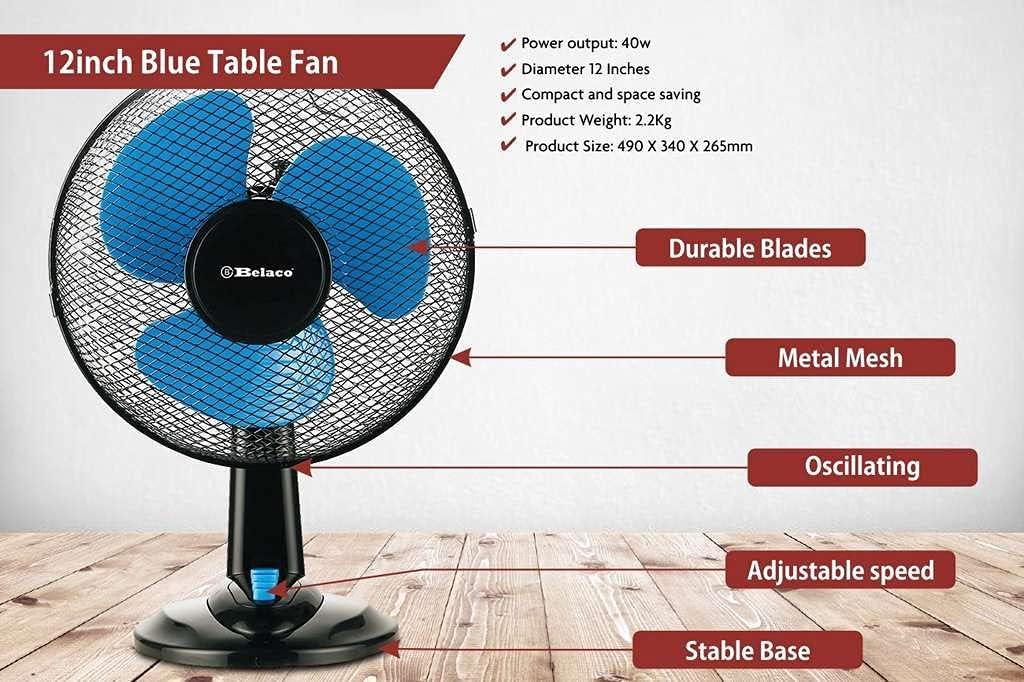
Figure 7.1: Key Features and Components
8. Warranty and Support
Belaco is committed to providing high-quality products. If you have any questions or concerns regarding your Belaco fan, please do not hesitate to contact our customer support. Our representatives will be glad to assist you with any issues you may have.
Please refer to your purchase documentation for specific warranty terms and contact information.