
1. Introduction
Thank you for purchasing the Beacon Pet Mini Oven. This 12L electric oven is designed for versatile home cooking, including baking, toasting, and preparing various dishes like pizza, cakes, and French fries. With its adjustable temperature control and compact design, it offers convenience and efficiency for daily use. Please read this manual thoroughly before operating the appliance to ensure safe and optimal performance.
2. Important Safety Instructions
- Read all instructions before using the oven.
- Do not touch hot surfaces. Use handles or knobs.
- To protect against electrical shock, do not immerse cord, plug, or oven in water or other liquid.
- Close supervision is necessary when any appliance is used by or near children.
- Unplug from outlet when not in use and before cleaning. Allow to cool before putting on or taking off parts.
- Do not operate any appliance with a damaged cord or plug, or after the appliance malfunctions or has been damaged in any manner.
- The use of accessory attachments not recommended by the appliance manufacturer may cause injuries.
- Do not use outdoors.
- Do not let cord hang over edge of table or counter, or touch hot surfaces.
- Do not place on or near a hot gas or electric burner, or in a heated oven.
- Extreme caution must be used when moving an appliance containing hot oil or other hot liquids.
- Always attach plug to appliance first, then plug cord into the wall outlet. To disconnect, turn any control to “off”, then remove plug from wall outlet.
- Do not use appliance for other than intended use.
- Oversized foods or metal utensils must not be inserted in a toaster oven as they may create a fire or risk of electric shock.
- A fire may occur if the oven is covered or touching flammable material, including curtains, draperies, walls, and the like, when in operation.
- Do not place any of the following materials in the oven: paper, cardboard, plastic, or anything similar.
- Do not store any materials, other than manufacturer’s recommended accessories, in this oven when not in use.
- Do not place cooking utensils or baking dishes on the glass door.
3. Product Overview
Components
The Beacon Pet Mini Oven comes with essential components for your cooking needs. Familiarize yourself with the parts before operation.
- Oven Unit
- Bakeware (Baking Pan)
- Gridiron (Wire Rack)
- Temperature Control Knob
- Timer Knob
- Power Indicator Light
- Glass Door with Handle

Figure 3.1: Front view of the Beacon Pet Mini Oven, showcasing its compact design, control knobs, and glass door. The internal baking pan and wire rack are visible.
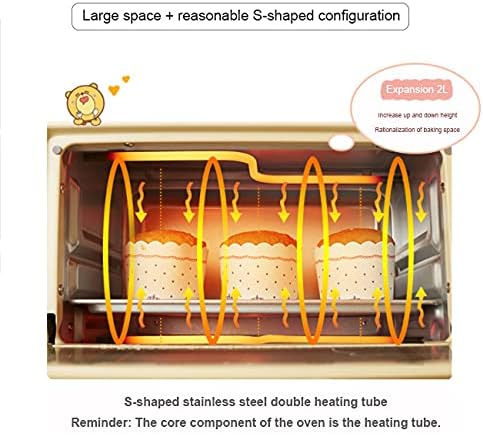
Figure 3.2: Internal view diagram illustrating the S-shaped stainless steel double heating tube, which ensures even heat distribution for consistent baking results.
4. Setup
Before first use, follow these steps to prepare your mini oven:
- Unpack: Carefully remove the oven and all accessories from the packaging. Retain packaging for future storage or transport.
- Remove Packing Materials: Remove any protective film, stickers, or packing materials from inside and outside the oven.
- Clean Accessories: Wash the bakeware and gridiron in warm, soapy water. Rinse thoroughly and dry completely.
- Wipe Down Oven: Wipe the exterior of the oven with a damp cloth. Do not immerse the oven in water.
- Placement: Place the oven on a stable, heat-resistant, and level surface. Ensure there is adequate clearance (at least 4 inches) on all sides for proper ventilation. Do not place it near flammable materials.
- First Use Burn-Off: Before cooking food, operate the oven empty for approximately 15 minutes at the maximum temperature (250°C) to burn off any manufacturing residues. A slight odor or smoke may be present during this process; ensure the area is well-ventilated.
- Cool Down: After the burn-off, turn off the oven and allow it to cool completely before proceeding.
5. Operating Instructions
Temperature and Timer Control
The oven features two knob controls for precise cooking. The upper knob controls the temperature, and the lower knob controls the timer.

Figure 5.1: Adjusting the temperature knob. The upper knob controls temperature from 100°C to 250°C, while the lower knob sets the cooking time up to 60 minutes.
- Temperature Knob: Rotate the upper knob to select the desired cooking temperature, ranging from 100°C to 250°C.
- Timer Knob: Rotate the lower knob to set the cooking time, up to 60 minutes. The oven will automatically turn off and signal when the timer reaches zero. For continuous operation, turn the timer knob to the 'Stay On' position (if available).
- Power Indicator Light: The light will illuminate when the oven is operating and will turn off when the set temperature is reached or the timer expires.
Cooking Guide
The mini oven is suitable for a variety of dishes. The following guide provides general recommendations for common foods. Adjust times and temperatures based on your specific recipe and desired doneness.
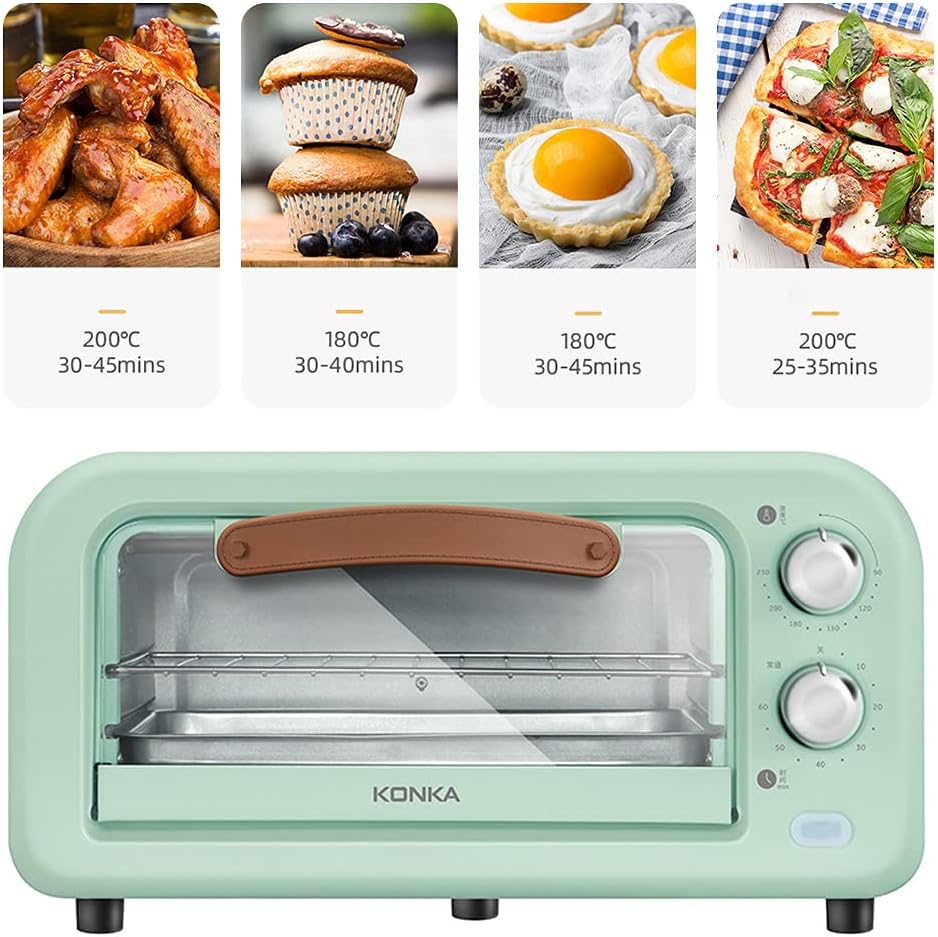
Figure 5.2: Visual cooking guide for various food items, providing approximate temperature and time settings for optimal results.
- Chicken Wings: Approximately 200°C for 30-45 minutes.
- Muffins/Cupcakes: Approximately 180°C for 30-40 minutes.
- Egg Tarts: Approximately 180°C for 30-45 minutes.
- Pizza (8-inch): Approximately 200°C for 25-35 minutes.
- French Fries: Refer to package instructions, typically 200°C for 15-25 minutes.
- Toast: Adjust temperature and time based on desired crispness, typically 180-200°C for 5-10 minutes.
Note:
- Preheat the oven for 5-10 minutes before placing food inside for best results.
- Always use oven mitts when handling hot bakeware or food.
- The curved inner tank design allows for baking up to an 8-inch pizza.
- This oven supports low-temperature fermentation, suitable for dough proofing.
6. Maintenance and Cleaning
Regular cleaning will help maintain the performance and longevity of your mini oven. Always unplug the oven and allow it to cool completely before cleaning.
- Interior Cleaning: Wipe the interior surfaces with a damp cloth and mild detergent. For stubborn stains, a non-abrasive cleaner can be used. Do not use steel wool or abrasive pads, as they can damage the surfaces.
- Exterior Cleaning: Wipe the exterior with a soft, damp cloth. Do not use harsh chemicals or abrasive cleaners.
- Bakeware and Gridiron: These accessories can be washed in warm, soapy water or placed in a dishwasher (if dishwasher safe). Rinse and dry thoroughly.
- Crumb Tray: If applicable, remove and empty the crumb tray regularly to prevent grease buildup and potential fire hazards. Wash it with warm, soapy water.
- Glass Door: Clean the glass door with a glass cleaner or a damp cloth. Avoid scratching the surface.
- Storage: When not in use, ensure the oven is clean and dry. Store it in a cool, dry place.
7. Troubleshooting
If you encounter any issues with your mini oven, refer to the table below for common problems and their solutions.
| Problem | Possible Cause | Solution |
|---|---|---|
| Oven does not turn on. | Not plugged in; power outlet malfunction; timer not set. | Ensure the oven is securely plugged into a working outlet. Check the circuit breaker. Turn the timer knob to the desired cooking time. |
| Food is not cooking evenly. | Incorrect temperature/time setting; food placed incorrectly; oven not preheated. | Adjust temperature and time according to recipe. Ensure food is centered and not overcrowding the oven. Preheat the oven before placing food inside. |
| Excessive smoke during operation. | Food residue inside; first use burn-off. | Clean the interior of the oven and accessories thoroughly. If it's the first use, this is normal; ensure good ventilation. |
| Timer not working. | Knob not turned far enough; mechanical issue. | Ensure the timer knob is turned past the 10-minute mark before setting the desired time. If issue persists, contact customer support. |
If the problem persists after attempting these solutions, please contact customer support for further assistance.
8. Specifications
Detailed technical specifications for the Beacon Pet Mini Oven:
| Feature | Specification |
|---|---|
| Brand | Beacon Pet |
| Model Name | Beacon Pet Mini Oven |
| Rated Capacity | 12 Liters |
| Rated Power | 1050W |
| Control Type | Knob (Manual, Mechanical) |
| Temperature Control Range | 100-250°C |
| Timer | 60-minute with signal |
| Door Style | Dropdown Door |
| Door Material Type | Tempered Glass |
| Included Components | 1 x Oven, 1 x Bakeware, 1 x Gridiron |
| Power Source | AC adapter |
| Product Dimensions (L x W x H) | 6.89 x 8.07 x 6.89 inches (approx. 175 x 205 x 175 mm) |
| Color | Black & Red (as per description, though product images show green) |
| ASIN | B097MSVHNR |
| Date First Available | June 21, 2021 |

Figure 8.1: Detailed dimensions of the oven unit (365mm x 225mm x 200mm) and its internal accessories (baking pan and gridiron, both 255mm x 195mm).
9. Warranty and Support
The Beacon Pet Mini Oven comes with a standard manufacturer's warranty. For specific warranty terms and conditions, please refer to the warranty card included with your product or contact Beacon Pet customer service.
For technical support, troubleshooting assistance, or to inquire about replacement parts, please contact Beacon Pet customer service through their official website or the retailer where the product was purchased. Please have your model number (Mini Oven) and purchase date ready when contacting support.