
QCY T13 (BH20T13A)
Contents
QCY T13 True Wireless Earbuds User Manual
Model: T13 (BH20T13A) | Brand: QCY
Introduction
Thank you for choosing the QCY T13 True Wireless Earbuds. This manual provides detailed instructions on how to set up, operate, maintain, and troubleshoot your earbuds to ensure optimal performance and longevity. Please read this manual thoroughly before using the product.

Image: QCY T13 True Wireless Earbuds in their open charging case, showcasing their sleek white design.
For a quick visual overview of the QCY T13 Wireless Bluetooth Earbuds, watch the video below:
Video: A brief official video showcasing the QCY T13 Wireless Bluetooth Earbuds and their key features.
What's in the Box
Verify that all items are present in your package:
- 1 x Wireless Headphones (QCY T13 Earbuds)
- 1 x Type-C Charging Cable
- 1 x Charging Case
- 3 x Eartips (Sizes: Large, Medium, Small)
- 1 x User Manual (this document)
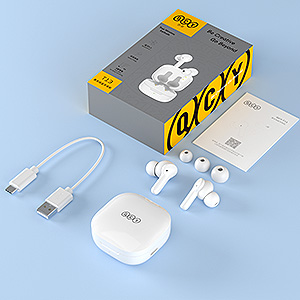
Image: A flat lay showing all components included in the QCY T13 Earbuds package: earbuds, charging case, USB-C cable, various eartip sizes, and the user manual.
Setup
1. Initial Charge
Before first use, fully charge the earbuds and the charging case. Connect the provided Type-C charging cable to the charging port on the case and a power source. The charging indicator light on the case will provide status feedback.

Image: The QCY T13 charging case with a USB-C cable plugged into its charging port, indicating the charging method.
A quick 5-minute charge can provide up to 1 hour of playback time. A full charge takes approximately 2 hours.

Image: A graphic illustrating the fast charge capability of QCY T13 earbuds, showing "5 minutes charging = 1 hour playback" and a total of "40 hours playback time".
2. Pairing with Your Device
The QCY T13 earbuds feature one-step pairing for convenience.
- Open the charging case. The earbuds will automatically power on and enter pairing mode.
- On your mobile device, enable Bluetooth and search for "QCY T13" in the list of available devices.
- Select "QCY T13" to connect. Once connected, you will hear a confirmation tone.
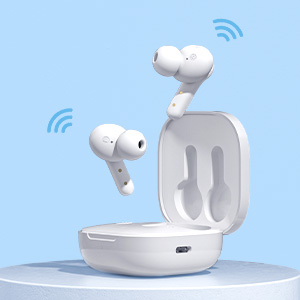
Image: QCY T13 earbuds in their charging case, with animated wireless signals emanating from them, symbolizing automatic pairing.
3. Fitting the Earbuds
For optimal sound quality and comfort, choose the correct size of eartips and ensure a secure fit.
- Select the eartips (S, M, L) that best fit your ear canals. A good seal is crucial for bass response and noise isolation.
- Gently insert the earbuds into your ears and twist them slightly to secure them in place.

Image: A close-up of a QCY T13 earbud properly seated in a person's ear, demonstrating the correct fit.
Operating Instructions
Touch Controls
The QCY T13 earbuds feature intuitive touch controls on each earbud. The specific touch control function makes it more convenient, allowing control without operating the phone.
- Answer/Hang up Call: Double-tap either L/R earbud.
- Reject Call: Press and hold either L/R earbud for 1.5 seconds.
- Previous Song: Press and hold the L earbud for 1.5 seconds.
- Next Song: Press and hold the R earbud for 1.5 seconds.
- Voice Assistant: Triple-tap the L earbud.
- Play/Pause: Double-tap either L/R earbud.
- Low Latency Mode: Triple-tap the R earbud.

Image: A visual diagram illustrating the various touch control gestures for the QCY T13 earbuds, including actions like answering calls, skipping tracks, and activating voice assistant.
To avoid accidental touches, especially when lying down or during active use, you can turn on "sleep mode" via the QCY App, which automatically shields the touch function.
Power On/Off
- Power On: Open the charging case, or press and hold the touch panel for 1.5 seconds if outside the case.
- Power Off: Place the earbuds back into the charging case and close the lid, or press and hold the touch panel for 4.5 seconds.
Battery Status Indication
The charging case has an LED indicator to show its battery level:
- Red Light: Battery less than 50%
- Blue Light: Battery between 50-90%
- Green Light: Battery greater than 90%

Image: A diagram showing the QCY T13 charging case with its LED indicator, explaining the color codes for different battery percentage ranges (Red for <50%, Blue for 50-90%, Green for >90%).
QCY App Integration
Enhance your experience by downloading the QCY App. The app allows for sound customization (EQ settings), pop-up window pairing, and a brand-new user interface for easier control.

Image: A graphic showcasing the QCY App, highlighting features like custom controls, pop-up window for connection, and a new user interface for managing the earbuds.
For a detailed visual guide on how to operate the QCY T13 wireless Bluetooth earbuds, please refer to the official video below:
Video: An official QCY video demonstrating the operational aspects of the T13 wireless Bluetooth earbuds, including pairing and touch controls.
Maintenance
Proper maintenance ensures the longevity and performance of your QCY T13 earbuds.
Cleaning
Regularly clean the earbuds and charging case to prevent debris buildup.
- Use a soft, dry, lint-free cloth to wipe the exterior of the earbuds and charging case.
- For charging contacts, eartips, and mesh, use an alcohol pad or a cotton swab lightly dampened with rubbing alcohol. Ensure no liquid enters the openings.
- Allow all components to dry completely before placing earbuds back into the case or using them.
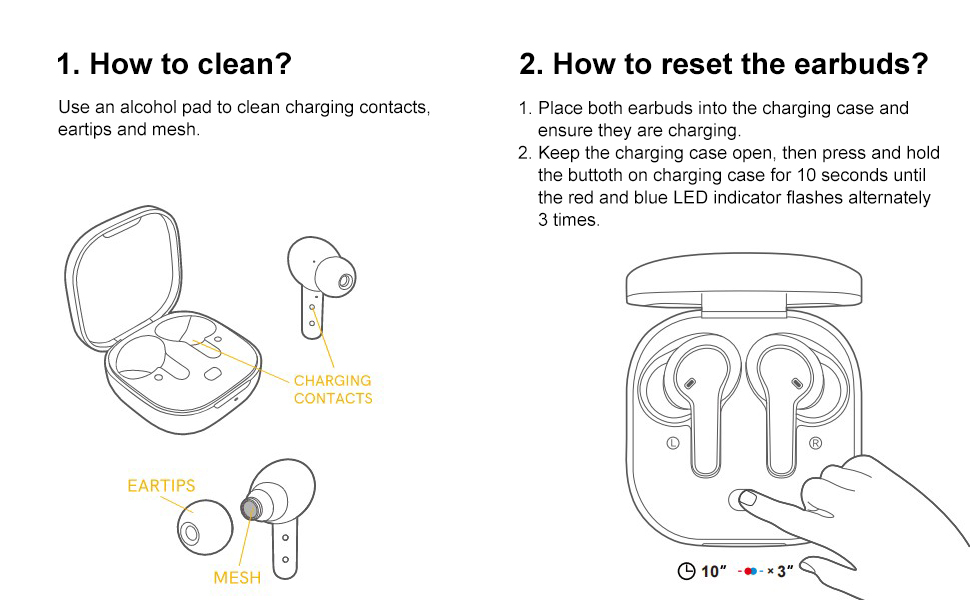
Image: A diagram showing how to clean the QCY T13 earbuds, specifically highlighting the charging contacts, eartips, and mesh areas for proper maintenance.
Water Resistance
The QCY T13 earbuds are IPX5 water resistant, meaning they are protected against sweat and water splashes. They are suitable for sports and exercise, including use on a rainy day, but are not designed for submersion in water.
Image: A graphic indicating the IPX5 water resistance rating of the QCY T13 earbuds, showing them resistant to rain, sweat, and splashes.
Troubleshooting
Resetting the Earbuds
If you experience pairing issues, sound problems, or other malfunctions, resetting the earbuds may resolve the issue.
- Place both earbuds into the charging case and ensure they are charging.
- Keep the charging case open, then press and hold the button on the charging case for 10 seconds until the red and blue LED indicator flashes alternately 3 times.
- Close the case, then open it again to re-pair with your device.
Image: A diagram illustrating the process of resetting the QCY T13 earbuds by holding a button on the charging case for 10 seconds until the LED flashes red and blue.
Common Issues
- Earbuds not connecting: Ensure Bluetooth is enabled on your device and the earbuds are charged. Try resetting the earbuds.
- Only one earbud working: Place both earbuds back in the case, close the lid, then open it again. If the issue persists, try resetting.
- Low volume or poor sound quality: Ensure eartips provide a good seal. Clean the earbud mesh. Adjust EQ settings in the QCY App.
- Earbuds not charging: Ensure the charging cable is securely connected and the charging contacts on both the earbuds and case are clean.
Specifications
| Model Name | T13 |
| Item Model Number | BH20T13A |
| Connectivity Technology | Wireless (Bluetooth 5.1) |
| Bluetooth Range | 15 Meters |
| Battery Life (Earbuds) | Up to 8 hours |
| Total Playtime (with Case) | Up to 40 hours |
| Charging Time | Approx. 2 hours (earbuds + case) |
| Quick Charge | 5 mins charge for 1 hour playback |
| Audio Driver Size | 7.2 mm Dynamic Driver |
| Noise Control | ENC Noise Cancellation (for calls) |
| Water Resistance Level | IPX5 (Sweat and water resistant) |
| Control Type | Touch Control |
| Material | Polycarbonate (PC), Acrylonitrile Butadiene Styrene (ABS) |
| Item Weight | 49 Grams (1.73 ounces) |
| Product Dimensions | 2.13 x 2.13 x 1.1 inches |
Safety Information
Please observe the following safety guidelines for safe and proper use of your earbuds:
- Do not disassemble or modify the product.
- Keep the product away from extreme temperatures, humidity, and corrosive substances.
- Avoid dropping or subjecting the product to strong impacts.
- Do not expose the charging case to water or moisture.
- Use only the provided or certified charging cables.
- Prolonged exposure to high volume levels may cause hearing damage. Adjust volume to a safe level.
- Do not use earbuds in situations where inability to hear ambient sounds could be dangerous (e.g., driving, cycling, walking in traffic).
Warranty and Support
For warranty information and customer support, please refer to the documentation included with your product packaging or visit the official QCY website. Keep your purchase receipt for warranty claims.
Ask a question about this manual
Ask about setup, troubleshooting, compatibility, parts, safety, or missing instructions. Manuals+ will review the question and use this page’s manual context to help answer it.