
1. Introduction
This instruction manual provides detailed information for the safe and effective use of your KAER 4-5 Gun Safe. Designed for quick access and high security, this biometric digital gun cabinet offers reliable storage for firearms and ammunition. Please read this manual thoroughly before installation and operation to ensure proper functionality and safety.
2. Safety Information
It is crucial to adhere to all safety guidelines to prevent accidents and ensure the security of your firearms.
- Ensure proper installation by securely anchoring the safe to the ground or wall.
- Do not overload the safe with more than the recommended capacity of 4-5 rifles.
- Keep emergency keys out of reach of children and store them in a separate, secure location to prevent unauthorized access.
- Always verify the safe is locked after closing the door.
- Do not store flammable materials or liquids inside the safe.
3. Package Contents
Upon opening the package, please verify that all components are present:
- 1 x KAER Rifle Gun Safe Cabinet
- 2 x Backup Keys
- 4 x Anchor Bolts for Mounting
- 1 x Emergency Battery Pack
- 1 x Instruction Manual (this document)
4. Specifications
| Feature | Detail |
|---|---|
| Brand | KAER |
| Model Number | W396 |
| Color | Black |
| Product Dimensions | 11"D x 11.8"W x 54.3"H |
| Interior Dimensions | 11.61"W x 8.66"D x 54.13"H |
| Item Weight | 68.34 Pounds |
| Material | Alloy Steel |
| Lock Type | Combination, Electronic, Key |
| Special Feature | Removable Shelf, Biometric Fingerprint |
| Capacity | Up to 4-5 Rifles |
5. Setup and Installation
The KAER gun safe is designed for freestanding placement but can be securely anchored for enhanced security. It is recommended to install the safe in a location that is dry, secure, and out of reach of unauthorized individuals.
5.1 Unpacking
Carefully remove the safe from its packaging. Inspect the safe for any signs of damage during transit. Retain all packaging materials until you are satisfied with the product.
5.2 Anchoring the Safe (Recommended)
For maximum security, it is highly recommended to bolt the safe to the floor or wall. The safe comes with pre-drilled holes and 4 anchor bolts for this purpose.
- Choose a suitable location for installation.
- Position the safe and mark the drilling points through the pre-drilled holes on the back or bottom of the cabinet.
- Move the safe and drill holes at the marked positions using an appropriate drill bit for your wall/floor material.
- Reposition the safe and align the holes. Insert the anchor bolts and tighten them securely.

Figure 1: All-steel construction and anchor bolts for secure installation.

Figure 2: Step-by-step diagram for wall mounting the gun safe.
6. Operating Instructions
Your KAER gun safe offers three convenient methods for entry:
6.1 Entry Methods
- Biometric Fingerprint:
To open using your fingerprint, press the power button on the keypad, then place your registered finger on the fingerprint scanner. Once recognized, the safe will unlock, allowing you to turn the handle and open the door. Refer to the separate programming guide for fingerprint registration.
- Digital Keypad (PIN):
Enter your 9-digit PIN code on the digital keypad. After entering the correct code, the safe will unlock. Turn the handle to open the door. Instructions for setting and changing your PIN are provided in the programming guide.
- Emergency Keys:
In case of battery failure or forgotten codes, use one of the provided emergency keys. Insert the key into the keyhole (usually concealed) and turn it to unlock the safe. Turn the handle to open the door. Always keep emergency keys stored securely outside the safe.

Figure 3: Overview of the three entry methods for the KAER gun safe.
6.2 Silent Mode and Alarm System
- Silent Mode: To enter silent mode, long press the "*" button on the keypad. Long press the "*" button again to return to sound mode.
- Alarm System: If an incorrect password or fingerprint is entered 5 times consecutively, the gun safe will lock for 1 minute and an alarm may sound. This is a security feature to deter unauthorized access.

Figure 4: Silent mode and alarm system features.
6.3 Interior Configuration
The safe features a removable shelf and adjustable gun racks to accommodate various firearm sizes and accessories. You can customize the interior layout to suit your storage needs.

Figure 5: Customizable interior with removable shelf and gun racks.
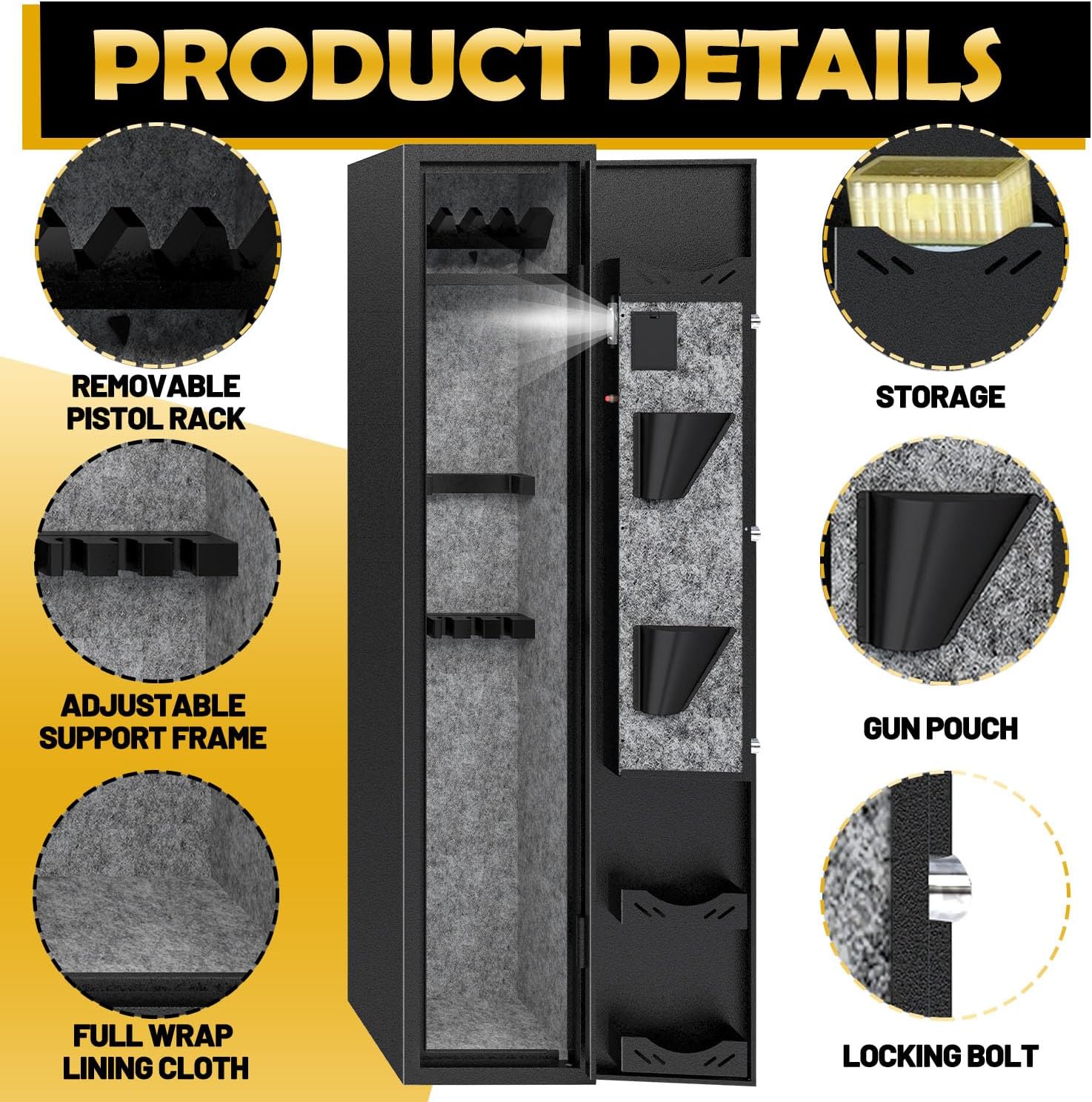
Figure 6: Additional interior features for organized storage.
7. Maintenance
Regular maintenance ensures the longevity and reliable operation of your gun safe.
- Cleaning: Wipe the exterior and interior surfaces with a soft, dry cloth. Avoid abrasive cleaners or solvents that could damage the finish.
- Battery Replacement: The digital keypad is powered by batteries. Replace batteries promptly when the low battery indicator appears to avoid being locked out. Always use the recommended battery type.
- Lock Mechanism: Do not attempt to lubricate the lock mechanism unless specifically instructed by customer support.
8. Troubleshooting
| Problem | Possible Cause | Solution |
|---|---|---|
| Safe does not open with fingerprint/PIN. | Incorrect fingerprint/PIN, low battery, or system error. |
|
| Alarm sounds unexpectedly. | Multiple incorrect entries. | Wait for the 1-minute lockout period to expire before attempting entry again. Ensure correct credentials. |
| Door is difficult to open or close. | Obstruction, misalignment, or heavy door. |
|
9. Warranty and Customer Support
Your KAER gun safe comes with a commitment to quality and customer satisfaction. If you encounter any issues or have questions regarding your product, please do not hesitate to contact our customer service team.
Contact Information: Please refer to the contact details provided on the product packaging or the official KAER website for the most up-to-date customer service information.
Our customer service team is dedicated to providing a satisfying solution for you.
For additional resources, including a PDF user guide, please visit: KAER User Guide (PDF)
