
Litetronics 77940
Litetronics 77940 PRT240 Indoor Square Flat Panel LED Fixture User Manual
Model: 77940 | Brand: Litetronics
Introduction
This manual provides comprehensive instructions for the installation, operation, and maintenance of your Litetronics 77940 PRT240 Indoor Square Flat Panel LED Fixture. Please read this manual thoroughly before installation and retain it for future reference. This fixture is designed for indoor commercial lighting applications, offering adjustable wattage and dimming capabilities.
Safety Information
Always follow basic safety precautions when installing and maintaining electrical equipment. Failure to do so may result in serious injury or property damage.
- WARNING: Risk of electric shock. Disconnect power at the fuse or circuit breaker before installation or servicing.
- Installation must be performed by a qualified electrician in accordance with all applicable national and local electrical codes.
- Ensure the supply voltage is compatible with the fixture's requirements (120/277 volt).
- Do not handle energized fixtures with wet hands or while standing on wet or damp surfaces.
- Do not modify the fixture in any way. Any modifications will void the warranty and may create a safety hazard.
- Keep flammable materials away from the fixture during operation.
Package Contents
Verify that all components are present and undamaged before beginning installation.
- Litetronics 77940 PRT240 LED Flat Panel Fixture
- Installation Guide (this manual)
- Mounting Hardware (e.g., clips, screws, wires - specific to mounting type)
Setup (Installation)
The Litetronics 77940 PRT240 fixture is designed for easy installation in standard 2'x2' grid ceilings. Consult a qualified electrician if you are unsure about any steps.
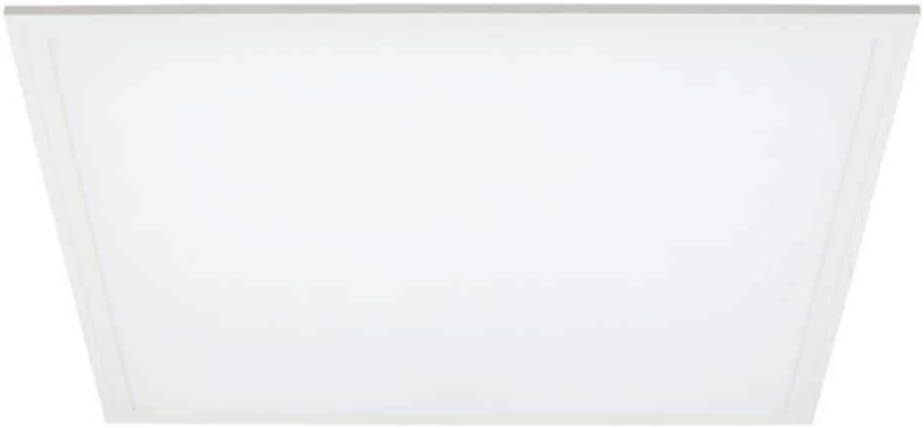
An overhead view of the Litetronics 77940 PRT240 Indoor Square Flat Panel LED Fixture, showcasing its white, flat, square design with a frosted polycarbonate lens.
Installation Steps:
- Power Disconnection: Before starting, ensure the power supply to the installation area is completely disconnected at the circuit breaker. Verify with a voltage tester.
- Prepare Opening: For recessed installations, ensure the ceiling grid opening is a standard 2'x2' size.
- Wiring: Open the wiring compartment on the back of the fixture. Connect the AC input wires (Line, Neutral, Ground) from the building's electrical system to the corresponding wires on the fixture. Ensure all connections are secure and insulated with wire nuts.
- Wattage Selection: Locate the wattage selector switch on the fixture. Choose the desired wattage setting (18W, 20W, 25W, 30W, or 36W) according to your lighting needs.
- Dimming Connection (Optional): If using a dimming system, connect the dimming wires (typically purple and gray for 0-10V dimming) from your dimmer control to the fixture's dimming wires.
- Secure Fixture: Carefully place the fixture into the ceiling grid opening. Use the integrated clips or mounting hardware to secure the fixture firmly to the grid.
- Power Restoration: Once the fixture is securely installed and all wiring connections are verified, restore power at the circuit breaker.
- Test Operation: Turn on the light switch to confirm the fixture is operating correctly.
Operating
The Litetronics 77940 PRT240 LED fixture is designed for simple operation once installed.
- Power On/Off: Control the fixture's power using the standard wall switch connected to its circuit.
- Dimming: If connected to a compatible 0-10V dimmer, adjust the light output by manipulating the dimmer control. The fixture supports smooth dimming down to low levels.
- Wattage Adjustment: The wattage setting is selected during installation. To change the wattage, power must be disconnected, and the fixture may need to be accessed to adjust the selector switch.
Maintenance
The Litetronics 77940 PRT240 LED fixture requires minimal maintenance due to its long-life LED technology.
- Cleaning: Ensure power is disconnected before cleaning. Use a soft, dry, or slightly damp cloth to wipe the surface of the fixture. Do not use abrasive cleaners, solvents, or cleaners containing alcohol, as these can damage the finish or lens.
- Inspection: Periodically inspect the fixture for any signs of damage or loose connections. Address any issues promptly.
- No User-Serviceable Parts: There are no user-serviceable parts inside the fixture. Do not attempt to open or repair the unit.
Troubleshooting
If you experience issues with your fixture, consult the table below for common problems and solutions.
| Problem | Possible Cause | Solution |
|---|---|---|
| Fixture does not light up | No power supply Incorrect wiring Faulty switch/breaker | Check circuit breaker and wall switch. Ensure power is connected. Verify wiring connections are secure and correct. |
| Light flickers or dims erratically | Loose wiring connection Incompatible dimmer Voltage fluctuations | Check all wiring connections. Ensure dimmer is compatible with 0-10V LED fixtures. Consult an electrician for voltage issues. |
| Light output is too low/high | Incorrect wattage setting Dimmer setting too low/high | Verify the wattage selector switch is set to the desired output. Adjust the dimmer control. |
| Humming noise from fixture | Incompatible dimmer Loose components | Ensure dimmer is compatible. If noise persists, contact customer support. |
Specifications
| Feature | Detail |
|---|---|
| Model Number | 77940 |
| Product Type | Indoor Square Flat Panel LED Fixture |
| Dimensions | 2' x 2' |
| Wattage Options | 18W, 20W, 25W, 30W, 36W (selectable) |
| Input Voltage | 120/277 Volt |
| Color Temperature | 4,000K (Cool White) |
| Lens Type | Polycarbonate Frosted Lens |
| Dimmable | Yes (0-10V Dimming) |
| Efficacy | 125 LpW |
| Lumens | 2250/2500/3125/3750/4500 (depending on wattage) |
| Color/Finish | White |
| UPC | 706762779405 |
Warranty and Support
For warranty information or technical support regarding your Litetronics 77940 PRT240 LED Fixture, please contact Litetronics customer service directly. Refer to the product packaging or the official Litetronics website for the most current contact details and warranty terms.
Litetronics Contact Information:
Please visit the official Litetronics website or refer to your purchase documentation for customer support contacts.
Ask a question about this manual
Ask about setup, troubleshooting, compatibility, parts, safety, or missing instructions. Manuals+ will review the question and use this page’s manual context to help answer it.