Introduction
The NineLeaf KS-SF30R is a versatile outdoor motion detector alarm system designed to enhance security and provide convenient alerts for various applications. It integrates both Passive Infrared (PIR) and Radar detection technologies to minimize false alarms. This system can function as a driveway alarm, a wireless doorbell, or a caregiver reminder, offering IP64 waterproof protection for reliable outdoor performance.
This manual provides essential information for the proper setup, operation, and maintenance of your NineLeaf KS-SF30R device. Please read it thoroughly before use.
Product Components

Image: The NineLeaf KS-SF30R system, showing the white receiver unit with speaker grille and LED indicators, and the compact white motion detector (transmitter) unit.
The NineLeaf KS-SF30R system typically includes the following main components:
- Receiver Unit: This unit receives signals from the motion detector and produces audible alerts, visual flashes, or vibrations. It features a loudspeaker, LED indicators, and control buttons.
- Motion Detector (Transmitter) Unit: This unit detects movement using PIR and Radar technology and sends signals to the receiver. It is designed for outdoor use with IP64 waterproofing.

Image: A diagram illustrating the dimensions and key parts of both the receiver and transmitter units. The receiver shows forward/backward buttons, 4 color LEDs, a 40mm loudspeaker, ON/OFF button, volume button, and Micro USB port. The transmitter shows an adjustable base/mount and an induction window.
Receiver Unit Features:
- Forward/Backward Buttons: For navigating ringtones or settings.
- 4 Color LEDs: Visual indicators for alerts.
- 40mm Loudspeaker: For audible alerts.
- ON/OFF Button: Powers the unit.
- Volume Button: Adjusts alert volume.
- Micro USB Port: For power supply.
Motion Detector (Transmitter) Unit Features:
- Adjustable Base/Mount: Allows for flexible positioning.
- Induction Window: Contains the PIR and Radar sensors.
Setup Instructions
1. Unboxing and Initial Inspection
Carefully remove all components from the packaging. Verify that all parts listed in the 'Product Components' section are present and undamaged.
2. Powering the Devices
- Receiver Unit: Can be powered via a Micro USB cable (not included) connected to a standard USB power adapter, or by inserting 3 x AAA batteries (not included) into the battery compartment.
- Motion Detector (Transmitter) Unit: Requires 3 x AAA batteries (not included). Open the battery compartment, insert the batteries with correct polarity, and securely close the compartment.
3. Mounting the Motion Detector (Transmitter)

Image: The motion detector unit mounted under an eave, illustrating its IP64 weatherproof design suitable for outdoor installation in various weather conditions.
- The transmitter is designed for wall mounting. Use the provided mounting hardware to secure it in the desired location.
- Ensure the mounting surface is stable and can support the device.
- The unit has an IP64 waterproof rating, making it suitable for outdoor environments such as doorways, driveways, garages, and mailboxes.
4. Placement and Angle Adjustment
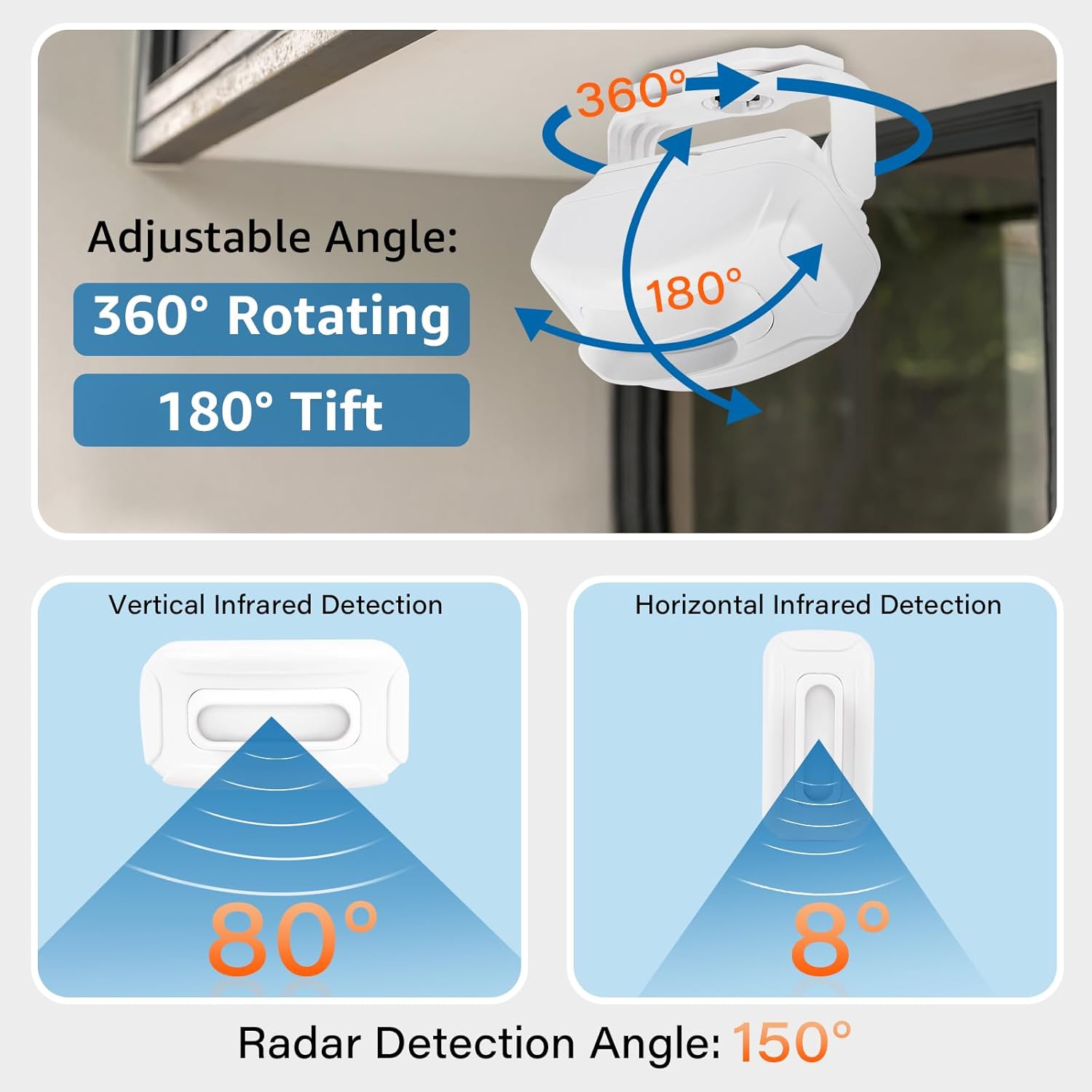
Image: A diagram showing the adjustable angle of the motion detector (360° rotating, 180° tilt) and its detection patterns: Vertical Infrared Detection (80°), Horizontal Infrared Detection (8°), and Radar Detection Angle (150°).
- Position the motion detector to cover the desired area. The adjustable base allows for 360° rotation and 180° tilt.
- Adjust the sensor's angle carefully to optimize detection and minimize false alarms caused by moving objects like trees, small animals, or direct sunlight.
- The infrared sensing distance is 2-8 meters, and the radar sensing distance is 6-8 meters, both affected by ambient temperature.
5. Pairing Devices
The receiver and transmitter are typically pre-paired. If re-pairing is needed or if you are adding additional sensors, refer to the detailed pairing instructions in the full product manual. Each receiver can learn a maximum of 32 wireless sensor accessories (infrared, vibration, magnetic, etc.) and 8 remote controllers.
Operating Instructions
1. Power On/Off
Press the ON/OFF button on the receiver unit to power it on or off.
2. Detection and Alerts
When the motion detector senses movement within its range, it will send a signal to the paired receiver. The receiver will then activate its alert functions.
3. Adjusting Volume and Ringtones

Image: The receiver unit placed on a coffee table, indicating 17 ringtones for choice and 5 adjustable volume levels.
- Volume: Use the volume button on the receiver to cycle through 4 adjustable volume levels.
- Ringtones: Use the forward/backward buttons to select from 17 available ringtones. The device features an 8-chord music chip for clear and melodious sounds.
4. Light and Flash Settings
The receiver's LED indicators offer 4 levels of adjustable brightness and 4 selectable colors. This feature is beneficial for individuals with hearing impairments or in environments where audible alerts might disturb others (e.g., sleeping babies).
5. Vibration Reminder

Image: The receiver unit on a bedside table next to a sleeping person, with an icon indicating the vibration function. This highlights the silent and strong vibration alerts for privacy.
The receiver includes a vibration function, providing silent yet strong alerts. This is particularly useful for personal privacy or as a caregiver reminder without disturbing others.
6. Application Scenarios

Image: A four-panel image showing the motion detector's use in various settings: Home (front porch), Garage (driveway), Store (entrance), and Office (interior space), illustrating its wide application range.
The NineLeaf KS-SF30R can be utilized in diverse environments:
- Home: For monitoring entryways, backyards, or driveways.
- Garage: To detect vehicle or pedestrian entry.
- Store/Office: As a wireless doorbell or visitor alert.
- Caregiver Reminder: To alert caregivers of movement from the elderly or those needing assistance.
Maintenance
1. Battery Replacement
- When the battery level is low, the device's performance may degrade. Replace batteries promptly.
- For the transmitter, open the battery compartment, remove old batteries, and insert new AAA batteries, ensuring correct polarity.
- For the receiver, replace AAA batteries as needed or rely on Micro USB power.
2. Cleaning
Wipe the exterior of both units with a soft, dry cloth. Do not use abrasive cleaners or solvents, as these can damage the device's surface or internal components. Ensure the induction window of the transmitter is kept clear of dirt or obstructions.
3. Environmental Considerations
While the transmitter is IP64 waterproof, prolonged exposure to extreme weather conditions (e.g., heavy snow, direct torrential rain) should be minimized if possible to extend product lifespan. Ensure the receiver is used indoors or in a protected area.
Troubleshooting
If you encounter issues with your NineLeaf KS-SF30R, refer to the following common troubleshooting steps:
- No Detection:
- Check if the transmitter and receiver are powered on and have sufficient battery charge.
- Ensure the transmitter is placed within the effective transmission range (up to 350m in open areas).
- Verify the detection angle and placement of the transmitter. Obstructions or incorrect angles can prevent detection.
- Confirm that the transmitter and receiver are properly paired.
- False Alarms:
- Adjust the angle of the motion detector to avoid detecting small animals, swaying branches, or direct sunlight.
- Ensure the detection area is clear of objects that might cause unwanted triggers.
- No Sound/Light/Vibration from Receiver:
- Check the receiver's power supply and battery level.
- Ensure the volume is not set to mute or the lowest level.
- Verify that the light and vibration functions are enabled in the settings.
- Confirm the receiver is paired with the transmitter.
- Limited Transmission Range:
- Obstacles such as thick walls, metal structures, or other electronic devices can interfere with the wireless signal. Try repositioning the units.
- Ensure batteries in both units are fresh.
For more detailed troubleshooting or persistent issues, please refer to the comprehensive product manual or contact customer support.
Specifications
| Feature | Specification |
|---|---|
| Brand | NineLeaf |
| Model Number | KS-SF30R |
| Power Source (Transmitter) | 3 x AAA Batteries (not included) |
| Power Source (Receiver) | 3 x AAA Batteries (not included) or Micro USB |
| Item Weight (Transmitter) | 3.04 ounces |
| Maximum Transmission Range | Up to 350 meters (open area) |
| Infrared Sensing Distance | 2-8 meters (affected by ambient temperature) |
| Radar Sensing Distance | 6-8 meters (affected by ambient temperature) |
| Waterproof Rating | IP64 (Transmitter) |
| Infrared Detection Angle (Vertical) | 80° |
| Infrared Detection Angle (Horizontal) | 8° |
| Radar Detection Angle | 150° |
| Volume Levels | 4 adjustable levels |
| Ringtones | 17 selectable melodies |
| Special Features | Dual monitoring (PIR & Radar), Wireless, Waterproof, Adjustable Volume, Flash Light, Vibration Reminder |
Warranty and Support
For information regarding product warranty, returns, or technical support, please refer to the documentation included with your purchase or contact NineLeaf customer service directly. Contact details can typically be found on the product packaging or the official NineLeaf website.


