
1. Introduction
The OWON XSA810-TG is a high-performance spectrum analyzer designed for precise signal analysis across a frequency range of 9 kHz to 1 GHz. This instrument features a 9-inch LCD with 1280x800 resolution, a tracking generator, and a minimum resolution bandwidth (RBW) of 1 Hz, making it suitable for various applications requiring detailed spectral measurements.

Figure 1.1: Front view of the OWON XSA810-TG Spectrum Analyzer. This image displays the device's main screen, control panel, and input/output ports, highlighting its compact design and user interface.
Key Features:
- Frequency Range: 9 kHz to 1 GHz.
- Resolution Bandwidth (RBW): 1 Hz to 1 MHz.
- Phase Noise: -80 dBc/Hz @1GHz (offset at 10 kHz, typical).
- Integrated Tracking Generator (TG) for comprehensive component testing.
- 9-inch LCD with 1280x800 resolution for clear display.
- Multiple extended function modes including modulation signal quality analysis, audio demodulation, channel measurement, and frequency counter.
- EMI pre-compliance test function.
- Waterfall plot graphic for analyzing signal stability over time.
2. Setup
2.1 Unpacking and Inspection
Carefully unpack the OWON XSA810-TG and inspect it for any signs of damage during transit. Retain the packaging materials for future transport or storage.
2.2 Included Accessories
Verify that the following accessories are included with your device:
- 1 x XSA810-TG Spectrum Analyzer
- 1 x 220V AC Power Cord
- 1 x USB Cable
- 1 x Quick Start Guide
2.3 Connecting Power
Connect the provided 220V AC power cord to the AC power connector on the rear panel of the spectrum analyzer. Plug the other end into a suitable AC power outlet. Ensure the power switch is in the OFF position before connecting the power cord.
2.4 Rear Panel Connections
The rear panel provides various interfaces for connectivity and external control.
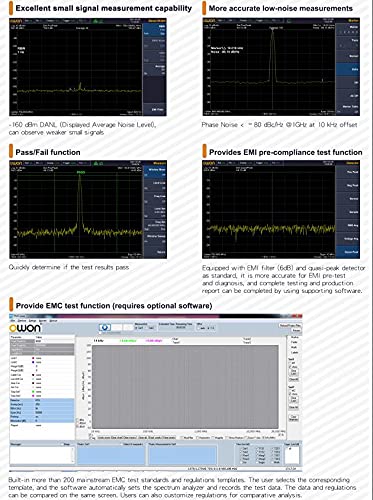
Figure 2.1: Rear panel of the OWON XSA810-TG, showing the AC power connector, USB Device interface, Trigger input, Reference clock in/out, LAN interface, HDMI interface, and security lock hole.
- AC Power Connector: For connecting the main power supply.
- USB Device Interface: For connecting to a computer for data transfer or remote control.
- Trigger Input Connector: For external trigger signals.
- Reference Clock In/Out: For synchronizing with external reference clocks or providing a reference clock output.
- LAN Interface: For network connectivity and remote control.
- HDMI Interface: For connecting an external display.
- Security Lock Hole: For securing the device.
3. Operation
3.1 Front Panel Overview
The front panel of the XSA810-TG features a 9-inch LCD, various control buttons, a numeric keypad, and input/output connectors for signal analysis.
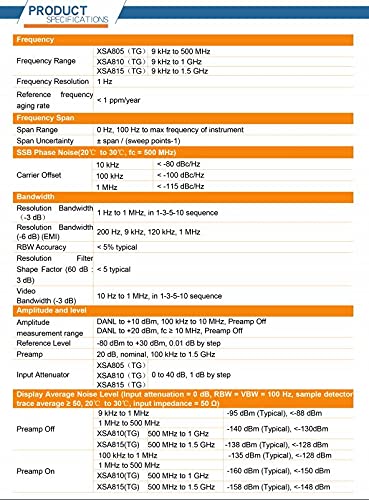
Figure 3.1: Diagram illustrating the front panel controls of the OWON XSA810-TG, including the power key, earphone interface, USB Host interface, tracking generator output, RF input connector, numeric keypad, knob, arrow keys, menu softkeys, and function keys.
- Power Key: Turns the device on or off.
- Earphone Interface: For audio output.
- USB Host Interface: For connecting USB storage devices or other peripherals.
- Tracking Generator Output (Optional): Provides a signal source for component testing.
- RF Input Connector: Main input for signals to be analyzed.
- Numeric Keypad: For direct entry of values.
- Knob & Arrow Keys: For navigation and fine-tuning parameters.
- Menu Softkeys & Function Keys: For accessing various measurement modes and settings.
3.2 Basic Measurement Setup
To perform a basic spectrum measurement:
- Connect the signal source to the RF Input 50Ω connector.
- Press the FREQ button to set the center frequency and span.
- Adjust the BW (Bandwidth) settings for Resolution Bandwidth (RBW) and Video Bandwidth (VBW) as required for your measurement.
- Use the AMPTD (Amplitude) button to set the reference level and attenuation.
- Observe the spectrum on the display.
3.3 Advanced Measurement Functions
The XSA810-TG offers several advanced functions for detailed analysis:

Figure 3.2: Display examples of extended function modes on the OWON XSA810-TG, including modulation signal quality analysis, audio demodulation, channel measurement, and frequency counter.
- Modulation Signal Quality Analysis: Evaluate the quality of modulated signals.
- Audio Demodulation: Demodulate audio signals for analysis.
- Channel Measurement: Perform measurements specific to communication channels.
- Frequency Counter: Precisely measure signal frequencies.
3.4 EMI Pre-compliance Testing
The device includes features for EMI pre-compliance testing, aiding in the identification of potential electromagnetic interference issues.
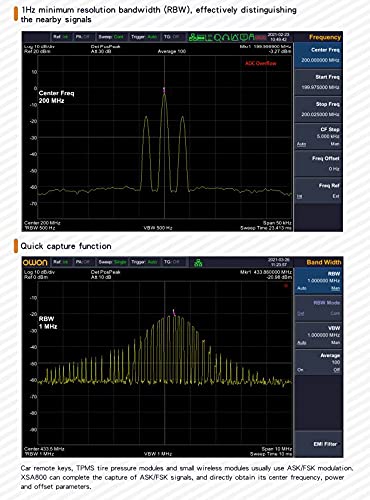
Figure 3.3: Screen captures demonstrating the EMI pre-compliance test function, pass/fail function, and low-noise measurement capabilities of the OWON XSA810-TG.
- Equipped with EMI filter (6dB) and quasi-peak detector as standard.
- Supports pass/fail function for quick assessment.
3.5 Waterfall Plot Graphic
The waterfall plot graphic allows for visualization of signal parameters over time, useful for analyzing intermittent signals or signal stability.
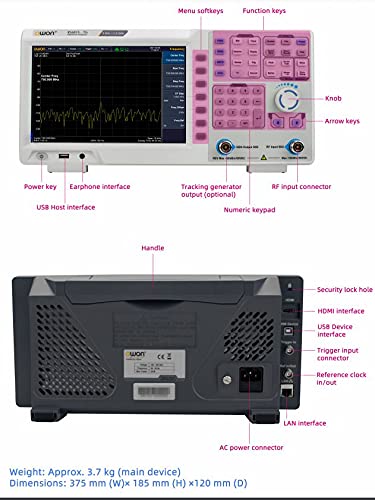
Figure 3.4: Example of a waterfall plot graphic on the OWON XSA810-TG display, showing signal behavior over time.
4. Maintenance
4.1 Cleaning the Device
To maintain the performance and appearance of your spectrum analyzer:
- Wipe the exterior surfaces with a soft, damp cloth.
- Do not use abrasive cleaners or solvents, as these can damage the casing or display.
- Ensure the device is powered off and disconnected from the AC supply before cleaning.
4.2 Storage
When not in use for extended periods, store the device in a dry, dust-free environment, preferably in its original packaging or a protective case.
5. Troubleshooting
This section provides solutions to common issues you might encounter with your OWON XSA810-TG.
| Problem | Possible Cause | Solution |
|---|---|---|
| Device does not power on. | Power cord not connected properly or no power from outlet. | Check power cord connection. Verify power outlet is functional. |
| No signal displayed. | Input signal not connected, signal level too low, or incorrect frequency/amplitude settings. | Ensure signal source is connected to RF Input. Adjust reference level and attenuation. Verify frequency span covers the signal. |
| Display is dim or unclear. | Brightness settings are too low. | Adjust display brightness settings via the system menu. |
If you encounter issues not listed here or require further assistance, please contact technical support.
6. Specifications
The following table details the technical specifications of the OWON XSA810-TG Spectrum Analyzer, transcribed from the product's specification sheet.
| Category | Parameter | Specification (XSA810-TG) |
|---|---|---|
| Frequency | Frequency Range | 9 kHz to 1 GHz |
| Frequency Resolution | 1 Hz | |
| Reference Frequency Aging Rate | < 1 ppm/year | |
| Frequency Span | Span | 0 Hz, 100 Hz to max frequency of instrument |
| Span Uncertainty | ± span / (sweep points - 1) | |
| SSB Phase Noise (20°C to 30°C, fc = 500 MHz) | 10 kHz Offset | < -80 dBc/Hz |
| 100 kHz Offset | < -100 dBc/Hz | |
| 1 MHz Offset | < -115 dBc/Hz | |
| Bandwidth | Resolution Bandwidth (-3 dB) | 1 Hz to 1 MHz, in 1-3-5-10 sequence |
| Resolution Bandwidth (-6 dB) (EMI) | 200 Hz, 9 kHz, 120 kHz, 1 MHz | |
| RBW Accuracy | < 5% typical | |
| Resolution Filter Shape Factor (60 dB : -3 dB) | < 5 typical | |
| Video Bandwidth (-3 dB) | 10 Hz to 1 MHz, in 1-3-5-10 sequence | |
| Amplitude and Level | DANL to +20 dBm, 100 kHz to 10 MHz, Preamp Off | DANL to +10 dBm, fc ≥ 10 MHz, Preamp Off |
| Measurement Range | -80 dBm to +30 dBm, 0.01 dB by step | |
| Reference Level | 20 dB, nominal, 100 kHz to 1.5 GHz | |
| Input Attenuator | 0 to 40 dB, 1 dB by step | |
| Display Average Noise Level (Input attenuation = 0 dB, RBW = VBW = 100 Hz, sample detector, trace average ≥ 50, 20°C to 30°C, input impedance = 50 Ω) | 9 kHz to 1 MHz | -95 dBm (Typical), <-88 dBm |
| 1 MHz to 500 MHz | -140 dBm (Typical), <-130 dBm | |
| XSA810(TG) 500 MHz to 1 GHz | -138 dBm (Typical), <-128 dBm | |
| Preamp On 100 kHz to 1 MHz | -135 dBm (Typical), <-128 dBm | |
| Preamp On 1 MHz to 500 MHz | -160 dBm (Typical), <-150 dBm | |
| Preamp On XSA810(TG) 500 MHz to 1 GHz | -158 dBm (Typical), <-148 dBm | |
| Physical Characteristics | Weight | Approx. 3.7 kg (main device) |
| Dimensions (W×H×D) | 375 mm × 185 mm × 120 mm | |
| Display | 9-inch LCD, 1280×800 pixels |
7. Support and Warranty
7.1 Warranty Information
Specific warranty terms and conditions for the OWON XSA810-TG are typically provided with the product documentation at the time of purchase. Please refer to the warranty card or contact your local distributor for detailed information regarding warranty coverage and duration.
7.2 Technical Support
For technical assistance, troubleshooting, or service inquiries, please contact your authorized OWON distributor or the manufacturer directly. Ensure you have your product model number (XSA810-TG) and serial number ready when contacting support.
Manufacturer: OWON (Note: While the Amazon listing indicates LILLIPUT as manufacturer, the product branding is OWON. For support, refer to OWON's official channels.)
Website: www.owon.com.hk (Example, actual website may vary. Please refer to official documentation.)


