
1. Introduction
Thank you for purchasing the LUMENA Cordless Humidifier H3 PLUS USB. This portable humidifier is designed to provide comfortable humidity levels in your personal space. Featuring a cordless design, USB charging, and a 700ml water tank, it offers convenience and efficient humidification. Please read this manual carefully before use to ensure proper operation and maintenance.
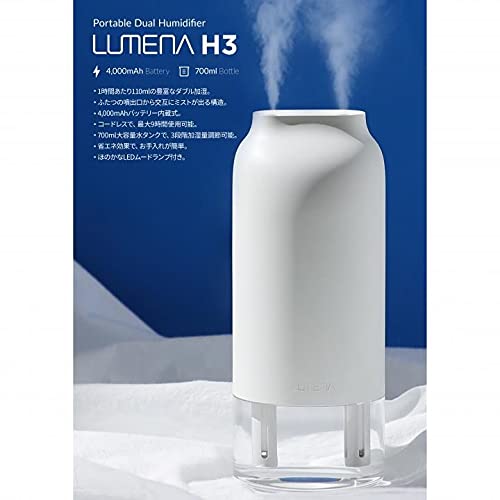
Image 1.1: The LUMENA H3 PLUS Cordless Humidifier, showcasing its sleek design and mist output.
2. Safety Precautions
- Do not immerse the main unit in water or other liquids.
- Use only clean tap water or distilled water. Do not add essential oils, perfumes, or other chemicals to the water tank, as this may damage the unit or affect mist output.
- Keep out of reach of children and pets.
- Do not block the mist outlet.
- Ensure the humidifier is placed on a stable, flat surface.
- Unplug the device before cleaning or refilling the water tank.
- Do not disassemble or attempt to repair the unit yourself. Contact customer support for assistance.
3. Package Contents
Please check that all items are present in the package:
- LUMENA H3 PLUS Humidifier Unit
- USB Charging Cable
- Water Filter (pre-installed or spare)
- User Manual
4. Product Diagram
Familiarize yourself with the components of your LUMENA H3 PLUS humidifier:
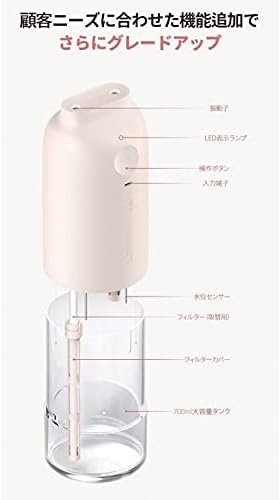
Image 4.1: Exploded view of the humidifier, detailing its parts including the vibrator, LED indicator, operation button, input terminal, water level sensor, filter, filter cover, and the 700ml large capacity tank.
- Vibrator: Generates ultrasonic vibrations for mist production.
- LED Indicator: Displays operational status and battery level.
- Operation Button: Controls power and mist modes.
- Input Terminal: USB-C port for charging.
- Water Level Sensor: Detects low water levels for automatic shut-off.
- Filter: Filters impurities from the water.
- Filter Cover: Secures the filter in place.
- 700ml Large Capacity Tank: Holds water for humidification.
5. Setup
5.1 Initial Charging
Before first use, fully charge the humidifier. Connect the provided USB charging cable to the input terminal on the unit and to a compatible USB power adapter (not included) or computer USB port. The LED indicator will show charging status.
5.2 Water Filling
- Carefully remove the top cover of the humidifier.
- Fill the water tank with clean tap water or distilled water up to the maximum fill line. Do not overfill.
- Ensure the filter is properly installed in the filter cover before reattaching the top cover.
- Securely place the top cover back onto the water tank.

Image 5.1: Illustrates the process of filling the water tank with water.
6. Operating Instructions
6.1 Power On/Off and Mist Mode Selection
The LUMENA H3 PLUS offers two mist modes:
- First Press: Press the operation button once to turn on the humidifier in Continuous Mist Mode. The LED indicator will illuminate.
- Second Press: Press the operation button a second time to switch to Intermittent Mist Mode. The LED indicator will change.
- Third Press: Press the operation button a third time to turn off the humidifier. The LED indicator will turn off.
6.2 Automatic Shut-off
The humidifier is equipped with a water level sensor. When the water level in the tank is too low, the unit will automatically shut off to prevent damage. Refill the water tank to resume operation.

Image 6.1: The humidifier in operation, demonstrating its mist output in a typical setting.
7. Maintenance
Regular cleaning and maintenance will ensure optimal performance and extend the lifespan of your humidifier.
7.1 Cleaning the Water Tank
The water tank is designed for easy cleaning:
- Turn off the humidifier and unplug the USB cable.
- Remove the top cover and empty any remaining water from the tank.
- Rinse the water tank thoroughly with clean water. For deeper cleaning, use a soft brush or cloth to gently scrub the inside of the tank.
- Wipe the tank dry with a clean cloth or allow it to air dry completely before reassembly.
7.2 Filter Maintenance
The filter should be regularly checked and replaced as needed. The filter is removable for easy inspection and replacement.
- Turn off the humidifier and unplug the USB cable.
- Remove the top cover.
- Gently pull out the filter and its cover from the main unit.
- Inspect the filter for discoloration or hardening. If heavily soiled, replace it with a new filter.
- Reinsert the filter and its cover, ensuring it is securely in place.

Image 7.1: Shows the humidifier's main unit, water tank, and replacement filters, highlighting the removable components for maintenance.
8. Troubleshooting
If you encounter issues with your humidifier, please refer to the following common problems and solutions:
| Problem | Possible Cause | Solution |
|---|---|---|
| No mist or low mist output |
|
|
| Humidifier does not turn on |
|
|
| Unusual noise |
|
|
If the problem persists after trying these solutions, please contact customer support.
9. Specifications
| Brand | LUMENA |
| Model Number | H3 PLUS |
| Color | White |
| Dimensions (Package) | 25.2 x 11.8 x 10.4 cm |
| Product Weight | 470 grams |
| Water Tank Capacity | 700 ml |
| Max Mist Output | 160 ml/hr |
| Mist Stages | 2 |
| Battery Capacity | 4,000 mAh (Built-in rechargeable) |
| Max Cordless Operation | Up to 12 hours |
| Noise Level | 30 dB |
| Applicable Area | Up to 10 square meters |
| Charging Interface | USB |
10. Warranty and Support
LUMENA products are manufactured with high quality standards. For warranty information, please refer to the warranty card included with your purchase or visit the official LUMENA website. If you require technical support or have questions not covered in this manual, please contact your retailer or LUMENA customer service.
Please retain your proof of purchase for warranty claims.


