1. Introduction
This manual provides essential information for the installation, operation, and maintenance of your GIGABYTE GeForce RTX 3070 Ti Vision OC 8G Graphics Card. Please read this manual thoroughly before installation to ensure proper setup and optimal performance.

Image 1.1: GIGABYTE GeForce RTX 3070 Ti Vision OC 8G Graphics Card and packaging.
The GIGABYTE GeForce RTX 3070 Ti Vision OC 8G is a high-performance graphics card designed for demanding visual applications and gaming. It features NVIDIA Ampere Streaming Multiprocessors, 2nd Generation RT Cores, and 3rd Generation Tensor Cores, powered by the GeForce RTX 3070 Ti GPU. The card is equipped with 8GB of GDDR6X 256-bit memory and utilizes the WINDFORCE 3X Cooling System for efficient thermal management. It supports a maximum digital resolution of 7680x4320 and includes 2x HDMI 2.1 and 2x DisplayPort 1.4 outputs.
2. Safety Information
Observe the following safety precautions during installation and operation:
- Always disconnect the power supply from your computer before installing or removing the graphics card.
- Wear an anti-static wrist strap or frequently touch a grounded metal object to discharge static electricity, which can damage electronic components.
- Handle the graphics card by its edges to avoid touching sensitive components.
- Ensure proper ventilation within your computer case to prevent overheating.
- Do not expose the graphics card to moisture or extreme temperatures.
3. Package Contents
Verify that all items are present in your package:
- GIGABYTE GeForce RTX 3070 Ti Vision OC 8G Graphics Card (GV-N307TVISION OC-8GD)
- Quick Start Guide (may be included)
- Driver CD/DVD (or instructions for online download)
Note: Additional accessories may vary by region or retailer.
4. Setup and Installation
4.1. Hardware Installation
- Prepare Your System: Power off your computer and disconnect all cables. Open the computer case.
- Locate PCIe Slot: Identify an available PCI Express x16 slot on your motherboard. This graphics card typically requires a 2-slot width.
- Remove Slot Covers: Remove the metal slot covers from the back of your computer case corresponding to the PCIe slot.
- Insert Graphics Card: Carefully align the graphics card with the PCIe slot and press it firmly until it is securely seated. Ensure the retention clip on the PCIe slot locks into place.
- Secure the Card: Fasten the graphics card to the computer case using screws or the case's retention mechanism.
- Connect Power Cables: Connect the required PCIe power connectors from your power supply to the graphics card. The GIGABYTE RTX 3070 Ti Vision OC 8G typically requires two 8-pin PCIe power connectors. Ensure all connections are firm.
- Close Case and Connect Peripherals: Close your computer case, reconnect all cables (monitor, keyboard, mouse, power), and power on your system.

Image 4.1: Graphics card showing PCIe connector and display outputs.
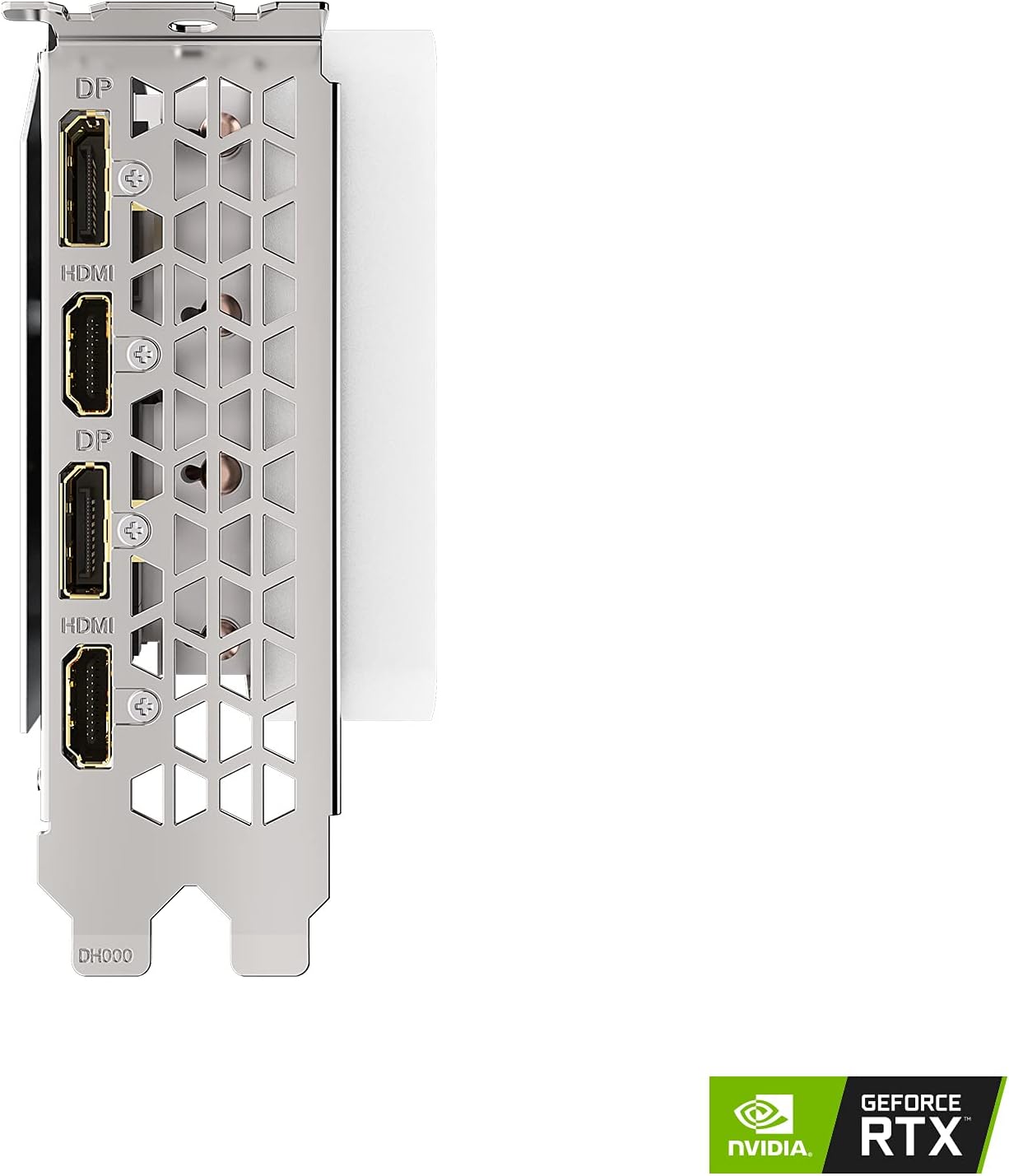
Image 4.2: Display output ports (2x HDMI 2.1, 2x DisplayPort 1.4).
4.2. Driver Installation
After hardware installation, you must install the graphics drivers for proper functionality.
- Download Drivers: Visit the official GIGABYTE website (www.gigabyte.com) or NVIDIA's official website (www.nvidia.com/drivers).
- Select Product: Navigate to the support section and locate your specific graphics card model (GeForce RTX 3070 Ti Vision OC 8G, GV-N307TVISION OC-8GD).
- Download Latest Drivers: Download the latest stable graphics drivers compatible with your operating system.
- Install Drivers: Run the downloaded installer and follow the on-screen instructions. A system restart may be required after installation.
5. Operation
5.1. Connecting Displays
Connect your monitor(s) to the graphics card's display outputs. This card features 2x HDMI 2.1 ports and 2x DisplayPort 1.4 ports. Use appropriate cables for your display type.
- HDMI 2.1: Supports high resolutions and refresh rates, including 4K at 120Hz or 8K at 60Hz.
- DisplayPort 1.4: Supports high resolutions and refresh rates, including 4K at 120Hz or 8K at 60Hz with Display Stream Compression (DSC).
5.2. WINDFORCE 3X Cooling System
The graphics card is equipped with the WINDFORCE 3X cooling system, featuring three alternate spinning fans. This design enhances heat dissipation by reducing turbulence and increasing airflow pressure. The fans may stop completely during low-load operation for silent performance.

Image 5.1: WINDFORCE 3X Cooling System with three fans.
5.3. RGB Fusion 2.0
The card features customizable RGB lighting through GIGABYTE's RGB Fusion 2.0 software. This software allows users to synchronize lighting effects with other compatible GIGABYTE devices and personalize the card's appearance. Download RGB Fusion 2.0 from the GIGABYTE website.
6. Maintenance
6.1. Cleaning
Regular cleaning helps maintain optimal performance and extends the lifespan of your graphics card.
- Power Off: Always power off your computer and disconnect it from the power outlet before cleaning.
- Dust Removal: Use compressed air to gently remove dust from the fans, heatsink fins, and other components. Hold the fans in place to prevent over-spinning during cleaning.
- Surface Cleaning: Use a soft, dry, lint-free cloth to wipe down the card's exterior. Avoid using liquid cleaners directly on the card.
6.2. Driver Updates
Keep your graphics drivers updated to ensure compatibility, performance improvements, and access to new features. Check the NVIDIA or GIGABYTE website periodically for the latest driver releases.
7. Troubleshooting
| Problem | Possible Cause | Solution |
|---|---|---|
| No display output. |
|
|
| System crashes or freezes during use. |
|
|
| Poor performance in games/applications. |
|
|
8. Specifications

Image 8.1: Graphics card dimensions (Length: 12.6", Width: 4.96", Height: 2.17").
| Feature | Detail |
|---|---|
| Graphics Processing Unit | NVIDIA GeForce RTX 3070 Ti |
| Core Clock | 1830 MHz |
| Memory Size | 8 GB GDDR6X |
| Memory Interface | 256-bit |
| Memory Speed | 19000 MHz |
| Digital Max Resolution | 7680x4320 |
| Multi-view | 4 |
| Output | 2x DisplayPort 1.4a, 2x HDMI 2.1 |
| Card Dimensions (L x W x H) | 12.6 x 4.96 x 2.17 inches (320 x 126 x 55 mm) |
| Item Weight | 3.96 pounds (1.8 kg) |
| Recommended PSU | 750W (minimum, consult system builder for specific needs) |
| Power Connectors | 2x 8-pin |
| PCI Express | 4.0 x16 |
9. Warranty Information
GIGABYTE products are covered by a limited warranty. The specific terms and duration of the warranty may vary by region and product type. Please retain your proof of purchase for warranty claims.
For detailed warranty information, including registration and service procedures, please visit the official GIGABYTE website's support section:
10. Technical Support
If you encounter any issues or have questions regarding your GIGABYTE GeForce RTX 3070 Ti Vision OC 8G Graphics Card that are not covered in this manual, please contact GIGABYTE technical support.
- Online Support: Visit the GIGABYTE support portal for FAQs, driver downloads, and contact options: www.gigabyte.com/Support
- Contact Information: Refer to the GIGABYTE website for regional contact numbers and email support.