
Introduction
This user manual provides detailed instructions for the installation, operation, and maintenance of your Aubric Universal Ceiling Fan Remote Control Kit. This kit is designed to add wireless control capabilities to most traditional ceiling fans with lights, offering convenience and enhanced functionality.

Image: The Aubric Universal Ceiling Fan Remote Control Kit components, including two compact receivers, two handheld remote controls, and a set of orange wire nuts for installation.
Safety Information
Please read all safety instructions carefully before installation and use. Failure to follow these instructions may result in electric shock, fire, or other hazards.
- Always disconnect power at the circuit breaker before installing or servicing the receiver.
- Ensure all wiring connections are secure and comply with local electrical codes. If you are unsure, consult a qualified electrician.
- Do not use this product with dimmer switches for the fan motor.
- This kit is designed for indoor use only.
- Keep the remote control and receiver away from water and excessive humidity.
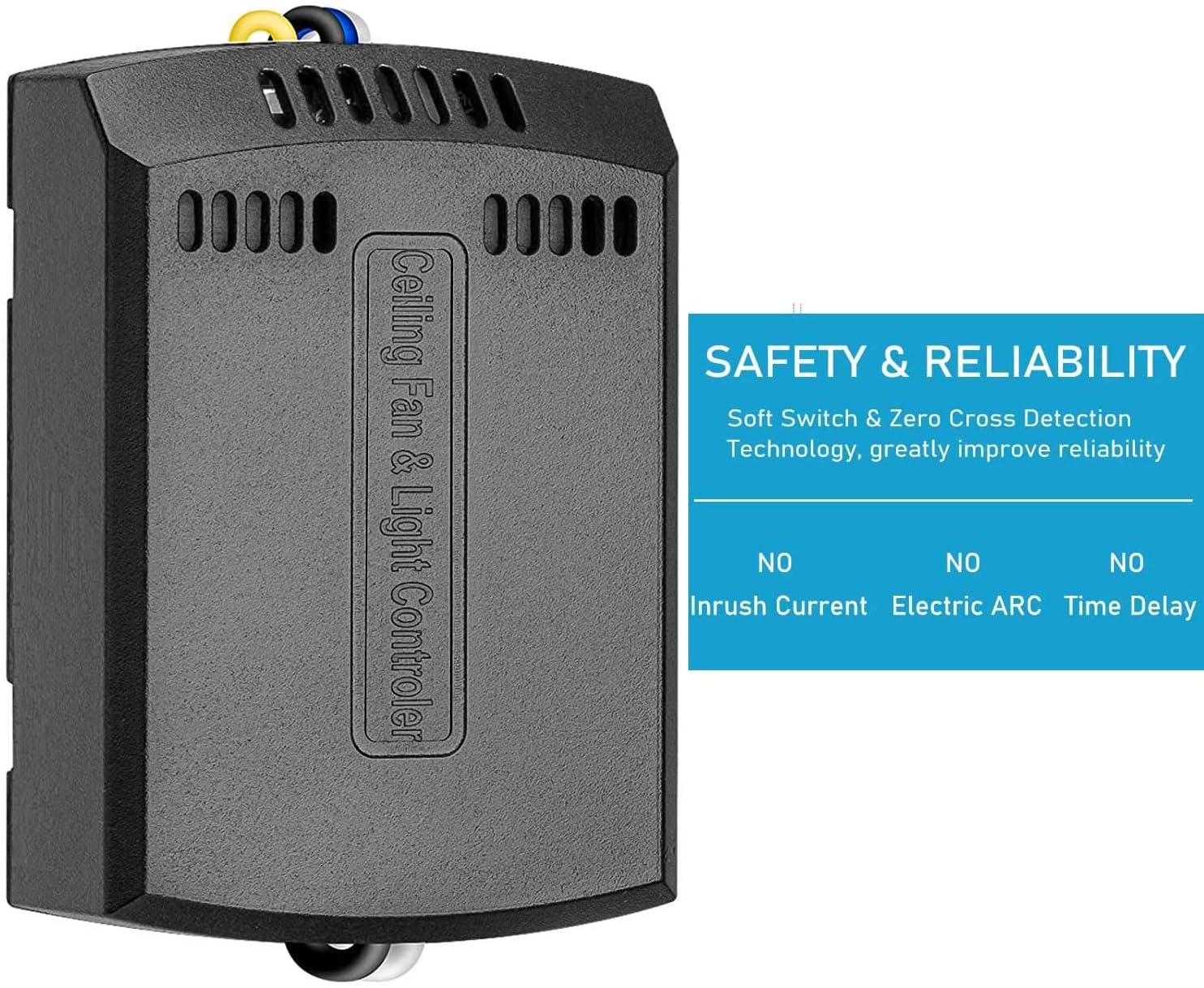
Image: A close-up of the Aubric receiver highlighting its safety and reliability features, including Soft Switch and Zero Cross Detection Technology, which enhance operational stability and reduce electrical stress.
Package Contents
Your Aubric Universal Ceiling Fan Remote Control Kit includes the following items:
- 2 x Universal Ceiling Fan Remote Control Receivers
- 2 x Handheld Remote Controls
- 10 x Wire Nuts
- User Manual (this document)
Product Features
The Aubric Universal Ceiling Fan Remote Control Kit offers a range of features for convenient control of your ceiling fan:
- Super Small Size: The receiver unit is designed to be compact, allowing for easy installation within most fan canopies. Dimensions: 3.0" (L) x 2.07" (W) x 1.0" (D).
- 3-in-1 Multi-Functions: Provides comprehensive control over fan speed (High/Medium/Low/OFF), light (ON/OFF), and timing (1H, 2H, 4H, 8H).
- Universal Compatibility: Works with 95% of ceiling fan lights, including popular brands like Hunter, Harbor Breeze, Westinghouse, and Honeywell.
- Easy Installation: Simplified 5-wire hookup, often without needing to remove the light kit or blades.
- Beep ON/OFF Option: The controller emits a beep sound for operation confirmation, which can be enabled or disabled.
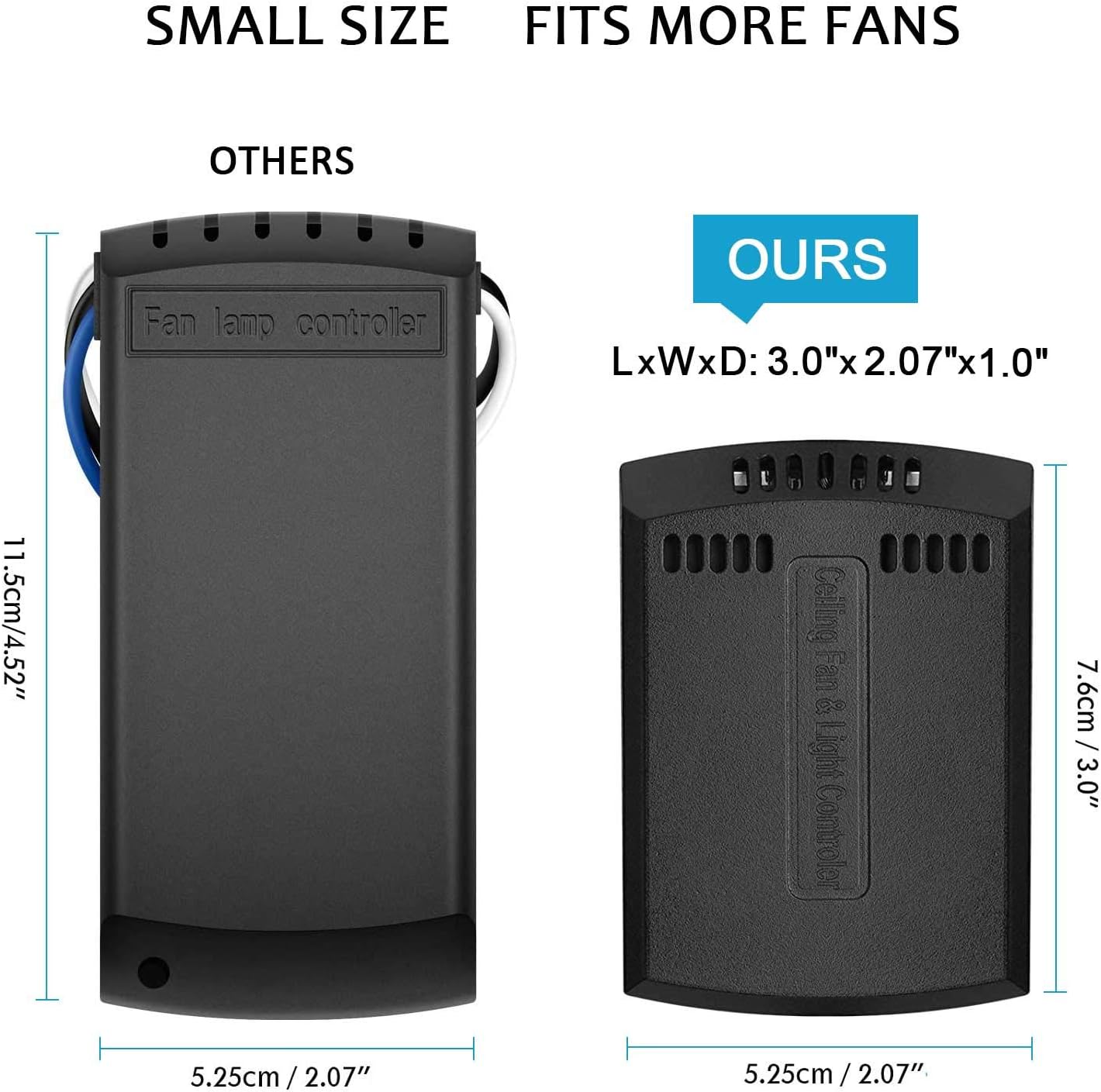
Image: A size comparison illustrating the compact design of the Aubric receiver (right) compared to a larger, standard fan lamp controller (left), emphasizing its small dimensions for easier installation.

Image: The Aubric remote control, highlighting its key features such as RF (Radio Frequency) control, 3-speed fan adjustment, light on/off functionality, a timer function, and its wall-mountable design.

Image: A visual representation of the universal compatibility of the Aubric remote kit, showcasing nine different styles of ceiling fans that can be controlled by the system.
Setup and Installation
Follow these steps to install your Aubric Universal Ceiling Fan Remote Control Kit:
- Preparation: Before beginning installation, ensure the power to the ceiling fan is turned OFF at the circuit breaker. If your fan has pull chains, set the fan speed to HIGH and turn the light ON using the pull chains. This allows the remote to take full control.
- Access Wiring: Loosen the collar at the ceiling to slide it down and reveal the existing wiring connections inside the electrical box.
- Connect Receiver: Refer to the wiring diagram below. The receiver has five wires: two input wires (AC Neutral Line, AC Live Line) and three output wires (Neutral Line, Live Line to FAN, Live Line to LIGHT). Connect these wires using the provided wire nuts.
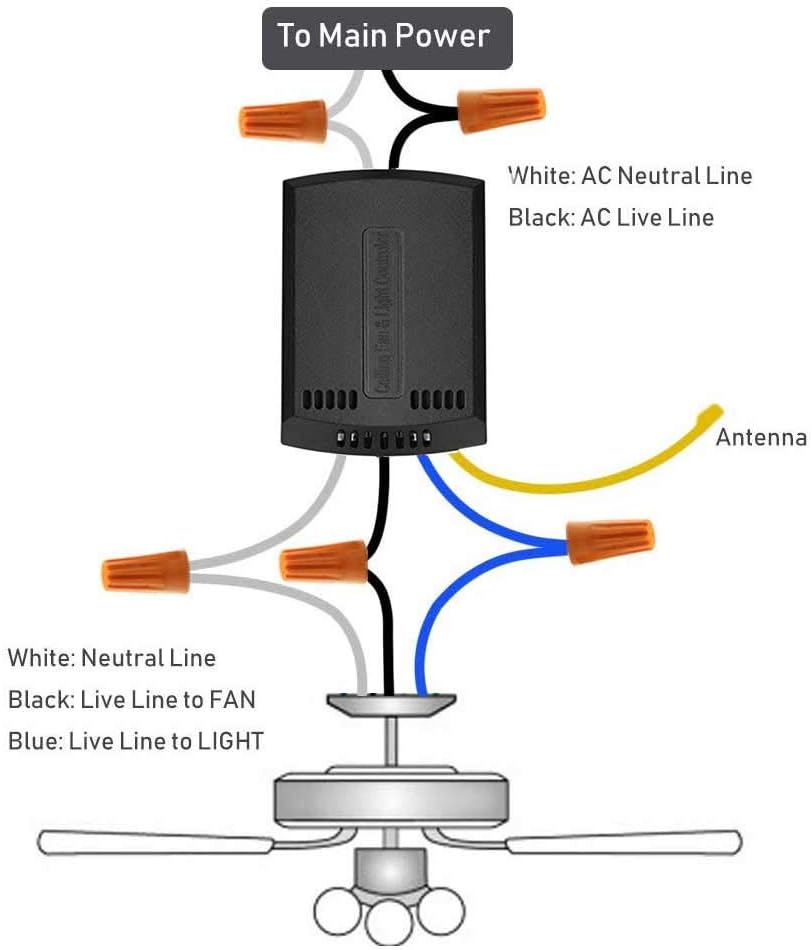
Image: A clear wiring diagram illustrating how to connect the Aubric receiver. It shows the input connections from the main power (AC Neutral Line, AC Live Line) and the output connections to the fan (Neutral Line, Live Line to FAN) and light (Live Line to LIGHT).
- Secure Connections: Ensure all wire nuts are securely tightened.
- Position Receiver: Carefully tuck the receiver into the fan canopy, ensuring it does not interfere with the fan's operation or wiring.
- Restore Power: Once all connections are secure and the receiver is safely housed, restore power at the circuit breaker.
- Pairing (if necessary): Most units come pre-paired. If the remote does not control the fan immediately, you may need to pair it. To pair, turn off the power to the fan for 10 seconds, then turn it back on. Within 5 seconds of restoring power, press and hold the 'STOP' button on the remote until you hear a beep or see the fan/light respond.
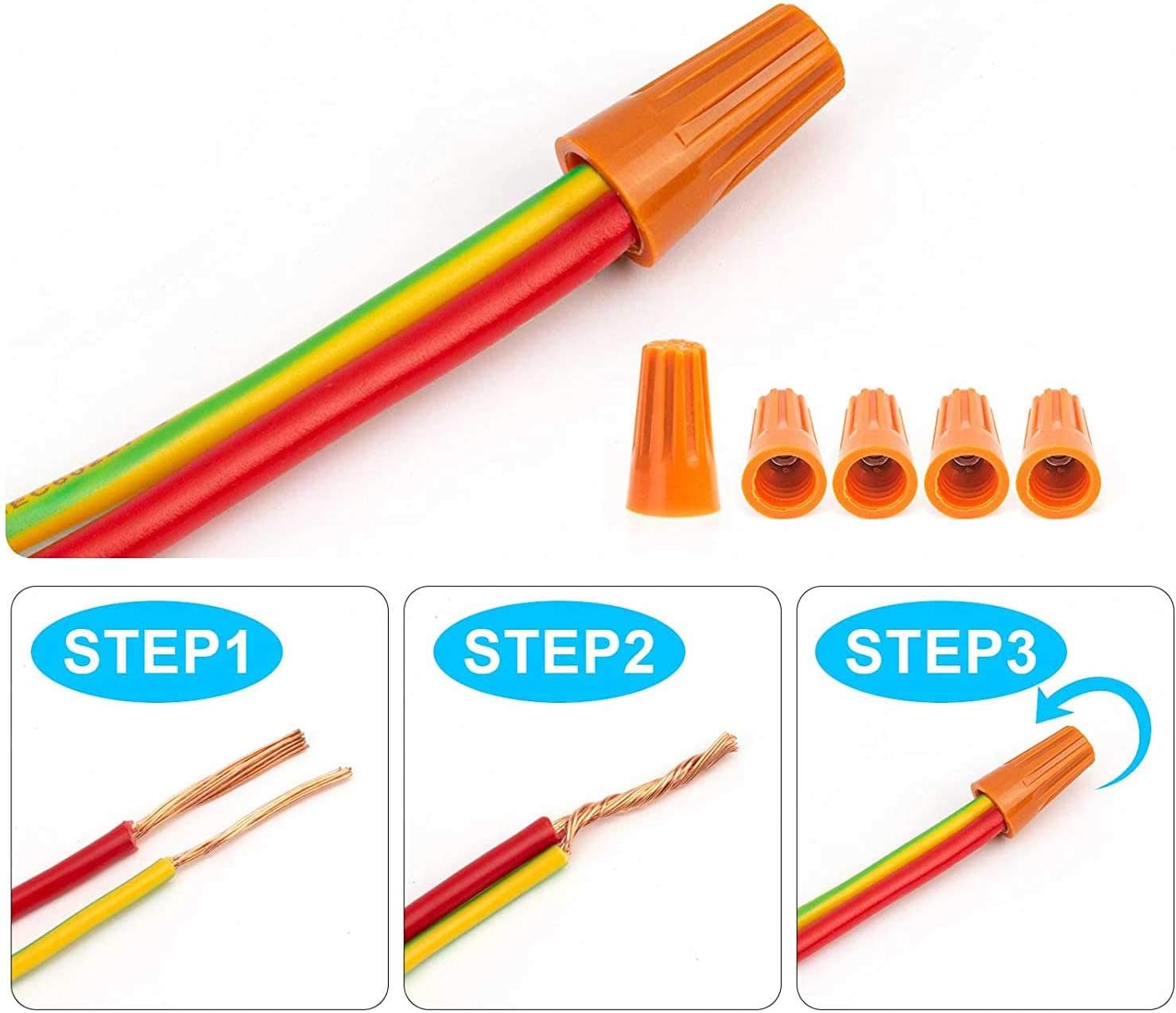
Image: A three-step visual guide demonstrating the proper technique for preparing wires (stripping insulation, twisting strands) and securing them with wire nuts for a safe electrical connection.
Operating Instructions
Your Aubric remote control provides intuitive control over your ceiling fan and light. Familiarize yourself with the buttons:
- Fan Speed Buttons (HI, MED, LOW): Press to select the desired fan speed.
- OFF Button: Turns the fan off.
- LIGHT ON/OFF Button: Toggles the fan light on or off. Note: This kit does not support dimming.
- Timing Buttons (1H, 2H, 4H, 8H): Press to set the fan to turn off automatically after 1, 2, 4, or 8 hours, respectively.
- STOP Button: Used for pairing and for controlling the beep sound.
Beep Sound Control: To turn the confirmation beep sound ON or OFF, re-power the receiver (turn off and on at the circuit breaker). Within 5 seconds of restoring power, long press the "STOP" button on the remote until you hear 3 beeps (for ON) or no beeps (for OFF).

Image: A hand holding the Aubric remote control, demonstrating its use to operate a ceiling fan and light in a contemporary living room setting, with a wireless signal icon indicating connectivity.
Maintenance
The Aubric Universal Ceiling Fan Remote Control Kit requires minimal maintenance.
- Cleaning: Wipe the remote control and receiver (if accessible) with a soft, dry cloth. Do not use abrasive cleaners or solvents.
- Battery Replacement: The remote control uses standard AAA batteries (not included). Replace batteries when the remote's indicator light dims or its range decreases. Ensure correct polarity when inserting new batteries.
Troubleshooting
If you encounter issues with your Aubric remote control kit, refer to the following common problems and solutions:
| Problem | Possible Cause | Solution |
|---|---|---|
| Fan/Light does not respond to remote. | No power to receiver, remote batteries low/dead, remote not paired, pull chain setting incorrect. | Check circuit breaker. Replace remote batteries. Re-pair remote (see Setup section). Ensure fan pull chain is on HIGH and light pull chain is ON. |
| Fan operates, but light does not. | Light bulb faulty, light pull chain off, wiring issue. | Check/replace light bulb. Ensure light pull chain is ON. Verify light wiring connection to receiver. |
| Fan operates at only one speed. | Fan pull chain not on HIGH. | Ensure the fan's pull chain is set to the highest speed setting. |
| Beep sound is too loud/quiet or unwanted. | Beep setting is enabled/disabled. | Follow instructions in the Operating section to toggle the beep sound ON or OFF. |
If the problem persists after trying these solutions, please contact Aubric customer support.
Specifications
| Feature | Detail |
|---|---|
| Model Number | 735417de-5dd2-4758-a3be-bb30ca1306bc |
| Package Dimensions | 10.24 x 6.02 x 1.54 inches |
| Item Weight | 12.3 ounces |
| Connectivity Technology | Radio Frequency (RF) |
| Compatible Devices | Ceiling Fans with Lights |
| Color | White (Remote), Black (Receiver) |
| Special Feature | Universal Compatibility, 3-in-1 Control (Speed, Light, Timing) |
Warranty and Support
Aubric products are designed for reliability and performance. For warranty information or technical support, please refer to the contact details provided with your purchase or visit the official Aubric website. Please have your model number and purchase date ready when contacting support.