
Introduction
Thank you for choosing the Hetyre 5-in-1 Night Light Bluetooth Speaker. This versatile device combines a Bluetooth speaker, touch-sensitive LED lamp, alarm clock, MP3 player, and hands-free call functionality into one compact unit. Designed for ease of use and multi-purpose enjoyment, it is suitable for various settings including bedrooms, living rooms, parties, and camping.

The Hetyre 5-in-1 Night Light Bluetooth Speaker, showcasing its multi-color lighting capabilities.
What's in the Box
- Hetyre 5-in-1 Night Light Bluetooth Speaker (Model DY28S)
- Power Cable (USB)
- Built-in Rechargeable Battery

The product packaging and included accessories.
Product Features
- 5-in-1 Multifunctionality: Integrates Bluetooth speaker, touch sensor LED lamp, alarm clock, MP3 player, and hands-free call capabilities.
- Soft Lamp Light: Features 3 levels of adjustable warm light and 48 multi-color lighting modes with a cool touch sensor. Light colors can change automatically with music rhythm.
- Alarm Clock: Large digit 12/24h display with calendar, alarm, and sleep mode. Includes snooze function (tap once for 5-minute snooze, tap twice to stop).
- Extended Playtime & Lighting: Built-in 2000mAh rechargeable battery provides 8-10 hours of music playback (at max volume) or up to 1 week of night light use on a full charge.
- MP3 Player: Supports music playback via USB flash drive and MicroSD Card input.
- Hands-Free Calling: Integrated microphone for convenient hands-free phone calls when connected via Bluetooth.
Setup
1. Charging the Device
Before first use, fully charge the device. Connect the provided USB power cable to the charging port on the speaker and plug the other end into a standard USB power adapter (not included) or a computer USB port. A full charge typically takes 6-8 hours. The battery capacity is 2000mAh.
2. Power On/Off
Press and hold the Power button (⏻) located on the control panel to turn the device on or off.
Operating Instructions
Light Control
- Warm White Light: Tap the top mesh area of the lamp once for low brightness, twice for medium brightness, and three times for high brightness. Tapping a fourth time will turn the warm white light off.
- Multi-Color Light: Press and hold the top mesh area to switch to multi-color mode. The light will cycle through various colors automatically.
- Fixed Color Mode: In multi-color mode, tap the top mesh area to pause on a specific color. Tap again to resume automatic color cycling. There are 48 lighting mode colors available.
- Music Light Mode: The light can also change colors with the rhythm of the music automatically.

Touch control for adjusting warm white light brightness.

Visual representation of the three brightness levels.
Bluetooth Speaker Function
To use the device as a Bluetooth speaker:
- Press the BT button on the control panel to enter Bluetooth pairing mode. The device will emit an audible prompt.
- On your smartphone, tablet, or other Bluetooth-enabled device, search for "DY28S" or "Hetyre Speaker" in the Bluetooth settings.
- Select the device to pair. Once paired, you will hear a confirmation sound.
- You can now play music from your connected device. Use the M/+ and M/- buttons to adjust volume or skip tracks.

Connecting to the speaker via Bluetooth for music and hands-free calls.
Alarm Clock Settings
The device features a 12/24-hour alarm clock with snooze functionality.
- Setting Time: Refer to the detailed instructions in the included physical user manual for specific time setting steps, as this often involves a combination of button presses.
- Setting Alarm: Similarly, alarm setting procedures are typically detailed in the physical manual. The alarm supports custom sounds from MicroSD card or USB disk.
- Snooze Function: When the alarm rings, tap the top mesh area once to activate snooze. The alarm will ring again in 5 minutes.
- Stopping Alarm: To stop the alarm completely, quickly tap the top mesh area twice when it is ringing.

The alarm clock mode helps ensure you wake up on time.
MP3 Player Function
The device can play MP3 files directly from a USB flash drive or MicroSD card.
- Insert a USB flash drive or MicroSD card containing MP3 files into the corresponding port on the device.
- The device should automatically switch to MP3 playback mode. If not, press the Mode button (if available, or cycle through modes using the BT button) until MP3 mode is active.
- Use the control buttons to play, pause, skip tracks, and adjust volume.
Hands-Free Calling
When connected to your smartphone via Bluetooth, the speaker can be used for hands-free calls.
- Answering/Ending Calls: Press the Phone button (☎) on the control panel to answer an incoming call or end an ongoing call.
- Redialing: Double-press the Phone button to redial the last number.
Maintenance
- Cleaning: Wipe the device with a soft, dry cloth. Do not use abrasive cleaners or solvents.
- Storage: Store the device in a cool, dry place away from direct sunlight and extreme temperatures.
- Battery Care: To prolong battery life, avoid fully discharging the battery frequently. Charge the device regularly, even if not in use for extended periods.
- Water Resistance: This product is NOT waterproof. Avoid exposure to water or high humidity.
Troubleshooting
| Problem | Possible Cause | Solution |
|---|---|---|
| Device does not power on. | Battery is depleted. | Charge the device fully (6-8 hours). |
| Cannot connect via Bluetooth. | Device is not in pairing mode; Bluetooth is off on source device; too far from device. | Ensure device is in BT pairing mode. Turn on Bluetooth on your phone/tablet. Move closer to the speaker (within 10 meters). |
| No sound from speaker. | Volume is too low; device is paused; incorrect mode selected. | Increase volume on both speaker and connected device. Press play. Ensure correct mode (Bluetooth/MP3) is selected. |
| Light is not working. | Light is off; battery is low. | Tap the top mesh area to turn on the light. Charge the device. |
| Alarm does not sound. | Alarm not set correctly; volume too low. | Verify alarm settings. Increase alarm volume. |
Specifications
| Model Name | DY28S |
| Brand | Hetyre |
| Product Dimensions | 4.84"D x 4.92"W x 5.63"H |
| Item Weight | 1 Pounds (approx. 0.45 kg) |
| Material | Plastic |
| Color | White |
| Connectivity Technology | Bluetooth, USB |
| Wireless Communication Technology | Bluetooth |
| Bluetooth Range | 10 Meters |
| Speaker Maximum Output Power | 3 Watts |
| Battery Capacity | 2000 Milliamp Hours |
| Charging Time | 8 Hours |
| Control Method | Touch |
| Includes MP3 player? | Yes |
| Water Resistance Level | Not Water Resistant |
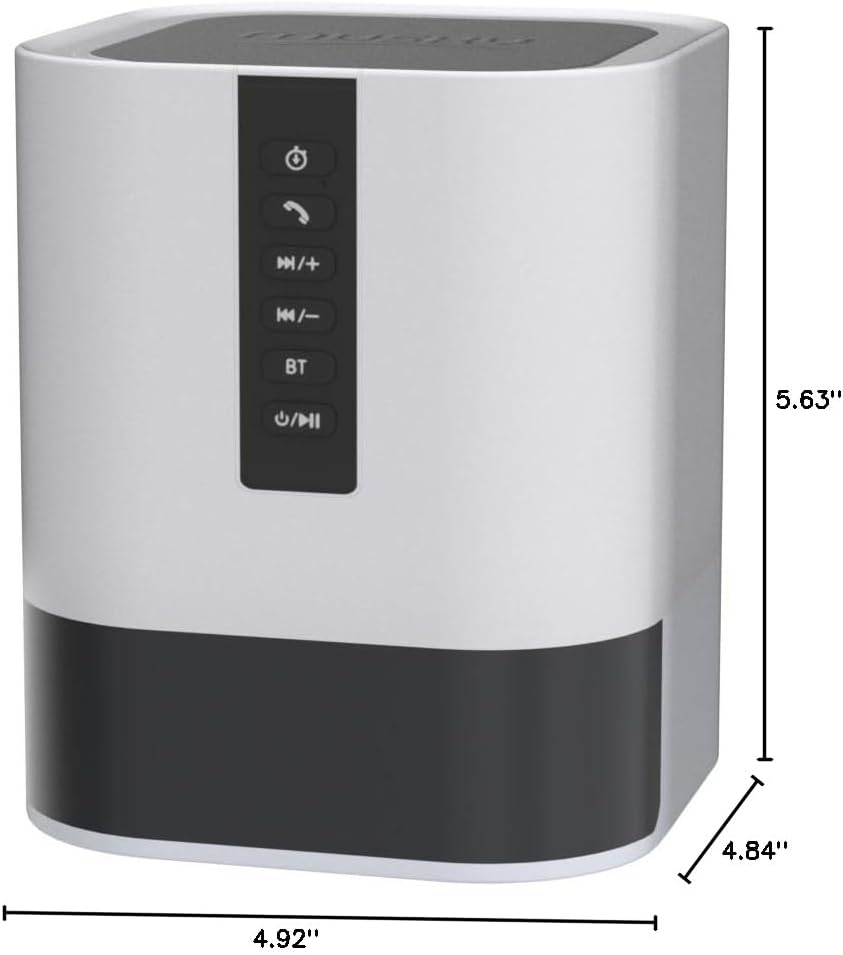
Product dimensions for placement and reference.
Warranty and Support
This product comes with a Limited Warranty. For specific details regarding warranty coverage and duration, please refer to the warranty card included in your product packaging or contact Hetyre customer support.
For technical support, troubleshooting assistance, or warranty claims, please contact Hetyre customer service through their official website or the contact information provided in your product documentation.
Please retain your purchase receipt for warranty purposes.