1. Introduction
This manual provides essential instructions for the safe assembly, operation, and maintenance of your Kidzone 12V Licensed Chevrolet Silverado Trail Boss LT Ride-On Truck. Please read this manual thoroughly before initial use and retain it for future reference.

Image: The Kidzone 12V Licensed Chevrolet Silverado Trail Boss LT Ride-On Truck, showcasing its design.
Key Features:
- Officially licensed Chevrolet Silverado Trail Boss design.
- 12V battery power for extended playtime.
- Includes a remote control for parental supervision.
- Integrated MP3 player, Bluetooth wireless technology, and LED lights.
- Durable construction with safety features like an adjustable seat belt.

Image: An infographic highlighting the truck's features including parental and kid controls, front-wheel suspension, safety belt, 12V battery, two-speed options, and wear-resistant wheels.
2. Safety Information
WARNING: To reduce the risk of injury, adult supervision is required. Never use in roadways, near motor vehicles, on or near steep inclines or steps, swimming pools or other bodies of water. Always wear shoes, and never allow more than one rider.
General Safety Guidelines:
- This product is suitable for ages 37-72 months (3-6 years) with a maximum weight capacity of 66 lbs.
- Ensure the child is securely fastened with the adjustable seat belt before operation.
- Always operate the vehicle on flat, dry surfaces away from traffic and hazards.
- The vehicle is constructed from durable, non-toxic plastic and is ASTM certified for reliability.
- Lockable doors provide additional protection during use.

Image: A close-up view of hands securing the 3-point safety harness, emphasizing safety.
3. What's in the Box
Upon opening the package, please verify that all components listed below are present and undamaged:
- Kidzone 12V Licensed Chevrolet Silverado Trail Boss LT Ride-On Truck
- Charger
- Remote Control
- User Manual (this document)
4. Assembly and Setup
Detailed assembly instructions are provided in the included printed manual. The general steps involve:
- Wheel Installation: Attach all four wheels securely according to the instructions.
- Steering Wheel Attachment: Connect the steering wheel, ensuring all electrical connections are made if applicable.
- Seat Installation: Secure the seat in place.
- Battery Connection: Connect the battery terminals as specified. Ensure the connection is firm.
- Initial Charge: Before first use, fully charge the battery as described in the 'Charging the Battery' section.
5. Charging the Battery
The ride-on truck is powered by a rechargeable 12V battery. Proper charging ensures optimal performance and battery longevity.
- Locate the charging port on the vehicle.
- Ensure the vehicle is turned OFF.
- Connect the charger to the charging port and then plug the charger into a standard wall outlet.
- The charging time is typically 8-12 hours. Do not overcharge.
- A full charge provides approximately 1-2 hours of playtime, depending on usage and terrain.
- Disconnect the charger once charging is complete.
6. Operating Instructions
Driving the Vehicle:
- Start-up: Press the one-button start on the control panel. You will hear startup sounds.
- Gear Selection: Select the forward or reverse gear using the gear selector.
- Acceleration: Press the foot pedal to move the vehicle.
- Steering: Turn the steering wheel to control direction.
- Stopping: Release the foot pedal to brake.

Image: A child operating the ride-on truck while an adult uses the remote control for supervision.
Remote Control Operation:
The included 2.4G remote control allows parents to guide the vehicle for younger children or intervene for safety.
- Pairing: Follow the pairing instructions in the detailed manual to connect the remote control to the vehicle.
- Controls: The remote typically includes buttons for forward/reverse, left/right steering, speed selection (high/low), and an emergency stop button.
- Priority: The remote control generally overrides manual vehicle controls for safety.
Media Features:
The control panel includes various entertainment options:
- MP3 Player: Connect an MP3 device via USB or auxiliary input.
- Bluetooth: Pair a Bluetooth-enabled device to stream audio.
- Radio: Tune into FM radio stations.
- LED Lights: Activate the dazzling LED headlights for a realistic experience.
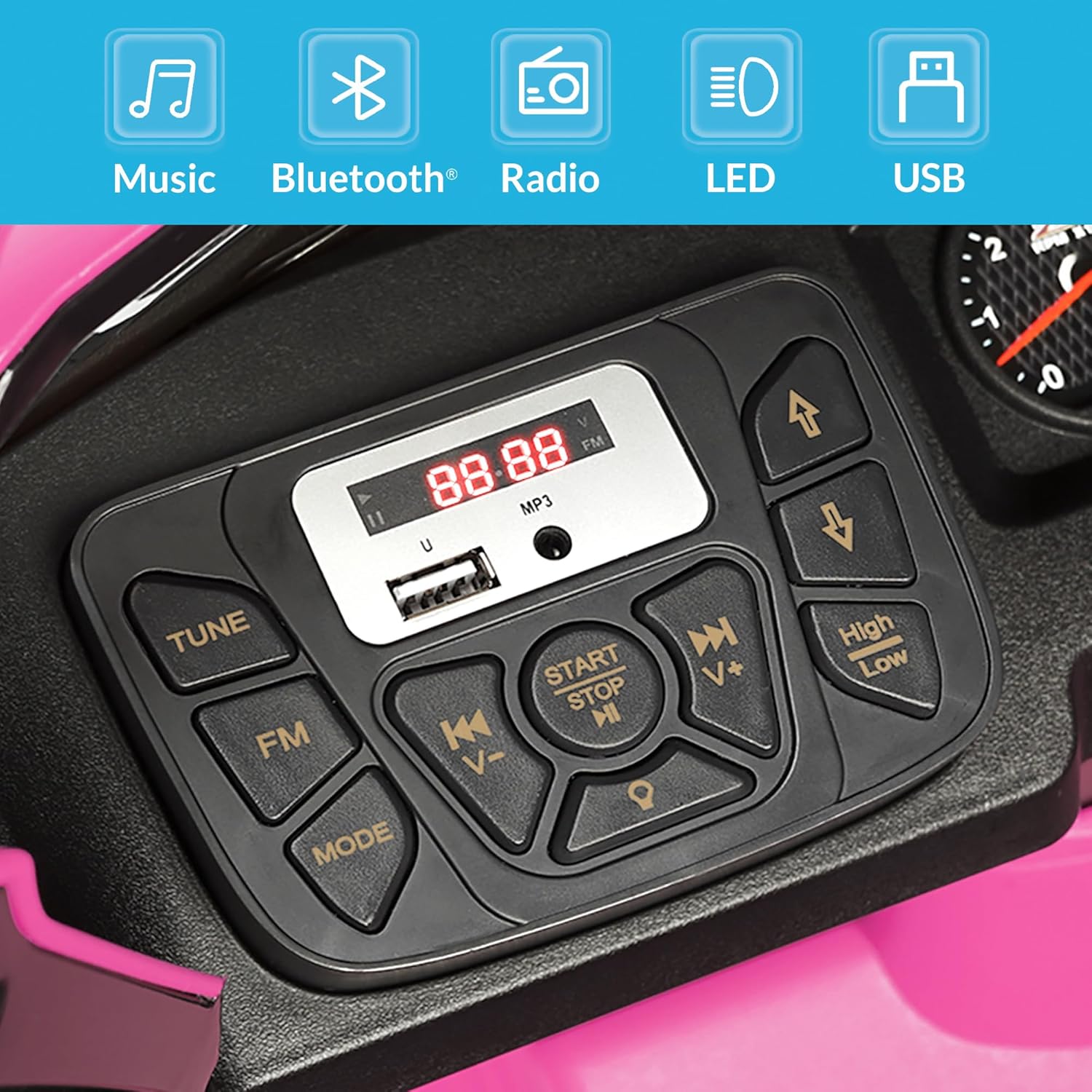
Image: A detailed view of the vehicle's control panel, showing buttons for music, Bluetooth, radio, LED lights, USB input, and speed selection.

Image: A close-up of the bright LED headlights, enhancing the realistic appearance of the truck.
Additional Features:
- Engine Sounds: Realistic engine startup sounds enhance the driving experience.
- Storage Bin: The truck bed features a rear storage bin for small items.

Image: A child utilizing the rear storage bin in the truck bed to store a bottle.
7. Maintenance
General Care:
- Regularly inspect the vehicle for loose parts, damaged wiring, or worn components.
- Clean the vehicle with a soft, damp cloth. Avoid using harsh chemicals or abrasive cleaners.
- Keep the vehicle dry. Do not expose it to rain or excessive moisture.
Battery Care and Storage:
- Always store the vehicle and battery in a cool, dry place.
- If storing for extended periods, charge the battery fully every 30 days to maintain its life.
- Do not store the battery in temperatures below freezing or above 100°F (38°C).
- Only use the charger provided by Kidzone for this product.
8. Troubleshooting
If you encounter issues with your ride-on truck, refer to the table below for common problems and solutions.
| Problem | Possible Cause | Solution |
|---|---|---|
| Vehicle does not move | Battery is low or not connected; Loose wiring; Blown fuse | Charge the battery; Check battery connections; Inspect wiring; Replace fuse if necessary (consult manual for fuse location) |
| Vehicle moves slowly | Low battery; Overloaded vehicle; Operating on rough terrain | Recharge battery; Reduce load; Operate on flat, smooth surfaces |
| Remote control not working | Remote batteries are dead; Remote not paired; Interference | Replace remote batteries; Re-pair remote control; Move away from sources of interference |
| Lights or sounds not working | Loose connection; Damaged component | Check all connections; Contact customer support if problem persists |
9. Specifications
Technical details for the Kidzone 12V Licensed Chevrolet Silverado Trail Boss LT Ride-On Truck:
| Feature | Detail |
|---|---|
| Product Dimensions | 42.91 x 28.34 x 25.19 inches |
| Item Weight | 36.8 pounds |
| Recommended Age | 3 - 6 years (37-72 months) |
| Maximum Weight Capacity | 66 lbs |
| Battery Type | 12V Rechargeable Lead-Acid |
| Charging Time | 8-12 hours |
| Playtime per Charge | 1-2 hours |
| Safety Certification | ASTM Certified |

Image: A visual representation of the ride-on truck's dimensions (length, width, height).
10. Warranty and Support
Kidzone products are manufactured with quality and care. For specific warranty details, please refer to the warranty card included with your product or visit the official Kidzone website. If you require technical assistance, replacement parts, or have questions not covered in this manual, please contact Kidzone customer support.
Contact Information: Please refer to your product packaging or the official Kidzone website for the most current customer support contact details.


