
1. Product Overview
The Taidacent RJ45 to RS485 Converter is an industrial-grade terminal adapter designed to facilitate communication between devices using RJ45 and RS485 interfaces. This specific model is configured for connecting RS485 signals to specific pins on an RJ45 connector, enabling robust data transmission in various industrial and networking applications.
Key features include:
- Converts RJ45 to RS485 terminal interface.
- Industrial-grade quality for reliable performance.
- Supports a wide operating temperature range: -40°C to 85°C.
- Specific pin configuration for RS485 A and B connections.
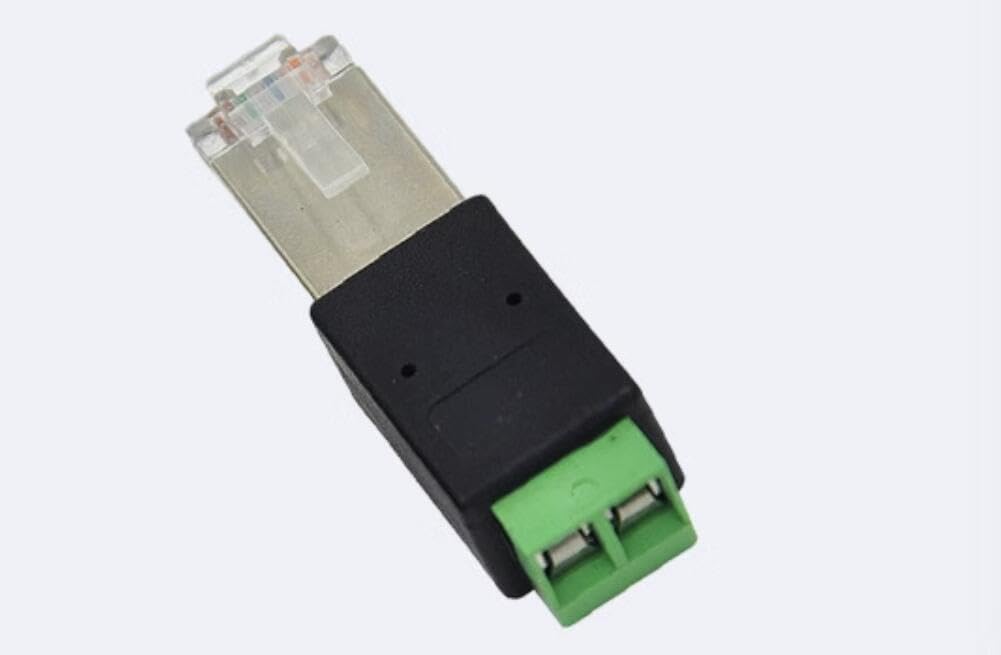
Figure 1: Taidacent RJ45 to RS485 Converter. This image shows the compact adapter with an RJ45 male connector on one end and a green screw terminal block with 'A' and 'B' labels on the other end.
2. Setup and Connection
This section details the correct procedure for connecting the Taidacent RJ45 to RS485 Converter to your devices.
2.1 Pin Configuration (Model: A Connects to PIN7, B Connects to PIN8)
For this specific converter model, the RS485 signals are mapped to the RJ45 pins as follows:
- The A terminal on the converter connects to RJ45 Pin 7.
- The B terminal on the converter connects to RJ45 Pin 8.
Ensure your RS485 device's A and B lines are correctly connected to the corresponding terminals on the converter.
2.2 Connection Steps
- Connect RS485 Wires: Loosen the screws on the green terminal block of the converter. Insert the RS485 A wire into the terminal labeled 'A' and the RS485 B wire into the terminal labeled 'B'. Tighten the screws to secure the connections.
- Connect RJ45 Cable: Plug the RJ45 male connector of the converter into the RJ45 port of your networking device or PC. Ensure it clicks securely into place.
- Verify Connections: Double-check all connections to ensure proper polarity and secure physical contact. Incorrect wiring can lead to communication errors or damage to equipment.

Figure 2: Detailed view of the converter's terminal block and RJ45 connector. This image highlights the screw terminals for RS485 A and B, and the transparent RJ45 plug with its internal wiring.
3. Operating Instructions
Once properly connected, the Taidacent RJ45 to RS485 Converter acts as a passive interface between your RS485 device and the RJ45-based network or control system. It does not require external power or drivers for its basic function.
- The converter facilitates the physical layer connection, translating the RS485 differential signals to the specified RJ45 pins.
- Ensure that the software or hardware controlling the RJ45 side is configured to communicate using the RS485 protocol on the designated pins (Pin 7 for A, Pin 8 for B).
- Refer to the documentation of your RS485 device and the RJ45-connected system for specific communication protocols, baud rates, and data formats.
4. Product Specifications
| Feature | Detail |
|---|---|
| Product Model | ZC-RJ45485adapter-210617 |
| Brand | Taidacent |
| Connector Type | RJ45 to RS485 Terminal Block |
| Pin Configuration | A connects to RJ45 Pin 7, B connects to RJ45 Pin 8 |
| Quality | Industrial Grade |
| Working Temperature | -40°C to 85°C (-40°F to 185°F) |
| Compatible Devices | Devices with RJ45 port, Devices with RS485 port |
| Specific Uses | PC, Networking Devices |
| Number of Ports | 1 (RJ45) |
5. Maintenance
The Taidacent RJ45 to RS485 Converter is designed for durability and requires minimal maintenance. Follow these guidelines to ensure its longevity:
- Cleaning: Keep the converter free from dust and debris. Use a soft, dry cloth for cleaning. Avoid liquid cleaners.
- Environment: Operate and store the converter within its specified temperature range (-40°C to 85°C) and in a dry environment to prevent moisture damage.
- Physical Inspection: Periodically check the RJ45 connector and terminal block for any signs of damage, corrosion, or loose connections.
- Secure Connections: Ensure that all screw terminal connections remain tight to prevent intermittent communication issues.
6. Troubleshooting
If you encounter issues while using the converter, consider the following troubleshooting steps:
- No Communication:
- Verify that the RS485 A and B wires are correctly connected to the 'A' and 'B' terminals on the converter, respectively.
- Ensure the RJ45 connector is fully seated in the port.
- Check the pin mapping on your RJ45-connected device. Confirm that Pin 7 is used for RS485 A and Pin 8 for RS485 B.
- Inspect all cables for damage.
- Intermittent Connection:
- Tighten the screws on the terminal block to ensure secure wire connections.
- Ensure the RJ45 cable is not loose.
- Check for electromagnetic interference (EMI) in the environment, which can affect RS485 communication.
- Device Not Recognized:
- The converter is a passive device and does not require drivers. Ensure the drivers for your RS485 device or the RJ45-connected system are correctly installed and configured.
- Verify the communication settings (baud rate, data bits, stop bits, parity) in your software match those of the connected devices.
7. Warranty and Support
The Taidacent RJ45 to RS485 Converter comes with a limited warranty. For specific warranty terms and conditions, please refer to the product packaging or contact your retailer.
For technical support or inquiries, please visit the official Taidacent website or contact their customer service department. You can often find support information on the Taidacent Store on Amazon.