
1. Introduction
Thank you for choosing the foreverLily Face Skin Care Machine. This device is designed to address various skin concerns through multi-functional light therapy and heat treatment. Please read this manual thoroughly before use to ensure safe and effective operation.

Image 1: The foreverLily Face Skin Care Machine in use, demonstrating its design and remote control.
Package Contents:
- 1 x Main Machine
- 1 x Adapter
- 1 x Protection Goggles
- 1 x User Manual
- 1 x Box

Image 2: Visual representation of the items included in the product package.
2. Safety Information
Please observe the following safety precautions to prevent injury or damage to the device:
- Do not use if you have any skin conditions such as open wounds, severe acne, or skin infections without consulting a medical professional.
- Always wear the provided protection goggles during light therapy sessions to protect your eyes.
- Keep the device away from water and moisture. Do not use in wet environments.
- Do not disassemble or attempt to repair the device yourself. Contact customer support for assistance.
- Keep out of reach of children.
- Ensure the power adapter is compatible with your local voltage supply.
- Discontinue use immediately if you experience any discomfort or adverse reactions.
3. Setup
- Unpack the Device: Carefully remove all components from the packaging.
- Connect Power: Connect the adapter to the device and then plug it into a power outlet.
- Positioning: Place the device on a stable, flat surface. The U-shape design allows for comfortable use while lying down, ensuring the light covers your face and neck area.

Image 3: The device positioned for use, highlighting its ergonomic design for home or salon settings.
4. Operating Instructions
Follow these steps for optimal use of your foreverLily Face Skin Care Machine:
- Clean Your Skin: Ensure your face is clean and free of makeup or other products before starting a session.
- Apply Skincare Products (Optional): For enhanced results, you may apply a mask, essence, or lotion to your skin before use.
- Connect Power and Turn On: Connect the power supply and short press the power button on the control panel to turn the device on.
- Select Time: Use the 'TIME+' or 'TIME-' buttons to set your desired session duration (5, 10, 15, 20, 25, or 30 minutes).
- Select Light Mode: Choose your preferred light therapy mode using the dedicated buttons:
- R/Y (Red/Yellow Cycle): Cycles between Red and Yellow light.
- B/P (Blue/Purple Cycle): Cycles between Blue and Purple light.
- G/C (Green/Cyan Cycle): Cycles between Green and Cyan light.
- CYCLE (White Light/7-Color Cycle): Cycles through all available colors, including White light.
- Adjust Temperature (Optional): Use the 'TEMP+' or 'TEMP-' buttons to activate and adjust the heat treatment function, ranging from 30°C to 60°C (86-140°F).
- Wear Goggles: Always wear the provided protection goggles before the light therapy begins.
- Enjoy the Session: Lie down comfortably and allow the device to work for the selected duration. A typical session is 15-20 minutes.
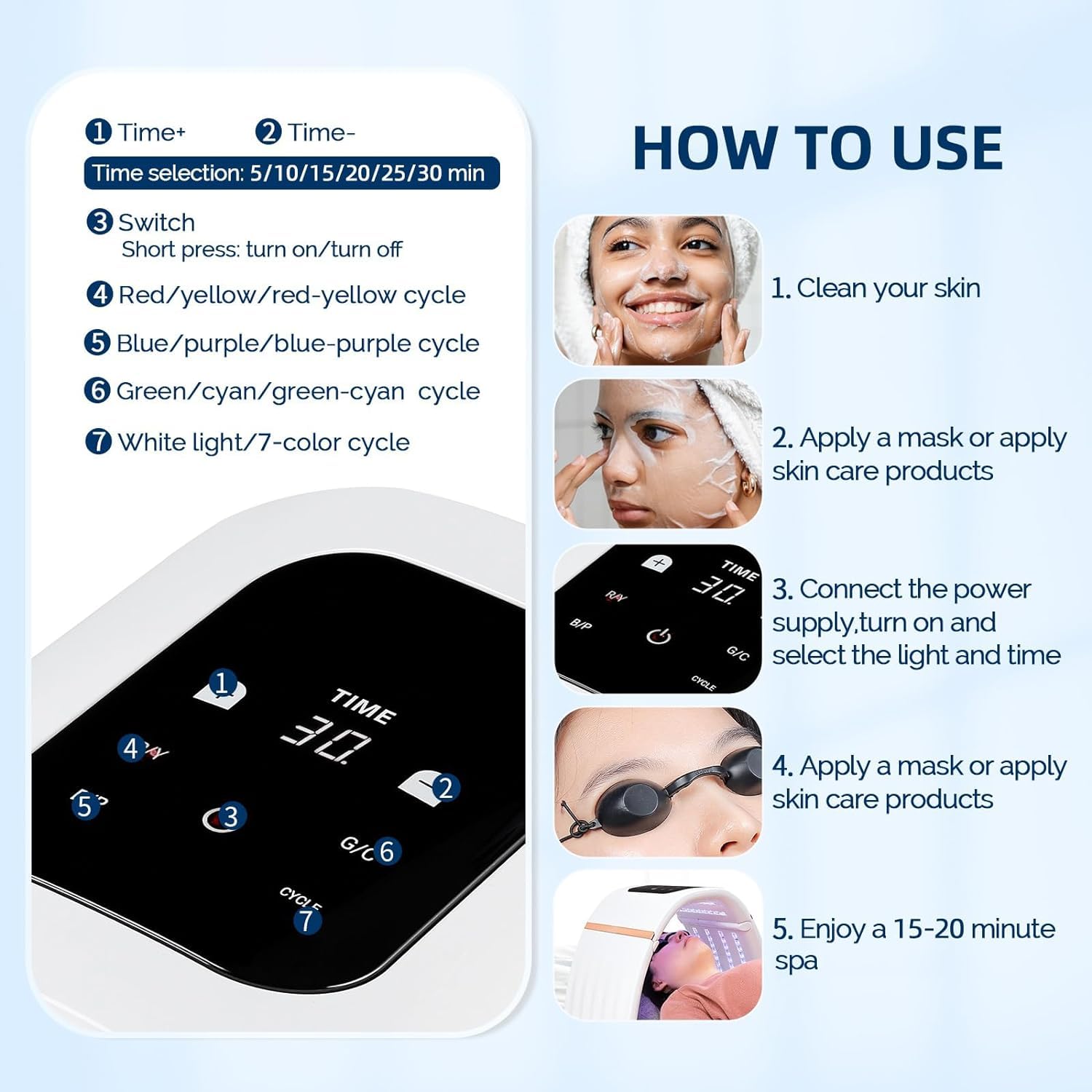
Image 4: A visual guide detailing the usage steps, from skin preparation to enjoying the treatment.
Light Therapy Modes and Benefits:
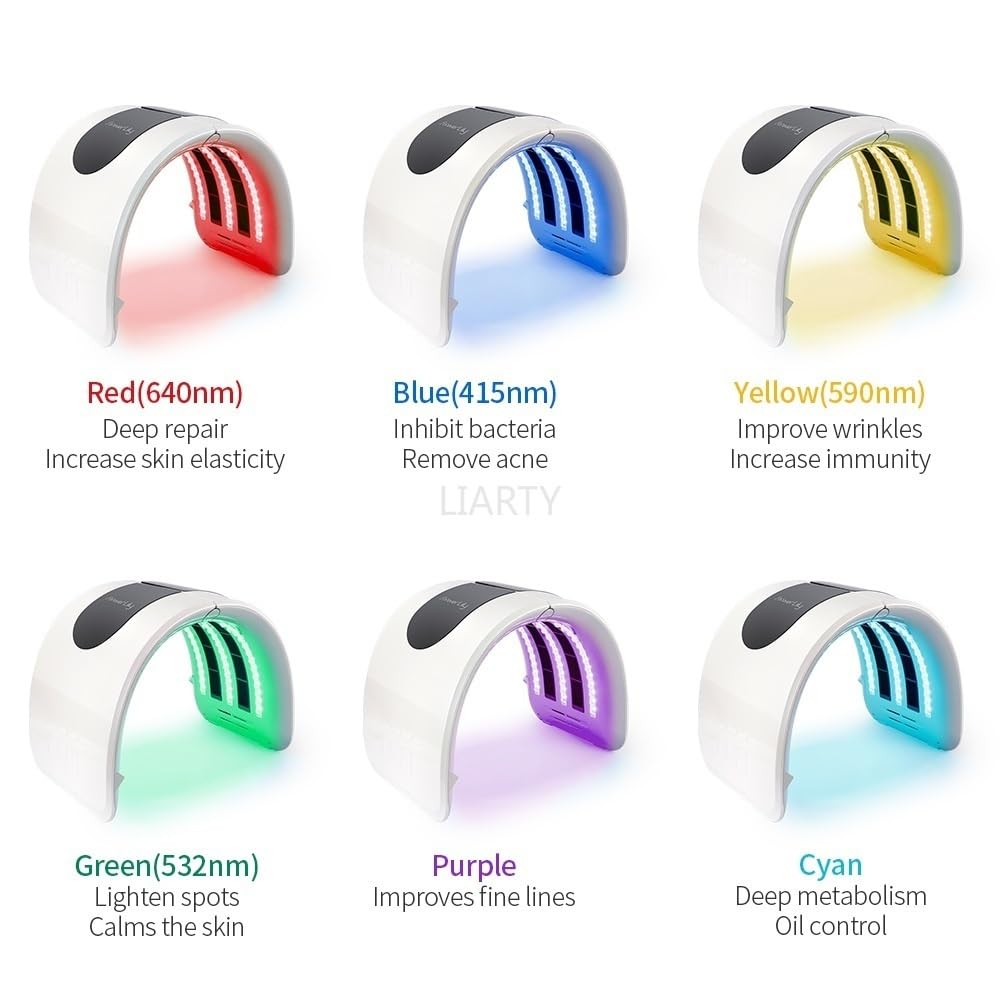
Image 5: An overview of the various light colors and their specific benefits for skin treatment.
- Red Light (640nm): Promotes deep repair and increases skin elasticity.
- Blue Light (415nm): Inhibits bacteria and helps remove acne.
- Yellow Light (590nm): Improves the appearance of wrinkles and supports skin immunity.
- Green Light (532nm): Helps lighten spots and calms the skin.
- Purple Light: Improves fine lines.
- Cyan Light: Supports deep metabolism and oil control.

Image 6: Illustration of how the device's color spectrum cycling technology targets various skin concerns.
Heat Treatment:
The device features a heat treatment function that can be adjusted between 30°C and 60°C. Heat helps to dilate pores, promote the absorption of skincare products, and improve blood circulation for enhanced results.

Image 7: Detail of the heat treatment feature, showing temperature control via the remote.
5. Maintenance
- Cleaning: After each use, gently wipe the surface of the device with a soft, dry cloth. Do not use abrasive cleaners or immerse the device in water.
- Storage: Store the device in a cool, dry place, away from direct sunlight and extreme temperatures. When not in use, you can fold the device for compact storage.
- Adapter Care: Ensure the power adapter is not bent or damaged. Unplug it from the wall when not in use for extended periods.
6. Troubleshooting
- Device not turning on:
- Ensure the power adapter is securely connected to both the device and a working power outlet.
- Check if the power outlet is functional by plugging in another appliance.
- Lights not working:
- Verify that the device is powered on and a light mode has been selected.
- If only some lights are off, contact customer support.
- No heat or insufficient heat:
- Ensure the heat function is activated and the temperature is set to your desired level using the 'TEMP+' button.
- Remote control not responding:
- Ensure there are no obstructions between the remote and the device.
- Check if the remote's batteries need replacement (if applicable).
If you encounter any issues not listed here or if troubleshooting steps do not resolve the problem, please contact customer support.
7. Specifications
| Feature | Detail |
|---|---|
| Brand | foreverLily |
| Model Number | ODM-CLC200608 |
| Item Type | LED Photon Machine |
| Material | ABS |
| Color | White |
| Number of Lamp Beads | 96 PCS |
| Power | 5.76-63.2W |
| Current | 3A |
| Temperature Range | 30°C ~ 60°C |
| Control Time | 1-30 minutes |
| Item Weight | 1.93 kg (1930 g) |
| Package Dimensions | 38.28 x 27.89 x 21.69 cm |
Note: Specifications are subject to change without prior notice.
8. Warranty and Support
foreverLily is committed to providing a satisfactory shopping experience. While specific warranty details are not provided in this manual, please retain your proof of purchase for any potential warranty claims.
For any questions, concerns, or technical support regarding your foreverLily Face Skin Care Machine, please do not hesitate to contact our customer service team. Refer to the product packaging or the retailer's website for contact information.
