
1. Important Safety Instructions
Please read all instructions carefully before using this appliance to ensure safe and efficient operation. Keep this manual for future reference.
- Do not attempt to operate this oven with the door open as this can result in harmful exposure to microwave energy.
- Do not place any object between the oven front face and the door or allow soil or cleaner residue to accumulate on sealing surfaces.
- Do not operate the oven if it is damaged. It is particularly important that the oven door closes properly and that there is no damage to the: (1) door (bent), (2) hinges and latches (broken or loosened), (3) door seals and sealing surfaces.
- The oven should not be adjusted or repaired by anyone except properly qualified service personnel.
- Ensure the appliance is properly grounded.
- Do not use corrosive chemicals or vapors in this appliance.
- Always use microwave-safe cookware.
2. Product Overview
The Philco PMO23IP is a 20-liter microwave oven designed for convenient food preparation. It features 1100W of power and a stainless steel finish.
Key Features:
- 20-Liter Capacity: Provides ample space for various dishes.
- 1100W Power: Efficient heating and cooking performance.
- Easy Clean Coating: Special interior coating prevents food residue from sticking, simplifying cleaning.
- Reheat Menu: Dedicated function for reheating food to an ideal temperature.
- +30 Seconds Button: Quickly adds 30 seconds to cooking time.
- Defrost by Weight and Time: Flexible defrosting options.
- Pre-programmed Recipes: Includes settings for Brigadeiro, Pizza, Meats, Cupcake, Lasagna, Popcorn, Vegetables, and Rice.
- Energy Efficiency Class A: Designed for economical energy consumption.
Components Included:
- Glass Turntable Plate
- Rotating Support Ring
- Instruction Manual
- Warranty Certificate
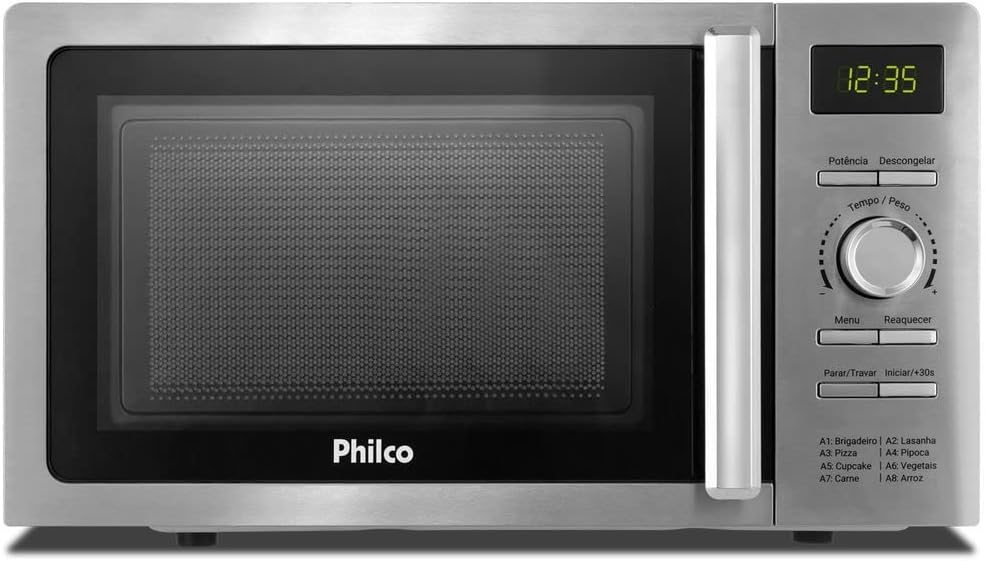
Product Views:


3. Setup and Installation
Unpacking:
Carefully remove the microwave oven and all packing materials from the carton. Check the oven for any damage, such as dents or a misaligned door. Do not operate the oven if it is damaged. Contact customer support.
Placement:
- Place the microwave oven on a flat, stable surface, such as a countertop, that is strong enough to hold the oven and the food being cooked.
- Ensure there is adequate ventilation. Maintain a minimum clearance of 10 cm (4 inches) at the rear, 20 cm (8 inches) at the top, and 5 cm (2 inches) on the sides. Do not block any ventilation openings.
- Keep the oven away from heat sources and strong magnetic fields.
Electrical Connection:
- This appliance operates on 127 Volts. Ensure your electrical outlet matches this voltage.
- Plug the power cord into a properly grounded electrical outlet. Do not use extension cords or adapters.
Turntable Assembly:
- Place the rotating support ring in the center of the oven cavity.
- Position the glass turntable plate securely on top of the rotating support ring. Ensure it sits correctly in the center drive hub.


4. Operating Instructions
This section details the basic functions and special features of your Philco PMO23IP microwave oven.
Control Panel Overview:
- Digital Display: Shows time, power level, and program indicators.
- Potência (Power) Button: Selects cooking power levels.
- Descongelar (Defrost) Button: Initiates defrosting by weight or time.
- Tempo / Peso (Time / Weight) Rotary Knob: Adjusts cooking time, weight for defrosting, or selects menu options.
- Menu Button: Accesses pre-programmed cooking menus.
- Reaquecer (Reheat) Button: Activates the reheat function.
- Parar / Travar (Stop / Lock) Button: Stops cooking or activates the child lock.
- Iniciar / +30s (Start / +30s) Button: Starts cooking or adds 30 seconds to the cooking time.
Basic Cooking:
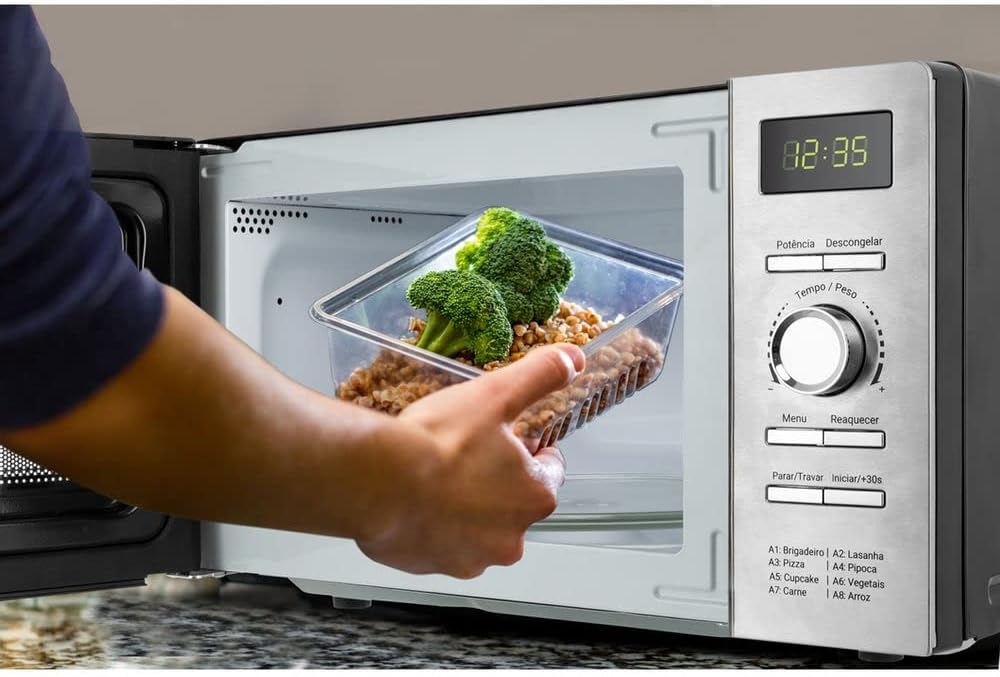
- Place food in a microwave-safe container on the glass turntable. Close the door securely.
- Press the Potência (Power) button repeatedly to select the desired power level (e.g., P100 for 100% power).
- Rotate the Tempo / Peso (Time / Weight) knob to set the cooking time.
- Press the Iniciar / +30s (Start / +30s) button to begin cooking.
Quick Start (+30 Seconds):
For quick heating at full power, simply press the Iniciar / +30s (Start / +30s) button. Each press adds 30 seconds to the cooking time, up to a maximum of 95 minutes.
Defrosting:
The oven offers two defrosting methods: by weight and by time.
- Defrost by Weight: Press the Descongelar (Defrost) button once. Rotate the Tempo / Peso (Time / Weight) knob to select the weight of the food. Press Iniciar / +30s (Start / +30s).
- Defrost by Time: Press the Descongelar (Defrost) button twice. Rotate the Tempo / Peso (Time / Weight) knob to set the defrosting time. Press Iniciar / +30s (Start / +30s).
Pre-programmed Recipes:
The microwave includes convenient pre-programmed settings for common dishes. The codes are listed on the control panel:
- A1: Brigadeiro
- A2: Lasanha (Lasagna)
- A3: Pizza
- A4: Pipoca (Popcorn)
- A5: Cupcake
- A6: Vegetais (Vegetables)
- A7: Carne (Meat)
- A8: Arroz (Rice)
To use a pre-programmed recipe:
- Press the Menu button repeatedly until the desired recipe code (e.g., A1) appears on the display.
- Rotate the Tempo / Peso (Time / Weight) knob to select the quantity or weight if applicable.
- Press the Iniciar / +30s (Start / +30s) button to start.
5. Cleaning and Maintenance
Regular cleaning and proper maintenance will ensure the longevity and optimal performance of your microwave oven.
General Cleaning:
- Always unplug the oven from the power outlet before cleaning.
- Interior: The oven features an "Easy Clean Coating" (Pintura Limpa Fácil) which helps prevent food from sticking. Wipe the interior cavity after each use with a damp cloth and mild detergent. For stubborn stains, place a bowl of water with lemon slices inside and heat for a few minutes to loosen residue, then wipe clean.
- Exterior: Clean the exterior surfaces with a soft, damp cloth. Avoid abrasive cleaners or harsh chemicals that could damage the finish.
- Door and Door Seals: Wipe the door, door seals, and adjacent parts frequently with a damp cloth to remove spills and splatters. Do not use abrasive cleaners.
- Glass Turntable and Rotating Support: The glass turntable plate and rotating support ring can be washed in warm, soapy water or in the dishwasher. Ensure they are completely dry before placing them back in the oven.
Maintenance:
- Do not attempt to repair or modify any part of the oven yourself. Refer all servicing to qualified personnel.
- Regularly check the power cord for any signs of damage. If damaged, it must be replaced by the manufacturer, its service agent, or similarly qualified persons to avoid a hazard.
6. Troubleshooting
If you encounter any issues with your microwave oven, please consult the following common problems and solutions before contacting customer support.
| Problem | Possible Cause | Solution |
|---|---|---|
| Oven does not start | Power cord not plugged in; Door not closed properly; Fuse blown or circuit breaker tripped. | Ensure power cord is securely plugged in; Close the door firmly; Check household fuse or reset circuit breaker. |
| Food not heating | Incorrect cooking time or power level set; Microwave-safe cookware not used. | Adjust cooking time and power level; Use only microwave-safe dishes. |
| Turntable not rotating | Turntable not properly placed on support; Debris under turntable. | Ensure turntable and support ring are correctly positioned; Clean any food particles from under the turntable. |
| Unusual noise during operation | Food container touching oven walls; Turntable not centered. | Ensure food container is not too large; Reposition the turntable. |
If the problem persists after trying these solutions, please contact Philco customer support.
7. Specifications
| Feature | Specification |
|---|---|
| Brand | PHILCO |
| Model Number | PMO23IP |
| Internal Model Information | 96051128 |
| Capacity | 20 Liters |
| Power Output | 1100 Watts |
| Voltage | 127 Volts |
| Dimensions (H x W x D) | 24 cm x 44.5 cm x 30 cm (approx. 9.45 x 17.52 x 11.81 inches) |
| Weight | 10.66 kg (approx. 23.5 lbs) |
| Energy Efficiency | Class A |
| Installation Type | Countertop |
| Material | Metal, Plastic, Glass (Stainless Steel interior lining) |
| Door Hinge | Left |
| Special Features | Defrost by weight or time, Pre-programmed recipes, Easy Clean Coating, Manual time and weight selector. |

8. Warranty and Support
Your Philco PMO23IP Microwave Oven comes with a warranty certificate included in the packaging. Please refer to this document for detailed warranty terms and conditions.
Customer Support:
For any questions, technical assistance, or warranty claims, please contact Philco customer support:
- Website: suporte.philco.com.br
- Phone (São Paulo capital and metropolitan region): (11) 4858-1141
- Phone (Other regions): (47) 3431-0499


