Introduction
The Dyson V15 Detect is a powerful and intelligent cordless vacuum cleaner designed to reveal microscopic dust and provide thorough cleaning across various surfaces. Its advanced technology ensures efficient debris removal and a cleaner home environment.
Included Components
Your Dyson V15 Detect vacuum cleaner comes with the following components:
- Dyson V15 Detect vacuum cleaner (main unit)
- Anti-tangle hair screw tool
- De-tangling digital Motorbar™ cleaner head
- Dusting Brush
- Combination tool
- Stubborn dirt brush
- Docking station
- Wand clip
- Charger
- Laser Slim Fluffy™ cleaner head
- Crevice Tool
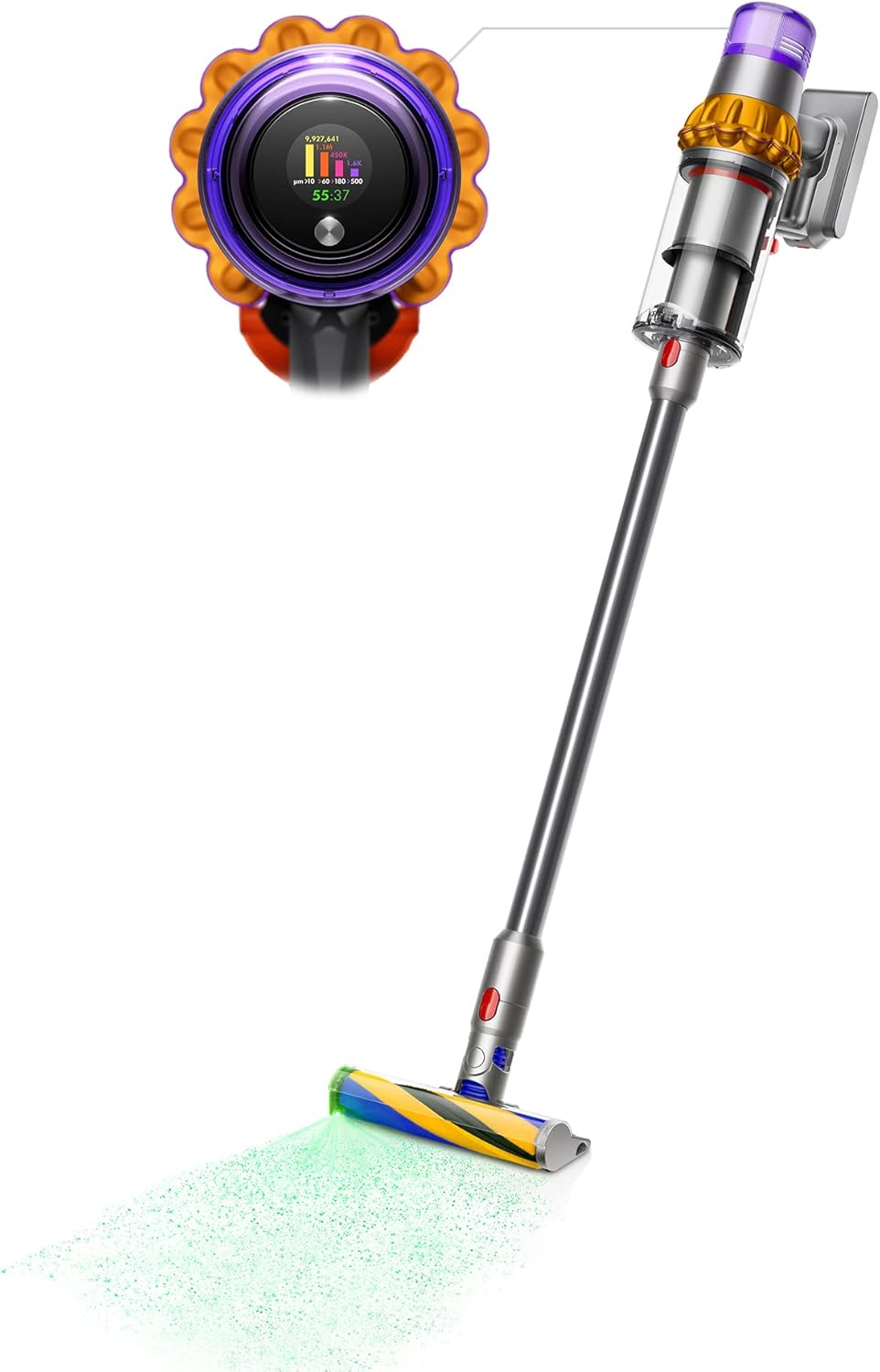
Figure 1: Dyson V15 Detect main unit with Laser Slim Fluffy™ cleaner head attached.

Figure 2: All included tools and cleaner heads for the Dyson V15 Detect.
Setup
Initial Charging
Before first use, fully charge your Dyson V15 Detect vacuum. Connect the charger to the docking station and plug it into a power outlet. Mount the vacuum onto the docking station. The LCD screen will display the charging status. A full charge takes approximately 270 minutes (4.5 hours).

Figure 3: Dyson V15 Detect charging on its wall-mounted docking station.
Assembly
Attach the desired cleaner head or tool to the end of the wand. Ensure it clicks securely into place. The main unit can also be used as a handheld vacuum by directly attaching tools.
Operating Instructions
Power Modes
The Dyson V15 Detect offers multiple power modes to suit different cleaning needs:
- Eco Mode: Provides the longest runtime (up to 60 minutes) for lighter cleaning tasks.
- Auto Mode: Intelligently adapts suction power based on floor type and debris level, optimizing battery life and cleaning performance.
- Boost Mode: Delivers maximum suction for intensive spot cleaning or heavily soiled areas.
Switch between modes using the button on the rear of the main unit's display.
Laser Illumination & Particle Detection
The Laser Slim Fluffy™ cleaner head features a precisely angled laser that illuminates microscopic dust on hard floors, making it visible for thorough cleaning. The LCD screen on the main unit displays real-time particle count and size, providing scientific proof of a deep clean.
Figure 4: Laser Slim Fluffy™ cleaner head illuminating dust on hard floors.
Maintenance
Emptying the Dustbin
To empty the dustbin, hold the vacuum over a trash can. Push the red lever on the side of the dustbin downwards. The bin will open, and the contents will be propelled out. Close the bin securely after emptying.
Washing the Filter
The HEPA filter is washable. To maintain optimal suction, wash the filter at least once a month. Twist the filter counter-clockwise to remove it from the main unit. Rinse the filter under cold running water until the water runs clear. Do not use detergent. Allow the filter to air dry completely for at least 24 hours before reinserting it into the vacuum. Ensure it is completely dry to prevent damage.
Troubleshooting
| Problem | Possible Cause | Solution |
|---|---|---|
| No power/Vacuum not turning on | Battery is depleted | Charge the vacuum fully. |
| Reduced suction power | Dustbin is full | Empty the dustbin. |
| Reduced suction power | Filter is dirty or clogged | Wash and thoroughly dry the HEPA filter. |
| Reduced suction power | Blockage in the cleaner head or wand | Check and clear any blockages from the cleaner head, wand, or main unit. |
| Cleaner head not spinning | Obstruction in the brush bar | Remove the brush bar and clear any tangled hair or debris. |
Specifications
| Feature | Detail |
|---|---|
| Brand | Dyson |
| Model Name | V15 Detect |
| Item Model Number | V15 |
| Special Features | Dyson DLS Technology, Laser illumination, Cordless, Engineered for homes with pets, 2 advanced cleaner heads, LCD screen display, Washable Filter |
| Filter Type | HEPA Filter |
| Is Cordless? | Yes |
| Capacity | 0.77 Liters |
| Wattage | 120 watts |
| Runtime | 1 hour (60 minutes) |
| Charging Time | 270 minutes |
| Recommended Uses | Carpet, Hard Floor |
| Form Factor | Stick |
| Color | Yellow/Nickel |
| Product Dimensions | 10.5"L x 9.8"W x 49.6"H |
| Battery Description | Lithium-Ion |
| Noise Level | 78 dB |
| Amperage | 15 Amps |
| Number of Items | 1 |
| Controller Type | Push Button |
| Control Method | Touch |
| Number of Speeds | 3 |
| Cleaning Path Width | 10.1 Inches |
| Portable | Yes |
| Number of Handles | 1 |
| Number of Wheels | 2 |
| Series Number | 15 |
| Indoor/Outdoor Usage | Indoor |
| UPC | 885609023106 |
| Item Weight | 6.03 pounds |
| Batteries Required | No (built-in) |
| Battery Type | Lithium-Ion |
| Import | Made in the USA |
Warranty and Support
Your Dyson V15 Detect Cordless Vacuum Cleaner comes with a manufacturer's warranty. Please refer to the warranty documentation included with your product for specific terms and conditions.
For further support, troubleshooting, or to register your product, please visit the official Dyson website or contact Dyson customer service.
Official Dyson Website: www.dyson.com