
Introduction
Welcome to the user manual for your FAGOR CONNECT Multifunction Food Processor. This appliance is designed to simplify your cooking experience with its versatile functions, integrated recipes, and smart connectivity. Please read this manual thoroughly before first use to ensure safe and optimal operation.
The FAGOR CONNECT features 12 functions, a 5-liter capacity bowl, a 7-inch touchscreen display, and a powerful 1500W motor. It includes integrated weighing up to 5 kg and adjustable temperature from 30 to 120 °C.
Safety Instructions
Always follow basic safety precautions when using electrical appliances to reduce the risk of fire, electric shock, and/or injury to persons.
- Do not immerse the motor base in water or any other liquid.
- Ensure the appliance is placed on a stable, flat, heat-resistant surface.
- Keep hands and utensils away from moving blades during operation.
- Unplug the appliance from the outlet when not in use, before assembling or disassembling parts, and before cleaning.
- Do not operate any appliance with a damaged cord or plug, or after the appliance malfunctions or has been dropped or damaged in any manner.
- This appliance is for household use only.
Components and Accessories
Your FAGOR CONNECT food processor comes with several components and accessories to enhance its functionality.

Main Unit: The Fagor Connect food processor, featuring a white base, a stainless steel mixing bowl, and a black lid with a transparent cover. The front panel includes a large touchscreen display and control buttons.

XXL 5L Bowl: The large capacity stainless steel bowl, ideal for preparing meals for 4 or more people. This image highlights the bowl's size and the integrated WiFi connectivity for recipe access.

Key Features Overview: An illustration pointing out the 5L bowl, the integrated tutorial for first use, access to 400 recipes after initial connection, and the WiFi feature for continuous recipe updates.

Accessory Overview: This image details the various accessories included, such as the 2-tier steam tray, butterfly whisk, spatula hook, 100ml measuring cap, chopping blade, and removable basket. It also mentions the 400 pre-installed recipes and the connected multifunctionality.
Included Accessories:
- Chopping Blade
- Removable Basket
- 2-Tier Steam Tray
- Spatula
- Hook
- 100 ml Measuring Cap
- Butterfly Whisk
Setup
Before first use, ensure all packaging materials are removed. Wash all removable parts (bowl, lid, accessories) with warm soapy water, rinse thoroughly, and dry. Wipe the motor base with a damp cloth.
- Place the motor base on a clean, dry, and stable surface.
- Insert the stainless steel bowl into the motor base, ensuring it clicks securely into place.
- Attach the desired accessory (e.g., chopping blade) inside the bowl.
- Place the lid onto the bowl and twist clockwise until it locks.
- Plug the appliance into a grounded electrical outlet.
- The touchscreen will power on, guiding you through the initial setup, including Wi-Fi connection for recipe access.
Bowl Removal: This image demonstrates how to properly remove the mixing bowl from the main unit, a key step for cleaning and assembly.

Touchscreen Interface: A close-up view of the 7-inch touchscreen display, showing various recipe categories and navigation icons, indicating the user-friendly interface for recipe selection.
Operating Instructions
The FAGOR CONNECT offers various modes of operation:
Using Pre-installed Recipes:
- From the main screen, select the "Recipes" icon.
- Browse through the 400 pre-installed recipes, categorized by themes (e.g., "Children Cook").
- Select your desired recipe. The screen will display step-by-step instructions, including ingredients and cooking parameters.
- Follow the on-screen prompts to add ingredients and operate the machine. The integrated scale will assist with precise measurements up to 5 kg.
Manual Mode:
For custom cooking, use the manual settings:
- Temperature: Adjustable from 30 °C to 120 °C.
- Timer: Adjustable up to 99 minutes.
- Speed: 10 speeds available, plus a pulse function.
- Weighing: Use the integrated scale for precise ingredient measurement.

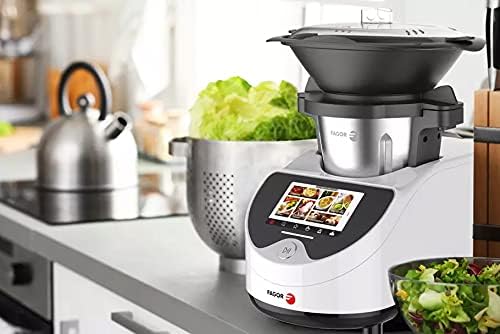
In Use: The food processor positioned on a kitchen counter, ready for use, with fresh ingredients nearby, illustrating its integration into a cooking environment.

Recipe Selection Screen: A detailed view of the touchscreen displaying a grid of recipe options, such as "Apero Time," "Fish and Crustaceans," and "Family Meals," demonstrating the breadth of available culinary choices.
Maintenance and Cleaning
Regular cleaning ensures the longevity and hygiene of your FAGOR CONNECT food processor.
- Always unplug the appliance before cleaning.
- The bowl and most accessories are dishwasher safe. Refer to the individual accessory instructions for specific care.
- Wipe the motor base and touchscreen with a soft, damp cloth. Do not use abrasive cleaners or immerse the base in water.
- Ensure all parts are completely dry before reassembling or storing the appliance.
Troubleshooting
| Problem | Possible Cause | Solution |
|---|---|---|
| Appliance does not turn on. | Not plugged in; power outlet issue; appliance not assembled correctly. | Check power cord connection; test outlet with another device; ensure bowl and lid are securely locked. |
| Motor stops during operation. | Overload protection activated; lid not properly closed. | Reduce ingredients; allow motor to cool down; ensure lid is securely locked. |
| Wi-Fi connection issues. | Incorrect password; out of range; router issue. | Verify Wi-Fi password; move appliance closer to router; restart router. |
| Bowl sticks to the bottom when cooking. | Possible residue buildup or improper seating. | Ensure bowl is clean and dry before placing it in the base. Check for any debris under the bowl. |
Specifications
| Feature | Detail |
|---|---|
| Model Number | FG0606 |
| Brand | Fagor |
| Functions | 12 (including cooking, steaming, chopping, mixing, emulsifying) |
| Capacity | 5 Liters (XXL bowl) |
| Power | 1500 Watts |
| Voltage | 230 Volts (AC) |
| Display | 7-inch Touchscreen |
| Temperature Range | 30 °C to 120 °C |
| Timer | Adjustable up to 99 minutes |
| Speeds | 10 speeds + Pulse function |
| Integrated Scale | Weighs up to 5 kg |
| Material | Stainless Steel (bowl) |
| Dishwasher Safe Parts | Bowl and most accessories |
| Connectivity | Wi-Fi (for recipe updates) |
| Dimensions (Package) | 53.5 x 48.5 x 33.5 cm |
| Item Weight | 10.91 kg |
Warranty and Support
Your FAGOR CONNECT Multifunction Food Processor comes with a 2-year warranty from the date of purchase. This warranty covers manufacturing defects and malfunctions under normal household use.
For warranty claims, technical support, or to inquire about spare parts, please contact Fagor customer service. Keep your proof of purchase for warranty validation.
Note: Information regarding spare parts availability is currently unavailable.