
1. Introduction
This manual provides detailed instructions for the operation and maintenance of your Topping D90SE MQA DAC. Please read this manual thoroughly before using the device to ensure proper functionality and to maximize your audio experience. The Topping D90SE is a high-performance Digital-to-Analog Converter designed for discerning audio enthusiasts, featuring MQA decoding, Bluetooth 5.0 with LDAC, and the ES9038PRO DAC chip.
2. Product Overview
2.1 Front Panel

Image: Front view of the Topping D90SE DAC, highlighting the Multifunction button, OLED screen, Remote control receiver, and Volume up/down buttons.
The front panel of the D90SE features an OLED screen for displaying operational status, input source, sample rate, and volume level. A Multifunction button (O/SEL) allows for power on/off and menu selection. Volume up (△) and Volume down (▽) buttons are provided for direct control, and a Remote control receiver ensures convenient operation.
2.2 Rear Panel

Image: Rear view of the Topping D90SE DAC, showing all input and output ports with labels.
The rear panel provides a comprehensive array of connectivity options. These include Balanced XLR outputs (Left and Right channels), Single-ended RCA outputs (Left and Right channels), COAX input, Bluetooth input, IIS-LVDS input, Optical input, USB input, and AES input. For power, there is a Power Input socket, a Fuse holder, and a main Power Switch.
2.3 Product Overview Video
Video: This video provides a visual overview of the Topping D90SE MQA DAC, including its physical appearance, front and rear panel features, and an unboxing sequence.
3. Key Features
3.1 MQA Full Decoding
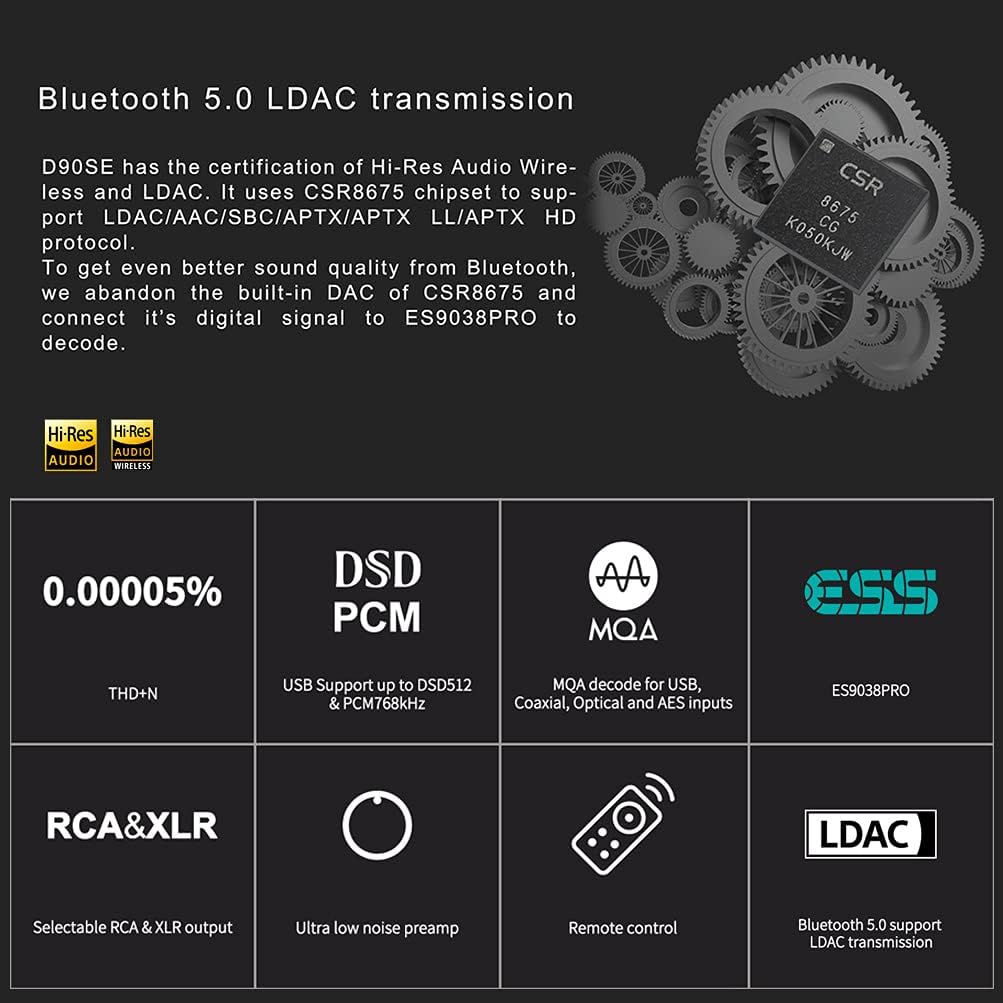
Image: Diagram illustrating MQA full decoding support across various inputs and selectable output options.
The D90SE supports MQA full decoding across its USB, Coaxial, Optical, and AES inputs. This allows the device to fully unfold MQA signals, delivering the highest possible sound quality from MQA-encoded audio files. It supports MQA Renderer, MQA, and MQA Studio formats. The D90SE also offers selectable output modes: XLR only, RCA only, or both XLR and RCA simultaneously, providing flexibility for different audio setups.
3.2 Bluetooth 5.0 LDAC Transmission
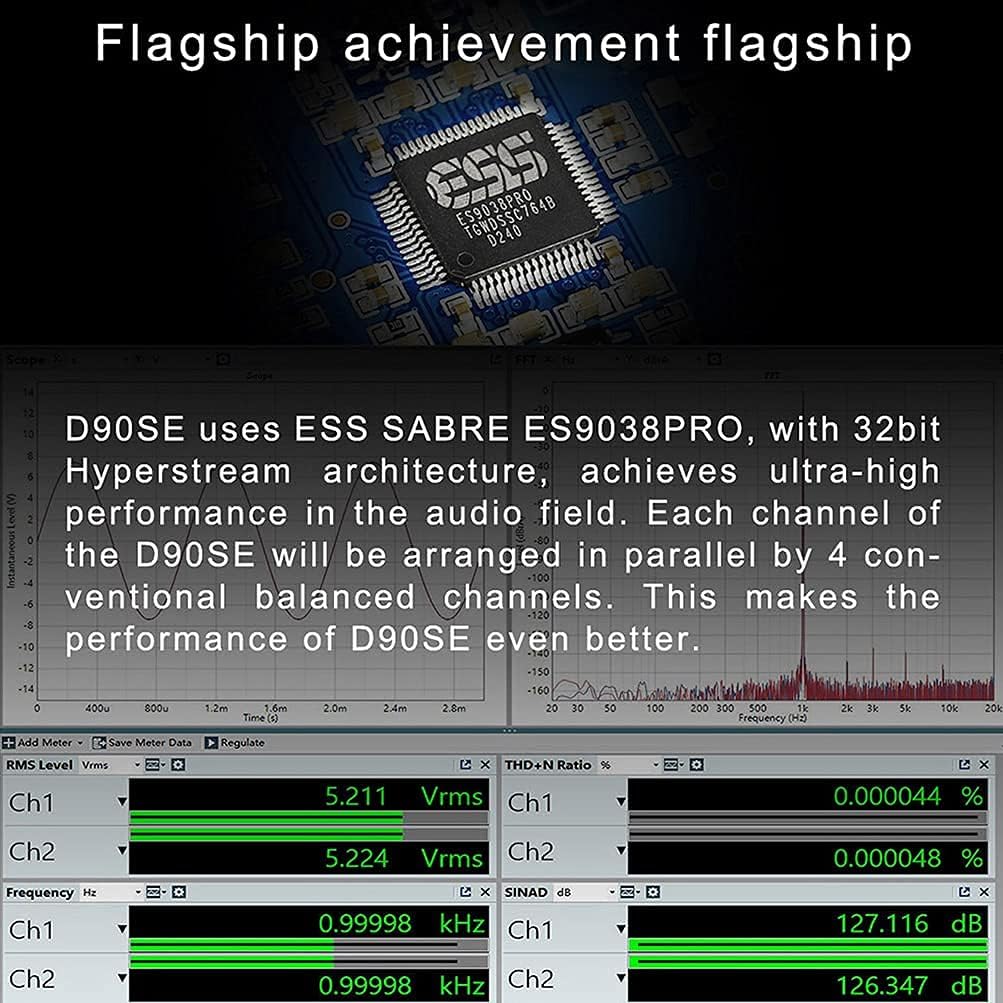
Image: Overview of Bluetooth 5.0 LDAC transmission and a summary of the D90SE's core features.
Equipped with a CSR8675 Bluetooth chip, the D90SE supports Bluetooth 5.0 with LDAC transmission, along with AAC, SBC, aptX, aptX LL, and aptX HD protocols. This ensures high-quality wireless audio streaming. The D90SE processes the digital signal from Bluetooth through its ES9038PRO DAC for optimal sound performance.
3.3 ES9038PRO DAC Chip

Image: Close-up of the ES9038PRO chip and graphs illustrating the D90SE's audio performance metrics.
The D90SE utilizes the ESS SABRE ES9038PRO DAC chip, featuring 32-bit Hyperstream architecture. Each channel of the D90SE is arranged in parallel by 4 conventional balanced channels, enhancing audio performance. This design contributes to the device's ultra-high performance in the audio field, as evidenced by its low THD+N and high SINAD measurements.
4. Setup
4.1 Unboxing and Initial Inspection
Upon receiving your Topping D90SE, carefully unbox the unit and inspect it for any signs of damage. Ensure all accessories are present. The package should contain:
- Topping D90SE DAC unit
- Remote control
- Bluetooth antenna
- USB cable
- AC power cable
- User manual
- Warranty card
Refer to the Product Overview Video in Section 2.3 for a visual guide to the unboxing process and included items.
4.2 Connecting the Device
- Power Connection: Connect the supplied AC power cable to the Power Input on the rear panel and then to a suitable power outlet.
- Bluetooth Antenna: Screw the Bluetooth antenna onto the designated connector on the rear panel.
- Audio Output: Connect your amplifier or active speakers to the D90SE using either the Balanced XLR outputs or the Single-ended RCA outputs. Ensure correct left and right channel connections.
- Audio Input: Connect your digital audio source (e.g., computer, CD player, streamer) to the D90SE using one of the available digital inputs: USB, Coaxial, Optical, AES, or IIS.
- USB Driver Installation (for Windows): For Windows operating systems, you may need to install the dedicated Thesycon ASIO driver for optimal USB audio performance. Drivers are typically provided on a CD or available for download from the manufacturer's website. macOS and Linux systems usually do not require specific driver installations.
5. Operating Instructions
5.1 Remote Control Functions
Image: Diagram of the remote control for the Topping D90SE, with numbered buttons corresponding to their functions.
- 1. Standby: Power on/off the device.
- 2. Volume Up (+): Increases the output volume.
- 3. Switch to Previous Input (←): Cycles through inputs in reverse order.
- 4. Filter Setting (F): Accesses and changes digital filter modes.
- 5. Auto Standby (AUTO): Toggles automatic standby function.
- 6. Brightness (☀): Adjusts the brightness of the OLED screen.
- 7. Mute (X): Mutes or unmutes the audio output.
- 8. Output Channel Switching (Line Out): Switches between XLR, RCA, or XLR+RCA output modes.
- 9. Switch to Next Input (→): Cycles through inputs in forward order.
- 10. Volume Down (-): Decreases the output volume.
Note: When the D90SE is in Bluetooth input state, pressing the brightness button for 3 seconds will disconnect the existing Bluetooth connection and forcibly enter Bluetooth pairing state.
5.2 Basic Operation
- Power On/Off: Use the power switch on the rear panel to turn the unit on or off. Alternatively, use the Standby button (1) on the remote control for standby mode.
- Input Selection: Press the 'Switch to Previous Input' (3) or 'Switch to Next Input' (9) buttons on the remote to cycle through available digital inputs. The selected input will be displayed on the OLED screen.
- Volume Control: Adjust the output volume using the Volume Up (+) (2) and Volume Down (-) (10) buttons on the remote.
- Output Mode Selection: Use the 'Output Channel Switching' (8) button to select between XLR, RCA, or combined XLR+RCA outputs.
5.3 Menu Settings
The D90SE offers various settings accessible via the remote control or the front panel multifunction button. These include:
- Digital Filters: The 'Filter Setting' (F) button (4) allows you to select from several digital filter modes, each offering a slightly different sonic characteristic. Experiment to find your preferred sound.
- Screen Brightness: The 'Brightness' (☀) button (6) adjusts the intensity of the OLED display.
6. Maintenance
To ensure the longevity and optimal performance of your Topping D90SE, follow these maintenance guidelines:
- Cleaning: Use a soft, dry cloth to clean the exterior of the unit. Avoid using abrasive cleaners, solvents, or chemical sprays, as these can damage the finish.
- Placement: Place the D90SE on a stable, flat surface with adequate ventilation. Avoid placing it near heat sources, direct sunlight, or in areas with high humidity or dust.
- Power: Disconnect the power cable from the wall outlet if the unit will not be used for an extended period.
7. Troubleshooting
If you encounter any issues with your D90SE, please refer to the following common troubleshooting steps:
- No Power: Ensure the power cable is securely connected to both the unit and the power outlet. Check the power switch on the rear panel is in the 'ON' position. Verify the fuse is intact.
- No Sound:
- Check that the correct input source is selected on the D90SE.
- Verify that the volume is not muted or set too low.
- Ensure all audio cables (input and output) are securely connected.
- Confirm that your amplifier or active speakers are powered on and functioning correctly.
- Distorted Sound:
- Check the quality of your input audio signal.
- Ensure all cables are in good condition and properly connected.
- Verify that the sample rate and bit depth settings on your source device match the capabilities of the D90SE.
- Bluetooth Connection Issues:
- Ensure the Bluetooth antenna is properly installed.
- Put the D90SE into Bluetooth pairing mode by pressing the brightness button on the remote for 3 seconds.
- Check that your source device's Bluetooth is enabled and within range.
- Remote Control Not Working: Replace the batteries in the remote control. Ensure there are no obstructions between the remote and the D90SE's remote control receiver.
If the issue persists after attempting these steps, please contact customer support.
8. Specifications
| Feature | Detail |
|---|---|
| Model Number | D90SE |
| DAC Chip | ESS SABRE ES9038PRO |
| USB Input Support | PCM 32bit/768kHz, DSD512 (Native) |
| IIS Input Support | PCM 32bit/768kHz, DSD1024 (Native) |
| Coaxial/Optical/AES Input Support | PCM 24bit/192kHz, DSD64 (DoP) |
| MQA Support | Full MQA Decode (USB, Coaxial, Optical, AES) |
| Bluetooth Version | 5.0 |
| Bluetooth Codecs | LDAC, AAC, SBC, aptX, aptX LL, aptX HD |
| Outputs | Balanced XLR, Single-ended RCA |
| THD+N (RCA) | <0.00007% @1kHz |
| THD+N (XLR) | <0.00005% @1kHz |
| SNR (RCA) | 127dB @1kHz |
| SNR (XLR) | 134dB @1kHz |
| Dynamic Range (RCA) | 127dB @1kHz |
| Dynamic Range (XLR) | 134dB @1kHz |
| Frequency Response | 20Hz-20kHz (±0.1dB), 20Hz-40kHz (±0.3dB) |
| Output Level (RCA) | 2.1Vrms @0dBFS (4V Mode), 2.6Vrms @0dBFS (5V Mode) |
| Output Level (XLR) | 4.2Vrms @0dBFS (4V Mode), 5.2Vrms @0dBFS (5V Mode) |
| Item Dimensions | 8.74 x 6.3 x 1.77 inches |
| Item Weight | 4.49 pounds |
| Manufacturer | Topping |
9. Warranty and Support
9.1 Warranty Information
AOSHIDA Audio products typically come with a one-year free repair period, which may vary depending on the specific brand product. Please refer to the warranty card included in your package for detailed terms and conditions.
9.2 Customer Support
AOSHIDA Audio provides 24-hour online service. If you have any questions, require technical assistance, or need after-sales support, please feel free to contact the AOSHIDA service team.
AOSHIDA Service Email: service@aoshida-audio.com

