
1. Product Overview
The NC TWS Bluetooth 5.1 Earphones offer a high-fidelity audio experience with advanced features designed for convenience and durability. These wireless earbuds provide clear stereo sound, effective noise cancellation, and a comfortable fit for various activities.

Image: NC TWS Bluetooth 5.1 Earphones in their charging case, displaying battery levels and earbud status.
Key Features:
- Bluetooth 5.1 Technology: Ensures stable and fast connection with low power consumption.
- CVC 8.0 Noise Cancelling: Provides clear call quality by reducing ambient noise.
- 9D Stereo Sound: Delivers strong deep bass music sound with DSR lossless HD rendering technology.
- IPX7 Waterproof Rating: Protects against water, rain, and sweat, suitable for sports and outdoor activities.
- Touch Control: Intuitive one-button control for managing music, calls, and voice assistant.
- Large Capacity Charging Case: 3500mAh charging box provides extended battery life and can also charge mobile devices.
Video: Official product overview of the NC TWS Bluetooth Earphones, highlighting key features and design.
2. Package Contents
Please check the package for the following items:
- 2 x Bluetooth Earphones (Left and Right)
- 1 x Charging Case
- 1 x USB Cable
- 1 x User Manual
- 2 x Earphone Cups (L, M Size)
3. Product Structure & Design
The NC TWS Earphones are designed for comfort and stability, featuring a lightweight and compact body that fits ergonomically in the ear canal.

Image: A woman wearing an NC TWS earbud, illustrating the comfortable and stable fit of the lightweight design.
Internal Components:
Equipped with advanced Bluetooth 5.1 chipset, these earphones ensure stable and fast transmission. The 10mm dual drive units deliver precise audio reproduction.

Image: Detailed view of the earbud's internal circuitry, highlighting the Bluetooth 5.1 chip for enhanced stability and compatibility.
4. Setup & Pairing
The earphones feature one-step pairing for ease of use.
Initial Pairing:
- Take both wireless Bluetooth headphones out of the charging box.
- They will automatically connect with each other.
- The earphones will automatically connect to the last-paired device.
These earphones are compatible with most Bluetooth devices, including smartphones, laptops, tablets, and smart speakers, supporting both Android and iOS devices.

Image: NC TWS earbuds and their charging case placed on a keyboard, with a smartphone nearby displaying its Bluetooth connection screen, illustrating the pairing process.
5. Operating Instructions
The earphones feature smart touch control for various functions.
Touch Control Functions:
- Play/Pause: Light touch the left earphone once.
- Answer/Hang up Call: Light touch the left earphone once.
- Summon Siri (Voice Assistant): Long press the left earphone for 1 second.
- Volume Reduction: Touch the left earphone triple in a row.
- Switch Previous Song: Touch the left earphone for 2 seconds.
- Turn On/Off: Long press the earphone for 5 seconds.
These controls allow for seamless management of your audio and calls without needing to access your connected device.
6. Charging & Battery Life
The NC TWS Earphones come with a powerful charging case to ensure extended usage.

Image: The charging case with an LED display showing battery percentage and estimated usage times: 100 hours standby, 36 hours phone call, and 24 hours playing.
Battery Performance:
- Earphone Playback: 5-6 hours on a single charge.
- Total Playback with Case: Up to 180 hours (charging case can recharge earphones approximately 21 times).
- Charging Case Charging Time: Approximately 1.5 hours via USB-C.
Charging Method:
- Earphone Charging: Place the earphones in the charging compartment and close the lid. The earphones will automatically charge. The earphone indicator light will be red when charging and turn off when fully charged.
- Charging Case Charging: Connect the USB cable to the charging case. The red light in the charging cabin lights up and goes out when fully charged.
Power Bank Functionality:
The large-capacity charging compartment can not only charge the earphones but also provide emergency battery life for mobile phones or other mobile devices, preventing them from running out of power.

Image: The earphone charging case connected to a smartphone via a USB cable, demonstrating its capability to charge external mobile devices.
7. Water Resistance
The NC TWS Earbuds are constructed with high-quality waterproof materials and a multi-process design, undergoing high-specification waterproof tests to achieve an IPX7 rating. This effectively protects the internal components from water, rain, and sweat, making them ideal for cycling, running, fitness, skiing, traveling, hiking, and water sports.
8. Specifications
Detailed technical specifications for the NC TWS Bluetooth Earphones:
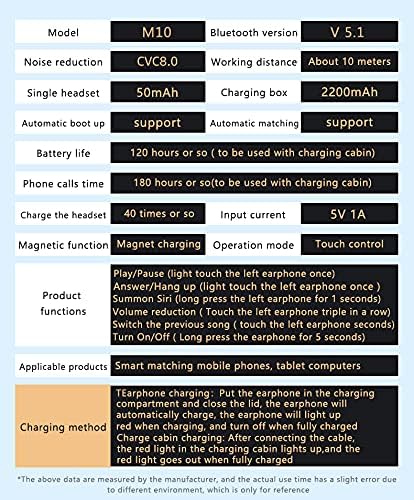
Image: A table detailing the specifications of the NC TWS Earbuds, including model, Bluetooth version, noise reduction, battery life, and product functions.
| Feature | Specification |
|---|---|
| Model Name | Earbuds |
| Bluetooth Version | 5.1 |
| Connectivity Technology | Wireless, Bluetooth 5.1 |
| Wireless Communication Technology | Bluetooth |
| Noise Control | Active Noise Cancellation (CVC 8.0) |
| Earphone Battery Life | 5-6 Hours (single charge) |
| Total Playback (with case) | Up to 180 Hours |
| Charging Case Battery Capacity | 3500mAh |
| Charging Case Charging Time | 1.5 Hours |
| Water Resistance Level | IPX7 Waterproof |
| Control Method | Touch |
| Bluetooth Range | 15 Meters |
| Audio Driver Type | Dynamic Driver (10mm dual drive units) |
| Built-in Microphone | Yes |
| Compatible Devices | Smartphones, Laptops, Tablets, Smart Speakers (Android, iOS) |
| Product Dimensions | 1.18 x 0.79 x 0.39 inches |
| Item Weight | 3.53 ounces (100 Grams) |
9. Maintenance
To ensure the longevity and optimal performance of your NC TWS Earphones, follow these maintenance guidelines:
- After use, gently wipe the earbuds with a soft, dry cloth to remove any sweat or debris.
- Ensure the charging contacts on both the earbuds and the charging case are clean and dry before placing the earbuds back into the case.
- Store the earphones and charging case in a cool, dry place away from extreme temperatures and direct sunlight.
- Avoid dropping the earphones or subjecting them to strong impacts.
- While the earphones are IPX7 waterproof, avoid prolonged submersion in water or exposure to harsh chemicals.
10. Troubleshooting
If you encounter any issues with your NC TWS Earphones, please refer to the following common troubleshooting steps:
- No Sound/Poor Sound Quality: Ensure earphones are fully charged and properly paired. Check volume levels on both earphones and connected device. Clean any debris from earbud speakers.
- Earphones Not Pairing: Ensure Bluetooth is enabled on your device. Place both earphones back into the charging case, close the lid, then open it again to re-initiate pairing. Forget the device in your phone's Bluetooth settings and try pairing again.
- Charging Issues: Ensure the charging cable is securely connected to both the case and a power source. Check if the charging case has power. Clean charging contacts on both earphones and case.
- Intermittent Connection: Ensure you are within the 15-meter Bluetooth range. Avoid obstacles between the earphones and your device. Reduce interference from other wireless devices.
- Touch Controls Not Responding: Ensure your fingers are clean and dry. Try restarting the earphones by placing them in the case and taking them out again.
If the issue persists after trying these steps, please contact customer support.
11. Warranty & Support
For warranty information and customer support, please refer to the documentation included with your product or visit the official NC product support page. Keep your purchase receipt for any warranty claims.


