
1. Introduction
Thank you for choosing the WEIJIA T855 Universal 7-Day Programmable Thermostat. This device is designed to provide reliable and efficient control over your heating and cooling systems. It is compatible with both conventional (up to 2 Heat, 2 Cool) and heat pump (up to 3 Heat, 2 Cool) systems. This manual provides detailed instructions for installation, operation, and maintenance to ensure optimal performance and longevity of your thermostat.
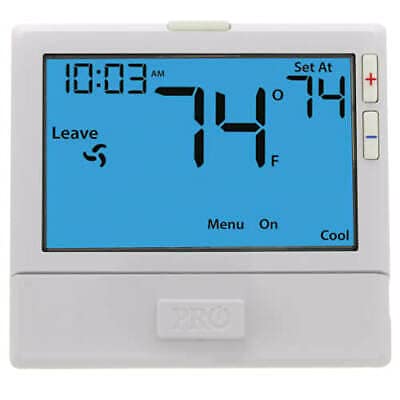
Image: The WEIJIA T855 Universal Programmable Thermostat, featuring its clear blue backlit display and intuitive button layout.
2. Key Features
- Universal Compatibility: Works with conventional (2H/2C) and heat pump (3H/2C) systems.
- Flexible Programming: Offers 7-day, 5/1/1 day, or non-programmable modes.
- Auto Changeover: Automatically switches between heating and cooling modes.
- Intuitive Interface: Easy menu-driven programming with clear icons (wake, leave, return, sleep).
- Large Display: 8 square inch display with a blue backlight for enhanced visibility.
- Glow-in-the-Dark Button: Convenient for low-light conditions.
- Programmable Fan: Allows for continuous fan operation or automatic control.
- Configurable Settings: Electric or Gas configurable, room temperature calibration.
- Advanced Control: Separate heating and cooling swing (cycle rate) adjustments.
- Security Features: Keypad lockout and heating/cooling setpoint limits.
- Compressor Protection: Selectable 5-minute compressor delay protection.
- Maintenance Reminder: Filter change indicator (selectable on or off).
- Easy Installation: Color-coded terminal blocks and universal sub-base for wall or junction box mounting.
- Dual Power Options: Operates on 2 AA alkaline batteries or 24 VAC hardwire.
3. Setup and Installation
3.1 Safety Precautions
Before beginning installation, always turn off power to the heating and cooling system at the main fuse or circuit breaker panel. Failure to do so could result in electrical shock or equipment damage.
3.2 Mounting the Thermostat
- Turn off all power to the heating/cooling system.
- Remove the old thermostat from the wall.
- Mount the universal sub-base of the T855 thermostat directly to the wall or to a standard junction box using the provided screws. Ensure it is level for aesthetic purposes.
- Refer to the wiring diagram for your specific system type (conventional or heat pump) and connect the wires to the appropriate color-coded terminal blocks on the sub-base.
3.3 Wiring
The T855 features easy wire color-coded terminal blocks. Connect your system wires to the corresponding terminals. If you are unsure about your system's wiring, consult a qualified HVAC technician.
- Power Source: The thermostat can be powered by 2 AA Alkaline batteries or hardwired to an 18 to 30 VAC, NEC Class II, 50/60 Hz common wire.
- Terminal Labels: Match the labels on your existing thermostat's wires to the T855's terminals (e.g., R, C, G, Y, W, O/B, Aux/E, L).
3.4 Initial Power Up
After wiring and mounting the thermostat to its sub-base, restore power to your HVAC system. The thermostat display should illuminate, and you will be prompted to configure initial settings such as date, time, and system type.
4. Operating Instructions
4.1 Display and Buttons
The T855 features an 8 square inch blue backlit LCD display. Navigation is performed using the buttons located below the display.
- UP/DOWN Arrows: Adjust temperature setpoints, navigate menu options.
- MENU Button: Access programming and advanced settings.
- SYSTEM Button: Cycle through system modes (OFF, HEAT, COOL, AUTO).
- FAN Button: Cycle through fan modes (AUTO, ON).
- GLOW Button: Activates the blue backlight for a short period.
4.2 Setting Time and Day
Press the MENU button, then navigate to the 'Set Time/Day' option using the UP/DOWN arrows. Follow the on-screen prompts to adjust the current time and day of the week.
4.3 Programming Schedules
The T855 offers 7-day, 5/1/1 day, or non-programmable options. To set a schedule:
- Press the MENU button and select 'Program Schedule'.
- Choose your desired programming mode (7-day, 5/1/1, or non-programmable).
- For programmable modes, use the UP/DOWN arrows to adjust the start time and temperature for each period (Wake, Leave, Return, Sleep) for each day or group of days.
- Confirm each setting to save.
4.4 System and Fan Modes
- System Modes: Press the SYSTEM button to cycle through OFF (system is off), HEAT (heating only), COOL (cooling only), and AUTO (thermostat automatically switches between heating and cooling to maintain setpoint).
- Fan Modes: Press the FAN button to cycle through AUTO (fan runs only when heating/cooling is active) and ON (fan runs continuously).
4.5 Temperature Adjustment
In normal operation, use the UP or DOWN arrows to adjust the desired temperature setpoint. The new setpoint will be displayed and the system will adjust accordingly.
5. Maintenance
5.1 Battery Replacement
When the low battery indicator appears on the display, replace the two AA Alkaline batteries. Open the battery compartment, remove the old batteries, and insert new ones, ensuring correct polarity. The thermostat will retain its settings for a short period during battery replacement.
5.2 Filter Change Indicator
The T855 features a selectable filter change indicator. When activated, it will remind you to change your HVAC system's air filter. After changing the filter, reset the indicator through the thermostat's menu settings.
5.3 Cleaning
Clean the thermostat's exterior with a soft, damp cloth. Do not use abrasive cleaners or solvents, as these can damage the display or casing.
6. Troubleshooting
If you experience issues with your WEIJIA T855 thermostat, refer to the following common troubleshooting steps:
- No Display: Check if the batteries are correctly installed and charged. If hardwired, ensure the 24 VAC power supply is active.
- Heating/Cooling Not Engaging:
- Verify the system mode is set to HEAT or COOL, not OFF.
- Ensure the temperature setpoint is appropriately above (for heat) or below (for cool) the current room temperature.
- Check for the 5-minute compressor delay protection if the system recently turned off.
- Inaccurate Temperature Reading: The thermostat has a room temperature calibration adjustment. Refer to the advanced settings menu to fine-tune the temperature reading if necessary.
- Programming Issues: If schedules are not working as expected, re-enter the program settings carefully, ensuring correct times and days. Verify the thermostat is in a programmable mode (7-day or 5/1/1).
- Keypad Locked: If the keypad is unresponsive, check if the keypad lockout feature is enabled in the settings. Disable it to regain control.
If problems persist after attempting these steps, contact a qualified HVAC technician or the manufacturer for assistance.
7. Specifications
| Feature | Specification |
|---|---|
| Model Name | T855 |
| Brand | WEIJIA |
| Display Range | 41°F to 95°F (5°C to 35°C) |
| Control Range | 44°F to 90°F (7°C to 32°C) |
| Load Rating | 1 amp per terminal, 1.5 amp maximum all terminals combined |
| Display Accuracy | ± 1 °F |
| Swing (Cycle Rate) | Adjustable from 0.2°F to 2.0°F (Heating & Cooling) |
| Power Source | 18 to 30 VAC (hardwire) or 2 AA Alkaline batteries |
| Operating Ambient | 32°F to +105°F (0°C to +41°C) |
| Mounting Type | Wall Mount |
| Connectivity | Wired |
| Control Type | Button Control, Touch |
| Display Type | LCD with Blue Backlight |
8. Warranty and Support
For warranty information, please refer to the documentation provided with your purchase or contact the seller directly. WEIJIA stands behind its products, and any warranty claims or technical support inquiries should be directed to the point of purchase or the official WEIJIA customer service channels.
When contacting support, please have your product model number (T855) and purchase details readily available.