
Introduction
The OCOOPA HotPal Rechargeable Hand Warmer is a portable and versatile device designed to provide warmth and serve as a power bank for your electronic devices. Constructed from durable aircraft-grade aluminum and ABS material, it features double-sided fast heating with three adjustable temperature levels, making it suitable for various outdoor activities and cold conditions. This manual provides essential information for the safe and effective use of your HotPal hand warmer.

Figure 1: OCOOPA HotPal Rechargeable Hand Warmer (Blue Two-Pack)
Product Features
- Double-sided Fast Heating: Provides rapid warmth on both sides of the device.
- Three Temperature Levels: Adjustable heat settings ranging from 95°F to 131°F (35°C to 55°C) to suit individual preferences.
- 5200mAh Rechargeable Battery: Offers extended operating time and doubles as a portable power bank.
- USB-C Charging Port: Convenient and fast charging for the hand warmer and external devices.
- Durable Construction: Made from aircraft-grade aluminum and ABS material for durability and a comfortable, anti-skid grip.
- Portable Design: Compact and lightweight, designed to fit comfortably in your pocket or hand.

Figure 2: Double-sided Heating Feature

Figure 3: Three Temperature Settings
Setup
Unboxing and Initial Charge
Upon receiving your OCOOPA HotPal hand warmer, carefully unbox all components. The package typically includes two HotPal rechargeable hand warmers, a carrying pouch, charging cables, and a USB converter. It is recommended to fully charge the device before its first use.

Figure 4: Package Contents
- Connect the provided USB-C charging cable to the hand warmer's charging port.
- Connect the other end of the cable to a USB power adapter (not included) or a computer's USB port.
- The indicator lights will illuminate to show the charging status. A full charge typically takes approximately 3 hours.
Operating Instructions
Power On/Off and Heat Adjustment
The OCOOPA HotPal features a single button for easy operation.
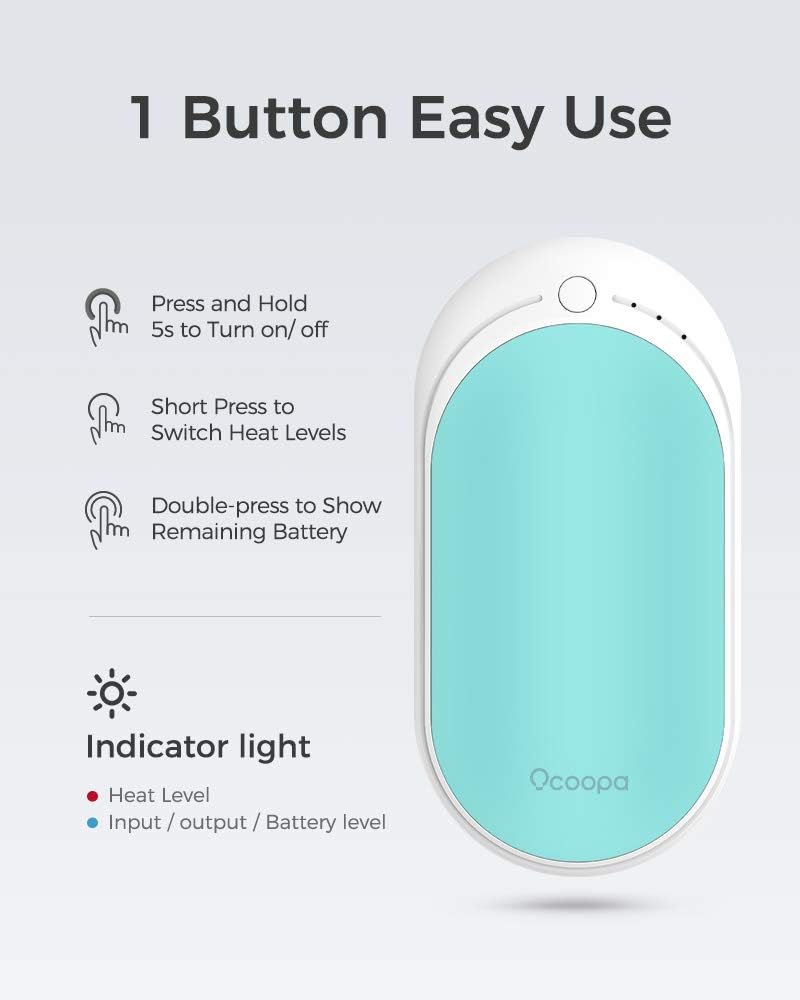
Figure 5: One Button Easy Use
- To Turn On/Off: Press and hold the power button for approximately 5 seconds. The indicator lights will show the current heat level or turn off.
- To Adjust Heat Levels: Once powered on, short press the power button to cycle through the three heat settings:
- 1 Red Light: Low (95-107.6°F / 35-42°C)
- 2 Red Lights: Medium (104-118.4°F / 40-48°C)
- 3 Red Lights: High (118.4-131°F / 48-55°C)
- To Check Remaining Battery: Double-press the power button. The indicator lights will briefly show the battery level.
Using as a Power Bank
The OCOOPA HotPal can also charge your mobile devices.

Figure 6: Power Bank Functionality
- Connect your device's charging cable to the USB-C port on the hand warmer.
- The hand warmer will automatically begin charging your device.
- Note that using the hand warming function simultaneously with the power bank function may reduce the overall battery life.
Maintenance
Cleaning and Storage
- Ensure the device is turned off and cool before cleaning.
- Wipe the surface with a soft, dry cloth. Do not use abrasive cleaners or immerse the device in water.
- Store the hand warmer in a cool, dry place away from direct sunlight and extreme temperatures.
- For long-term storage, charge the device to approximately 50% every three months to maintain battery health.
Troubleshooting
| Problem | Possible Cause | Solution |
|---|---|---|
| Device not turning on. | Low battery or incorrect power-on procedure. | Charge the device fully. Ensure you press and hold the power button for 5 seconds. |
| Device not heating. | Not in heating mode or low battery. | Short press the power button to select a heat level. Charge the device if battery is low. |
| Device not charging external device. | Cable issue, external device issue, or low hand warmer battery. | Ensure the cable is securely connected. Try a different cable or external device. Charge the hand warmer. |
| Short battery life. | High heat setting usage, frequent power bank use, or aging battery. | Use lower heat settings when possible. Avoid simultaneous heating and charging. Battery capacity naturally decreases over time. |
Specifications
| Specification | Detail |
|---|---|
| Brand | OCOOPA |
| Model Number | ZLS-118S |
| Color | Blue Two-Pack |
| Material | Aircraft-grade Aluminum, ABS |
| Battery Capacity | 5200mAh Lithium-Ion |
| Charging Time | Approximately 3 Hours |
| Lower Temperature Rating | 95 Degrees Fahrenheit (35°C) |
| Upper Temperature Rating | 131 Degrees Fahrenheit (55°C) |
| Item Weight | 250 Grams |
| Item Dimensions (LxWxH) | 2.09 x 1.07 x 4.23 inches |
| Included Components | 2*Hotpal rechargeable hand warmer, carrying pouch, charging cables, USB convertor |
Safety Information
Please read and follow these safety guidelines to prevent injury or damage to the device:
- Do not expose the device to extreme temperatures (above 140°F/60°C or below 0°F/-18°C) or direct sunlight for prolonged periods.
- Do not puncture, disassemble, or modify the device.
- Keep away from water and other liquids. Do not operate with wet hands.
- Do not use if the device appears damaged or swollen.
- Keep out of reach of children and pets.
- Use only the provided or certified charging cables.
- If the device becomes excessively hot, discontinue use immediately.
- Dispose of the device responsibly according to local regulations for electronic waste.

Figure 7: Internal Safety Features
Official Product Video
Video 1: Giving the gift of warmth and comfort. This video demonstrates the OCOOPA HotPal hand warmer's features, including its quick heating, portability, and use as a power bank, showcasing its versatility for various situations and as a thoughtful gift.
Warranty and Support
For warranty information, technical support, or any inquiries regarding your OCOOPA HotPal hand warmer, please refer to the warranty card included in your product packaging or visit the official OCOOPA store online:
Please have your model number (ZLS-118S) and purchase details ready when contacting support.


