
Elgato 10GBA9901
Elgato Stream Deck MK.2 User Manual
Model: 10GBA9901 | Brand: Elgato
Introduction
The Elgato Stream Deck MK.2 is a studio controller designed to give you instant control over your applications and tools. Featuring 15 fully customizable LCD keys, it allows you to trigger actions, launch social posts, adjust audio, play sound effects, activate lights, and much more. This manual provides essential information for setting up, operating, and maintaining your Stream Deck MK.2.

Figure 1: Elgato Stream Deck MK.2, a studio controller with 15 customizable LCD keys.
What's in the Box
Upon unboxing your Elgato Stream Deck MK.2, verify that all components are present:
- Stream Deck MK.2 Unit
- Desktop Stand
- USB-C to USB-C Cable
- Quick Start Guide

Figure 2: Contents of the Elgato Stream Deck MK.2 packaging.
Setup
Follow these steps to set up your Elgato Stream Deck MK.2:
- Connect the Device: Place the Stream Deck MK.2 on its desktop stand. Connect the provided USB-C cable from the Stream Deck to an available USB port on your computer (Mac or PC).
- Download Software: Visit the official Elgato website (elgato.com/s/downloads) to download and install the Stream Deck software. This software is essential for configuring your device.
- Install Software: Run the downloaded installer and follow the on-screen prompts to complete the software installation.
- Launch Software: Once installed, launch the Elgato Stream Deck application. The software will automatically detect your connected Stream Deck MK.2.
- Explore Marketplace: Within the software, you can explore the Stream Deck Marketplace to find and download plugins, icon packs, and pre-made profiles tailored to your needs.
- Customize Keys: Use the drag-and-drop interface in the Stream Deck software to assign actions, shortcuts, and macros to each of the 15 LCD keys. You can create folders for more actions and switch between profiles.

Figure 3: Steps for software download, marketplace exploration, and key customization.
Operating the Stream Deck MK.2
The Stream Deck MK.2 is designed for intuitive control of your digital environment. Its 15 customizable LCD keys provide visual feedback and allow for a wide range of operations.
Key Features and Functions:
- Customizable LCD Keys: Each of the 15 keys is an LCD screen that can display custom icons, allowing for clear identification of assigned actions.
- One-Touch Operation: Execute single or multiple actions with a single press. This includes launching applications, posting to social media, adjusting audio levels, muting microphones, and controlling smart home devices like lights.
- Visual Feedback: The LCD keys provide immediate visual confirmation that your command has been executed, enhancing workflow efficiency.
- Powerful Plugins: Integrate directly with popular applications and services such as Elgato 4KCU, OBS, Twitch, YouTube, Twitter, Discord, Spotify, and Philips Hue.
- Hotkey Actions: Streamline complex workflows in creative software for film editing, music production, and photography by assigning multi-step hotkey sequences to a single button.
- Multi Actions: Create sequences of actions that trigger simultaneously or one after another. For example, a single button press can start your stream, post a "live" notification, launch specific applications, and adjust lighting.

Figure 4: The Stream Deck MK.2 is built for creators, offering instant control over various applications.

Figure 5: Level up your production with centralized control of streaming apps and devices.

Figure 6: Stream Deck simplifies workflow by eliminating the need to switch between applications.

Figure 7: Automate complex sequences with Multi Actions for efficient task management.

Figure 8: Instant control over a wide array of functions and applications.

Figure 9: Focus on content creation by having essential tools readily accessible.
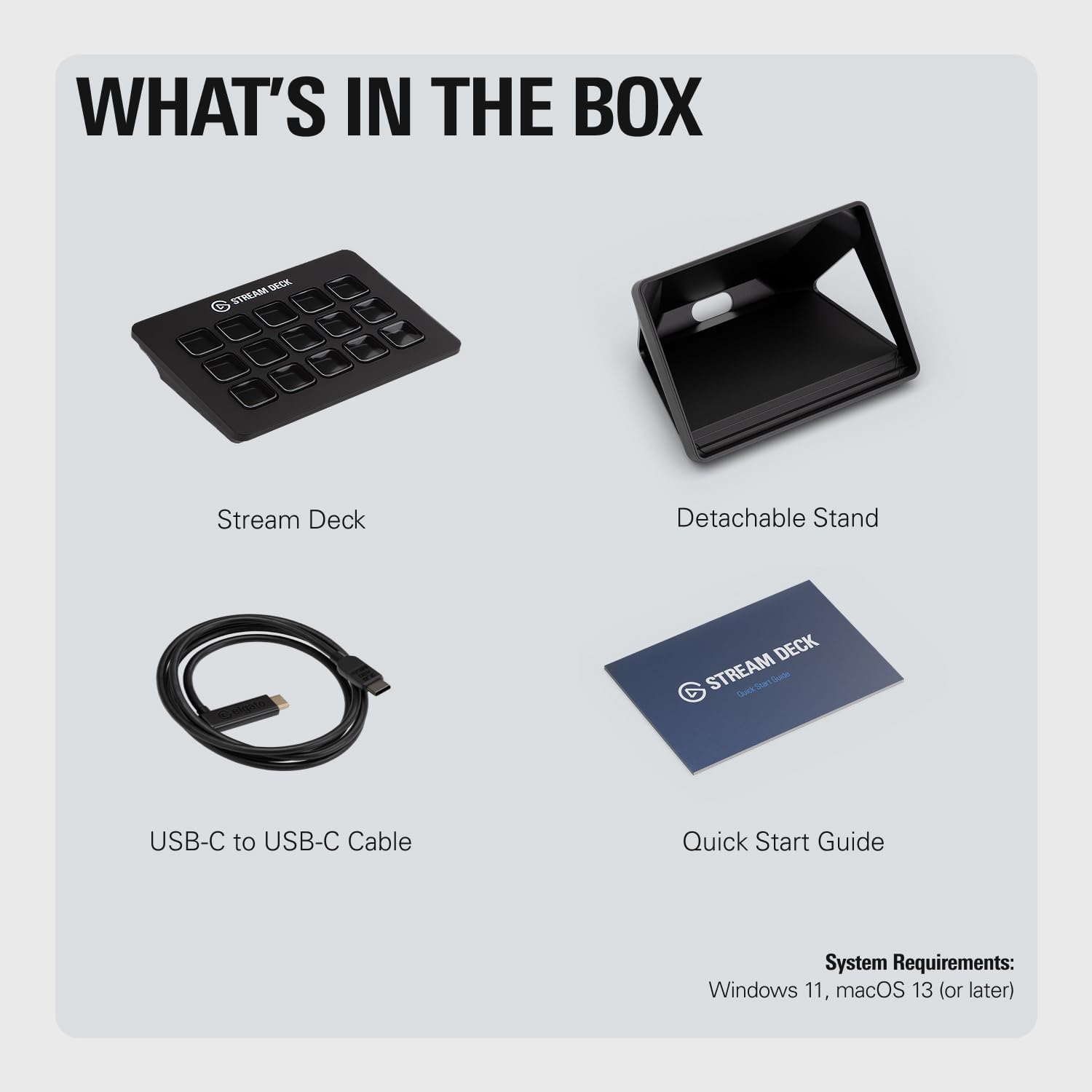
Figure 10: The Elgato Marketplace offers extensive customization options through plugins and profiles.
Maintenance
The Elgato Stream Deck MK.2 requires minimal maintenance to ensure its longevity and optimal performance.
- Cleaning: Use a soft, dry, lint-free cloth to gently wipe the surface of the Stream Deck and its keys. Avoid using abrasive cleaners, solvents, or aerosol sprays, as these can damage the device.
- Storage: When not in use for extended periods, store the Stream Deck in a cool, dry place away from direct sunlight and extreme temperatures.
- Cable Care: Handle the USB-C cable with care. Avoid sharp bends or excessive pulling, which can damage the cable or the port.
Troubleshooting
If you encounter issues with your Elgato Stream Deck MK.2, consider the following troubleshooting steps:
- Device Not Detected:
- Ensure the USB-C cable is securely connected to both the Stream Deck and your computer.
- Try connecting the Stream Deck to a different USB port on your computer.
- Restart the Elgato Stream Deck software.
- Restart your computer.
- Keys Not Responding:
- Verify that the Stream Deck software is running and that the correct profile is active.
- Check if the assigned action for the key is still valid (e.g., if an application path has changed).
- Update the Stream Deck software to the latest version.
- Software Crashes/Freezes:
- Ensure your operating system meets the minimum requirements (macOS 10.15 or newer / Windows 10 (64-bit)).
- Close other demanding applications that might be consuming system resources.
- Reinstall the Stream Deck software if the issue persists.
For more detailed troubleshooting or persistent issues, refer to the official Elgato support resources or contact their customer service.
Specifications
| Feature | Detail |
|---|---|
| Brand | Elgato |
| Model Name | Stream Deck MK.2 |
| Item Model Number | 10GBA9901 |
| Keys | 15 customizable LCD keys |
| Interface | USB 2.0 (USB-C connection) |
| Dimensions (without stand) | 118 x 84 x 25 mm / 4.6 x 3.3 x 1.0 inches |
| Weight (without stand) | 145 g / 5.1 ounces |
| System Requirements | macOS 10.15 or newer / Windows 10 (64-bit) |
| Color | Black |
| Country of Origin | Taiwan |
| First Available Date | July 16, 2021 |
Figure 11: Physical dimensions of the Elgato Stream Deck MK.2.
Warranty and Support
For information regarding the product warranty, please refer to the warranty card included with your Stream Deck MK.2 or visit the official Elgato website's support section. Elgato provides comprehensive support resources, including FAQs, drivers, software updates, and contact information for technical assistance.
You can also find the official Installation Manual (PDF) here for additional guidance.
For direct support, visit the Elgato Store on Amazon or their official website.
Related documents10GBA9901


Ask a question about this manual
Ask about setup, troubleshooting, compatibility, parts, safety, or missing instructions. Manuals+ will review the question and use this page’s manual context to help answer it.