
1. Introduction
Thank you for choosing the CREATE WINDCALM M Ceiling Fan. This manual provides essential information for the safe installation, operation, and maintenance of your new ceiling fan. Please read this manual thoroughly before installation and keep it for future reference.

Image 1.1: The CREATE WINDCALM M Ceiling Fan, showcasing its sleek design, accompanying remote control, and the smartphone app interface for smart control.
2. Safety Instructions
Always follow basic safety precautions when installing and operating electrical appliances to reduce the risk of fire, electric shock, and personal injury.
- Ensure the power supply is disconnected before installation or maintenance.
- Installation should be performed by a qualified electrician or a competent person.
- The mounting structure must be capable of supporting the fan's weight.
- Do not insert objects into the fan blades while the fan is operating.
- Keep children and pets away from the fan during operation.
- This fan is suitable for indoor and outdoor covered areas.
3. Package Contents
Carefully unpack all components and check against the list below. If any items are missing or damaged, contact customer support immediately.
- Ceiling Fan Motor Unit
- Fan Blades (3x)
- Mounting Bracket
- Remote Control
- Mounting Hardware (screws, anchors, washers)
- Instruction Manual
4. Setup and Installation
Follow these steps for proper installation. Professional installation is recommended.
- Prepare the Mounting Location: Ensure the ceiling joist or support structure can hold the fan's weight (approximately 6.22 kg).
- Install the Mounting Bracket: Secure the mounting bracket to the ceiling using the provided screws and anchors. Ensure it is firmly attached.
- Wiring: Connect the fan's electrical wires to your household wiring according to local electrical codes. The fan operates on 240 Volts. Ensure correct connection of Live (L), Neutral (N), and Ground (Earth) wires.
- Attach the Fan Unit: Carefully lift the fan motor unit and attach it to the mounting bracket. Many models include a hook to temporarily hang the fan while wiring.
- Install Fan Blades: Attach the three fan blades to the motor unit using the provided screws. Ensure all screws are tightened securely.

Image 4.1: Detailed view of the fan's central unit, showing the robust construction and points for blade attachment.

Image 4.2: The ceiling fan seamlessly integrated into a room, demonstrating its aesthetic appeal and compact design.
5. Operation
Your CREATE WINDCALM M Ceiling Fan can be controlled via the included remote control or the CREATE mobile application (for Wi-Fi enabled models).
5.1. Remote Control Functions
- Power On/Off: Turns the fan on or off.
- Speed Control: Adjusts fan speed through 6 settings.
- Timer: Set the fan to turn off automatically after 1, 2, or 4 hours.
- Summer/Winter Mode: Changes the direction of blade rotation.
5.2. Summer/Winter Operation
The fan features a reversible motor for year-round comfort.
- Summer Mode (Counter-clockwise rotation): Pushes cool air downwards, creating a refreshing breeze. This mode helps to cool the room by circulating air.
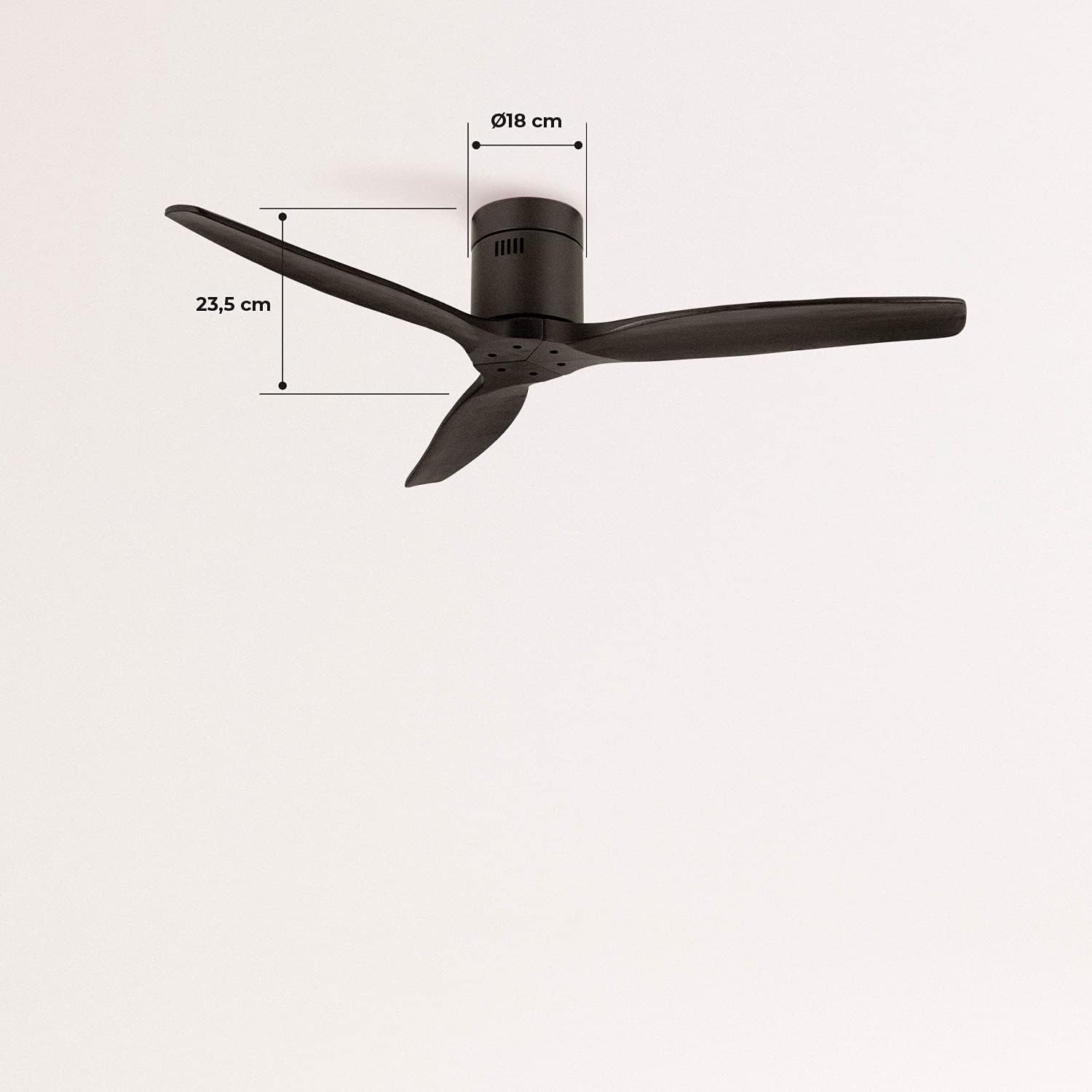
Image 5.1: Visual representation of the fan's airflow in Summer Mode, where cool air is directed downwards.
- Winter Mode (Clockwise rotation): Draws cool air upwards, circulating warm air trapped near the ceiling downwards. This helps to distribute heat more evenly, reducing heating costs.

Image 5.2: Visual representation of the fan's airflow in Winter Mode, where warm air is recirculated from the ceiling.
5.3. Wi-Fi and App Control (Smart Option)
If your model includes the Wi-Fi option, download the CREATE app to control and program your fan from your smartphone. Follow the in-app instructions for pairing your device.
6. Maintenance
Regular maintenance ensures optimal performance and longevity of your fan.
- Cleaning: Dust the fan blades and motor housing regularly with a soft, damp cloth. Do not use abrasive cleaners or solvents.
- Blade Inspection: Periodically check that all blade screws are tight. Loose blades can cause wobbling and noise.
- Motor Lubrication: The fan's DC motor is permanently lubricated and does not require additional oiling.
7. Troubleshooting
If you encounter issues with your fan, refer to the following common problems and solutions:
| Problem | Possible Cause | Solution |
|---|---|---|
| Fan does not turn on | No power supply; Remote control battery low; Incorrect wiring. | Check circuit breaker; Replace remote battery; Verify wiring connections. |
| Fan wobbles | Loose blade screws; Unbalanced blades; Loose mounting bracket. | Tighten all blade screws; Ensure blades are correctly installed; Check mounting bracket for secure attachment. |
| Excessive noise | Loose components; Motor issue. | Check all screws and connections; If noise persists, contact customer support. |
| Remote control not working | Battery low/dead; Remote not paired. | Replace battery; Refer to remote pairing instructions in the full manual (if applicable). |
| Wi-Fi connectivity issues | Incorrect network password; Router too far; App issues. | Verify Wi-Fi password; Move router closer or use a Wi-Fi extender; Reinstall app or check for updates. |
8. Specifications
| Feature | Specification |
|---|---|
| Brand | CREATE |
| Model Number | 93531_182750 |
| Color | Black |
| Style | Without Light |
| Power Source | Corded Electric |
| Voltage | 240 Volts |
| Wattage | 40 Watts |
| Airflow | 210 Cubic meters per minute |
| Noise Level | 50 dB |
| Blade Length | 66 Centimeters |
| Diameter | 132 Centimeters |
| Product Dimensions | 132D x 132W x 23.5H cm |
| Item Weight | 6.22 Kilograms |
| Special Feature | Lightweight |

Image 8.1: Key dimensions of the fan, including its 132 cm diameter and 66 cm blade length.

Image 8.2: Additional dimensions, highlighting the fan's height of 23.5 cm and the 18 cm diameter of the motor housing.
9. Warranty and Support
Your CREATE WINDCALM M Ceiling Fan comes with a standard warranty. For specific warranty terms and conditions, please refer to the documentation included with your purchase or visit the official CREATE website. In case of any issues or for technical support, please contact CREATE customer service. The seller, CREATE, offers support and assistance for product-related inquiries.