
1. Introduction
Thank you for choosing the DOQAUS Indoor Thermometer and Humidity Gauge. This device provides accurate and fast readings of indoor temperature and humidity, helping you maintain a comfortable and healthy environment in your home, office, greenhouse, or other spaces. This manual will guide you through the setup, operation, and maintenance of your new device.

Image 1: Three DOQAUS Indoor Thermometers displaying temperature and humidity.
2. Package Contents
Please check the package to ensure all items are present:
- 3 x DOQAUS Indoor Thermometer and Humidity Gauge
- 3 x CR2032 Batteries (pre-installed or included separately)
- 1 x User Manual
3. Product Features
The DOQAUS Indoor Thermometer and Humidity Gauge offers several key features:
- High Accuracy and Fast Refresh: Provides temperature accuracy of ±1°F and humidity accuracy of ±3%~5% RH, with readings updated every 5 seconds.
- Air Comfort Indicator: Displays dry, comfort, or wet conditions using emoticons and text, offering a quick visual reference of the environment.
- Clear LCD Display: A 2.3-inch LCD screen with large digits ensures easy readability from various angles.
- Temperature Unit Selection: Easily switch between Celsius (°C) and Fahrenheit (°F).
- Compact Design: Its pocket-sized and lightweight design allows for versatile placement without occupying much space.
- Multiple Mounting Options: Features a tabletop stand, magnetic back, and wall hanging hole for flexible placement.

Image 2: Visual representation of the thermometer's key features.

Image 3: Display size comparison, illustrating the large digits for enhanced readability.
4. Setup
Follow these steps to set up your DOQAUS Indoor Thermometer:
- Battery Installation: The device typically comes with a CR2032 battery pre-installed. If not, or if the display is blank, gently open the battery compartment cover on the back of the device. Insert one CR2032 battery with the positive (+) side facing up. Close the cover securely.
- Power On: The device will automatically power on once the battery is correctly installed. The current temperature and humidity will be displayed on the LCD screen.

Image 4: Back of the device, illustrating the battery compartment and C/F switch.
5. Operation
Operating your thermometer is straightforward:
- Reading the Display: The top large number indicates the current temperature, and the bottom large number shows the current relative humidity (RH%).
- Comfort Indicator: Below the temperature reading, an emoticon and text will indicate the air comfort level:
- Dry: Humidity < 40%
- Comfort: 40% ≤ Humidity ≤ 60%
- Wet: Humidity > 60%
- Switching Temperature Units: On the back of the device, locate the °C/°F button. Press this button to toggle between Celsius and Fahrenheit temperature displays.
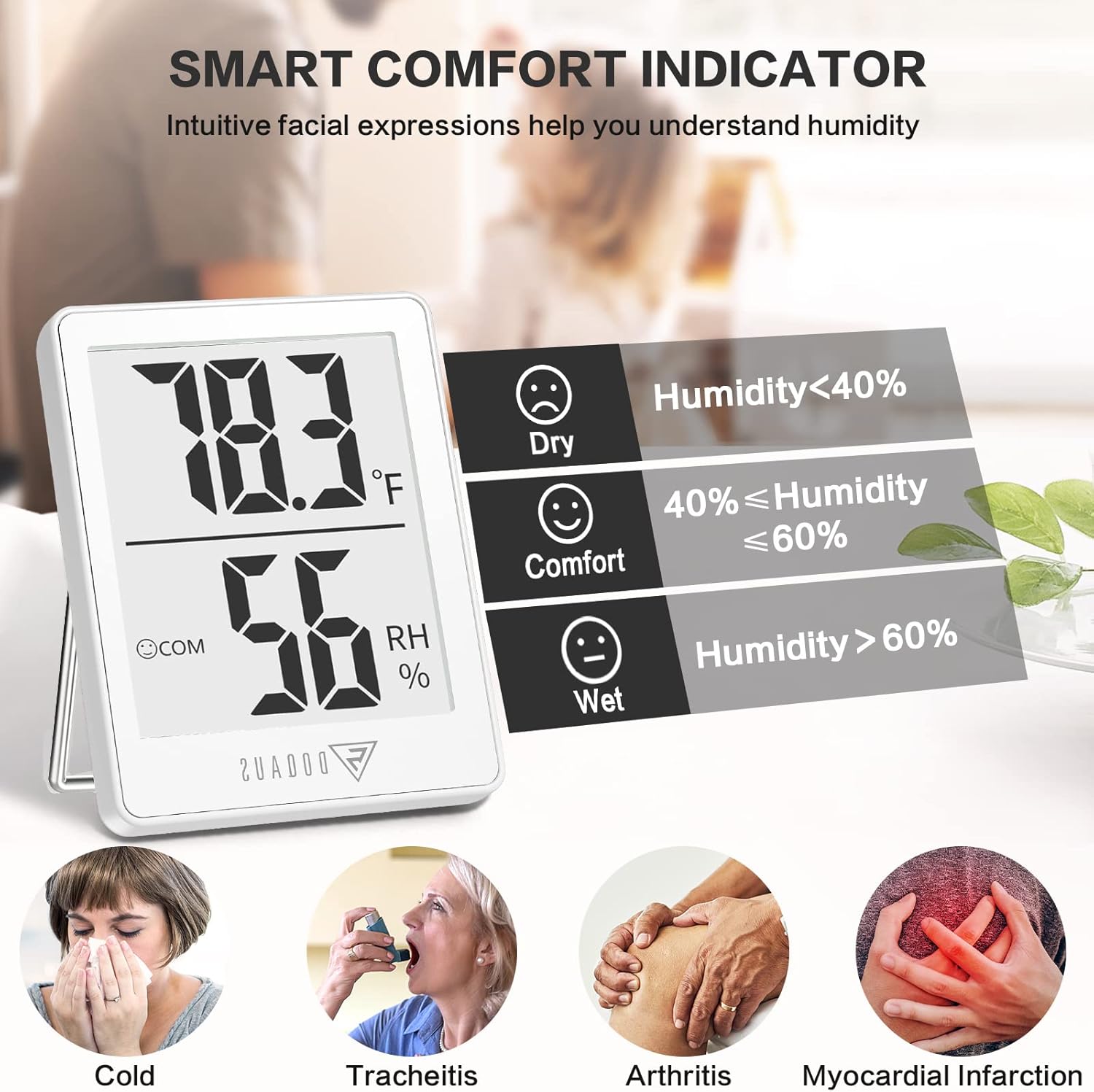
Image 5: Explanation of the Smart Comfort Indicator.
6. Mounting Options
The DOQAUS thermometer offers three convenient ways to place it:
- Tabletop Stand: Pull out the integrated stand on the back of the device to place it upright on any flat surface, such as a desk, shelf, or nightstand.
- Wall Hanging: Use the hanging hole on the back of the device to mount it on a nail or hook on a wall.
- Magnetic Back: The device features a magnetic back, allowing it to be attached to metallic surfaces like refrigerators or magnetic boards.

Image 6: Illustrations of tabletop stand, wall mount, and magnetic back mounting options.
7. Specifications
| Specification | Detail |
|---|---|
| Brand | DOQAUS |
| Model Number | DQDQHM001AW3-USA4 |
| Product Dimensions | 1.8"W x 2.3"H |
| Item Weight | 0.11 Kilograms (3.84 ounces) |
| Battery Type | 1 x CR2032 (included) |
| Mounting Type | Hanging Hole, Tabletop Stand, Magnet Attaching |
| Operating Humidity Range | 10% to 99% RH |
| Upper Temperature Rating | 122 Degrees Fahrenheit (50°C) |
| Temperature Accuracy | ±1°F (0.5°C) for 10°C~40°C; ±1.5°F (0.8°C) outside this range |
| Humidity Accuracy | ±3% RH for 40%~80% RH; ±5% RH outside this range |

Image 7: Illustration of temperature and humidity accuracy testing.
8. Maintenance
To ensure the longevity and accurate performance of your device:
- Cleaning: Wipe the device with a soft, dry cloth. Do not use abrasive cleaners or immerse the device in water.
- Battery Replacement: When the display becomes dim or stops working, it's time to replace the CR2032 battery. Follow the battery installation steps in Section 4. Batteries typically last 3-6 months depending on usage and environmental conditions.
- Storage: If storing the device for an extended period, remove the battery to prevent leakage. Store in a cool, dry place away from direct sunlight.
9. Troubleshooting
If you encounter issues with your DOQAUS thermometer, refer to the following common solutions:
- No Display or Dim Display:
- Check if the battery is installed correctly with the positive (+) side facing up.
- Replace the CR2032 battery with a new one.
- Inaccurate Readings:
- Ensure the device is placed in a stable environment, away from direct sunlight, heat sources, or strong drafts that could affect readings.
- Allow the device to stabilize for at least 30 minutes after initial setup or relocation to a new environment.
- Avoid placing the device near vents, windows, or doors where temperature and humidity can fluctuate rapidly.
- °C/°F Button Not Responding:
- Ensure the battery is not low. Replace if necessary.
- Press the button firmly.
10. Warranty and Support
DOQAUS is committed to providing high-quality products. While specific warranty details are not provided in this manual, please retain your proof of purchase. For any product inquiries, technical support, or warranty claims, please contact DOQAUS customer service through the retailer where you purchased the product or visit the official DOQAUS website for contact information.
We value your feedback and are here to assist you with any questions or concerns.

