
1. Introduction
This manual provides essential instructions for the safe and efficient use of your ELOMILE 15050B2HL AC Cooling Fan. This fan is designed for various applications requiring effective air cooling, particularly in desktop computer systems or industrial equipment. Please read this manual thoroughly before installation and operation to ensure proper function and longevity of the product.
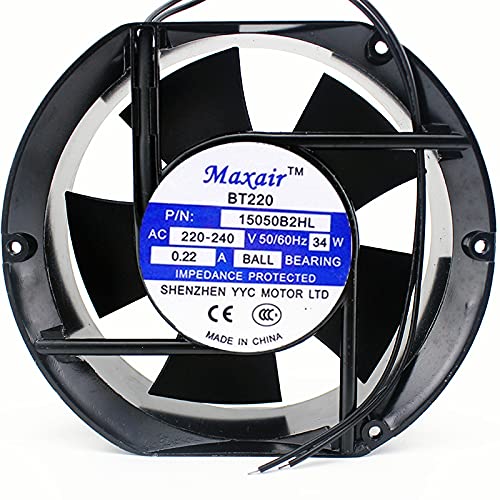
Figure 1: ELOMILE 15050B2HL AC Cooling Fan. This image displays the front view of the fan, highlighting its five black blades and the sturdy square frame designed for efficient air circulation.
2. Safety Information
Always observe the following safety precautions to prevent injury or damage to the product:
- Ensure the power supply matches the fan's specified voltage (220-240V AC).
- Disconnect power before installation, cleaning, or maintenance.
- Do not insert fingers or other objects into the fan blades while the fan is operating or connected to power.
- Install the fan in a well-ventilated area, free from obstructions that could impede airflow.
- Avoid exposing the fan to moisture, extreme temperatures, or corrosive environments.
- This product is intended for indoor use only.
- If you encounter any issues or are unsure about installation, consult a qualified technician or contact customer support.
3. Package Contents
Verify that all items are present in the package:
- 1 x ELOMILE 15050B2HL AC Cooling Fan
- (Note: Mounting hardware or additional accessories may be sold separately.)
4. Setup and Installation
Follow these general steps for installing your AC cooling fan. Specific installation may vary depending on your application.
- Power Disconnection: Before beginning installation, ensure that the power supply to the device or system where the fan will be installed is completely disconnected.
- Mounting Location: Identify a suitable mounting location that allows for optimal airflow and is compatible with the fan's dimensions (172mm x 150mm x 51mm).
- Secure Mounting: Use appropriate screws or fasteners (not included) to securely mount the fan to the desired surface. Ensure the fan is stable and does not vibrate excessively. The fan frame includes mounting holes for this purpose.
- Electrical Connection: Connect the fan's 3-pin power connector to a compatible 220-240V AC power source. Ensure correct polarity if applicable, though AC fans typically do not have strict polarity requirements for power input. If unsure, consult a qualified electrician.
- Cable Management: Route the power cable safely, ensuring it is not pinched or exposed to moving parts.
- Final Check: Double-check all connections and mounting points before restoring power.
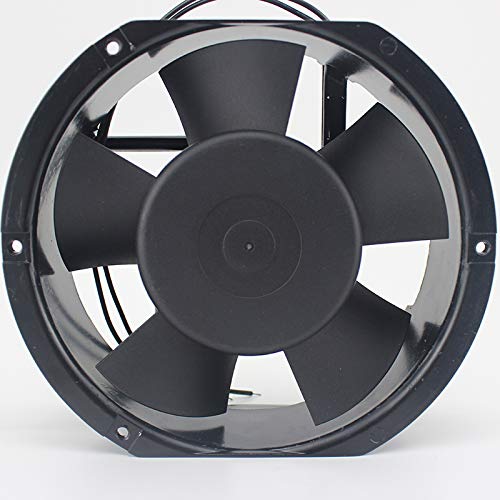
Figure 2: Detail of the fan's mounting corner. This close-up shows one of the fan's mounting holes, indicating where screws can be used to secure the fan in place. A portion of a fan blade is also visible.
5. Operating Instructions
Once properly installed and connected to a power source:
- Power On: Restore power to the system or device where the fan is installed. The fan should begin to operate, providing airflow.
- Verify Function: Observe the fan to ensure the blades are spinning freely and that it is generating adequate airflow. Listen for any unusual noises.
- Power Off: To stop the fan, disconnect power from the system or device.
The fan is designed for continuous operation within its specified voltage and temperature ranges.
6. Maintenance
Regular maintenance helps ensure optimal performance and extends the lifespan of your cooling fan.
- Cleaning: Periodically disconnect power and gently clean the fan blades and frame using a soft, dry cloth or compressed air to remove dust and debris. Do not use liquid cleaners directly on the fan.
- Inspection: Regularly inspect the fan for any signs of wear, damage, or loose connections.
- Lubrication: This fan is designed to be maintenance-free regarding lubrication. Do not attempt to lubricate the bearings.
7. Troubleshooting
If you encounter issues with your ELOMILE AC Cooling Fan, refer to the following common problems and solutions:
| Problem | Possible Cause | Solution |
|---|---|---|
| Fan does not spin. | No power, incorrect voltage, loose connection, or fan motor failure. |
|
| Fan makes unusual noise. | Obstruction, loose mounting, or worn bearings. |
|
| Insufficient airflow. | Blocked intake/exhaust, dust accumulation, or incorrect fan orientation. |
|
For further assistance, please refer to the Warranty & Support section.
8. Specifications
| Feature | Detail |
|---|---|
| Model | 15050B2HL |
| Brand | ELOMILE |
| Type | AC Cooling Fan |
| Dimensions (Length×Height×Width) | 172mm × 150mm × 51mm (6.77"L x 5.91"H x 2.01"W) |
| Voltage | 220-240V AC |
| Current | 0.22A |
| Power | 34W |
| Power Connector Type | 3-Pin |
| Cooling Method | Air |
| Compatible Devices | Desktop (and other industrial applications) |
| Material | Copper |
| Manufacturer | Johnson Mars |
| UPC | 755346744063 |
9. Warranty and Support
ELOMILE products are manufactured to high-quality standards. For information regarding warranty coverage, please refer to the documentation provided at the time of purchase or contact your retailer.
If you have questions about the fan model, installation, or encounter any problems not covered in this manual, please contact ELOMILE customer support. You can typically find contact information on the product packaging or the official ELOMILE website.
"Fan model and installation problems, if you don’t understand, please email us" - As per product information, direct email support is available for specific issues.