
1. Introduction
This manual provides essential information for the proper installation, operation, and maintenance of your Asber ABBC-24-72 Refrigerated Slim Line Back Bar Cooler. Please read these instructions thoroughly before operating the unit to ensure safe and efficient performance. Retain this manual for future reference.
The Asber ABBC-24-72 is a three-section, self-contained refrigerated back bar cooler designed for commercial use. It features a stainless steel top, black vinyl exterior, galvanized interior, and uses R-290 hydrocarbon refrigerant.
2. Safety Information
Important Safety Instructions:
- Always disconnect power before cleaning, servicing, or performing maintenance.
- Do not store explosive substances such as aerosol cans with a flammable propellant in this appliance.
- Ensure proper ventilation around the unit. Do not block air vents.
- This appliance is intended for commercial use only. Residential use may void the warranty.
- Use only authorized service personnel for repairs.
- The unit contains R-290 hydrocarbon refrigerant, which is flammable. Handle with care and ensure proper ventilation during service.
3. Setup and Installation
Proper installation is crucial for the optimal performance and longevity of your back bar cooler.
3.1 Unpacking
- Carefully remove all packaging materials, including tape and protective film.
- Inspect the unit for any shipping damage. Report any damage immediately to the carrier and supplier.
- Remove all internal packing materials and accessories.
3.2 Location
Choose a location that meets the following criteria:
- Level Surface: The unit must be placed on a strong, level surface capable of supporting its weight (approximately 370 lbs empty, plus contents).
- Ventilation: Ensure adequate air circulation around the unit. The front-breathing design requires clear space in front for proper airflow. Avoid enclosed spaces.
- Temperature: Avoid direct sunlight, heat-producing equipment, or areas with extreme ambient temperatures. The optimal ambient temperature range is 60°F to 80°F (16°C to 27°C).
- Clearance: Allow at least 2 inches of clearance on the sides and rear for proper ventilation and service access.
3.3 Dimensions
Refer to the diagram below for the unit's dimensions to ensure proper placement and clearance.
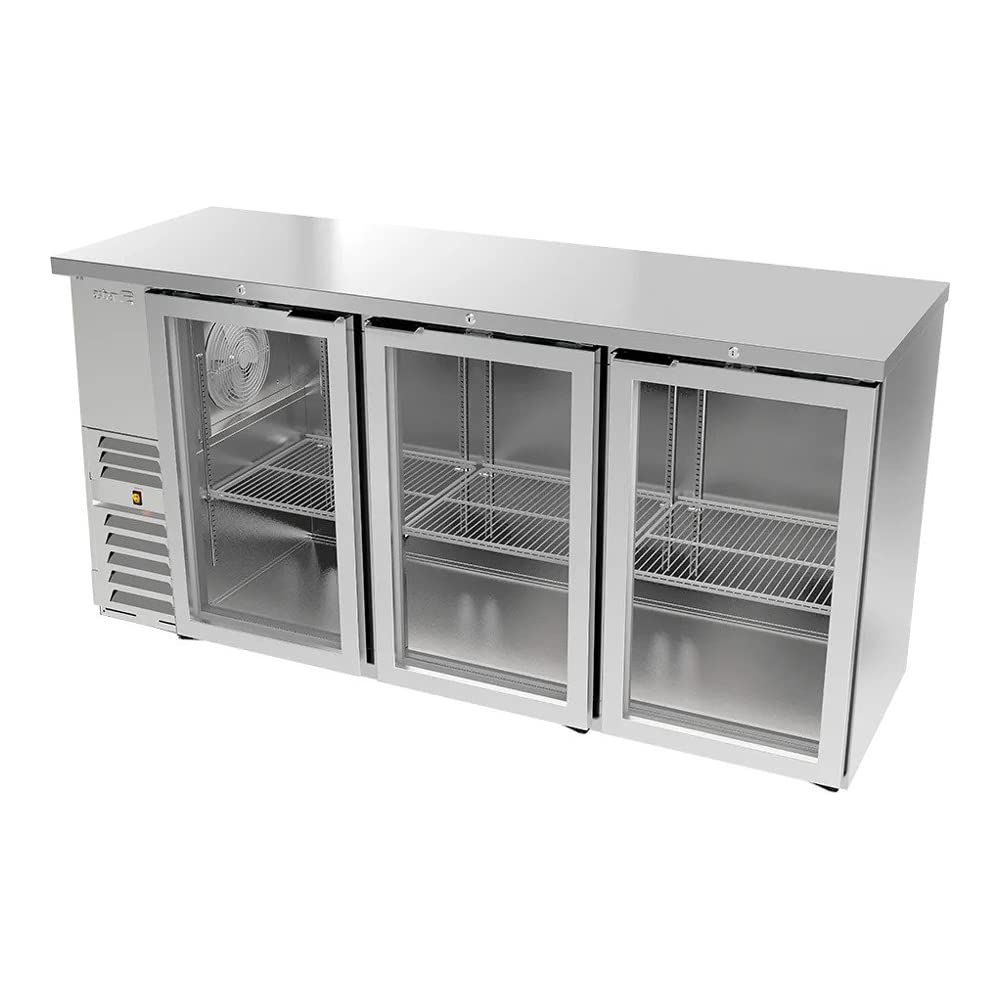
Figure 1: Asber ABBC-24-72 Back Bar Cooler with overall dimensions. The unit measures 72 inches in width, 24.38 inches in depth, and 35.5 inches in height. This image provides a clear visual reference for planning installation space.
3.4 Electrical Connection
- Ensure the power supply matches the unit's requirements (115 volts, 60 Hz, single phase).
- Connect the unit to a dedicated, properly grounded electrical outlet. Do not use extension cords or adapter plugs.
3.5 Shelf Installation
The unit comes with 6 adjustable coated wire shelves. Install them according to your storage needs. Ensure shelves are securely seated on the shelf clips.
4. Operating Instructions
4.1 Initial Startup
- After installation, wait at least 2 hours before plugging in the unit to allow refrigerants to settle.
- Plug the unit into the dedicated electrical outlet.
- The unit will begin cooling. Allow several hours for the cabinet to reach the desired temperature before loading products.
4.2 Temperature Control
The unit is equipped with an electronic controller and digital display. The factory preset temperature range is 33°F to 38°F (0.5°C to 3.3°C).
- Viewing Temperature: The digital display shows the current internal temperature.
- Adjusting Temperature: Refer to the specific instructions for the electronic controller model for detailed temperature adjustment procedures. Generally, there are 'Set' and arrow buttons to modify the set point.
4.3 Interior Lighting
The unit features LED interior lights. These lights are typically controlled by a switch located near the control panel or inside the cabinet. Turn on the lights as needed for visibility.
4.4 Loading Product
- Do not overload shelves. Ensure proper air circulation around products for efficient cooling.
- Avoid blocking the internal air vents or evaporator coil.
5. Maintenance
Regular maintenance ensures optimal performance and extends the life of your cooler.
5.1 Cleaning the Interior
- Disconnect the unit from power.
- Remove all products and shelves.
- Clean the interior surfaces with a mild soap and warm water solution. Rinse with clean water and dry thoroughly.
- Do not use abrasive cleaners, steel wool, or harsh chemicals.
5.2 Cleaning the Exterior
Wipe down the stainless steel top and black vinyl exterior with a soft cloth and mild detergent. For stainless steel, wipe in the direction of the grain. Avoid harsh chemicals that can damage the finish.
5.3 Condenser Coil Cleaning
The condenser coil should be cleaned every 30-60 days, or more frequently in dusty environments. A dirty condenser coil reduces cooling efficiency and increases energy consumption.
- Disconnect the unit from power.
- Locate the condenser coil (typically behind the front grille or side-mounted compressor section).
- Use a stiff brush or vacuum cleaner with a brush attachment to remove dust and debris from the coil fins.
- Ensure the area is clear of obstructions before restoring power.
5.4 Gasket Maintenance
Regularly inspect door gaskets for tears or damage. Clean gaskets with warm water and mild soap. Ensure they form a tight seal when the doors are closed to prevent air leakage.
6. Troubleshooting
Before calling for service, review the following common issues and their solutions:
| Problem | Possible Cause | Solution |
|---|---|---|
| Unit not cooling | No power; thermostat set too high; dirty condenser coil; door left open; excessive product load. | Check power supply; adjust thermostat; clean condenser coil; ensure doors are closed; reduce product load. |
| Unit runs constantly | Dirty condenser coil; door gasket leak; ambient temperature too high; excessive door openings. | Clean condenser coil; inspect/replace door gaskets; relocate unit if ambient is too high; minimize door openings. |
| Excessive noise | Loose components; unit not level; fan motor issue. | Check for loose parts; level the unit; contact service if fan noise persists. |
| Water on floor | Clogged drain line; drain pan overflow. | Clear drain line; ensure drain pan is correctly positioned. |
If the problem persists after attempting these solutions, contact qualified service personnel.
7. Specifications
| Feature | Detail |
|---|---|
| Model Number | ABBC-24-72 |
| Dimensions (W x D x H) | 72" x 24.38" x 35.5" |
| Capacity | 18.4 cubic feet (approx. 540 12 oz cans / 3 kegs) |
| Number of Doors | 3 (Solid) |
| Shelves | 6 adjustable coated wire shelves |
| Refrigerant | R-290 Hydrocarbon |
| Temperature Range | 33°F to 38°F (0.5°C to 3.3°C) |
| Voltage | 115V / 60Hz / 1 Phase |
| Horsepower | 1/4 HP |
| Insulation | 2" Ecomate CFC Free foam |
| Exterior Finish | Black Vinyl |
| Interior Finish | Galvanized |
| Weight | 370 lbs |
| Certifications | cETLus, ETL-Sanitation, NSF-7, DOE, ISO 9001 |
8. Warranty and Support
8.1 Manufacturer's Warranty
This Asber unit comes with a 1-year manufacturer's warranty. Please note that the warranty will not be honored for residential or non-commercial use of this equipment. Keep your purchase receipt for warranty claims.
8.2 Customer Support
For technical assistance, parts, or warranty inquiries, please contact Asber customer support. Refer to your purchase documentation for specific contact information or visit the official Asber website.