
1. Introduction
Thank you for choosing the KSUN GZ20 Long Range 22-Channel Walkie Talkies. This manual provides essential information for the safe and efficient operation of your device. The GZ20 is a portable two-way radio designed for clear communication over distances of 1-2 miles, featuring a high-gain internal antenna, long-standby battery, and intelligent noise reduction.

Figure 1: KSUN GZ20 Walkie Talkies
2. Package Contents
Verify that all items are present in your package:
- 2 x KSUN GZ20 Walkie Talkies
- 2 x Rechargeable Lithium Polymer Batteries (pre-installed or separate)
- 2 x Back Clips
- 2 x USB Charging Cables
- 2 x Power Adapters
- 2 x Lanyards
- 1 x User Manual

Figure 2: Package Contents
Video 1: Unboxing the KSUN GZ20 Walkie Talkie, showing all included accessories.
3. Product Overview
Familiarize yourself with the buttons and features of your KSUN GZ20 walkie talkie.
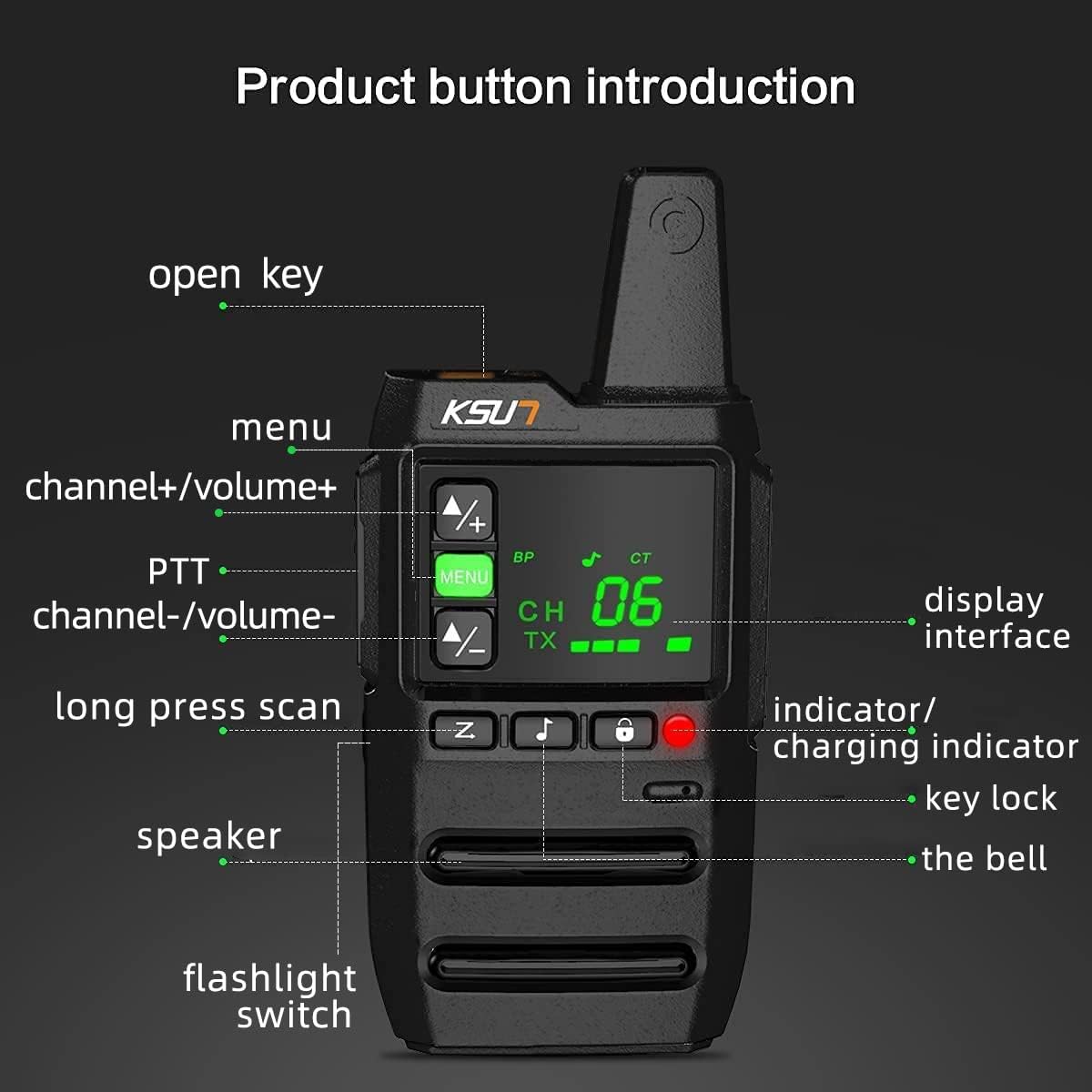
Figure 3: Product Button Introduction
4. Getting Started
4.1. Charging the Battery
The GZ20 walkie talkie is equipped with a 2800mAh Lithium Polymer battery and supports fast USB-C charging. Connect the provided USB charging cable to the Type-C port on the side of the radio and plug the adapter into a power outlet. The charging indicator will show the charging status.

Figure 4: Battery and Charging Features
4.2. Attaching the Belt Clip and Lanyard
To attach the belt clip, align it with the screw hole on the back of the radio and secure it with the provided screw. The lanyard can be threaded through the designated loop for convenient carrying.
Video 2: Instructions for installing the lanyard and back clip on a walkie talkie.
4.3. Powering On/Off
Rotate the power/volume knob clockwise to turn the radio on. Rotate it counter-clockwise until you hear a click to turn the radio off.
5. Basic Operation
5.1. Adjusting Volume
Rotate the power/volume knob to adjust the listening volume. Turn clockwise to increase, counter-clockwise to decrease.
5.2. Selecting Channels
Use the Channel Up (CH+) and Channel Down (CH-) buttons to select one of the 22 available channels. The selected channel will be displayed on the LED screen.
5.3. Transmitting and Receiving (PTT)
To transmit, press and hold the Push-To-Talk (PTT) button on the side of the radio. Speak clearly into the microphone. Release the PTT button to receive messages.
5.4. Using the Flashlight
Press the dedicated flashlight switch to activate the built-in LED flashlight. This feature is useful for low-light conditions.

Figure 5: LED Flashlight in Use
5.5. Monitoring Function
The radio includes a monitoring function to listen for weak signals on the current channel. Refer to the product diagram for the specific button location.
5.6. Scanning Function
Activate the scanning function by long-pressing the designated scan button to search for active channels. The radio will stop on an active channel.
6. Maintenance
6.1. Cleaning
Clean the radio's exterior with a soft, damp cloth. Do not use harsh chemicals or abrasive cleaners. Ensure all port covers are securely closed to maintain water resistance.
6.2. Battery Care
To prolong battery life, avoid fully discharging the battery frequently. Store the radio in a cool, dry place when not in use for extended periods.
7. Troubleshooting
- No Power: Ensure the battery is charged and properly installed. Rotate the power knob clockwise to turn on.
- No Sound: Check the volume level. Ensure the radio is not in 'Monitor' mode unintentionally.
- Short Range: Obstructions like buildings, hills, and dense foliage can reduce range. Ensure you are within the optimal operating range (1-2 miles in open areas).
- Cannot Communicate with Other Radios: Verify that both radios are on the same channel.
8. Specifications
| Feature | Specification |
|---|---|
| Model Number | X-TFSI-GZ20 |
| Brand | KSUN |
| Number of Channels | 22 |
| Display Type | LED |
| Battery Type | 1 Lithium Polymer (2800mAh) |
| Charging | USB-C Fast Charge |
| Talking Range Maximum | 2 Miles (optimal conditions) |
| Frequency Range | UHF |
| Special Features | Flashlight, Lightweight, Long Range, Intelligent Noise Reduction |
| Water Resistance Level | Water Resistant |
| Item Weight | 7 ounces |
| Product Dimensions | 3.62 x 2 x 1 inches |

Figure 6: Product Dimensions
9. Customer Support
For any issues or inquiries regarding your KSUN GZ20 walkie talkies, please contact customer service via Amazon. We are committed to providing support and assistance to our customers.


