
Arafuna CD5197B
Arafuna Portable CD Player User Manual
Model: CD5197B
1. Introduction
Thank you for choosing the Arafuna Portable CD Player. This device is designed to provide high-quality audio playback from various CD formats, offering portability and convenience for use at home, in the car, or while traveling. Please read this manual carefully to understand the features, operation, and maintenance of your new CD player.

Image: The Arafuna Portable CD Player shown with its accompanying headphones, highlighting its compact design and readiness for use.
2. Package Contents
Ensure all items are present in the package:
- 1 x Arafuna Portable CD Player
- 1 x 3.5mm to 3.5mm AUX Cable
- 1 x Wire-controlled Headphones
- 1 x USB Charging Cable
- 1 x User Manual (this document)
- 1 x Quick Start Guide
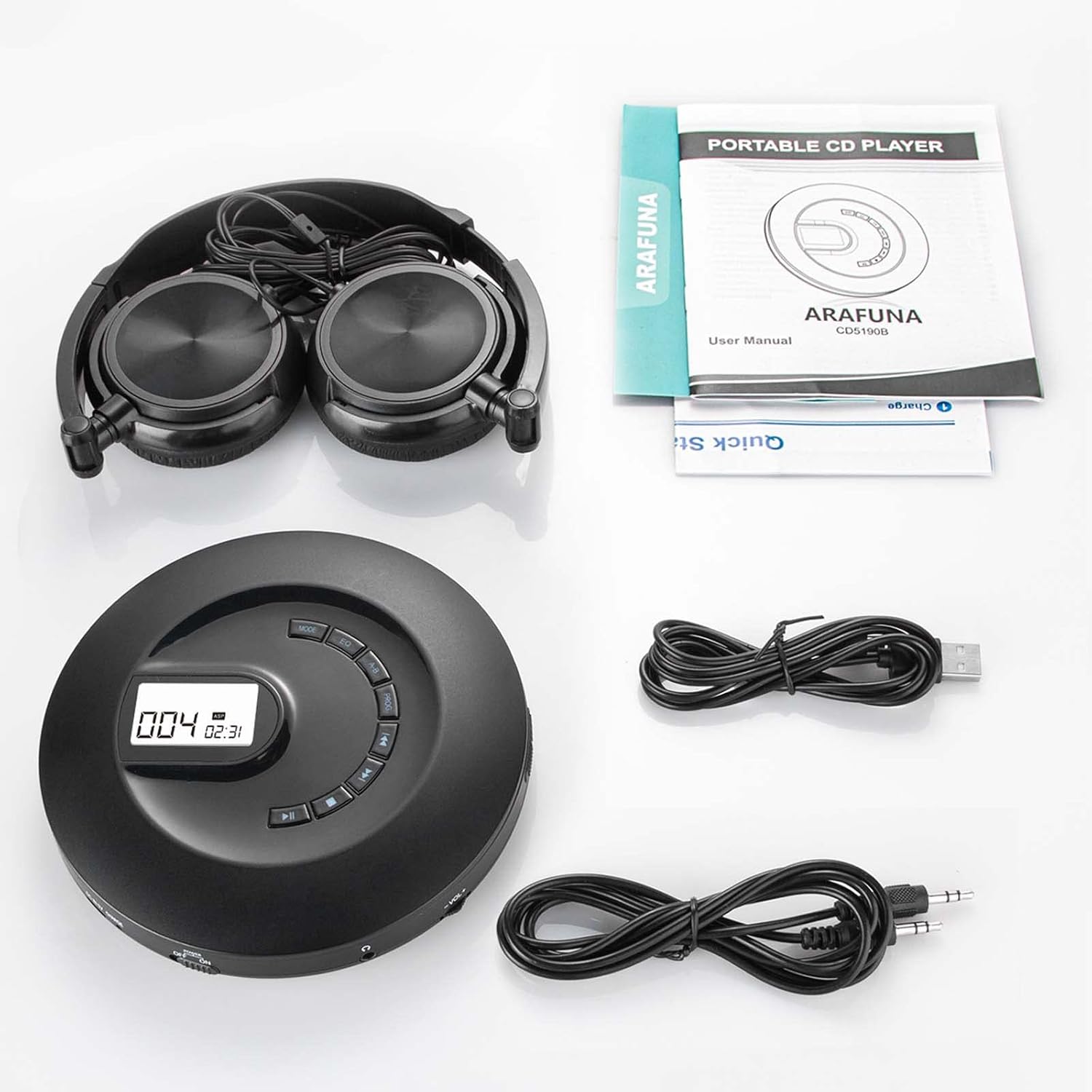
Image: A visual representation of all items included in the product package: the CD player, headphones, AUX cable, USB charging cable, and user manuals.
3. Product Overview
Familiarize yourself with the various parts and controls of your CD player:

Image: A detailed diagram showing the top and side views of the CD player with numbered labels indicating each button, port, and feature for easy identification.
- Door Open Button: Press to open the CD compartment.
- Volume Knob: Rotate to adjust the playback volume.
- MODE Button: Cycles through play modes (Repeat 1, Repeat All, Shuffle, Intro).
- EQ Button: Cycles through equalizer sound effects (BBS, Pop, Jazz, Rock, Classical).
- A-B Button: Sets and repeats a specific section of audio.
- PROG Button: Used for programming track playback order.
- Next Button: Skips to the next track.
- Previous Button: Skips to the previous track.
- Stop Button: Stops playback.
- Play/Pause Button: Starts or pauses playback.
- Earphone Jack: 3.5mm output for headphones.
- Hold On/Off Switch: Locks/unlocks buttons to prevent accidental presses.
- Power On/Off Switch: Turns the device on or off.
- Charge Indicator Light: Red indicates charging, Green indicates full charge.
- DC In 5V (Micro USB Port): Power input for charging.
- TF Card Port: For future expansion or specific models (card not included).
4. Setup
4.1 Charging the Battery
The CD player has a built-in rechargeable lithium battery. Before first use, fully charge the device.
- Connect the supplied USB charging cable to the DC In 5V port on the CD player.
- Connect the other end of the USB cable to a USB power adapter (5V/1A recommended, not included) or a computer's USB port.
- The Charge Indicator Light will be RED during charging.
- Once fully charged, the indicator light will turn GREEN. A full charge provides approximately 16 hours of playback.

Image: The CD player connected to a power outlet via its USB charging cable, illustrating the charging process and indicator lights.
4.2 Powering On/Off
- To turn on the player, slide the Power On/Off switch to the "ON" position.
- To turn off the player, slide the Power On/Off switch to the "OFF" position.
4.3 Inserting a CD
- Slide the Open button to open the CD compartment lid.
- Carefully place a CD (CD, MP3, HDCD, CD-R formats supported) onto the spindle with the label side facing up.
- Gently press the center of the CD until it clicks into place.
- Close the CD compartment lid firmly until it latches.
5. Operating Instructions
5.1 Basic Playback
- After inserting a CD and powering on, the player will read the disc. The LCD display will show the total number of tracks and total playback time.
- Press the Play/Pause button to start playback.
- Press the Play/Pause button again to pause playback. Press it once more to resume.
- Use the Next and Previous buttons to skip tracks.
- Press the Stop button to stop playback.
5.2 Volume Adjustment
Rotate the Volume Knob on the side of the player to increase or decrease the volume.
5.3 Play Modes
Press the MODE button repeatedly to cycle through the following play modes:
- Play in Order: Plays tracks sequentially.
- Shuffle (SHUF): Plays tracks in a random order.
- Repeat a Track (REP1): Repeats the current track.
- Intro: Plays the first 10 seconds of each track.
- Repeat All (ALL): Repeats all tracks on the disc.

Image: An illustration detailing the compatible CD formats (CD, MP3, HDCD, CD-R) and the five available play modes (Play in order, Shuffle, Repeat a track, Intro, Repeat all).
5.4 Equalizer (EQ) Settings
Press the EQ button repeatedly to cycle through different sound effects:
- BBS (Bass Boost System)
- Pop
- Jazz
- Rock
- Classical
5.5 A-B Repeat Function
The A-B repeat function allows you to repeat a specific segment of audio. This is useful for language learning or musical practice.
- During playback, press the A-B button once to set the starting point (A).
- Press the A-B button again to set the ending point (B). The player will then continuously repeat the section between A and B.
- Press the A-B button a third time to cancel the A-B repeat function and resume normal playback.

Image: Two scenarios showing the CD player in use, one for learning and another for relaxation, emphasizing the built-in A-B repeat and resume functions.
5.6 Hold Function
Slide the Hold On/Off switch to "ON" to lock all buttons. This prevents accidental presses during transport or movement. Slide to "OFF" to unlock the buttons.
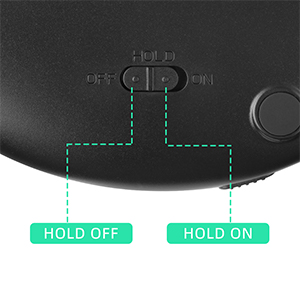
Image: A close-up view of the 'HOLD' switch, clearly showing its 'OFF' and 'ON' positions to prevent unintended button presses.
6. Connectivity
6.1 Connecting to External Speakers or Car Audio
The CD player can be connected to external speakers or a car's audio system using the included 3.5mm AUX cable.
- Connect one end of the 3.5mm AUX cable to the Earphone Jack on the CD player.
- Connect the other end of the AUX cable to the AUX-in port on your external speaker or car audio system.
- Adjust the volume on both the CD player and the connected device for optimal sound.

Image: The CD player connected via a 3.5mm AUX cable to both a car's audio system and a home speaker, demonstrating its versatile connectivity options.
Video: An official product video demonstrating the features and usage of the Arafuna Portable CD Player, including its various ports and functions.
7. Anti-Skip Protection
The Arafuna Portable CD Player features an advanced anti-skip/shockproof system to ensure smooth playback even during movement or minor shocks. This is particularly useful for car use or during exercise.
- Provides 100 seconds of anti-skip protection for standard CDs.
- Provides 180 seconds of anti-skip protection for MP3 CDs.
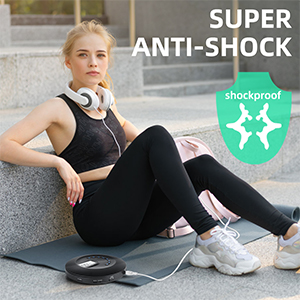
Image: A visual representation of the CD player's "Super Anti-Shock" feature, showing a person exercising, implying stable playback even during physical activity.
8. Maintenance
- Cleaning: Use a soft, dry cloth to clean the exterior of the player. Do not use abrasive cleaners or solvents.
- CD Care: Handle CDs by their edges. Keep them clean and free of scratches. Use a soft, lint-free cloth to wipe CDs from the center outwards.
- Storage: Store the CD player in a cool, dry place away from direct sunlight and extreme temperatures.
- Battery Care: For optimal battery life, avoid fully discharging the battery frequently. If storing for a long period, charge the battery to about 50% every few months.
9. Troubleshooting
| Problem | Possible Cause | Solution |
|---|---|---|
| Player does not power on. | Battery is depleted; Power switch is OFF; Hold switch is ON. | Charge the battery; Slide Power switch to ON; Slide Hold switch to OFF. |
| No sound or low volume. | Volume too low; Headphones not connected properly; AUX cable not connected properly (if using external device). | Increase volume; Ensure headphones/AUX cable are fully inserted. |
| Disc skipping or not playing. | CD is dirty or scratched; CD is inserted incorrectly; Player is experiencing excessive vibration. | Clean or replace CD; Re-insert CD correctly; Ensure player is on a stable surface or minimize movement. |
| Buttons are unresponsive. | Hold switch is ON. | Slide Hold switch to OFF. |
10. Specifications
| Feature | Detail |
|---|---|
| Model Number | CD5197B |
| Product Dimensions | 5.47 x 5.47 x 1.1 inches |
| Item Weight | 8.1 ounces |
| Battery | 1 Lithium Polymer battery (included) |
| Playback Time | Up to 16 hours per charge |
| Supported Disc Formats | CD, MP3, HDCD, CD-R |
| Anti-Skip Protection | 100 seconds for CD, 180 seconds for MP3 |
| Connectivity | 3.5mm AUX, Micro USB (for charging) |
| Special Features | Portable, Lightweight, Rechargeable, Anti-Skip Protection, Backlit Buttons, LCD Display, 5 EQ Modes, 4 Play Modes, A-B Repeat |
11. Warranty and Support
Arafuna products are designed and manufactured to the highest quality standards. For information regarding warranty coverage, technical support, or customer service, please refer to the contact information provided on the product packaging or visit the official Arafuna website.
Please retain your purchase receipt as proof of purchase for warranty claims.
Related documentsCD5197B


Ask a question about this manual
Ask about setup, troubleshooting, compatibility, parts, safety, or missing instructions. Manuals+ will review the question and use this page’s manual context to help answer it.