
Introduction
This manual provides instructions for the proper installation, operation, and maintenance of the URMET 1068/021 LCD Keyboard, designed for use with URMET System 1068. Please read this manual thoroughly before using the product to ensure safe and efficient operation.
Product Overview
The URMET 1068/021 is an LCD keyboard component intended for integration into URMET System 1068. It provides a user interface for system interaction and status display.
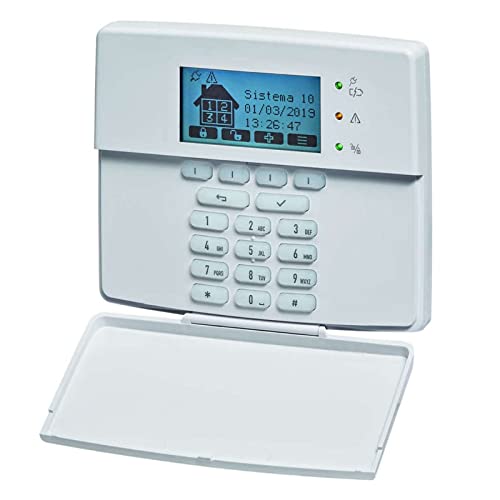
Image: Front view of the URMET 1068/021 LCD Keyboard, showing the display and keypad.
Setup and Installation
This section details the steps required to correctly install your URMET 1068/021 LCD Keyboard.
Unpacking
- Carefully remove the keyboard from its packaging.
- Inspect the unit for any signs of damage. If damaged, do not proceed with installation and contact your supplier.
- Ensure all components are present as per the packing list.
Connection
The URMET 1068/021 LCD Keyboard is designed for integration with URMET System 1068. Refer to your System 1068 main unit manual for specific connection ports and procedures.
- Power off the main system before connecting the keyboard to prevent electrical damage.
- Connect the keyboard to the designated port on the System 1068 main unit using the appropriate cable.
- Secure all connections firmly to ensure reliable communication.
- Power on the main system after all connections are made and verified.
Operating Instructions
The URMET 1068/021 LCD Keyboard provides an interface for interacting with your System 1068.
Basic Operation
- Upon system power-up, the LCD display should illuminate and show the system status or a welcome message.
- Use the keypad to input commands or navigate menus as defined by your System 1068's software.
- The LCD screen will display relevant information, such as system status, menu options, or input prompts.
Keypad Functions
Specific key functions are determined by the System 1068's programming and configuration. Common functions may include:
- Numeric Keys (0-9): For entering codes, numerical data, or selecting numbered options.
- Navigation Keys: For moving through menu options or adjusting settings.
- Enter/Confirm Key: To confirm selections or inputs.
- Back/Escape Key: To return to the previous menu or cancel an operation.
Consult your System 1068 user manual for detailed information on specific commands, menu structures, and advanced functionalities.
Maintenance
Proper maintenance ensures the longevity and reliable operation of your URMET 1068/021 LCD Keyboard.
Cleaning
- Disconnect power to the system before cleaning the keyboard.
- Use a soft, dry, lint-free cloth to gently wipe the LCD screen and keypad.
- For stubborn marks, lightly dampen the cloth with water. Avoid harsh chemicals, abrasive cleaners, or excessive moisture, as these can damage the display or electronics.
- Do not spray cleaning solutions directly onto the keyboard.
Storage
- If storing the keyboard for an extended period, ensure it is kept in a cool, dry place, away from direct sunlight, extreme temperatures, and high humidity.
- Protect the keyboard from dust and physical impact during storage.
Troubleshooting
This section addresses common issues you might encounter with your URMET 1068/021 LCD Keyboard and provides potential solutions.
Display Issues
- No display/Blank screen:
- Check power: Ensure the System 1068 is powered on and the keyboard is correctly connected.
- Connection: Verify the connection cable between the keyboard and the main unit is secure and undamaged.
- System Status: Confirm the main System 1068 is functioning correctly and not in an error state.
- Flickering display:
- Power Cycle: Try powering off and on the System 1068 to reset the connection.
- Connection: Re-check the connection cable for looseness or damage.
Keypad Issues
- Keys not responding:
- Cleaning: Ensure no debris or foreign objects are lodged under the keys.
- System Status: Verify the System 1068 is not in a locked or unresponsive state.
- Connection: Re-check the connection cable for proper seating.
If problems persist after attempting these solutions, contact URMET technical support or your authorized dealer for further assistance.
Specifications
| Feature | Detail |
|---|---|
| Brand | URMET |
| Model Number | 1068/021 |
| Display Type | LCD |
| Manufacturer | URMET |
| ASIN | B096YJ4LZ1 |
| First Available Date | 21 June 2021 |
| Guaranteed Software Updates Until | Unknown |
Warranty and Support
URMET products are designed for reliability and performance. For detailed warranty information, please refer to the warranty card included with your product or visit the official URMET website for the most current terms and conditions.
For technical support, service, or replacement parts, please contact your authorized URMET dealer or URMET customer service. When contacting support, please provide your product model number (1068/021) and a detailed description of the issue you are experiencing.


