
1. Introduction
Thank you for choosing the Foneng Stereo Music Earphone White, Model T34. These earphones are designed to provide a comfortable listening experience with clear audio and convenient controls for both music playback and phone calls. This manual will guide you through the proper use and care of your new earphones.
2. Product Overview
The Foneng T34 earphones feature a lightweight, in-ear design with comfortable ear cushions that sit securely without needing to be crammed into the ear canal. They are smaller than typical earbuds, making them suitable for users with smaller ears, including children.

Figure 2.1: Front view of the Foneng Stereo Music Earphone White, highlighting its sleek, in-ear design.
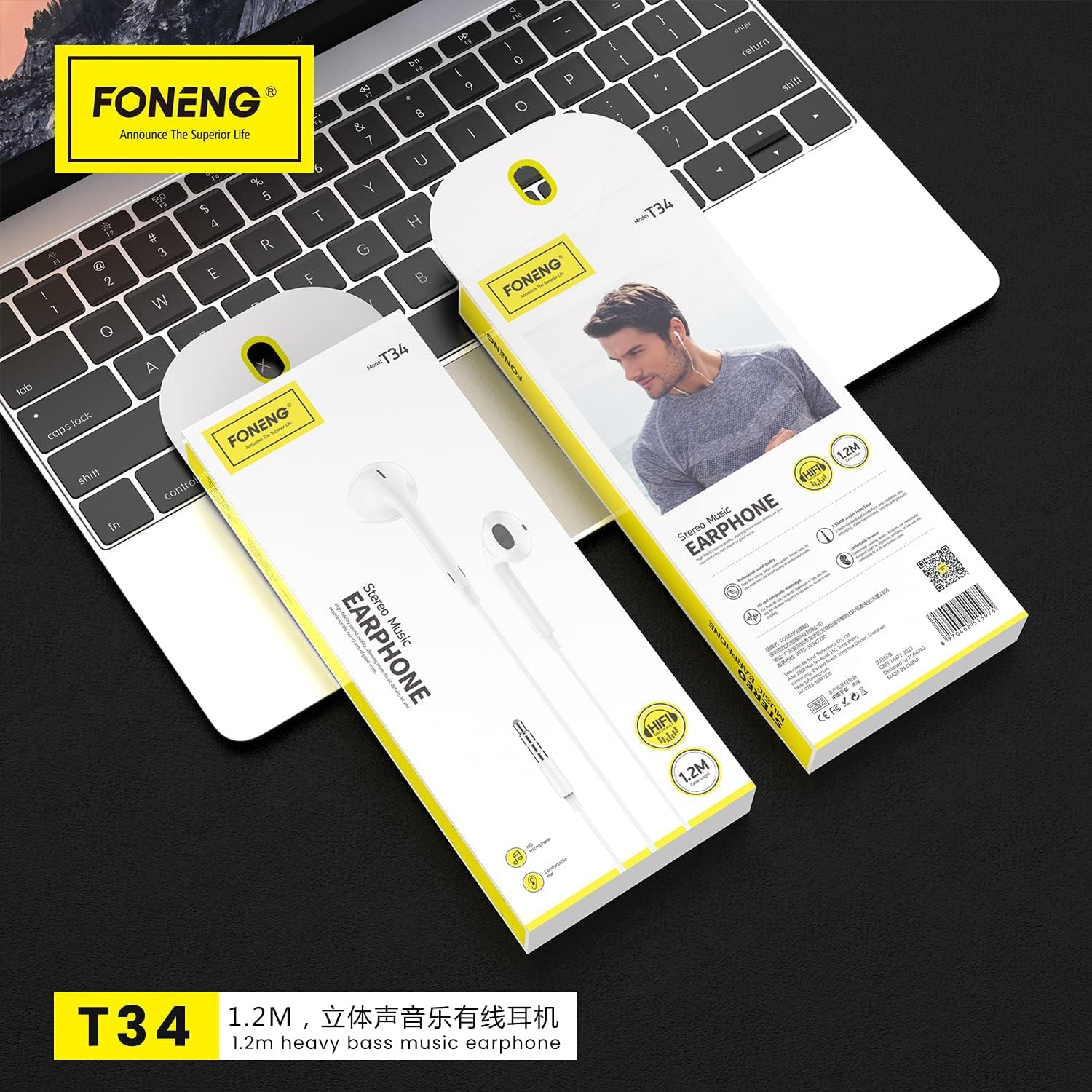
Figure 2.2: Packaging of the Foneng T34 earphones, illustrating the product and its integrated control unit.
Key Components:
- Earphone Units: Left and right earpieces with comfortable ear cushions.
- In-line Control Unit: Integrated remote with multi-function button and volume controls.
- Built-in Microphone: Located on the control unit for clear voice pickup during calls.
- 3.5mm Audio Jack: Standard connector for compatible devices.
3. Setup
Setting up your Foneng T34 earphones is simple and requires no complex installation.
- Unpack: Carefully remove the earphones from their packaging.
- Connect: Insert the 3.5mm audio jack firmly into the headphone port of your audio device (smartphone, tablet, laptop, MP3 player, etc.).
- Wear: Place the earphone units comfortably into your ears. Ensure a snug fit for optimal sound quality and noise isolation.
4. Operating Instructions
The Foneng T34 earphones feature an intuitive in-line control unit for managing your audio and calls.
Multi-function Button Control:
The single button on the control unit allows for various functions:
- Play/Pause Music: Press once to play or pause the current track.
- Next Track: Press twice quickly to skip to the next song.
- Previous Track: Press three times quickly to go back to the previous song.
- Answer/End Call: Press once to answer an incoming call or end an ongoing call.
- Reject Call: Press and hold for approximately 2 seconds to reject an incoming call.
- Activate Voice Assistant (Siri, Google Assistant, etc.): Press and hold for approximately 3 seconds (functionality may vary by device).
Volume Control:
Use the dedicated volume buttons on the control unit to adjust the audio level:
- Volume Up: Press the '+' button to increase the volume.
- Volume Down: Press the '-' button to decrease the volume.
Microphone Usage:
The built-in microphone is positioned to pick up your voice clearly while minimizing background noise, ensuring clear conversations during phone calls. No special activation is required; it functions automatically when a call is initiated or received.
5. Maintenance and Care
Proper care will extend the lifespan and maintain the performance of your Foneng T34 earphones.
- Cleaning: Gently wipe the earphone units and cable with a soft, dry cloth. Do not use harsh chemicals or abrasive materials. For ear cushions, a slightly damp cloth can be used, ensuring they are completely dry before use.
- Storage: When not in use, store the earphones in a clean, dry place, preferably in a small pouch or case to prevent tangling and damage to the cable.
- Avoid Moisture: Do not expose the earphones to water, rain, or excessive humidity. They are not waterproof.
- Handle with Care: Avoid pulling the cable forcefully when disconnecting from a device. Always grasp the 3.5mm jack. Do not bend or twist the cable excessively.
- Temperature: Avoid exposing the earphones to extreme temperatures (very hot or very cold), as this can affect the materials and internal components.
6. Troubleshooting
If you encounter issues with your Foneng T34 earphones, try the following basic troubleshooting steps:
- No Sound:
- Ensure the 3.5mm jack is fully inserted into the device's audio port.
- Check the volume level on your device and on the earphone's in-line control.
- Try the earphones with a different audio device to rule out a device-specific issue.
- Ensure the audio source is playing.
- Distorted Sound:
- Lower the volume on your device and earphones.
- Check if the audio jack is clean and free of debris.
- Test with another audio source or device.
- Microphone Not Working:
- Ensure the earphones are fully plugged into the device.
- Check your device's audio settings to ensure the external microphone is selected.
- Test the microphone function with a different application or device.
If these steps do not resolve the issue, please refer to the warranty and support information.
7. Specifications
| Feature | Description |
|---|---|
| Brand Name | Foneng |
| Model Number | T34 |
| Headphone Form Factor | In-ear |
| Noise Control | Sound Isolation |
| Headphone Jack | 3.5 mm Jack |
| Included Components | Ear Cushions |
| Material | Plastic |
| Control Type | Volume Control |
| Manufacturer | FONENG |
8. Warranty and Support
For warranty information and customer support, please refer to the documentation provided with your purchase or visit the official Foneng website. Keep your proof of purchase for any warranty claims.
Contact Information: Please consult your retailer or the manufacturer's official website for the most up-to-date contact details for support.