
Remax RTS-10
Remax RTS-10 Bluetooth Speaker & Home Theater System User Manual
Model: RTS-10
1. Introduction
Thank you for purchasing the Remax RTS-10 Bluetooth Speaker and Home Theater System. This manual provides essential information for setting up, operating, and maintaining your device. Please read it thoroughly before use to ensure optimal performance and safety.
2. Safety Information
- Do not expose the device to rain, moisture, or extreme temperatures.
- Do not open the casing. Refer all servicing to qualified personnel.
- Ensure proper ventilation around the unit to prevent overheating.
- Keep out of reach of children.
- Use only the power adapter supplied with the device.
3. Package Contents
Please check the box for the following items:
- Remax RTS-10 Soundbar
- Subwoofer
- Remote Control
- Audio Cables
- Power Cable
- User Manual

Image: The Remax RTS-10 soundbar and subwoofer are shown inside their retail packaging, indicating the complete product set.
4. Product Overview
The Remax RTS-10 system consists of a main soundbar unit and a separate subwoofer for enhanced bass. A remote control is included for convenient operation.
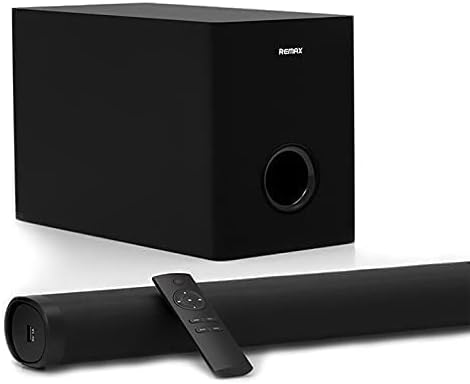
Image: The main components of the Remax RTS-10 system are displayed: the long, slender soundbar, the cubic subwoofer, and the compact remote control.

Image: A closer view of the Remax RTS-10 soundbar and subwoofer, with the remote control positioned on the soundbar, highlighting their design.
5. Setup
5.1 Placement
- Place the soundbar directly in front of your TV, centered.
- Position the subwoofer on the floor near the soundbar, preferably in a corner for optimal bass response.
- Ensure there is adequate space for ventilation around both units.
5.2 Connections
- Connect the soundbar to the subwoofer using the provided audio cable.
- Connect the power cable to the soundbar and then to a power outlet.
- Choose your audio input method:
- AUX Connection: Use the included AUX cable to connect the soundbar's AUX input to your TV, DVD player, or other audio source's audio output.
- USB Connection: Insert a USB drive with audio files into the USB port on the soundbar.
- Bluetooth Connection: See section 6.3 for Bluetooth pairing instructions.
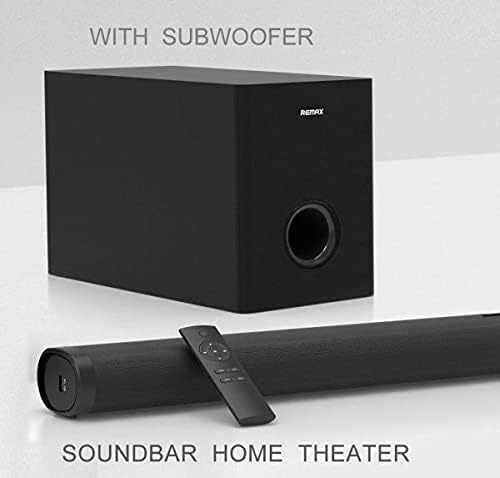
Image: A detailed view of the input ports on the Remax RTS-10 soundbar, clearly showing the AUX and USB connections available for various audio sources.
6. Operating Instructions
6.1 Power On/Off
Press the Power button on the remote control or on the soundbar to turn the system on or off.
6.2 Input Selection
Press the 'Input' or 'Source' button on the remote control to cycle through available input modes (Bluetooth, AUX, USB).
6.3 Bluetooth Pairing
- Turn on the Remax RTS-10 soundbar.
- Select Bluetooth mode using the 'Input' button. The soundbar will enter pairing mode, indicated by a flashing LED.
- On your mobile device (smartphone, tablet, etc.), enable Bluetooth and search for available devices.
- Select "RTS-10" from the list of devices.
- Once paired, the LED indicator will stop flashing and remain solid. You can now play audio from your device wirelessly.
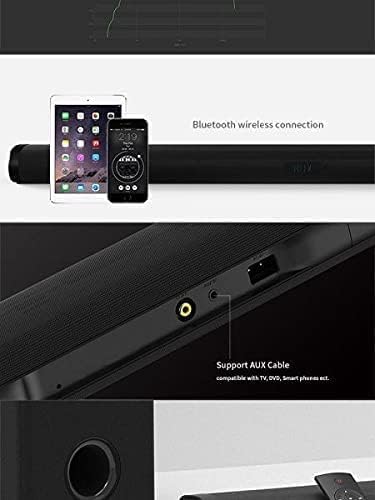
Image: The Remax RTS-10 soundbar is depicted wirelessly connected to both a smartphone and a tablet, illustrating its Bluetooth connectivity feature.
6.4 Volume Control
Use the Volume Up (+) and Volume Down (-) buttons on the remote control or the soundbar to adjust the volume level.
7. Maintenance
- Clean the surface of the soundbar and subwoofer with a soft, dry cloth. Do not use liquid cleaners or aerosols.
- Keep the units free from dust and debris.
- When not in use for extended periods, unplug the power cable from the wall outlet.
8. Troubleshooting
| Problem | Possible Cause | Solution |
|---|---|---|
| No power | Power cable not connected; Power outlet not working | Ensure power cable is securely connected; Try a different outlet |
| No sound | Incorrect input selected; Volume too low; Cables not connected properly | Select correct input mode; Increase volume; Check all audio cable connections |
| Bluetooth pairing fails | Device too far; Soundbar not in pairing mode; Interference | Move device closer; Ensure soundbar is in pairing mode; Turn off other Bluetooth devices nearby |
| Remote control not working | Batteries low/dead; Obstruction between remote and soundbar | Replace batteries; Remove any obstructions |
9. Specifications
- Model: RTS-10
- Brand: Remax
- Speaker Type: 2.1 Soundbar with Subwoofer
- Connectivity: Wireless (Bluetooth), Wired (AUX, USB)
- Audio Output Mode: Surround
- Nominal Output: 100 Watts or more
- Subwoofer Diameter: 10 inch
- Included Components: Remote Control, Cables
- Color: Black
- Item Weight: 7 Kilograms
- Mounting Type: Wall Mount (optional)
- Power Source: Corded Electric
- Recommended Uses: Music players, TVs, DVD players, Surround sound systems
10. Warranty and Support
For warranty information and technical support, please refer to the warranty card included with your product or visit the official Remax website. Keep your purchase receipt as proof of purchase.
Related documentsRTS-10


Ask a question about this manual
Ask about setup, troubleshooting, compatibility, parts, safety, or missing instructions. Manuals+ will review the question and use this page’s manual context to help answer it.