
Kyglaring ky42110
Kyglaring LED Light Kit for Lego 42110 Land Rover Defender - Standard Version Instruction Manual
Model: ky42110 | Brand: Kyglaring
Introduction
This instruction manual provides detailed guidance for installing and operating your Kyglaring LED Light Kit, specifically designed for the Lego 42110 Land Rover Defender building blocks model. This kit enhances your model by adding illumination, transforming it into a vibrant display piece. Please note that the Lego model itself is not included with this light kit.
Safety Information
- Small Parts Warning: This kit contains small parts that may pose a choking hazard. Keep out of reach of small children.
- Electrical Components: Handle all electrical components with care. Do not pull wires too hard during installation to prevent damage.
- Power Source: The light kit is powered by USB. Ensure the power source voltage is less than 5V. Batteries are not included.
- Installation Environment: Perform installation in a well-lit, clean, and stable environment.
Package Contents
Your Kyglaring LED Light Kit package includes:
- LED light fixtures (various types for different parts of the model)
- Connecting wires
- USB power cable
- Installation accessories (e.g., adhesive squares, small connectors)
- Numbered light bags for organized installation

Image: The Kyglaring LED Light Kit components sealed in their original packaging.

Image: Individual light components organized into numbered bags for step-by-step installation.
Setup and Installation
The installation process involves integrating the LED lights into your Lego 42110 Land Rover Defender model. Detailed video and PDF installation instructions are available online. Follow the step-by-step guidance provided with the numbered light bags.
- Preparation: Ensure your Lego model is fully assembled before beginning the light kit installation.
- Access Instructions: Refer to the online video or PDF instructions for your specific model. These instructions will guide you through disassembling specific sections of your Lego model to install the light fixtures.
- Component Identification: Use the numbered light bags to identify the correct components for each step.
- Gentle Handling: The parts are small. Install light fixtures by carefully disassembling only the necessary bricks. Avoid pulling wires too hard to prevent damage.
- Testing: It is recommended to test each light part before fully assembling it into the model to ensure proper functionality.
- Wiring Management: Route wires carefully to ensure they are nearly invisible and do not interfere with the model's structure or functionality.
Video: Official installation guide for the Kyglaring LED light kit, demonstrating the lighting effects on the Land Rover Defender model.

Image: Front view of the Lego Land Rover Defender model with the Kyglaring LED light kit installed, showcasing illuminated headlights and underglow.
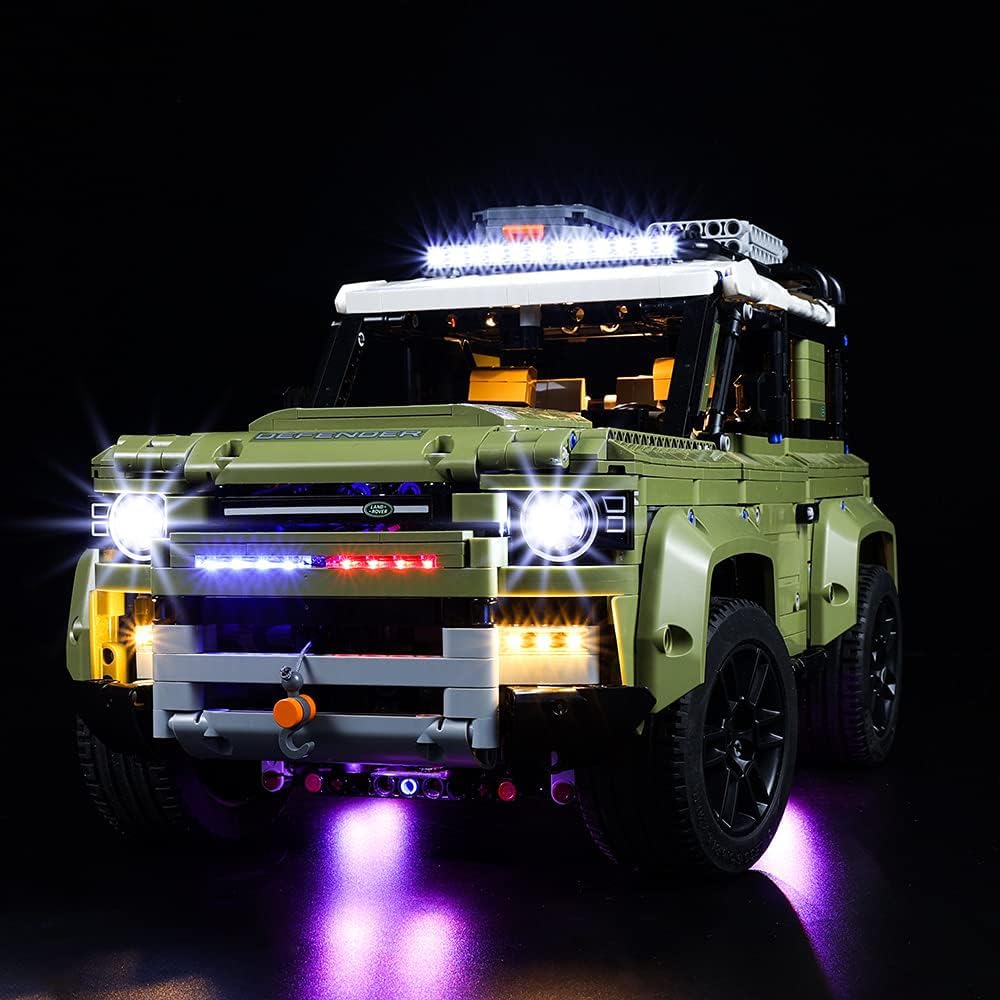
Image: Rear view of the Lego Land Rover Defender model with the Kyglaring LED light kit installed, highlighting illuminated taillights and spare tire.
Operating Instructions
Once the light kit is fully installed, connect the USB power cable to a compatible USB power source (e.g., a USB wall adapter, power bank, or computer USB port). Ensure the voltage is less than 5V. The lights will illuminate upon connection. For optimal brightness, use a stable USB power source.
Maintenance
- Cleaning: Use a soft, dry cloth to gently wipe dust from the LED lights and wires. Avoid using liquids or abrasive cleaners.
- Storage: When not in use, store the model in a clean, dry place away from direct sunlight and extreme temperatures.
- Wire Integrity: Periodically inspect wires for any signs of wear or damage. If damage is found, discontinue use and contact support.
Troubleshooting
| Problem | Possible Cause | Solution |
|---|---|---|
| Lights do not turn on. |
|
|
| Some lights are dim or flickering. |
|
|
| Wires are visible or interfere with bricks. | Improper wire routing. | Carefully re-route wires according to the online instructions, ensuring they are hidden and do not obstruct brick connections. |
Specifications
- Model Number: ky42110
- Light Source Type: LED
- Power Source: USB (Voltage less than 5V)
- Batteries: Not included
- Material: Plastic
- Compatible Model: Lego 42110 Land Rover Defender
Warranty and Support
For any questions, technical assistance, or warranty inquiries regarding your Kyglaring LED Light Kit, please contact Kyglaring customer support through the retailer where the product was purchased or visit the official Kyglaring website for contact information. Please retain your proof of purchase for warranty claims.
Related documentsky42110


Ask a question about this manual
Ask about setup, troubleshooting, compatibility, parts, safety, or missing instructions. Manuals+ will review the question and use this page’s manual context to help answer it.