
1. Introduction
This user manual provides detailed instructions for the Uleway G380S Flip Phone. Designed for ease of use, this phone features large buttons, a clear display, high volume, and an essential SOS emergency function, making it ideal for users who prefer simplicity and reliability in a mobile device. Please read this manual thoroughly to understand all functions and ensure proper operation.

Image 1.1: The Uleway G380S flip phone in blue, shown partially open to display the keypad and screen.
2. Product Overview
2.1 Key Features
- Large Buttons: Easy to press and navigate.
- High Volume: Clear audio for calls and alerts.
- SOS Button: For emergency calls to pre-set contacts.
- Long Standby Time: Equipped with a 1000mAh rechargeable battery.
- Multifunctionality: Includes camera, Bluetooth, flashlight, alarm, calculator, and FM radio.
- Dual SIM Support: Use with any GSM network (SIM card not included).

Image 2.1: Visual representation of the Uleway G380S's key features, including Bluetooth, camera, flashlight, FM radio, calculator, SOS button, speed dial, blacklist, and whitelist functions.
2.2 Phone Components
Familiarize yourself with the physical components of your Uleway G380S phone:
- External Display: Shows time, date, and notifications when closed.
- Internal Display: Main screen for navigation and interaction.
- Keypad: Large, backlit buttons for dialing and menu navigation.
- SOS Button: Located on the back of the phone.
- Volume Buttons: On the side for adjusting call and media volume.
- Flashlight Button: Dedicated button for quick access to the flashlight.
- Charging Port: Micro USB port for charging.
- Camera: Integrated for basic photo capture.
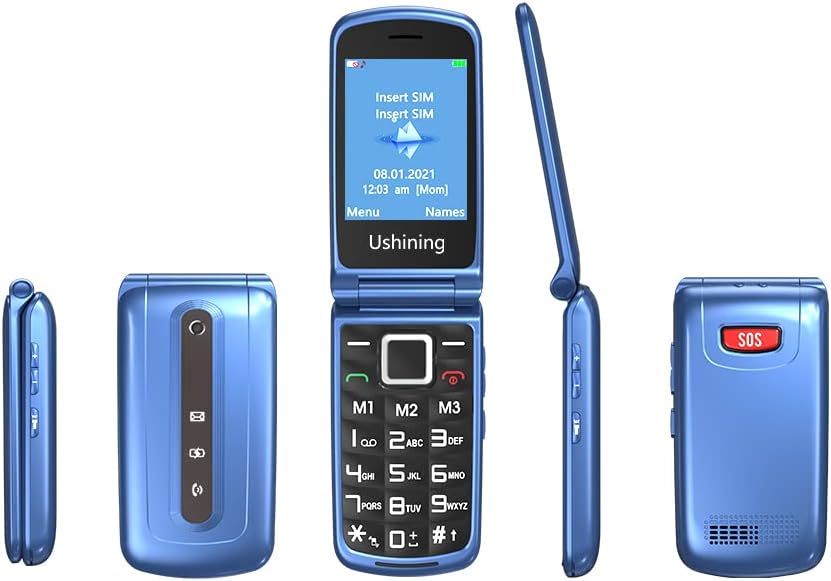
Image 2.2: Various angles of the Uleway G380S, illustrating its design, including the external display, keypad, and side buttons.
3. Setup
3.1 Installing the SIM Card and Battery
- Remove Back Cover: Gently pry open the back cover of the phone.
- Insert SIM Card(s): Locate the SIM card slot(s). Insert your 2G GSM SIM card(s) into the designated slot(s) with the gold contacts facing down, ensuring it is securely seated.
- Insert Battery: Place the 1000mAh Lithium-ion battery into the battery compartment, aligning the contacts.
- Replace Back Cover: Snap the back cover firmly into place.

Image 3.1: The phone's battery compartment with the 1000mAh battery visible, highlighting its long standby capability.
3.2 Charging the Phone
Before first use, fully charge the phone battery.
- Connect the Micro USB cable to the charging port on the phone.
- Connect the other end of the cable to a compatible USB power adapter or a computer's USB port.
- The charging indicator on the screen will show the charging status.
- Once fully charged, disconnect the charger.
4. Operating Instructions
4.1 Power On/Off
- To Power On: Press and hold the red 'End Call' button (☎) until the screen lights up.
- To Power Off: Press and hold the red 'End Call' button (☎) until the power off options appear, then select 'Power Off'.
4.2 Making and Receiving Calls
- Making a Call: Open the flip, enter the phone number using the keypad, then press the green 'Call' button (☎).
- Answering a Call: When the phone rings, open the flip and press the green 'Call' button (☎).
- Ending a Call: Press the red 'End Call' button (☎) or close the flip.

Image 4.1: The phone's large keypad and clear display, designed for easy dialing and readability.
4.3 Sending and Receiving SMS
- To Send SMS: Navigate to 'Messages' from the main menu, select 'Write Message', enter your text, then select 'Send' and choose the recipient.
- To Read SMS: Navigate to 'Messages' from the main menu, select 'Inbox', and choose the message you wish to read.

Image 4.2: The phone's menu interface, showing the 'Message' icon for accessing SMS functions.
4.4 SOS Emergency Function
The SOS button allows you to quickly call up to 5 pre-set emergency contacts.
- Setting SOS Numbers: Go to 'Settings' > 'SOS Settings' and add up to 5 emergency contact numbers.
- Using SOS: In an emergency, press and hold the SOS button on the back of the phone for 3 seconds. The phone will automatically call the pre-set numbers in sequence until one answers. It will also send an emergency SMS to these contacts.

Image 4.3: A hand demonstrating the use of the SOS emergency button located on the back of the phone.
4.5 Flashlight
To activate the flashlight, press the dedicated flashlight button on the side of the phone. Press it again to turn it off.

Image 4.4: The phone's dual LED flashlight in operation, providing illumination.
4.6 FM Radio
To use the FM radio, navigate to 'FM Radio' in the main menu. You may need to connect headphones (not included) to act as an antenna for better reception.
4.7 Alarm and Calculator
- Alarm: Access 'Tools' > 'Alarm' from the main menu to set alarms.
- Calculator: Access 'Tools' > 'Calculator' from the main menu to perform basic calculations.
4.8 Speed Dial Keys (M1, M2, M3)
The M1, M2, and M3 keys can be programmed for quick dialing of important contacts.
- Setting Speed Dial: Go to 'Settings' > 'Speed Dial' and assign a contact to M1, M2, or M3.
- Using Speed Dial: Press and hold the assigned M1, M2, or M3 key to call the corresponding contact.

Image 4.5: The M1, M2, and M3 keys on the keypad, designated for speed dial functions.
5. Maintenance
- Cleaning: Use a soft, dry cloth to clean the phone's surface. Avoid liquid cleaners.
- Storage: Store the phone in a cool, dry place away from direct sunlight and extreme temperatures.
- Battery Care: Do not expose the battery to high temperatures or puncture it. Recycle batteries responsibly.
6. Troubleshooting
| Problem | Possible Solution |
|---|---|
| Phone does not power on. | Ensure the battery is correctly installed and charged. Try charging the phone for at least 30 minutes. |
| Cannot make or receive calls. | Check if the SIM card is properly inserted and activated. Ensure you have network coverage. |
| No sound during calls. | Adjust the volume using the side buttons. Check if the phone is in silent mode. |
| SOS function not working. | Verify that emergency numbers are correctly set in 'SOS Settings'. Ensure the numbers are valid and reachable. |
| Battery drains quickly. | Reduce screen brightness, close unused applications, or consider replacing an old battery. |
7. Specifications
| Feature | Detail |
|---|---|
| Brand | Uleway |
| Model Number | G380S |
| Operating System | Other (Basic OS) |
| Screen Size | 1.8 Inches |
| Resolution | 120 x 160 pixels |
| RAM Size | 32 MB |
| Memory Storage Capacity | 16 GB (likely for external storage via microSD, not internal) |
| Connectivity Technology | Bluetooth |
| Cellular Technology | 2G (GSM) |
| Wireless Carrier | All carriers (GSM compatible) |
| Special Features | Camera, Internet (basic), Radio (FM) |
| Battery Composition | Lithium-ion (1000mAh) |
8. Warranty and Support
For warranty information and customer support, please refer to the documentation provided with your purchase or contact Uleway customer service directly. Keep your proof of purchase for any warranty claims.