
Introduction
This manual provides essential instructions for the safe and efficient operation of the Williams AV POE 001 Power-Over-Ethernet Injector. Please read this manual thoroughly before installation and use to ensure proper functionality and to prevent damage to the device or connected equipment. The POE 001 is designed to supply power to compatible Power-over-Ethernet (PoE) devices over an Ethernet cable, simplifying installation by eliminating the need for separate power outlets near the powered device.
Safety Information
- Ensure the power source matches the voltage requirements specified for the POE 001.
- Do not expose the device to moisture, rain, or extreme temperatures.
- Avoid placing the device near heat sources or in direct sunlight.
- Do not attempt to open or service the unit. Refer all servicing to qualified personnel.
- Use only the provided WLC 004 line cord or an approved equivalent.
Package Contents
Verify that all items are present in the package:
- Williams AV POE 001 Power-Over-Ethernet Injector
- WLC 004 Line Cord
- This User Manual
Setup
Follow these steps to set up your POE 001 injector:
- Connect to Network: Connect an Ethernet cable from your network switch or router to the "DATA IN" port on the POE 001 injector.
- Connect to PoE Device: Connect another Ethernet cable from the "DATA & POWER OUT" port on the POE 001 injector to the PoE-compatible device (e.g., IP camera, VoIP phone, wireless access point).
- Connect Power: Plug the WLC 004 line cord into the power input of the POE 001 injector, then plug the other end into a standard AC power outlet.
- Verify Operation: Once powered, the indicator light on the POE 001 should illuminate, indicating that power is being supplied. The connected PoE device should also power on.
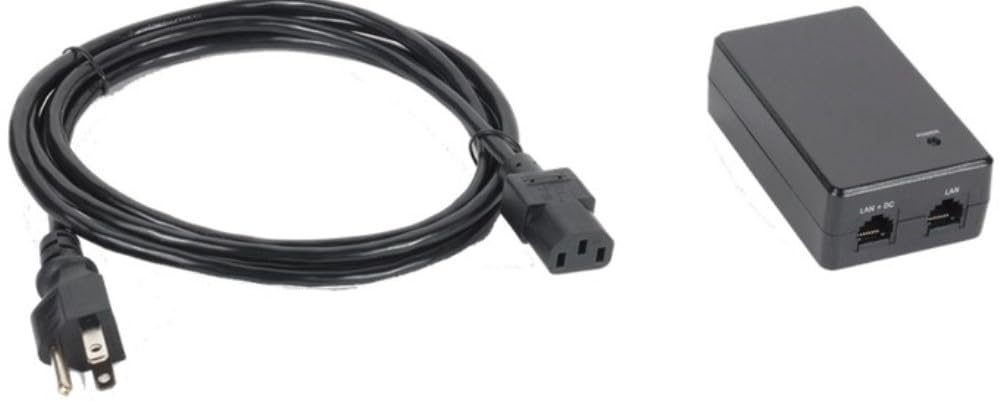
Figure 1: Williams AV POE 001 Power-Over-Ethernet Injector. This image shows the compact design of the injector with its "DATA IN" and "DATA & POWER OUT" Ethernet ports, and the power input.
Operating
The Williams AV POE 001 operates automatically once connected and powered. It provides power and data simultaneously over a single Ethernet cable to a compatible PoE device.
- Power Indicator: A status LED on the injector indicates power status. Refer to the device's specific documentation for LED behavior (e.g., solid green for active power).
- Data Transmission: The injector passes network data through without modification, ensuring seamless communication between your network and the PoE device.
- Compatibility: Ensure your connected device is PoE-compatible to avoid damage. The POE 001 is designed to work with standard PoE devices.
Maintenance
The POE 001 injector requires minimal maintenance to ensure long-term performance.
- Cleaning: Disconnect power before cleaning. Use a soft, dry cloth to wipe the exterior of the device. Do not use liquid cleaners or aerosols.
- Ventilation: Ensure the device is placed in a well-ventilated area to prevent overheating. Do not block ventilation openings.
- Cable Management: Periodically check all cable connections to ensure they are secure and free from damage.
Troubleshooting
| Problem | Possible Cause | Solution |
|---|---|---|
| No power to PoE device. |
|
|
| No data connection. |
|
|
| Injector feels hot. |
|
|
Specifications
| Feature | Detail |
|---|---|
| Model Number | POE 001 |
| Brand | Williams AV |
| Item Weight | 12 ounces |
| Included Accessory | WLC 004 Line Cord |
| Function | Power-Over-Ethernet Injector |
| ASIN | B096WJ5HPV |
Warranty and Support
For warranty information and technical support, please refer to the official Williams AV website or contact their customer service directly. Keep your purchase receipt for warranty claims.
Williams AV Contact Information:
- Website: www.williamsav.com
- Customer Service: Refer to the website for regional contact details.