
Introduction
Thank you for purchasing the LyxPro 60 Watt Electric Guitar Amplifier. This solid-state combo amplifier is designed to provide clear and powerful sound for electric guitars, featuring a 10-inch speaker, custom EQ controls, drive, and delay effects. It includes various input and output options for versatile use in studio or stage environments. Please read this manual thoroughly to ensure proper setup and operation.
Safety Information
- Do not expose this appliance to rain or moisture.
- Do not remove the cover or back panel. There are no user-serviceable parts inside. Refer servicing to qualified personnel.
- Ensure the amplifier is placed on a stable, level surface to prevent tipping.
- Do not block any ventilation openings.
- Use only the power cord supplied with the unit.
- Unplug the unit during lightning storms or when unused for long periods.
Product Overview
The LyxPro 60 Watt Electric Guitar Amplifier is a versatile combo amp suitable for practice, studio recording, and live performances. It features a robust 10-inch, 4-ohm speaker for clear audio reproduction and a range of controls to shape your sound.

Image: The LyxPro 60 Watt Combo Amplifier, showcasing its compact design.
Key features include:
- 60-Watt Output: Powerful enough for various settings.
- 10-inch, 4-Ohm Speaker: Delivers clear treble and rich bass.
- Custom EQ Controls: Treble, Middle, and Bass adjustments for tonal shaping.
- Drive and Delay Effects: Built-in distortion (Gain) and digital delay (Time/Repeat) for creative sound.
- Multiple Inputs: Passive/Active 1/4" inputs for guitar, 1/4" microphone input.
- Auxiliary Input: 3.5mm jack for connecting external audio devices.
- Headphone Jack: 1/4" output for private practice.
- Line Out: For connecting to external speakers, PA systems, or recording equipment.

Image: Diagram illustrating the 10-inch speaker and its sound projection.
Controls and Connections
Familiarize yourself with the front panel controls and connections:

Image: Detailed view of the LyxPro AGL60 amplifier's front panel, labeling all controls and inputs.
- Passive Input: 1/4" jack for guitars with passive pickups.
- Active Input: 1/4" jack for guitars with active pickups.
- Boost Switch: Toggles between clean and overdrive channels.
- Gain Control: Adjusts the amount of distortion in the overdrive channel.
- Treble Control: Adjusts the high-frequency response (0-10).
- Middle Control: Adjusts the mid-range frequency response (0-10).
- Bass Control: Adjusts the low-frequency response (0-10).
- Time Control: Adjusts the delay time for the digital delay effect.
- Repeat Control: Adjusts the number of repeats for the digital delay effect.
- Master Volume: Controls the overall output volume of the amplifier.
- Mic Input: 1/4" jack for connecting a microphone.
- Mic Volume: Adjusts the volume level of the connected microphone.
- Line Out: 1/4" output for connecting to external audio systems.
- Headphone Jack: 1/4" output for connecting headphones for silent practice.
- Aux Input: 3.5mm jack for connecting external audio sources like MP3 players or phones.
- Power Switch: Turns the amplifier on or off.
Setup
- Placement: Place the amplifier on a stable surface, ensuring adequate ventilation around the unit.
- Power Connection: Ensure the amplifier's power switch is in the OFF position. Connect the supplied power cable to the amplifier's power input and then to a suitable AC power outlet.
- Instrument Connection:
- For guitars with passive pickups, connect your guitar to the Passive Input using a standard 1/4" instrument cable.
- For guitars with active pickups, connect your guitar to the Active Input using a standard 1/4" instrument cable.
- Microphone Connection (Optional): If using a microphone, connect it to the Mic Input using a 1/4" cable.
- Auxiliary Device Connection (Optional): To play along with music, connect your audio device (e.g., smartphone, MP3 player) to the Aux Input using a 3.5mm audio cable.
- Headphone Connection (Optional): For private practice, connect headphones to the Headphone Jack. This will mute the main speaker.
- External Output (Optional): To connect to a PA system or recording interface, use a 1/4" cable from the Line Out to the desired input on your external equipment.
- Initial Settings: Before powering on, set all volume controls (Master Volume, Mic Volume) to their minimum position. Set EQ controls (Treble, Middle, Bass) to the center (5) position.
Operating
- Power On: Flip the Power Switch to the ON position. The power indicator light will illuminate.
- Adjusting Guitar Volume: Slowly increase the Master Volume control to your desired listening level.
- Using the Clean Channel: With the Boost Switch off, adjust the Treble, Middle, and Bass controls to shape your clean tone.
- Using the Overdrive Channel:
- Engage the overdrive by pressing the Boost Switch.
- Adjust the Gain control to increase or decrease the amount of distortion.
- Further refine your distorted tone using the Treble, Middle, and Bass controls.
- Applying Delay Effect:
- Adjust the Time control to set the interval between delay repeats.
- Adjust the Repeat control to set how many times the delayed sound repeats.
- Microphone Volume: If a microphone is connected, slowly increase the Mic Volume to blend it with your guitar sound.
- Auxiliary Input Volume: Control the volume of your auxiliary device directly from the device itself.
- Power Off: Before turning off the amplifier, reduce all volume controls to minimum. Then, flip the Power Switch to the OFF position.
Helpful Tip: Increase Your Bass
Video: A short demonstration offering tips to increase bass response on the amplifier. This can help achieve a fuller sound.
Maintenance
- Cleaning: Use a soft, dry cloth to clean the exterior of the amplifier. Do not use liquid cleaners or abrasive materials.
- Storage: When not in use, store the amplifier in a cool, dry place away from direct sunlight and extreme temperatures.
- Ventilation: Ensure that the amplifier's ventilation openings are never blocked to prevent overheating.
- Cable Care: Always handle cables by the connector, not the wire, to prevent damage.
Troubleshooting
| Problem | Possible Cause | Solution |
|---|---|---|
| No sound from amplifier. |
|
|
| Distorted or unclear sound. |
|
|
| Microphone not working. |
|
|
Specifications
| Feature | Detail |
|---|---|
| Brand | LyxPro |
| Model Name | LYXAGL60 |
| Output Wattage | 60 watts |
| Speaker Size | 10 inches |
| Speaker Impedance | 4 Ohm |
| Amplifier Type | Solid State |
| Inputs | 1/4" Passive, 1/4" Active, 1/4" Microphone, 3.5mm Aux In |
| Outputs | 1/4" Headphone, 1/4" Line Out |
| Controls | Passive/Active Switch, Boost Switch, Gain, Treble, Middle, Bass, Time, Repeat, Master Volume, Mic Volume, Power |
| Power Source | Corded Electric |
| Dimensions (D x W x H) | 11.4"D x 22"W x 22"H |
| Material | Wood (Enclosure) |
| UPC | 843812154413 |
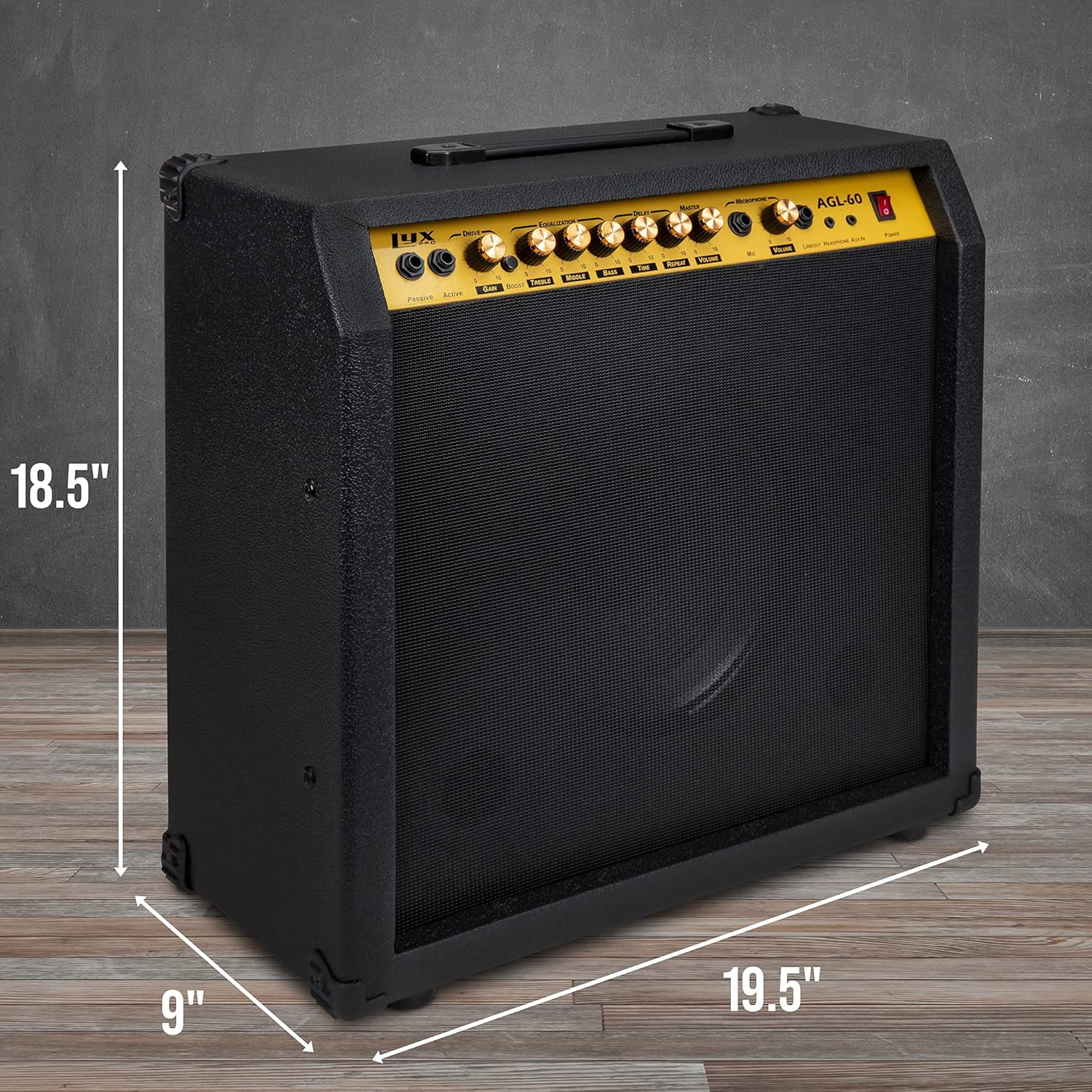
Image: Side view of the LyxPro AGL60 amplifier with dimensions labeled.
Understanding Solid State Amplifiers
Video: A brief explanation of solid-state amplifiers and their characteristics, relevant to the LyxPro AGL60.
Warranty and Support
This LyxPro amplifier comes with a 1-year manufacturer's warranty from the date of purchase. This warranty covers defects in materials and workmanship under normal use.
For warranty claims, technical support, or service inquiries, please refer to the contact information provided with your purchase documentation or visit the official LyxPro website. Keep your proof of purchase for warranty validation.
For additional resources and product information, you may visit the LyxPro Store on Amazon.
