Introduction
Thank you for choosing the Dolphin BoxParty 2120 Dual 12-inch Party Speaker. This manual provides essential information for the safe and efficient operation of your new speaker. Please read it thoroughly before use and retain it for future reference.
Package Contents
Ensure all items listed below are present in your package:
- Dolphin BoxParty 2120 Speaker Unit
- User Guide (this document)
- Warranty Card
- Remote Control
- Wired Microphone
- Power Cord
- External Battery Cable
- AUX Cable

Image: Dolphin BoxParty 2120 speaker and its accessories.
Product Overview
The Dolphin BoxParty 2120 is a portable and rechargeable party speaker designed for powerful audio output and versatile connectivity. It features dual 12-inch woofers, a Hi-Fi amplifier, a 5-band equalizer, and dynamic LED lights.

Image: Front view of the Dolphin BoxParty 2120 speaker highlighting the dual 12-inch woofers and LED lights.

Image: Side view of the Dolphin BoxParty 2120 speaker, illustrating its portability with a retractable trolley handle and wheels.
Setup
- Unpacking: Carefully remove the speaker and all accessories from the packaging.
- Initial Charge: Before first use, connect the speaker to a power outlet using the provided power cord. Allow the unit to charge fully. The charging indicator light will change when charging is complete.
- Power On: Locate the power switch on the rear control panel and switch it to the 'ON' position.
Operating Instructions
The BoxParty 2120 offers multiple ways to play audio and customize your sound experience.

Image: Detailed view of the speaker's control panel.
Bluetooth Connection
- Ensure the speaker is powered on.
- Press the 'MODE' button on the control panel or remote until 'BLUE' appears on the LED display, indicating Bluetooth mode.
- On your mobile device, enable Bluetooth and search for available devices.
- Select 'Dolphin SP-2120RBT' from the list. A confirmation tone will sound upon successful pairing.
- You can now stream audio wirelessly from your device to the speaker.
USB/SD Card Playback
- Insert a USB drive or SD card (with MP3 files) into the corresponding slot on the control panel.
- The speaker will automatically switch to USB/SD mode and begin playing audio. If not, press the 'MODE' button to select.
- Use the playback controls (Play/Pause, Next/Previous Track) on the control panel or remote to manage your music.
Auxiliary Input
- Connect an external audio device (e.g., smartphone, tablet, MP3 player) to the 'AUX IN' port on the control panel using the provided AUX cable.
- Press the 'MODE' button until 'LINE' appears on the LED display.
- Play audio from your connected device.
Microphone and Guitar Input
- Connect the wired microphone to the 'MIC IN' port.
- Connect a guitar to the 'JITAR IN' port.
- Adjust the 'M.VOL' (Microphone Volume) and 'JITAR.VOL' (Guitar Volume) knobs to your desired levels.
- Use the 'M.ECHO' knob to add echo effects to the microphone.
Equalizer and Sound Controls
The speaker features a 5-band equalizer and individual control knobs for fine-tuning your audio:
- Volume: Master volume control.
- X-Bass: Enhances bass frequencies.
- M.Bass / M.Treble: Adjusts bass and treble for the microphone.
- 5-Band Equalizer: Adjust specific frequency ranges (200Hz, 500Hz, 1KHz, 5KHz, 12KHz) to customize the overall sound profile.
LED Lights
The speaker features dynamic LED lights that can sync with the music. Use the 'LED LIGHT' switch on the control panel to turn the lights ON or OFF.

Image: Speaker with LED lights active, demonstrating the visual effect and the control switch.
WaveSync Technology
The BoxParty 2120 supports WaveSync technology, allowing you to wirelessly pair two compatible Dolphin speakers for a true stereo sound experience. Refer to the WaveSync pairing instructions in the full user guide for detailed steps.
Video: Official Dolphin video showcasing the BoxParty 2120 speaker's features, including sound quality, LED lights, and connectivity options.
Charging and Battery
The speaker is equipped with a built-in rechargeable 12V 7000mAh lead-acid battery, providing over 7 hours of continuous music playback on a full charge.
- Charging: Connect the power cord to the 'POWER INPUT (AC110-240V)' port and a wall outlet. The 'CHARGE' indicator light will illuminate during charging.
- External Battery: For extended playtime, you can connect an external 12V battery to the 'EXTERNAL BATTERY INPUT 12V DC' terminals using the provided external battery cable. Ensure correct polarity (red to positive, black to negative).

Image: Speaker used outdoors, highlighting its long battery life.
Maintenance
- Cleaning: Use a soft, dry cloth to clean the speaker's exterior. Do not use abrasive cleaners or solvents.
- Storage: Store the speaker in a cool, dry place away from direct sunlight and extreme temperatures.
- Battery Care: To prolong battery life, fully charge the speaker before storing it for extended periods. Recharge every 3-6 months if not in use.
Troubleshooting
| Problem | Possible Cause | Solution |
|---|---|---|
| No power | Battery depleted; Power cord not connected | Charge the battery; Ensure power cord is securely connected |
| No sound | Volume too low; Incorrect input mode; Device not paired (Bluetooth) | Increase volume; Select correct input mode; Pair Bluetooth device |
| Bluetooth pairing issues | Device too far; Speaker not in pairing mode; Interference | Move device closer; Ensure speaker is in Bluetooth mode; Restart both devices |
| LED lights not working | LED switch is OFF | Toggle the 'LED LIGHT' switch to ON |
Specifications
- Model: SP-2120RBT
- Brand: Dolphin
- Mounting Type: Freestanding
- Power Source: Corded Electric, Battery
- Connectivity Technology: Bluetooth, USB, SD Card, AUX, FM Radio
- Audio Input: 1/4" Microphones, Guitars
- Number of Channels: 2
- Impedance: 4 Ohm
- Material: Metal (grille), ABS Plastic (cabinet)
- Item Weight: 36 Pounds
- Product Dimensions (L x W x H): 14 x 14 x 32 inches
- Battery: 1 x 12V 7000mAh (included)
- UPC: 850006218578
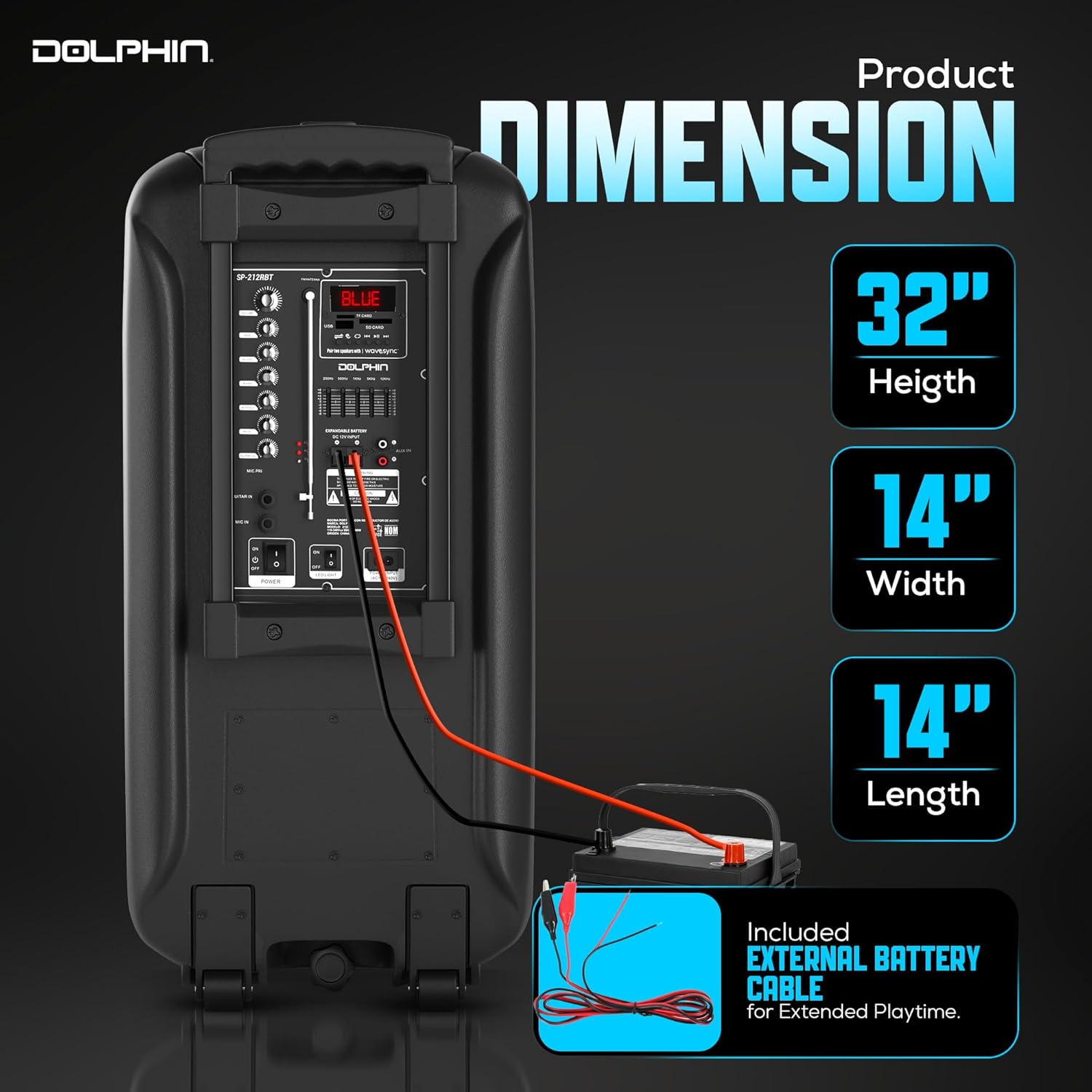
Image: Speaker dimensions for reference.
Warranty and Support
This product includes a Warranty Card. Please refer to the card for detailed warranty information, terms, and conditions. For technical support or service inquiries, please contact Dolphin customer service through the contact information provided on your Warranty Card or the official Dolphin website.


