
1. Introduction
Thank you for choosing the THOMSON Cyclo Easy THVC93120BL Cordless Stick Vacuum Cleaner. This 2-in-1 appliance is designed for efficient cleaning, functioning as both a powerful stick vacuum for floors and a versatile handheld vacuum for smaller tasks. Featuring HEPA filtration, it helps capture fine dust and allergens. Please read this manual thoroughly before use to ensure proper operation, maintenance, and safety.
2. Safety Instructions
Always follow basic safety precautions when using electrical appliances to reduce the risk of fire, electric shock, or injury.
- Read all instructions before using the appliance.
- Do not use the vacuum cleaner outdoors or on wet surfaces.
- Do not allow children to operate the vacuum cleaner. Close supervision is necessary when used near children.
- Use only as described in this manual. Use only manufacturer's recommended attachments.
- Do not use with a damaged cord or plug. If the appliance is not working as it should, has been dropped, damaged, left outdoors, or dropped into water, return it to a service center.
- Do not pull or carry by cord, use cord as a handle, close a door on cord, or pull cord around sharp edges or corners. Keep cord away from heated surfaces.
- Do not unplug by pulling on cord. To unplug, grasp the plug, not the cord.
- Do not handle plug or appliance with wet hands.
- Do not put any object into openings. Do not use with any opening blocked; keep free of dust, lint, hair, and anything that may reduce airflow.
- Keep hair, loose clothing, fingers, and all parts of body away from openings and moving parts.
- Do not pick up anything that is burning or smoking, such as cigarettes, matches, or hot ashes.
- Use extra care when cleaning on stairs.
- Do not use to pick up flammable or combustible liquids, such as gasoline, or use in areas where they may be present.
- Store the appliance indoors in a cool, dry place.
- Use only the charger supplied by the manufacturer to recharge.
3. Package Contents
Verify that all components are present and in good condition upon unpacking.
- Main Motor Unit (Handheld Vacuum)
- Extension Tube
- Motorized Floor Brush
- Crevice Tool
- 2-in-1 Brush Tool
- Power Adapter/Charger
- Wall Mount Bracket and Screws

Image: All included accessories, including the crevice tool, 2-in-1 brush, charger, and wall mount.
4. Product Overview
Familiarize yourself with the main parts of your THOMSON Cyclo Easy vacuum cleaner.

Image: The Thomson Cyclo Easy vacuum cleaner fully assembled in stick mode.
Main Components:
- Handle with Controls: Power button, suction mode selector.
- Motor Unit: Contains the motor, dustbin, and HEPA filter.
- Dustbin Release Button: For emptying the dustbin.
- Extension Tube Release Button: For detaching the extension tube.
- Motorized Floor Brush: For cleaning various floor types.
- Battery Indicator Lights: Show remaining battery life.

Image: Close-up view of the vacuum's handle, showing the power button and suction level controls.
5. Setup
5.1 Assembly
The THOMSON Cyclo Easy can be assembled in two configurations: stick vacuum or handheld vacuum.
Stick Vacuum Assembly:
- Insert the extension tube into the main motor unit until it clicks into place.
- Attach the motorized floor brush to the other end of the extension tube until it clicks into place.

Image: The vacuum cleaner fully assembled for use as a stick vacuum.
Handheld Vacuum Assembly:
- Press the release button on the main motor unit and detach the extension tube (if attached).
- Select the desired accessory (crevice tool or 2-in-1 brush) and attach it directly to the main motor unit until it clicks into place.

Image: The vacuum cleaner configured as a handheld unit with an attached nozzle.
5.2 Charging the Battery
Before first use, fully charge the vacuum cleaner for approximately 4.5 hours.
- Connect the power adapter to the charging port on the main motor unit.
- Plug the power adapter into a wall outlet.
- The battery indicator lights will illuminate during charging and turn off or change color when fully charged.
- Unplug the charger once charging is complete.
6. Operating Instructions
6.1 Power On/Off
Press the power button on the handle to turn the vacuum cleaner on or off.
6.2 Selecting Suction Mode
The vacuum cleaner offers two suction modes: Normal and Max.
- Press the '+' button to increase suction to Max mode for tougher dirt.
- Press the '-' button to switch to Normal mode for everyday cleaning and extended battery life.
6.3 Using the Stick Vacuum
For cleaning floors, carpets, and large areas:
- Ensure the vacuum is assembled in stick mode with the motorized floor brush.
- Turn on the vacuum and select the desired suction mode.
- Guide the vacuum across the surface to be cleaned. The motorized brush will agitate dirt for effective removal.
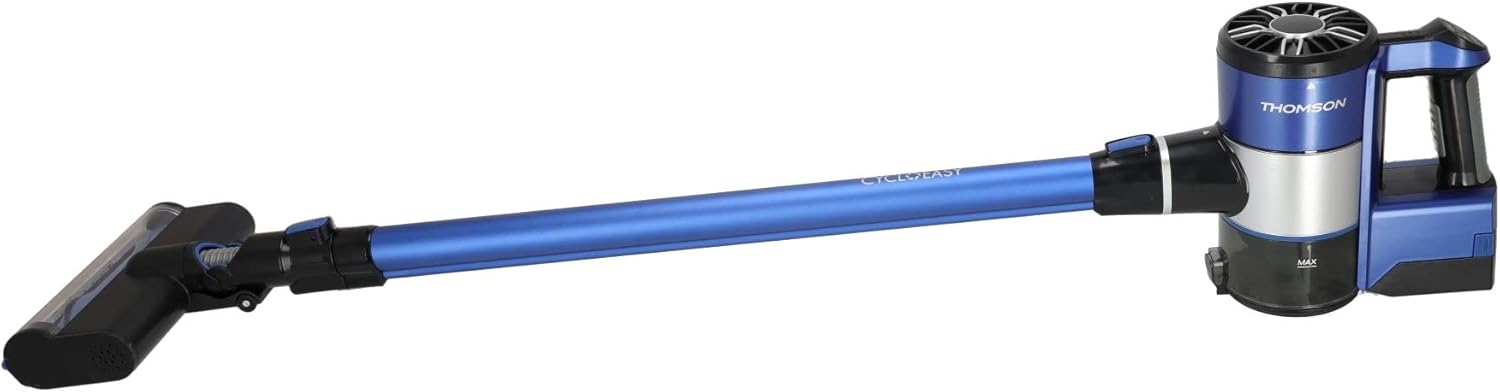
Image: Side view of the vacuum cleaner in its stick configuration, ready for floor cleaning.
6.4 Using the Handheld Vacuum
For cleaning furniture, car interiors, tight spaces, or above-floor surfaces:
- Detach the extension tube and floor brush.
- Attach the crevice tool for narrow gaps or the 2-in-1 brush for upholstery and delicate surfaces.
- Turn on the vacuum and clean the desired area.
7. Maintenance
Regular maintenance ensures optimal performance and extends the lifespan of your vacuum cleaner.
7.1 Emptying the Dustbin
Empty the dustbin after each use or when the MAX fill line is reached.
- Ensure the vacuum cleaner is turned off.
- Press the dustbin release button to detach the dustbin from the main motor unit.
- Hold the dustbin over a trash can and open the bottom flap to release the contents.
- Close the flap and reattach the dustbin to the motor unit until it clicks.

Image: Close-up of the vacuum's motor unit, showing the dustbin and its MAX fill indicator.
7.2 Cleaning the HEPA Filter
Clean the HEPA filter regularly (e.g., monthly, or more often with heavy use) to maintain suction power.
- With the dustbin detached, carefully remove the HEPA filter.
- Tap the filter gently over a trash can to remove loose dust.
- If necessary, rinse the filter under cold running water. Ensure it is completely dry (allow 24-48 hours) before reinserting. Do not use detergents or hot water.
- Reinsert the dry HEPA filter and reattach the dustbin.
7.3 Cleaning the Brush Roll
Periodically check the motorized floor brush for tangled hair or debris.
- Turn off the vacuum and detach the floor brush.
- Locate the brush roll access cover (usually on the bottom of the brush head) and open it.
- Remove the brush roll and carefully cut away any tangled hair or fibers using scissors.
- Clean any debris from the brush housing.
- Reinsert the brush roll and close the access cover.
7.4 Battery Care
- For optimal battery life, avoid completely draining the battery before recharging.
- Store the vacuum cleaner in a cool, dry place when not in use.
- If storing for an extended period, charge the battery to about 50% and recharge every few months.
8. Troubleshooting
If you encounter issues, refer to the following common problems and solutions.
| Problem | Possible Cause | Solution |
|---|---|---|
| Vacuum does not turn on | Battery is depleted Power button not pressed correctly | Charge the battery fully Ensure the power button is pressed firmly |
| Low suction power | Dustbin is full Filter is clogged Nozzle/tube is blocked | Empty the dustbin Clean or replace the HEPA filter Check and clear any blockages in the extension tube or attachments |
| Brush roll not spinning | Hair or debris tangled in brush Brush roll is jammed | Clean the brush roll as described in Maintenance section Check for any obstructions preventing rotation |
| Short operating time | Battery not fully charged Using Max suction mode continuously Aging battery | Ensure battery is fully charged Use Normal mode for longer runtime Contact customer support for battery replacement options |
9. Specifications
Technical details for the THOMSON Cyclo Easy THVC93120BL.
- Model Number: THVC93120BL
- Power: 120 Watts
- Voltage: 22.2 Volts
- Battery: 2200 mAh Lithium-ion (included)
- Charging Time: Approximately 4.5 hours
- Autonomy: Up to 1 hour (in Normal mode)
- Filtration: HEPA10 Filter
- Noise Level: 76 Decibels
- Dimensions (L x W x H): 106 x 24 x 22 cm
- Weight: 2.5 Kilograms
- Number of Speeds: 2 (Normal, Max)
10. Warranty and Support
This product is covered by a manufacturer's warranty. For specific warranty terms and conditions, please refer to the warranty card included with your purchase or contact Thomson customer service.
If you require technical assistance, have questions about your product, or need to report a defect, please contact Thomson customer support. Have your model number (THVC93120BL) and purchase information ready when contacting support.


