
1. Introduction
Thank you for choosing the Monzana MZKA1000 Mobile Air Conditioner. This appliance is designed to provide efficient cooling, dehumidification, and ventilation for your indoor spaces. With its 4-in-1 functionality, Wi-Fi connectivity, and user-friendly controls, it offers a comfortable environment. Please read this manual thoroughly before operation to ensure proper use, maintenance, and safety.

Image: The Monzana MZKA1000 mobile air conditioner positioned in a room, ready for use.
2. Safety Instructions
Important Safety Information: Always follow basic safety precautions when using electrical appliances to reduce the risk of fire, electric shock, and injury.
- Ensure the power supply matches the voltage specified on the unit's rating label.
- Do not operate the unit with a damaged cord or plug. If the cord is damaged, it must be replaced by the manufacturer, its service agent, or similarly qualified persons to avoid a hazard.
- Do not block air inlets or outlets. Maintain a minimum distance from walls and furniture.
- Do not insert objects into the air outlets.
- Keep the unit away from heat sources, direct sunlight, and flammable materials.
- Always unplug the unit before cleaning or servicing.
- This appliance can be used by children aged 8 years and above and persons with reduced physical, sensory or mental capabilities or lack of experience and knowledge if they have been given supervision or instruction concerning use of the appliance in a safe way and understand the hazards involved.
- Children should be supervised to ensure they do not play with the appliance.
- The appliance uses R290 refrigerant. Be aware that R290 is a flammable refrigerant.
- Do not pierce or burn the appliance.
- Be aware that refrigerants may not contain an odour.
3. Package Contents
Carefully unpack your Monzana MZKA1000 Mobile Air Conditioner and check that all items are present and undamaged. If any items are missing or damaged, please contact customer support.
- 1x Monzana MZKA1000 Mobile Air Conditioner
- 1x Exhaust Hose
- 1x Hose Connector
- 1x Remote Control
- 1x Water Hose (for continuous drainage)
- 2x Slats for Roller Shutter Mounting
- 1x Adapter for Window Installation
- 1x 400 cm Window Seal Fabric with Zipper (for casement windows)
- 1x Hook-and-Loop Tape

Image: Overview of all included accessories, including the exhaust hose, remote control, window kit components, and drainage hose.
4. Product Features
The Monzana MZKA1000 offers a range of features for optimal climate control:
- 4-in-1 Functionality: Cooling, Dehumidifier, Fan, and Night Mode.
- Powerful Cooling: 9000 BTU cooling capacity, effective for rooms up to 360 square feet.
- Wi-Fi & Alexa Compatibility: Control the unit remotely via the 'Tuya' Smart Life app on your smartphone, compatible with Alexa for voice commands.
- Digital Display & Touch Panel: Easy-to-read digital screen and intuitive touch controls on the unit.
- Remote Control: Full control over all functions from a distance.
- Quiet Operation: Designed for low noise levels, ideal for bedrooms and offices.
- Adjustable Temperature Range: Set desired temperature between 16°C and 32°C.
- 24-Hour Timer: Program the unit to turn on or off automatically.
- Eco-Friendly Refrigerant: Uses R290 refrigerant with low environmental impact.
- Portable Design: Equipped with 360° casters for easy movement between rooms.

Image: The air conditioner highlighting its remote control, app connectivity, digital display, and easy-to-move casters.
5. Setup and Installation
Follow these steps to set up your mobile air conditioner:
- Placement: Place the air conditioner on a flat, stable surface. Ensure there is adequate space around the unit for proper airflow (at least 30 cm from walls and furniture). The unit is equipped with 360° casters for easy positioning.
- Exhaust Hose Installation:
- Attach the hose connector to one end of the exhaust hose.
- Connect the other end of the exhaust hose to the air outlet on the back of the unit.
- Extend the exhaust hose to the nearest window or opening.
- Window Kit Installation:
- For Casement Windows: Apply the self-adhesive hook-and-loop tape around the window frame. Attach the window seal fabric to the tape, ensuring a tight seal. Pass the exhaust hose through the zipper opening in the fabric.
- For Roller Shutters/Sliding Windows: Use the provided slats and adapter to create a sealed opening for the exhaust hose. Adjust the slats to fit the window opening and secure them. Insert the hose adapter into the opening.
- Power Connection: Plug the power cord into a grounded electrical outlet.

Image: The air conditioner properly set up with the exhaust hose vented through a window using the provided sealing kit.
6. Operating Instructions
Your Monzana MZKA1000 can be operated via the touch control panel, remote control, or the 'Tuya' Smart Life app.
6.1 Control Panel and Remote Control

Image: The top control panel of the air conditioner with its digital display and touch buttons, alongside the remote control.
- Power Button: Press to turn the unit ON or OFF.
- Mode Button: Cycle through Cooling, Dehumidifier, Fan, and Night modes.
- Up/Down Buttons: Adjust the desired temperature (16-32°C) or set the timer.
- Speed Button: Adjust fan speed (Low, High).
- Swing Button: Activate or deactivate the automatic louver swing for wider air distribution.
- Timer Button: Set the 24-hour timer for automatic operation.
6.2 Wi-Fi and App Control
The unit can be controlled via the 'Tuya' Smart Life app, compatible with Alexa.
- Download the 'Tuya' or 'Smart Life' app from your smartphone's app store.
- Register or log in to your account.
- Ensure your air conditioner is plugged in and in pairing mode (refer to the app's instructions for specific pairing steps, usually involving holding a button on the unit).
- Follow the in-app instructions to add your device.
- Once connected, you can control all functions of the air conditioner remotely, including setting schedules and integrating with Alexa for voice control.

Image: A smartphone displaying the Smart Life application, illustrating the remote control capabilities of the air conditioner.
7. Maintenance
Regular maintenance ensures optimal performance and longevity of your air conditioner.
- Cleaning the Air Filter: The air filter, located at the rear of the unit, should be cleaned regularly (every two weeks or more often depending on use).
- Unplug the unit from the power outlet.
- Remove the filter cover and slide out the air filter.
- Wash the filter with warm, soapy water. Rinse thoroughly and allow it to air dry completely before reinserting.
- Never operate the unit without the air filter.
- Draining Water: The unit has an auto-evaporation system for standard use. However, in high humidity conditions or when using the dehumidifier mode, the internal water tank may fill up. Connect the provided water hose to the drainage port for continuous drainage, or manually empty the tank when the "Full Water" indicator lights up.
- Cleaning the Exterior: Wipe the exterior of the unit with a soft, damp cloth. Do not use harsh chemicals or abrasive cleaners.
- Storage: If storing the unit for an extended period, ensure it is clean and dry. Store it in an upright position in a cool, dry place, preferably covered to protect it from dust.

Image: The back of the air conditioner with the air filter compartment open, illustrating how to access and clean the filter.
8. Troubleshooting
If you encounter issues with your air conditioner, refer to the following common problems and solutions:
| Problem | Possible Cause | Solution |
|---|---|---|
| Unit does not turn on | No power; Power cord unplugged; Circuit breaker tripped. | Check power outlet; Ensure cord is securely plugged in; Reset circuit breaker. |
| No cooling or insufficient cooling | Air filter dirty; Exhaust hose not properly installed/sealed; Room too large; Doors/windows open; Temperature setting too high. | Clean air filter; Ensure exhaust hose is sealed; Close doors/windows; Lower temperature setting. |
| Unit is noisy | Unit not on a flat surface; Air filter dirty; Obstruction in fan. | Place on a flat surface; Clean air filter; Check for obstructions. |
| "Full Water" indicator light is on | Water tank is full. | Drain the water tank manually or connect the continuous drainage hose. |
| Wi-Fi connection issues | Incorrect Wi-Fi password; Router too far; App not properly configured. | Verify Wi-Fi password; Move unit closer to router; Reconfigure app connection. |
If the problem persists after trying these solutions, please contact Monzana customer support.
9. Specifications
| Specification | Value |
|---|---|
| Brand | Monzana |
| Model Number | MZKA1000 |
| Cooling Capacity | 9000 BTU/h |
| Power Consumption | 2600 Watts |
| Voltage | 240 Volts |
| Dehumidification Capacity | Max. 24 Liters/24h |
| Air Circulation | 360 m³/h |
| Noise Level | 65 Decibels (max) |
| Refrigerant | R290 (GWP: 3) |
| Energy Efficiency Class | A |
| Seasonal Energy Efficiency Ratio (SEER) | 14 |
| Product Dimensions (D x W x H) | 35P x 33l x 70H cm |
| Exhaust Hose Dimensions (Diameter x Length) | 15 x 160 cm |
| Control Method | Remote Control, Touch Panel, Wi-Fi App |
| Operating Modes | Cooling, Dehumidifying, Fan, Night Mode |
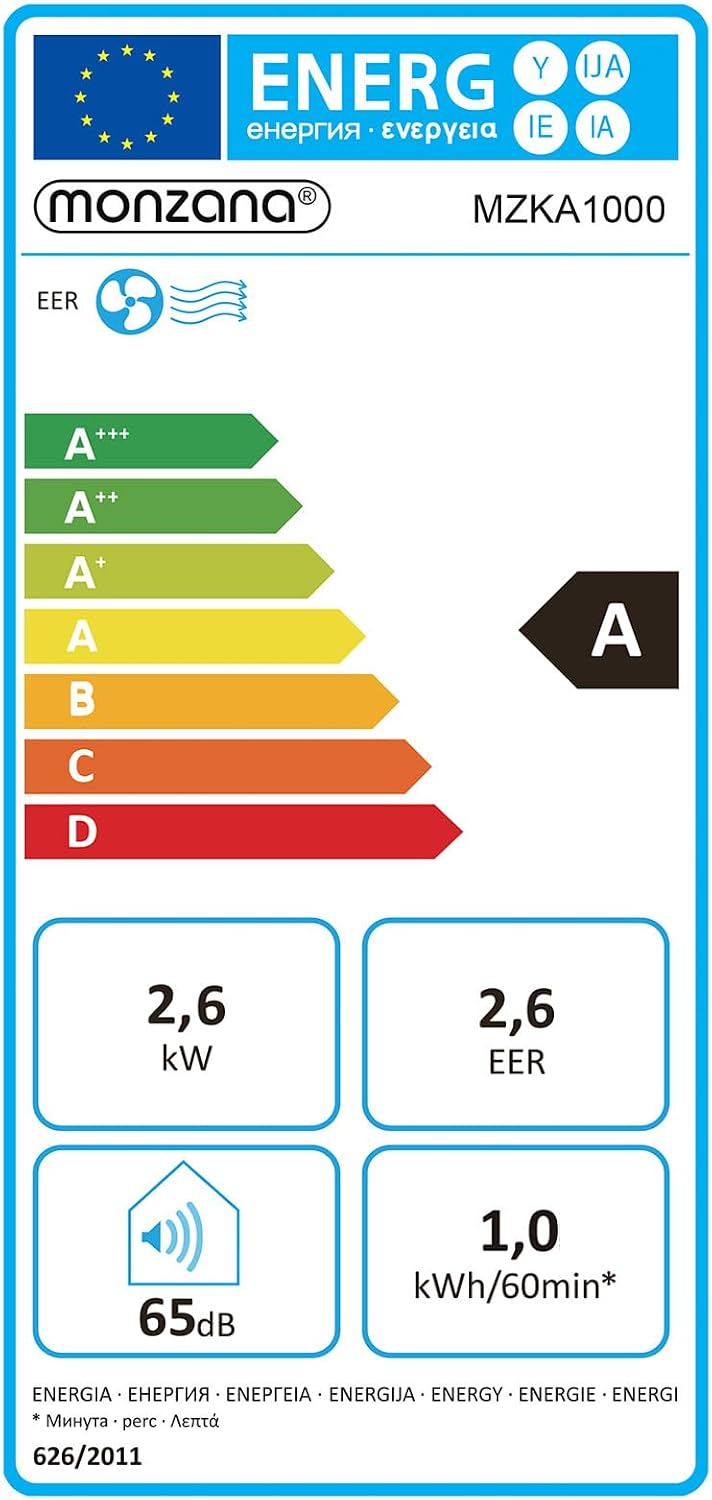

Image: The EU Energy Label and a detailed product data sheet for the MZKA1000 model, showing energy efficiency and technical data.
10. Warranty and Support
The Monzana MZKA1000 Mobile Air Conditioner comes with a Limited Warranty. Please refer to the warranty card included in your package for specific terms and conditions.
For technical support, troubleshooting assistance, or warranty claims, please contact Monzana customer service. Contact information can typically be found on the manufacturer's website or on the product packaging.
