
1. Product Overview
The XTRARM Arius TV Stand is a compact and versatile solution designed for mounting televisions ranging from 32 to 65 inches (81-165 cm). This stand is suitable for both professional and private environments, offering adjustable height and a 360° swivel function for optimal viewing angles. Its stable round base includes height-adjustable rubber feet for secure positioning and can be further secured against accidental tipping. The integrated cable management system helps maintain a tidy appearance.

2. Safety Information
Please read all safety instructions carefully before assembly and use. Failure to follow these instructions may result in property damage, injury, or death.
- Weight and VESA Compatibility: Before assembly, verify your television's VESA mounting pattern and weight. This stand supports TVs up to 35 kg (77 lbs). Do not exceed this maximum weight capacity.
- Component Check: Ensure all components are present and undamaged before beginning assembly. Do not use if any parts are missing or defective.
- Stability: Always ensure the stand is placed on a flat, stable, and level surface. Utilize the adjustable rubber feet to achieve optimal stability.
- Anti-Tip Security: For enhanced safety, especially in households with children or pets, consider securing the stand to the floor or wall using appropriate anti-tip hardware (not included).
- Professional Assistance: If you are unsure about any installation steps or have concerns about the safety of your setup, consult a qualified professional.
- Cable Management: Route all cables securely to prevent tripping hazards and to avoid damage to the cables or the TV.
3. Package Contents
Please check that all the following components are included in your package:
- TV Stand Column
- Round Base
- TV Mounting Brackets (VESA compatible)
- Standard Mounting Hardware (screws, washers, spacers)
- Adjustable Rubber Feet / Caster Wheels
- Cable Management Clips/System

4. Setup Instructions
Follow these steps to assemble your XTRARM Arius TV Stand:
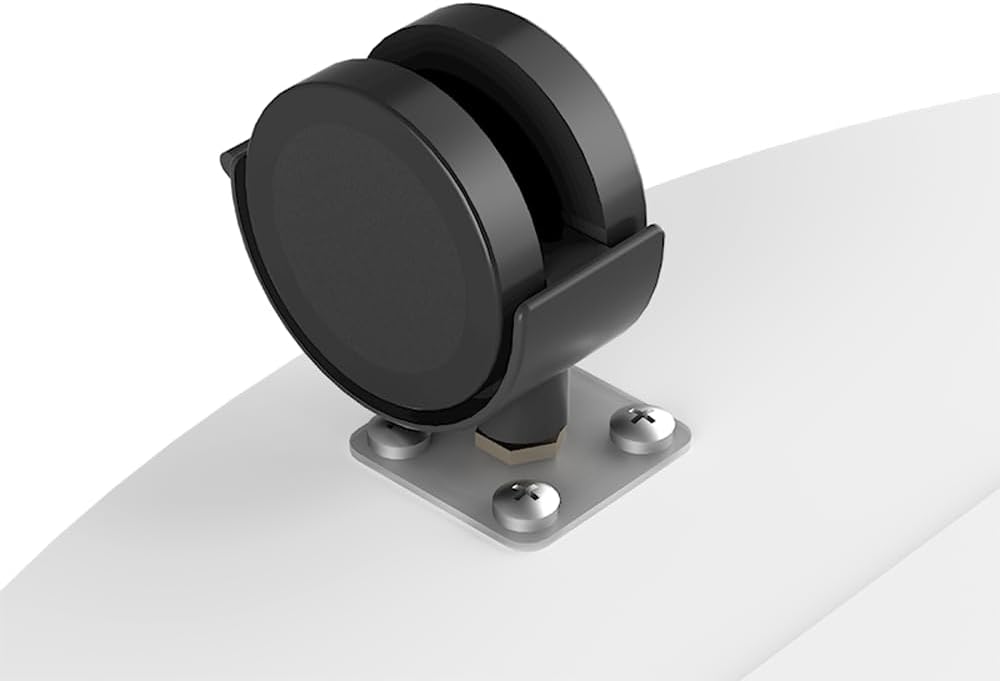
- Assemble the Base: Attach the caster wheels or adjustable rubber feet to the bottom of the round base. Ensure they are securely fastened.
- Attach Column to Base: Insert the main stand column into the center opening of the round base. Secure it using the provided screws and tools.
- Attach VESA Brackets to TV: Carefully place your TV face down on a soft, clean surface. Attach the VESA mounting brackets to the back of your television using the appropriate screws, washers, and spacers from the standard mounting hardware kit. Ensure the brackets are centered and securely tightened.
- Mount TV to Stand: With assistance, carefully lift the television and hook the VESA brackets onto the mounting plate on the stand column. Secure the TV to the stand using the locking mechanisms or screws as indicated in the detailed diagram.
- Adjust Height: Loosen the height adjustment mechanism on the stand column. Adjust the TV to your desired viewing height, then securely tighten the mechanism to lock the TV in place.
- Cable Management: Route all necessary cables through the integrated cable management system within the column to keep them organized and out of sight.

5. Operating Instructions
The XTRARM Arius TV Stand offers flexible viewing options:
- Swivel Function: The mounted television can be rotated 360° around the central column. To adjust the viewing angle, gently grasp the sides of your television and rotate it to the desired position. Avoid excessive force.
- Height Adjustment: To change the height of your television, locate the height adjustment mechanism on the stand column. Loosen the mechanism, carefully slide the TV up or down to the preferred height, and then securely tighten the mechanism to lock it in place. Always ensure the TV is stable after adjustment.

6. Maintenance
Proper maintenance ensures the longevity and safe operation of your TV stand:
- Regular Checks: Periodically inspect all screws, bolts, and connections to ensure they remain tight and secure. Retighten any loose fasteners.
- Cleaning: Clean the stand with a soft, dry, or slightly damp cloth. Avoid using abrasive cleaners, solvents, or harsh chemicals, as these can damage the finish.
- Cable Management: Ensure that cables are properly routed and secured within the cable management system to prevent wear, damage, or entanglement.
7. Troubleshooting
If you encounter issues with your XTRARM Arius TV Stand, refer to the following common problems and solutions:
- TV Stand is Unstable:
- Ensure all assembly screws are fully tightened.
- Verify that the TV's weight and VESA pattern are within the stand's specifications.
- Adjust the rubber feet on the base to ensure the stand is level on the floor.
- Consider using additional anti-tip hardware if stability remains a concern.
- Difficulty Swiveling the TV:
- Check for any cables or obstructions that might be impeding the swivel mechanism.
- Ensure the TV is correctly mounted and not binding against the column.
- Height Adjustment Mechanism Not Working:
- Ensure the locking mechanism is fully disengaged before attempting to adjust the height.
- After adjustment, ensure the mechanism is fully engaged and tightened to secure the TV.
8. Specifications
| Model Number | XTR-FS2020 |
| Brand | XTRARM |
| Color | White |
| Compatible TV Sizes | 32-65 inches (81-165 cm) |
| Maximum Load Capacity | 35 kg (77 lbs) |
| Swivel Angle | 360° |
| VESA Compatibility | 100x100, 100x200, 200x200, 200x300, 300x300, 300x200, 400x200, 400x300, 400x400 mm |
| Adjustable Height | Yes, up to approximately 130 cm (51 inches) |
| Base Diameter | 60 cm (23.6 inches) |
| Column Diameter | 3.4 cm (1.3 inches) |
| Material | Iron (column), Wood/Iron/Lacquered (base) |

9. Warranty and Support
Warranty Information: Spare parts for the XTRARM Arius TV Stand are available for a period of 2 years from the date of purchase.
Customer Support: For technical assistance, warranty claims, or any questions regarding your XTRARM Arius TV Stand, please contact XTRARM customer service. When contacting support, please provide your product model number (XTR-FS2020) and proof of purchase.
