
HOFTRONIC 4409111
HOFTRONIC Burley Outdoor Solar Wall Light with Motion Sensor
Brand: HOFTRONIC | Model: 4409111
1. Introduction
Thank you for choosing the HOFTRONIC Burley Outdoor Solar Wall Light. This solar-powered wall light is designed for outdoor use, offering convenient and energy-efficient illumination with a built-in motion sensor and three distinct lighting modes. Its robust construction and IP65 rating ensure durability in various weather conditions. This manual provides essential information for installation, operation, and maintenance.

Image: HOFTRONIC Burley Outdoor Solar Wall Light installed under an eave, illuminating the area at night.
2. Safety Information
Please read all safety instructions carefully before installation and use. Keep this manual for future reference.
- Ensure the product is installed in a location where it receives direct sunlight for optimal charging.
- Do not attempt to disassemble, repair, or modify the product. This may void the warranty and pose safety risks.
- Keep the solar panel clean from dust, dirt, and debris to maintain charging efficiency.
- This product is designed for outdoor use and is IP65 rated for water and dust resistance. However, avoid submerging it in water.
- Do not dispose of the product in fire, as the battery may explode.
- Keep out of reach of children.

Image: The HOFTRONIC solar light is rated IP65 for water and dust resistance, suitable for outdoor environments.
3. Package Contents
Verify that all components are present before installation:
- 1 x HOFTRONIC Burley Outdoor Solar Wall Light
- 1 x Mounting Hardware (screws, wall plugs)
- 1 x User Manual
4. Installation Instructions
The HOFTRONIC Burley solar wall light is designed for easy installation, requiring minimal tools.
- Choose a Location: Select an outdoor location that receives direct sunlight for at least 4-6 hours daily. This ensures the solar panel can fully charge the battery. Avoid areas under eaves, trees, or shadows that might obstruct sunlight.
- Mark Drilling Points: Hold the light against the desired mounting surface (wall, fence, pergola) and mark the positions for the two mounting screws.
- Drill Holes: Drill holes at the marked positions. Insert wall plugs if mounting on masonry or concrete.
- Mount the Light: Align the light with the drilled holes and secure it using the provided screws. Ensure it is firmly attached.
- Initial Charge: After installation, allow the light to charge in direct sunlight for a full day (at least 6-8 hours) before its first use to ensure optimal battery performance.
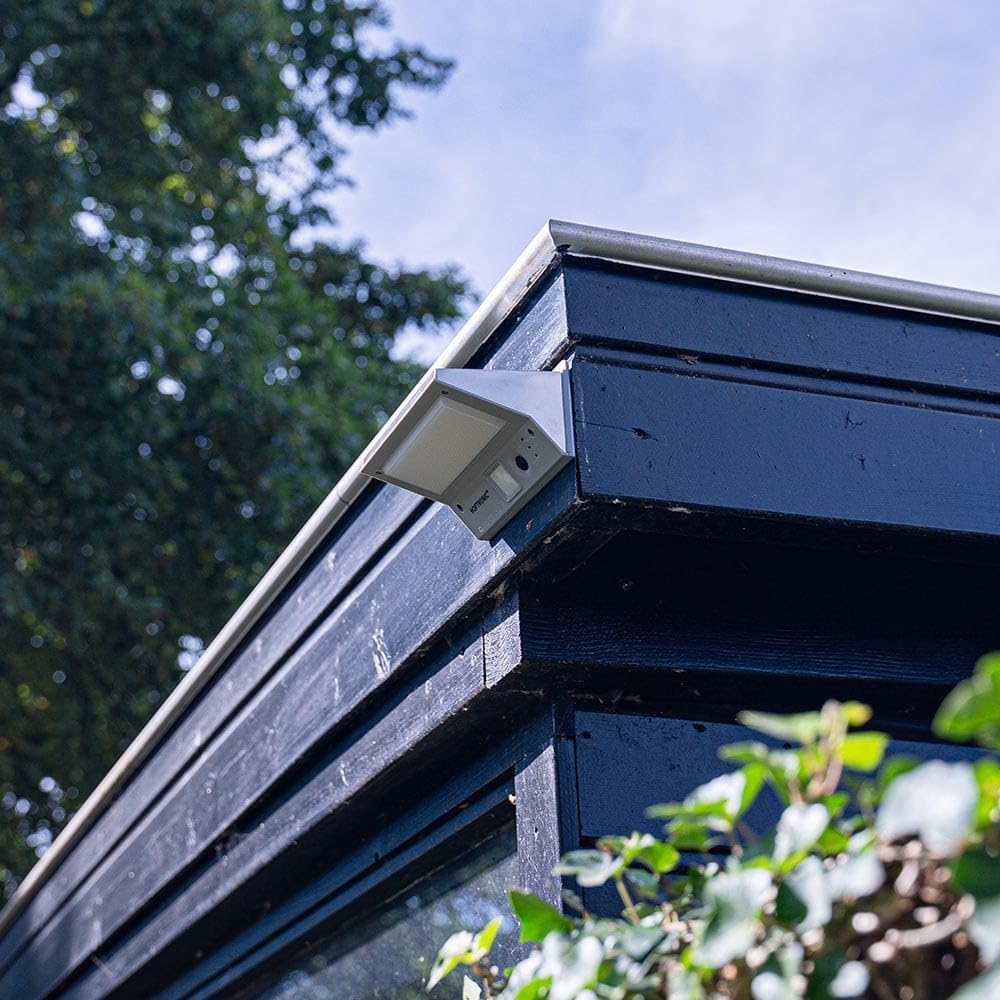
Image: HOFTRONIC Burley Solar Wall Light installed on a shed, demonstrating a typical mounting scenario.

Image: Close-up of the solar panel, highlighting its design for efficient energy conversion.
5. Operating Modes
The HOFTRONIC Burley solar light features an ON/OFF switch and a mode selector to choose between three lighting modes. The light automatically turns on at dusk and off at dawn.

Image: Underside of the light showing the ON/OFF switch, mode selector, and indicator lights.
To select a mode, press the mode button located on the underside of the light. Each press cycles through the modes:
- Mode 1 (Dim Light Sensor Mode): The light stays on continuously at a dim 10 lumens. When motion is detected within the 120° sensor range (up to 5 meters), it brightens to 250 lumens for 35 seconds, then returns to dim light. (Indicated by a Green LED)
- Mode 2 (Strong Light Sensor Mode): The light remains off. When motion is detected within the 120° sensor range (up to 5 meters), it turns on at full brightness (330 lumens) for 35 seconds, then turns off. (Indicated by a Blue LED)
- Mode 3 (Continuous Light Mode): The light stays on continuously at 80 lumens throughout the night. The motion sensor is deactivated in this mode. (Indicated by a Red LED)
Ensure the light is switched ON for it to operate. The solar panel charges the internal battery during the day, and the light automatically activates at night based on the selected mode.
6. Maintenance
Regular maintenance ensures optimal performance and longevity of your solar light.
- Clean the Solar Panel: Periodically wipe the solar panel with a soft, damp cloth to remove dust, dirt, leaves, or snow. A clean panel ensures maximum sunlight absorption and charging efficiency.
- Clean the Light Fixture: Clean the light fixture with a soft, damp cloth. Do not use abrasive cleaners or solvents.
- Check Mounting: Occasionally check that the light is securely mounted and that screws are tight.
7. Troubleshooting
If your solar light is not functioning as expected, try the following solutions:
| Problem | Possible Cause | Solution |
|---|---|---|
| Light does not turn on at night. |
|
|
| Light is dim or only stays on for a short time. |
|
|
| Motion sensor is not working. |
|
|
8. Specifications
| Feature | Detail |
|---|---|
| Brand | HOFTRONIC |
| Model Number | 4409111 |
| Dimensions (L x W x H) | 16 x 11 x 8.5 cm |
| Weight | 0.5 kg (approx.) (Note: Source data listed 5 kg, which is likely an error for this product type.) |
| Material | Stainless Steel, ABS, Polycarbonate (PC) |
| Ingress Protection (IP) Rating | IP65 (Water and Dust Resistant) |
| Light Source | LED |
| Luminous Flux | 330 lumens (max) |
| Color Temperature | 3000 Kelvin (Warm White) |
| Power | 2 Watts |
| Equivalent Incandescent Power | 20 Watts |
| Power Source | Solar Powered |
| Battery Capacity | 2200 mAh |
| Charging Time | 4-6 hours (in direct sunlight) |
| Operating Time | Up to 10 hours (depending on mode and charge) |
| Motion Sensor Detection Angle | 120° |
| Motion Sensor Detection Range | Up to 5 meters |
| Special Features | Motion Detector, Water Resistant |
Note: Specifications are subject to change without notice.
9. Warranty and Support
The HOFTRONIC Burley Outdoor Solar Wall Light comes with a 2-year warranty from the date of purchase, covering manufacturing defects.
For any questions, technical assistance, or warranty claims, please contact HOFTRONIC customer service. We aim to respond to all inquiries within 24 hours.
Contact Information: Please refer to your purchase documentation or the HOFTRONIC official website for the most current customer support details.

Image: The HOFTRONIC solar light is backed by a 2-year warranty, highlighting its durable construction.
Ask a question about this manual
Ask about setup, troubleshooting, compatibility, parts, safety, or missing instructions. Manuals+ will review the question and use this page’s manual context to help answer it.