
1. Introduction
Thank you for choosing the PROTEAR E8830bt AM/FM Radio Bluetooth Hearing Protector Headphones. This device is designed to provide effective hearing protection with an NRR of 25dB, while also offering entertainment and communication features through its integrated AM/FM radio and Bluetooth connectivity. Please read this manual thoroughly before use to ensure proper operation and to maximize the lifespan of your product.

Image 1.1: Front view of the PROTEAR E8830bt headphones.
2. Safety Information
Important: Always prioritize your safety. These headphones are designed to protect your hearing in noisy environments. Failure to follow these instructions may result in hearing damage or other injuries.
- Ensure the earmuffs fit snugly over your ears to achieve the stated Noise Reduction Rating (NRR 25dB).
- Do not modify the headphones. Any modifications may compromise their protective capabilities.
- Avoid using the headphones in situations where the inability to hear ambient sounds (e.g., warning signals, alarms) could pose a safety risk.
- Keep the headphones away from extreme temperatures, direct sunlight, and moisture.
- Use only the provided USB charging cable.
- Dispose of batteries according to local regulations.
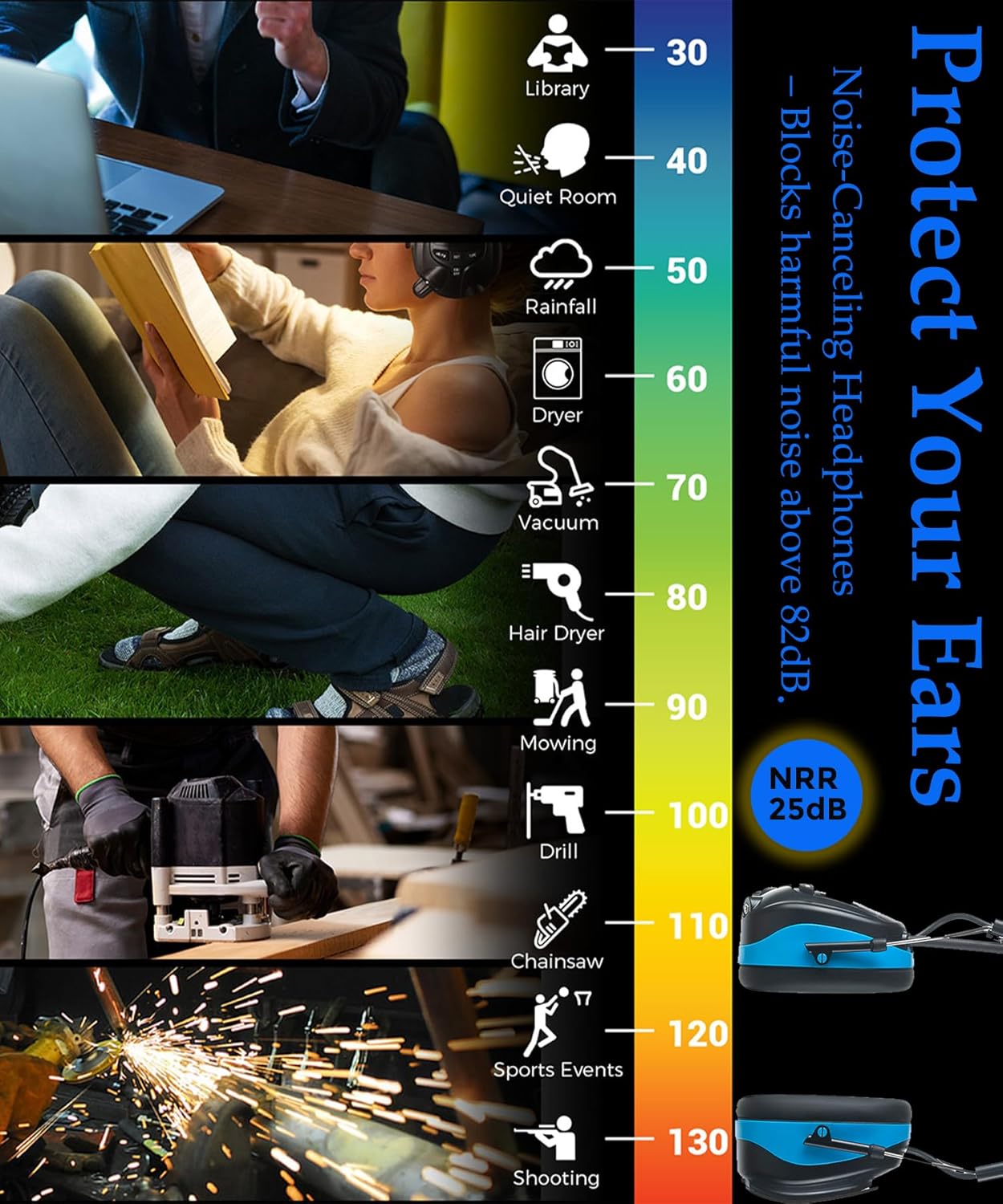
Image 2.1: Chart illustrating noise reduction capabilities across different sound environments.
3. Package Contents
Verify that all items are present in the package:
- PROTEAR E8830bt Hearing Protector Headphones
- USB Charging Cable
- User Manual (this document)
4. Product Overview
The PROTEAR E8830bt headphones feature an ergonomic design for comfort and functionality. Key components include:
- Adjustable Headband: Padded for comfort and adjustable to fit various head sizes.
- Soft Ear Cushions: Designed for extended wear comfort and effective noise sealing.
- Control Panel: Located on one earcup, featuring an LCD display and control buttons.
- Antenna: For improved AM/FM radio reception.
- Built-in Microphone: For hands-free calling.
- USB Charging Port: For recharging the internal battery.
- 3.5mm AUX Input: For wired audio connection (cable not included).

Image 4.1: Detailed view of headphone components and controls.
5. Setup
5.1. Charging the Battery
The headphones are powered by a 1200mAh rechargeable lithium battery. Before first use, fully charge the battery.
- Locate the USB charging port on the earcup.
- Connect the provided USB charging cable to the headphones and to a standard USB power source (e.g., computer, wall adapter).
- The LCD display will indicate charging status. A full charge typically takes several hours.
- Once fully charged, disconnect the cable. The battery provides approximately 8 hours of continuous use.
Image 5.1: Location of the battery compartment and charging port.
5.2. Fitting the Headphones
Proper fit is crucial for both comfort and effective noise reduction.
- Extend the headband by pulling the earcups downwards until they comfortably fit over your ears.
- Ensure the ear cushions create a tight seal around your ears, covering them completely.
- Adjust the headband for a secure yet comfortable fit.

Image 5.2: Instructions for adjusting the headphone headband.
6. Operating Instructions
6.1. Power On/Off
- To power on, press and hold the Power button until the LCD screen illuminates.
- To power off, press and hold the Power button until the LCD screen turns off.
6.2. Adjusting Volume
Use the large volume knob on the earcup to increase or decrease the audio volume.
6.3. AM/FM Radio Operation
- Press the 'Mode' button to switch to AM or FM radio mode. The current frequency will be displayed on the LCD.
- Use the 'Up' and 'Down' buttons to manually tune to a specific frequency.
- To auto-scan and save stations, press and hold the 'Scan' button (if available, or refer to specific button functions on the device). The headphones can store up to 20 AM and 20 FM stations.
- To recall saved stations, use the 'Preset' button (if available) or the 'Up' and 'Down' buttons in preset mode.
6.4. Bluetooth Connectivity
The headphones feature Bluetooth for wireless audio streaming and hands-free calling.
- Ensure the headphones are powered on and in Bluetooth mode (indicated on the LCD). If not, press the 'Mode' button to cycle through modes.
- On your mobile device (phone, tablet, etc.), enable Bluetooth and search for available devices.
- Select "PROTEAR E8830bt" from the list of devices to pair.
- Once paired, you can stream audio wirelessly from your device.
6.5. Hands-Free Calling
When connected via Bluetooth to a phone:
- Answer Call: Press the multi-function button (often the Power/Play/Pause button) once.
- End Call: Press the multi-function button once during a call.
- Reject Call: Press and hold the multi-function button for 2 seconds.

Image 6.1: User demonstrating the headphones in a work environment.
7. Maintenance
To ensure longevity and optimal performance of your PROTEAR headphones:
- Clean the ear cushions and headband regularly with a soft, damp cloth. Do not use harsh chemicals or abrasive cleaners.
- Store the headphones in a cool, dry place when not in use.
- Avoid bending or twisting the antenna excessively.
- Do not immerse the headphones in water.
- Periodically check the ear cushions for wear and tear. Replace if damaged to maintain noise reduction effectiveness.
8. Troubleshooting
If you encounter issues with your headphones, refer to the following common problems and solutions:
| Problem | Possible Solution |
|---|---|
| Headphones do not power on. | Ensure the battery is charged. Connect to a power source using the USB cable. |
| No sound from radio/Bluetooth. | Check volume level. Ensure correct mode (AM/FM/Bluetooth) is selected. For Bluetooth, verify successful pairing. |
| Poor radio reception. | Extend and adjust the antenna. Move to an area with better signal. Auto-scan for stronger stations. |
| Bluetooth device not pairing. | Ensure headphones are in Bluetooth pairing mode. Turn off and on Bluetooth on your mobile device. Ensure devices are within range. |
| Uncomfortable fit or poor noise reduction. | Adjust the headband for a snug fit. Ensure ear cushions fully cover your ears and are not worn out. |
9. Specifications
- Model Name: E8830bt
- Noise Reduction Rating (NRR): 25dB (ANSI S3.19 Certified)
- Connectivity Technology: Bluetooth, USB
- Wireless Communication: Bluetooth
- Battery Type: 1200mAh Rechargeable Lithium Polymer (included)
- Battery Life: Approximately 8 hours
- Display: LCD
- Material: ABS, Leather (ear cushions)
- Item Weight: 450 Grams (15.9 ounces)
- UPC: 700773655956
- Included Components: USB Charging Cable, User Manual
10. Warranty and Support
PROTEAR is committed to providing quality products and customer satisfaction. For any questions, concerns, or technical support regarding your E8830bt headphones, please contact our customer service. We offer after-sales services to address customer issues and ensure a positive experience.
Please refer to the product packaging or the official PROTEAR website for the most current warranty information and contact details.