
Introduction
The PROTEAR Digital AM FM Radio Hearing Protection Headphones (Model E8830) are designed to provide effective hearing protection while allowing you to listen to AM/FM radio. These earmuffs feature a Noise Reduction Rating (NRR) of 25dB, making them suitable for use in various noisy environments such as mowing, construction, and woodworking. The integrated digital radio offers clear reception and easy station tuning.

Figure 1: PROTEAR Digital AM FM Radio Hearing Protection Headphones.
Setup
1. Battery Installation
The headphones require two (2) AA batteries (not included) for operation. To install the batteries:
- Locate the battery compartment cover on one of the earcups.
- Gently open the cover.
- Insert two AA batteries, ensuring correct polarity (+/-) as indicated inside the compartment.
- Close the battery compartment cover securely.

Figure 2: Battery compartment for AA battery installation.
2. Adjusting the Headband
For optimal comfort and hearing protection, adjust the headband to fit your head snugly. The headband is adjustable and features soft padding.
- Grasp the earcups and slide them up or down along the headband wires.
- Adjust until the earcups fully cover your ears and the headband rests comfortably on your head.
- Ensure a tight seal around your ears for maximum noise reduction.

Figure 3: Adjustable headband and earcup rotation for comfortable fit.
Operating Instructions
1. Power On/Off
Press the ON/OFF button located on the earcup to turn the headphones on or off. The LCD display will illuminate when powered on.
2. AM/FM Radio Tuning
The headphones feature digital AM/FM radio tuning with an LCD display.
- Switching Bands: Press the AM/FM button to switch between AM and FM radio bands.
- Manual Tuning: Use the TUNE buttons (up/down arrows) to manually adjust the frequency.
- Seek/Scan: Press and hold the TUNE buttons to automatically seek the next available station.
- Preset Stations: The unit can store up to 8 AM and 8 FM stations. To save a station, tune to the desired frequency, then press and hold the SET button until the preset number flashes. Use the TUNE buttons to select a preset number, then press SET again to confirm. To recall a preset, briefly press the SET button and use the TUNE buttons to select the desired preset.

Figure 4: Control panel with LCD display and function buttons.
3. Volume Control
Adjust the listening volume using the rotary Volume Knob located on the earcup. Rotate clockwise to increase volume and counter-clockwise to decrease it.
4. Auxiliary Input (3.5mm AUX)
The headphones include a 3.5mm AUX port to connect external audio devices (e.g., MP3 players, smartphones) using the provided audio cable.
- Connect one end of the 3.5mm audio cable to the AUX port on the headphone earcup.
- Connect the other end to the audio output jack of your external device.
- Adjust the volume on both the headphones and your external device for desired listening levels.

Figure 5: Using the 3.5mm AUX input with an external audio source.
5. Hearing Protection Functionality
These headphones are certified with an NRR of 25dB, providing significant noise reduction in loud environments. They are designed to protect your hearing from hazardous sound levels.
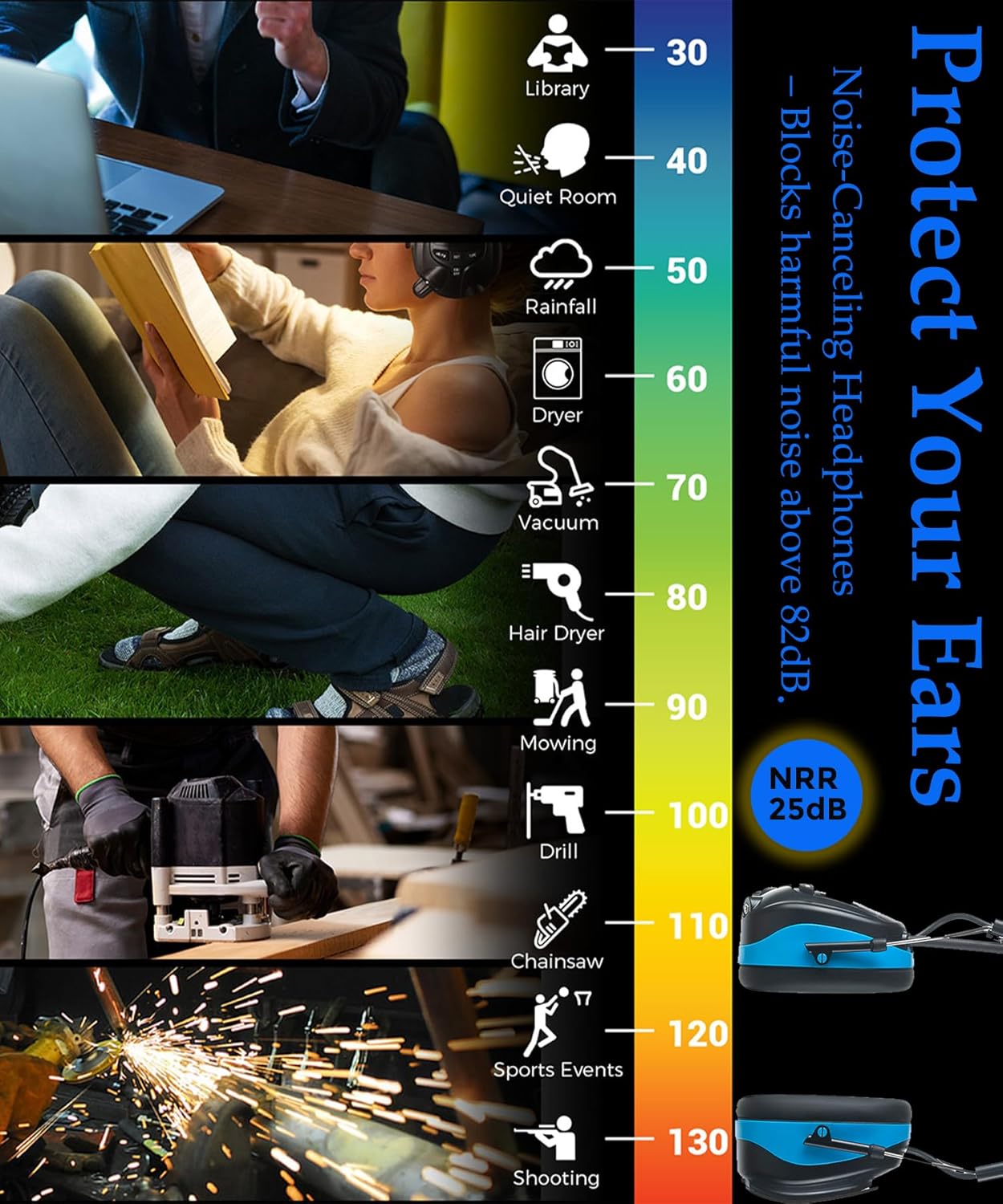
Figure 6: Illustration of noise reduction capabilities across different environments.
Maintenance
Proper maintenance ensures the longevity and performance of your PROTEAR headphones.
- Cleaning: Clean the exterior of the earmuffs with a dry cloth. Avoid using harsh chemicals or abrasive cleaners.
- Earcup Cushions: The ear cushions feature a snap-in design for easy maintenance and replacement. Periodically inspect them for wear and tear. Replace if damaged to maintain optimal hearing protection and comfort.
- Storage: When not in use, store the headphones in a clean, dry place away from extreme temperatures and direct sunlight.
Troubleshooting
| Problem | Possible Cause | Solution |
|---|---|---|
| No power or unit does not turn on. | Dead or incorrectly installed batteries. | Replace batteries with fresh AA batteries, ensuring correct polarity. |
| Poor radio reception. | Weak signal, environmental interference. | Extend the antenna fully. Move to an open area away from large metal objects or other electronic devices. Try manual tuning. |
| No sound from radio or AUX input. | Volume too low, incorrect mode, loose AUX cable. | Increase volume using the knob. Ensure correct mode (AM/FM or AUX). Check AUX cable connection and volume on external device. |
| Headphones are uncomfortable or do not block noise effectively. | Improper fit, worn ear cushions. | Adjust the headband for a snug fit. Ensure earcups fully cover ears. Inspect and replace ear cushions if they are worn or damaged. |
| Unit automatically shuts off. | Low battery power. | Replace batteries. |
Specifications
- Model: E8830
- Noise Reduction Rating (NRR): 25 dB
- Single Number Rating (SNR): 25 dB
- Radio Bands: AM/FM Digital Tuning
- Power Source: 2 x AA Batteries (not included)
- Material: ABS Plastic, Soft Padding
- Fit Type: Over the Head
- Connectivity: 3.5mm AUX Input
- UPC: 700773655949
Official Product Videos
Bluetooth Hearing Protection Headphones with FM AM Radio
This video demonstrates the features and usage of the PROTEAR Hearing Protection Headphones, including AM/FM radio functionality.
AM FM Bluetooth earmuffs for reading, noisy work
This video highlights the use of PROTEAR AM/FM earmuffs for various activities requiring noise reduction, such as reading and working in noisy environments.
Warranty and Support
PROTEAR provides a ONE-YEAR WARRANTY for this product. For any questions or support needs, please refer to the contact information provided with your purchase or visit the official PROTEAR website.