
Introduction
This manual provides essential information for the ALLIMITY BN59-01301A Replacement Remote Control. It is designed to be compatible with various Samsung 2018 UHD Smart TV models. Please read these instructions carefully to ensure proper setup and operation of your new remote control.
Setup
The ALLIMITY BN59-01301A remote control requires two AAA batteries (not included) for operation. No programming is required; simply insert the batteries, and the remote will be ready to use with compatible Samsung TVs.
Battery Installation
- Locate the battery compartment cover on the back of the remote control.
- Slide the cover downwards or press the latch and lift to open the compartment.
- Insert two new AAA batteries, ensuring the positive (+) and negative (-) terminals match the diagrams inside the compartment.
- Replace the battery compartment cover by sliding it back into place until it clicks securely.

Image showing the open battery compartment of the remote control, ready for two AAA batteries to be inserted. The positive and negative terminals are clearly marked.
Operating Instructions
This remote control is designed for immediate use with compatible Samsung 2018 UHD Smart TVs without any setup or programming. Point the remote directly at your television's infrared sensor.
Basic Functions
- Power Button (Red): Turns the TV on or off.
- Source Button: Selects input sources (HDMI, AV, etc.).
- Number Buttons (0-9): Directly select channels.
- Volume Up/Down (VOL +/-): Adjusts the television's volume.
- Mute Button: Mutes or unmutes the television sound.
- Channel Up/Down (CH ^/v): Changes channels sequentially.
- Navigation Pad (Up, Down, Left, Right, Enter): Navigates menus and confirms selections.
- Home/Smart Hub Button: Accesses the TV's Smart Hub or main menu.
- Return Button: Returns to the previous screen or menu.
- Exit Button: Exits the current menu or application.
- Settings Button: Opens the TV's settings menu.
- Guide Button: Displays the electronic program guide.
- Info Button: Shows information about the current program.
- Color Buttons (A, B, C, D): Perform specific functions depending on the TV menu or application.
- Media Control Buttons (Play, Pause, Stop, Fast Forward, Rewind): Controls media playback.
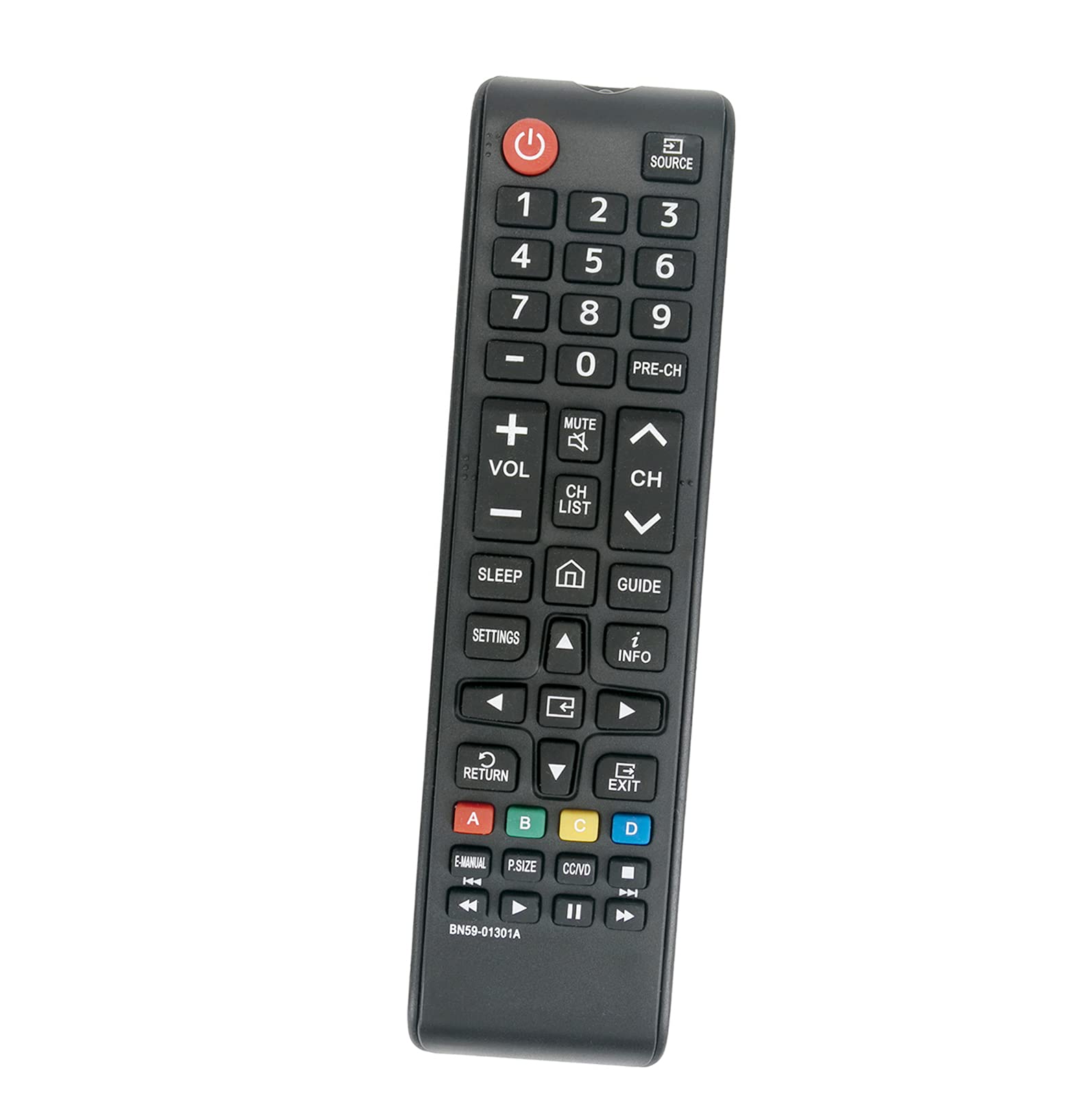
Overview of the ALLIMITY BN59-01301A replacement remote control, displaying all buttons and their labels, including power, volume, channel, navigation, and media controls.
Maintenance
Cleaning
Wipe the remote control with a soft, dry cloth. Do not use liquid cleaners or abrasive materials, as they may damage the surface or internal components.
Battery Care
Replace batteries when the remote's response becomes sluggish or stops working. Remove batteries if the remote will not be used for an extended period to prevent leakage.
Troubleshooting
- Remote not responding:
- Ensure fresh AAA batteries are correctly installed with proper polarity.
- Check for any obstructions between the remote control and the TV's infrared sensor.
- Verify that the TV is powered on.
- Test the remote at a closer distance to the TV.
- Specific buttons not working:
This may indicate a faulty button or a need for battery replacement. If replacing batteries does not resolve the issue, contact customer support.
Specifications
- Brand: ALLIMITY
- Model: BN59-01301A
- Connectivity Technology: Infrared (IR)
- Compatible Devices: Samsung 2018 UHD Smart TVs (e.g., UN43NU7100FXZA, UN55NU6900FXZA, UN55NU7100FXZA, UN75NU7100FXZA, and others)
- Power Source: 2 x AAA Batteries (not included)
- Special Feature: No Programming Required
- Button Quantity: 20
- Maximum Range: Approximately 3.28 feet (1 meter)
- Item Weight: Approximately 2 Ounces
Warranty and Support
This product is a replacement remote control. For any issues or questions regarding its functionality or compatibility, please refer to the seller's return policy or contact the manufacturer, ALLIMITY, directly for support. Keep your purchase receipt for any warranty claims.
