
1. Introduction
This user manual provides comprehensive instructions for the Radioddity DB25-D Dual Band DMR Mobile Radio. It covers the radio's features, setup procedures, operational guidelines, maintenance tips, and troubleshooting information. Please read this manual thoroughly before operating your device to ensure proper functionality and safety.

Figure 1.1: Radioddity DB25-D Mobile Radio with Speaker Microphone
2. Product Overview
2.1 Key Features
- 20W Transmit Power & 300,000 DMR Contacts: The Radioddity DB25-D is a compact yet powerful mobile radio. It features a selectable transmit power of 20W (High) or 5W (Low). The radio supports up to 300,000 DMR contacts and allows for mass data import via software.
- Dual Band, Dual Mode, and Dual Standby: The DB25-D operates in dual band (VHF and UHF) and dual mode (analog and digital, DMR Tier I and Tier II). It also supports dual standby functionality, allowing simultaneous monitoring of two frequencies.
- Integrated GPS and APRS Functionality: The DB25-D includes an integrated GPS receiver, enabling APRS functionality for real-time digital communication of location data and other relevant information. This feature is beneficial for outdoor and mobile applications.
- High-Resolution Color Display and Dual Speakers: The radio features a high-resolution color display and dual speakers, one located near the microphone and another on the radio's front panel. Users can select to use both speakers or only one. Microphone gain is customizable for optimal audio quality.
- 7 Customizable Function Keys: The radio offers 7 customizable function keys: 3 on the radio unit and 4 on the microphone. Each key supports both short and long press functions, allowing for personalized operation.

Figure 2.1: High-Resolution Color Display
2.2 Radio Unit Components
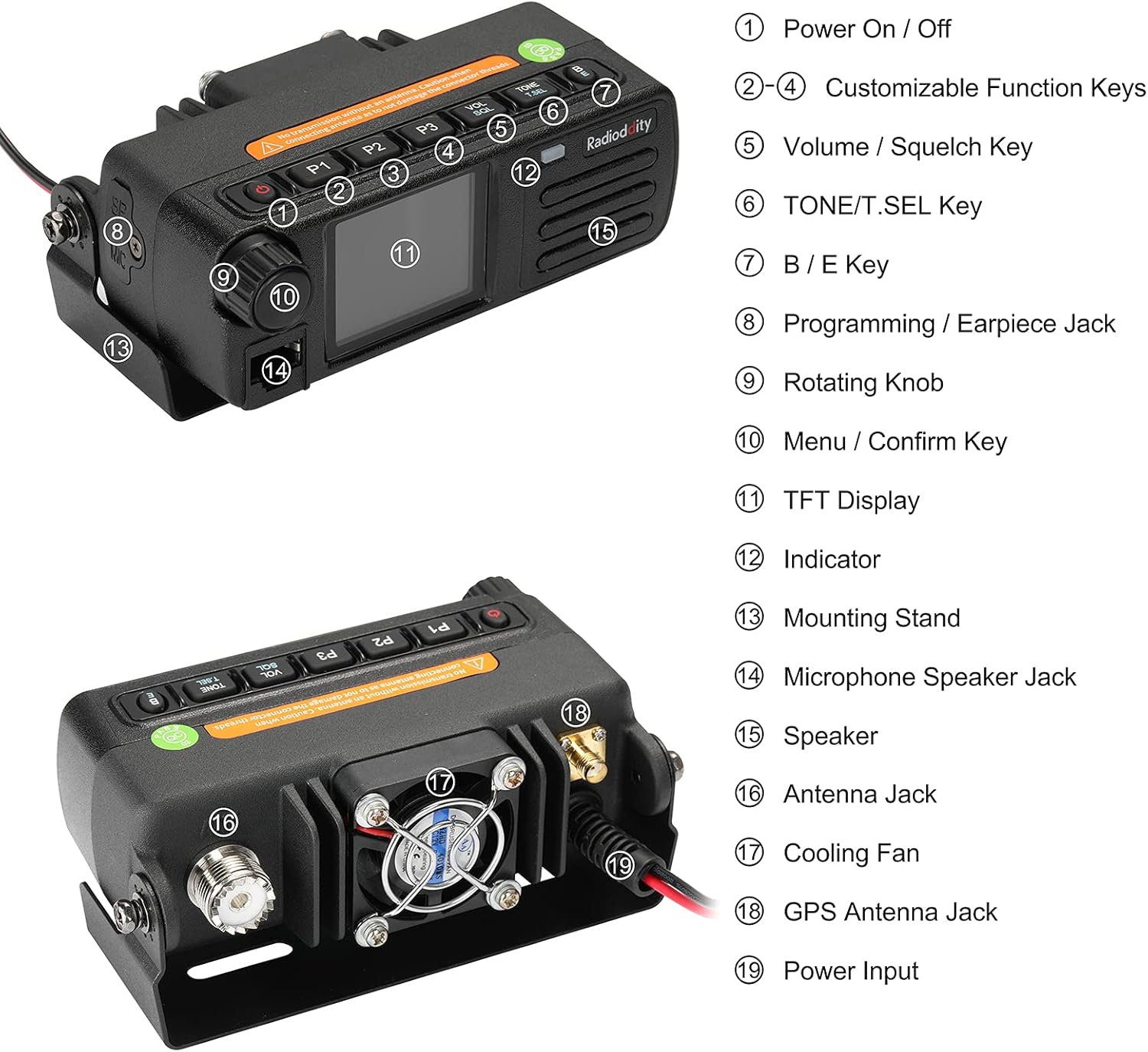
Figure 2.2: Radioddity DB25-D Radio Unit Components
- Power On / Off Button
- Customizable Function Keys (P1, P2, P3)
- Volume / Squelch Key
- TONE / T.SEL Key
- B / E Key
- Programming / Earpiece Jack
- Rotating Knob
- Menu / Confirm Key
- TFT Display
- Indicator LED
- Mounting Stand Attachment Point
- Microphone Speaker Jack
- Speaker
- Antenna Jack
- Cooling Fan
- GPS Antenna Jack
- Power Input
2.3 Speaker Microphone Components

Figure 2.3: Speaker Microphone Components
- Speaker
- PTT (Push-To-Talk) Key
- Indicator LED
- Keypad Panel
- Customizable Function Keys (P4, P5, P6, P7)
- Microphone
2.4 Package Contents

Figure 2.4: Included Accessories
The package typically includes the Radioddity DB25-D radio unit, speaker microphone, power cable, mounting bracket, and a USB programming cable.
3. Setup
3.1 Mounting the Radio
The DB25-D is designed for mobile or base station use. Use the provided mounting bracket to secure the radio in a stable location. Ensure adequate ventilation around the unit, especially for the cooling fan, to prevent overheating during extended operation.
3.2 Power Connection
Connect the provided power cable to the radio's power input (19) and to a stable 12V DC power source. Ensure correct polarity to avoid damage to the unit. The radio requires a 12 Volt (DC) power supply.
3.3 Antenna Connection
Connect a suitable VHF/UHF antenna to the Antenna Jack (16) on the rear of the radio. For GPS functionality, connect the GPS antenna to the GPS Antenna Jack (18). Ensure all connections are secure.
3.4 Speaker Microphone Connection
Plug the speaker microphone into the Microphone Speaker Jack (14) on the front of the radio unit.
4. Operating Instructions
4.1 Power On/Off
Press the Power On/Off Button (1) to turn the radio on or off.
4.2 Volume and Squelch Adjustment
Use the Volume / Squelch Key (3) and the Rotating Knob (9) to adjust the audio volume and squelch level. The dual speakers (15 on radio, speaker on mic) can be configured via settings.
4.3 Channel and Frequency Selection
Use the Rotating Knob (9) to navigate through channels or adjust frequencies in VFO mode. The keypad on the speaker microphone can also be used for direct frequency entry.
4.4 Dual Band and Dual Mode Operation
The DB25-D supports both VHF and UHF bands, and can operate in analog or digital (DMR Tier I and Tier II) modes. Switch between modes and bands as needed for your communication requirements. The dual standby feature allows monitoring of two frequencies simultaneously.
4.5 Customizable Function Keys
The 3 function keys on the radio unit (P1, P2, P3) and 4 on the speaker microphone (P4, P5, P6, P7) can be programmed for various functions with both short and long press actions. Refer to the programming software for configuration options.
5. GPS and APRS Functionality
The integrated GPS receiver enables the Automatic Packet Reporting System (APRS) feature. APRS allows for real-time digital communication of your geographical position and other relevant data. This is particularly useful for tracking and location-based services in outdoor and mobile environments.

Figure 5.1: GPS and APRS Function Overview
6. Programming and Software
The Radioddity DB25-D requires programming software (CPS) for advanced configuration, channel management, and contact list import. The radio supports up to 300,000 DMR contacts and 4,000 channels, which can be managed through the software.
- Software Acquisition: The official CPS software can typically be downloaded from the Radioddity website.
- Compatibility: Users have reported varying compatibility with different Windows operating systems. If issues arise with the official software, community-developed alternatives may be available.
- Contact List Import: Large contact lists (e.g., DMR IDs) can be imported from .csv files, which may take a significant amount of time (e.g., 45 minutes for 255,000 contacts).
- Customization: The software allows for detailed customization of radio settings, including microphone gain and function key assignments.
7. Maintenance
- Cleaning: Use a soft, dry cloth to clean the radio's exterior. Avoid using harsh chemicals or solvents.
- Connections: Periodically check all cable connections (power, antenna, microphone) to ensure they are secure and free from damage.
- Environment: Operate the radio within its specified temperature and humidity ranges. While the device is noted as water-resistant, avoid direct exposure to heavy rain or immersion.
- Firmware Updates: Check the Radioddity website for any available firmware updates to improve performance or add features.
8. Troubleshooting
This section addresses common issues you might encounter with your Radioddity DB25-D radio.
| Problem | Possible Cause | Solution |
|---|---|---|
| Radio does not power on. | Incorrect power connection, faulty power cable, internal fault. | Verify power cable connection and polarity. Test with a known good 12V DC power source. If issue persists, contact support. |
| Programming software not working. | Software incompatibility with OS (e.g., Windows 11), incorrect driver installation, faulty programming cable. | Ensure correct drivers are installed. Check Radioddity website for updated software or drivers. Consider using community-developed CPS versions if official software is problematic. Verify programming cable connection. |
| No audio or low audio output. | Volume too low, squelch too high, speaker selection settings, faulty speaker/microphone. | Adjust volume and squelch levels. Check radio settings for speaker output (single/dual). Test microphone gain settings. |
| Cannot transmit or receive. | Incorrect frequency/channel, antenna not connected, high SWR, power output setting (low/high). | Verify frequency and channel settings. Ensure antenna is properly connected. Check transmit power setting. Consult a qualified technician for SWR issues. |
9. Specifications
| Specification | Detail |
|---|---|
| Brand | Radioddity |
| Model | DB25-D |
| Product Dimensions | 6.6 x 12.19 x 4.32 cm |
| Item Weight | 907.18 grams |
| Tuner Technology | VHF, UHF |
| Voltage | 12 Volts (DC) |
| Batteries Required/Included | No |
| Additional Features | Integrated GPS receiver, APRS support, Dual Band and Mode, Color Screen Dual Speaker, 7 Customizable Keys |
| Compatible Peripherals | Programming software, Speaker microphone with 4 customizable keys |
| Water Resistance Level | Water Resistant |
| Number of Channels | 4,000 (programmable) |
10. Support
For technical assistance, warranty information, or further inquiries, please contact Radioddity customer support. Many users have reported positive experiences with their responsive and helpful support team.
Refer to the official Radioddity website for the most up-to-date contact information, software downloads, and additional resources.


