
1. Introduction
Thank you for choosing the IRONCK Nightstand with Wireless Charging. This manual provides essential information for the safe and efficient assembly, operation, and maintenance of your new nightstand. Please read these instructions carefully before use and retain them for future reference.
2. Product Overview
The IRONCK Nightstand is a 2-tier industrial-style end table designed for small spaces, suitable for living rooms or bedrooms. It features a sturdy metal frame and engineered wood top with a vintage brown finish. A key feature is the integrated wireless charging pad, offering convenient power for compatible devices.

Image: The IRONCK Nightstand with Wireless Charging, showcasing its design and placement next to a bed.
3. Package Contents
Before assembly, please verify that all components are present and undamaged. If any parts are missing or damaged, contact customer support.
- Nightstand Top Panel (Engineered Wood)
- Lower Shelf Panel (Engineered Wood)
- Metal Frame Components
- Wireless Charging Unit with USB-C Cable
- Assembly Hardware (screws, bolts, Allen wrench)
- Instruction Manual
4. Setup and Assembly
Assembly of the IRONCK Nightstand is designed to be straightforward. Follow these general steps. For detailed visual guidance, refer to the included assembly diagram.
- Unpack Components: Carefully remove all parts from the packaging and lay them out on a clean, soft surface to prevent scratches.
- Assemble Frame: Attach the metal frame components using the provided screws and Allen wrench. Ensure all connections are secure but do not overtighten until the entire frame is assembled.
- Attach Lower Shelf: Secure the lower shelf panel to the assembled metal frame.
- Install Top Panel: Place the top panel onto the frame and secure it with the remaining hardware.
- Connect Wireless Charger: The wireless charging unit is pre-installed in the top panel. Connect the integrated USB-C cable to a suitable power adapter (not included) for optimal charging performance.
- Final Tightening: Once all components are in place, gently tighten all screws and bolts to ensure stability.
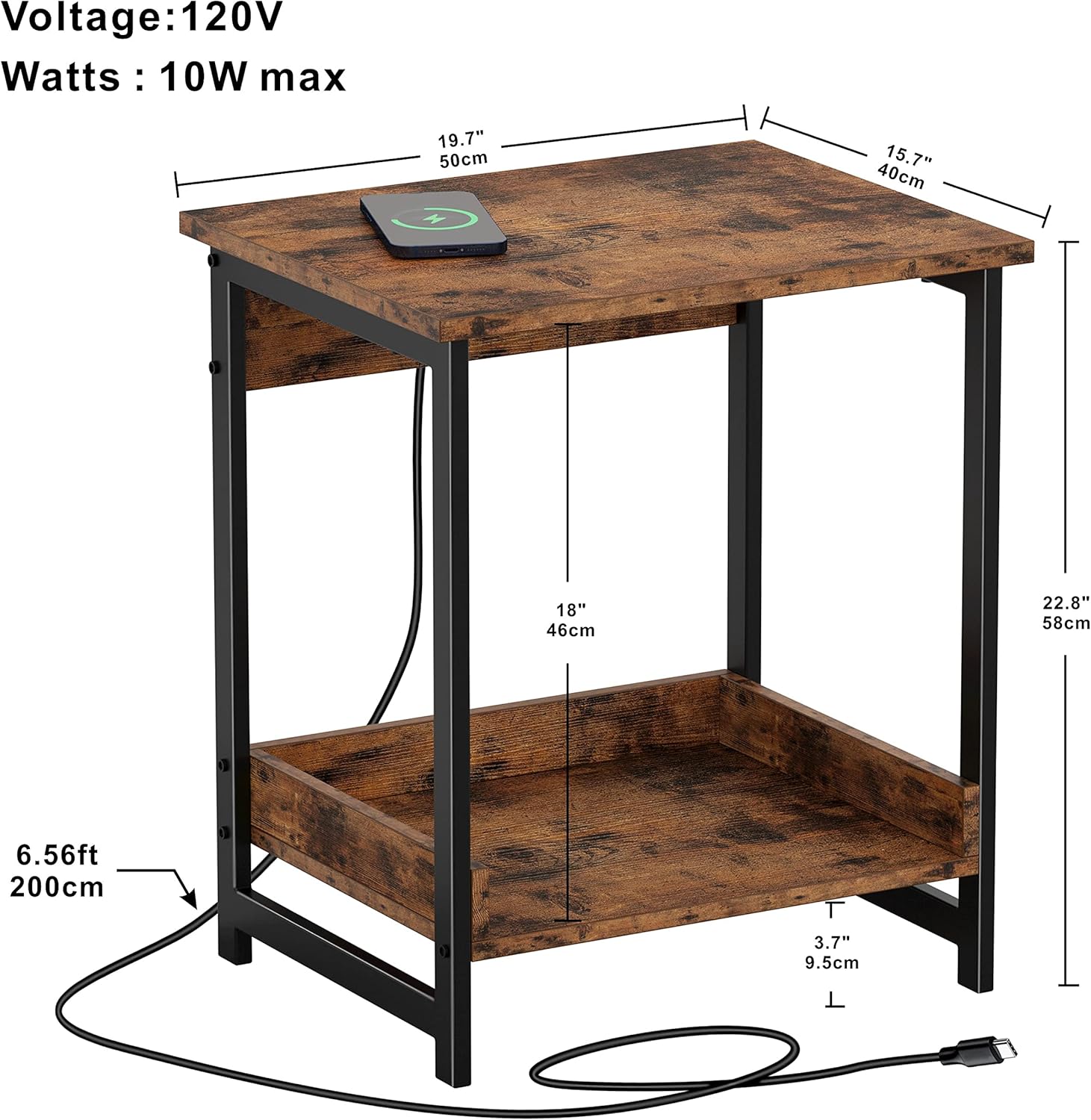
Image: Dimensional diagram of the IRONCK Nightstand, including height, width, depth, and cable length.
Video: Overview of the IRONCK End Table with Storage and Wireless Charging, demonstrating its features and potential use cases.
5. Operating Instructions - Wireless Charging
The nightstand features an integrated wireless charging pad for compatible devices. To use this function:
- Power Connection: Ensure the nightstand's USB-C cable is securely connected to a power adapter and plugged into a working electrical outlet.
- Device Placement: Place your compatible smartphone or wireless earbuds directly on the center of the charging pad located on the nightstand's top surface.
- Charging Confirmation: Your device should indicate that it is charging. If not, adjust the device's position on the pad.
Important Notes for Wireless Charging:
- The charger works with rubber, plastic, or TPU cases up to 4mm thickness.
- Cases made of metal, or attachments such as magnets, cards, and grips, will interfere with charging. Remove such items before charging.
- For stable and efficient charging, ensure your phone is placed precisely on the center of the charging part.
- Use a compatible power adapter with the USB-C plug to ensure high-efficiency charging.

Image: Wireless charging compatibility details, showing 10W for Samsung, 7.5W for iPhone, and support for various wireless earbuds.

Image: Icons highlighting key features: Easy Charging, Superior Safety, and Waterproof surface.
Video: Demonstration of the IRONCK Nightstand's wireless charging feature in use.
6. Maintenance
To ensure the longevity and appearance of your IRONCK Nightstand, follow these maintenance guidelines:
- Cleaning: Wipe surfaces with a soft, damp cloth. Avoid harsh chemicals or abrasive cleaners, which can damage the finish.
- Spills: Promptly clean up any spills, especially on the engineered wood surfaces, to prevent staining or water damage.
- Hardware: Periodically check and tighten all screws and bolts to maintain stability.
- Wireless Charger: Keep the charging pad free of dust and debris. Do not attempt to disassemble the charging unit.
- Placement: Avoid placing the nightstand in direct sunlight or near heat sources, which can cause fading or warping.
7. Troubleshooting
If you encounter issues with your IRONCK Nightstand, particularly with the wireless charging function, refer to the following common solutions:
Wireless Charging Issues:
- Device Not Charging:
- Ensure the USB-C cable is fully plugged into a power adapter and the adapter is connected to a live power outlet.
- Verify your device is wirelessly charging compatible.
- Reposition your device on the charging pad. It must be centered for proper contact.
- Remove any phone cases thicker than 4mm or cases made of metal. Magnets, cards, or grips attached to the phone or case can also interfere.
- Try a different power adapter if available, ensuring it provides sufficient power for wireless charging.
- Intermittent Charging:
- This often indicates poor alignment. Adjust the device's position on the pad.
- Check for foreign objects between the device and the charging pad.
- Ensure the power adapter is stable and not experiencing power fluctuations.
Structural Issues:
- Wobbling/Instability:
- Check all assembly hardware (screws, bolts) and tighten them securely. Do not overtighten.
- Ensure the nightstand is placed on a flat, level surface.
If these steps do not resolve the issue, please contact IRONCK customer support.
8. Specifications
| Brand | IRONCK |
| Model Name | Industrial |
| Product Dimensions (D x W x H) | 15.7"D x 19.7"W x 22.8"H (40cm D x 50cm W x 58cm H) |
| Frame Material | Metal |
| Top Material Type | Engineered Wood |
| Shape | Square |
| Base Type | Leg |
| Number of Items | 1 |
| Table Design | Nightstand |
9. Warranty and Support
IRONCK products are manufactured to high-quality standards. For specific warranty information, please refer to the warranty card included with your purchase or visit the official IRONCK website. If you require assistance, have questions, or need to report a missing/damaged part, please contact IRONCK customer support:
- Website: Visit the IRONCK Store on Amazon
- Email: support@ironck.com (Example email, replace with actual if available)
- Phone: 1-800-XXX-XXXX (Example phone, replace with actual if available)
Please have your product model name (Industrial) and purchase date ready when contacting support.

