
Geevon 8703+8688
Geevon 8703 Wireless Rain Gauge & 8688 Wireless Digital Hygrometer Temperature Gauge User Manual
Model: 8703+8688
Product Overview
The Geevon 8703 Wireless Rain Gauge and 8688 Wireless Digital Hygrometer Temperature Gauge system provides comprehensive environmental monitoring for your home and garden. The 8703 rain gauge features a self-emptying collector that measures rainfall, outdoor temperature, and humidity, transmitting data wirelessly to an indoor display. The 8688 hygrometer offers indoor and outdoor temperature and humidity readings, along with time, alarm, and calendar functions. Both units are designed for ease of use and accurate data collection.
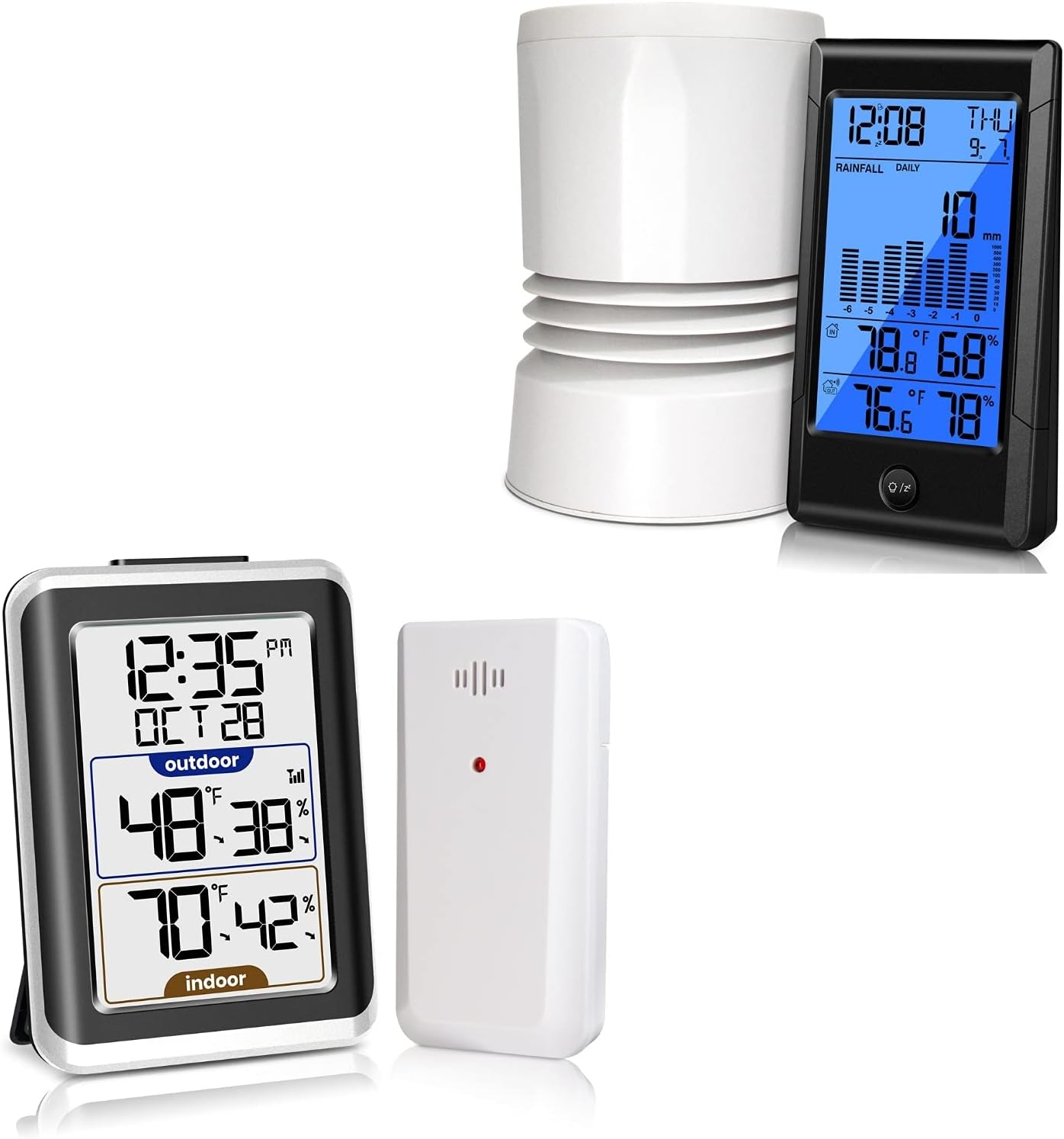
Image: Main components of the Geevon 8703 Wireless Rain Gauge and 8688 Wireless Digital Hygrometer Temperature Gauge system, including the self-emptying rain collector, the rain gauge display unit, the hygrometer display unit, and its remote sensor.
Setup and Installation
Powering the Units
- Insert required batteries (not included) into the rain gauge display unit, the rain collector sensor, the hygrometer display unit, and its remote sensor. Ensure correct polarity.
Rain Gauge Installation (Model 8703)
- The self-emptying rain collector should be placed in an open area, away from obstructions like trees or buildings, to ensure accurate rainfall collection.
- Ensure the rain collector is level for precise measurements.
- The rain gauge display unit can be placed indoors.
- The wireless transmission range between the rain collector and the display unit is up to 150 feet (50 meters) in an open area.

Image: Illustration showing the wireless connection between the outdoor self-emptying rain collector and the indoor display unit, highlighting the effective transmission range.
Hygrometer Installation (Model 8688)
- The hygrometer display unit can be placed on a tabletop or mounted on a wall for convenience.
- The outdoor remote sensor should be placed vertically and out of direct sunlight for accurate temperature and humidity readings.
- Do not place the sensor horizontally or directly on the ground.
- The maximum effective distance between the hygrometer display screen and its remote sensor is within 200 feet (60 meters).

Image: Visual guidelines for optimal placement of the outdoor hygrometer sensor, emphasizing vertical orientation, protection from direct sunlight, and avoiding horizontal or ground placement, along with the maximum wireless range.
Operating Instructions
Rain Gauge Display (Model 8703)
- The display shows current rainfall, outdoor temperature, and humidity.
- Rainfall totals can be viewed for the past day, week, month, or total precipitation since the last reset.
- The unit features an alarm and snooze function, which can be set as needed.

Image: The Geevon 8703 rain gauge display unit showing its alarm and snooze functionality, indicating its use beyond just weather monitoring.
Hygrometer Display (Model 8688)
- Displays indoor and outdoor temperature and humidity.
- Records 24-hour maximum and minimum temperature and humidity readings.
- Trend arrows indicate whether temperature and humidity are rising or falling.
- Temperature can be displayed in Celsius (°C) or Fahrenheit (°F).
- Includes a built-in alarm clock (12/24H format), snooze function, and calendar.
- Supports up to 3 remote sensors (one included, additional sensors sold separately) for monitoring different locations.
- Press the "SNOOZE/LIGHT" button to activate a soft white backlight for 10 seconds.
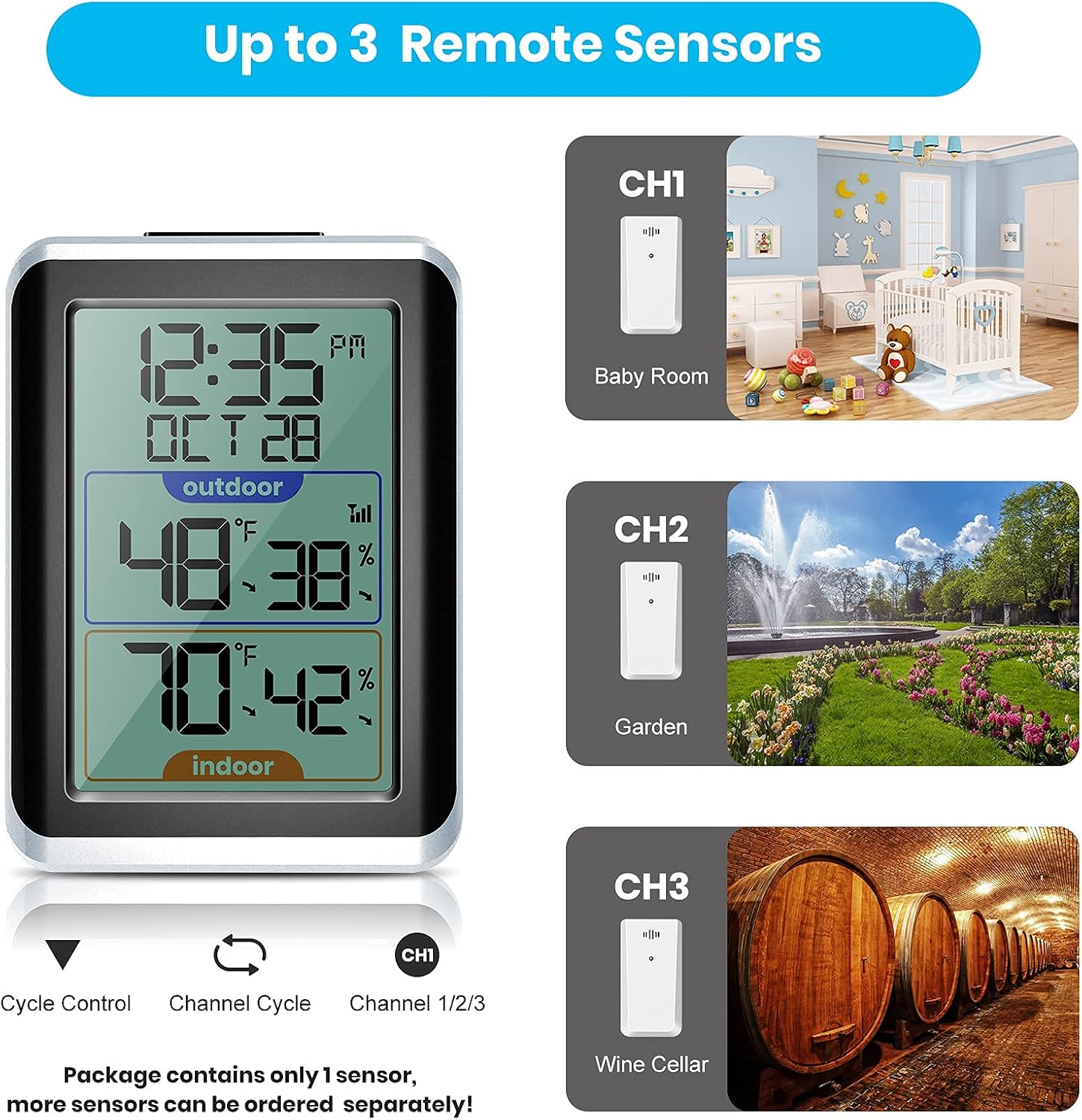
Image: The Geevon 8688 hygrometer display unit illustrating its capability to connect with up to three remote sensors, allowing for monitoring of different areas like a baby room, garden, or wine cellar.

Image: The Geevon 8688 hygrometer display unit demonstrating its backlight feature, which illuminates the screen for improved visibility in low-light conditions.
Maintenance
- The 8703 rain collector is self-emptying, requiring no daily manual emptying.
- Periodically check the rain collector for any debris (leaves, dirt) that might obstruct the tipping bucket mechanism and clean if necessary.
- Wipe down the display units and sensors with a soft, damp cloth. Do not use abrasive cleaners or solvents.
- Replace batteries in all units when the low battery indicator appears on the display, or if readings become inconsistent.
Troubleshooting
No Readings or Inconsistent Data
- Check Batteries: Ensure all units have fresh batteries and are inserted correctly.
- Transmission Range: Verify that the outdoor sensors are within the specified wireless range of their respective display units (150ft/50m for rain gauge, 200ft/60m for hygrometer). Reduce obstacles between units.
- Sensor Placement: Ensure outdoor sensors are placed vertically and away from direct sunlight or heat sources that could affect readings.
- Re-sync: If connection is lost, try re-syncing the sensors with their display units according to the quick start guide (refer to specific pairing instructions if provided with product).
Inaccurate Rainfall Readings
- Level Surface: Ensure the rain collector is placed on a perfectly level surface.
- Clear Debris: Check the tipping bucket mechanism inside the rain collector for any debris that might prevent it from tipping freely.
- Obstructions: Confirm there are no overhead obstructions (trees, eaves) that could block rain from entering the collector.
Specifications
| Feature | Specification |
|---|---|
| Brand | Geevon |
| Model | 8703+8688 |
| Power Source | Battery Powered |
| Connectivity Technology | 868 MHz Wireless |
| Included Components | Outdoor Rain Gauge Sensor, Indoor Rain Gauge Display, Outdoor Hygrometer Sensor, Indoor Hygrometer Display, Mounting Hardware |
| Temperature Accuracy | 0.5 °C |
| Rain Gauge Resolution | 0.1mm / 0.01 inch |
| Rain Gauge Transmission Range | Up to 150 ft (50 m) in open area |
| Hygrometer Transmission Range | Up to 200 ft (60 m) in open area |
| Display Type | Digital LCD |
| Special Features | Adjustable Brightness (backlight), Alarm, Thermometer, Hygrometer, Calendar, Max/Min Records, Trend Arrows |

Image: Front and back views of the Geevon 8703 rain gauge display unit, illustrating its physical dimensions and button layout.

Image: Comparison of the Geevon 8688 hygrometer display unit's dimensions against a smaller, generic display, highlighting its larger LCD screen for better readability.

Image: Dimensions of the Geevon 8703 self-emptying 3-in-1 wireless rain collector, which also measures outdoor temperature and humidity.
Warranty and Support
Specific warranty information and detailed support contact details are not available in the provided product data. Please refer to the product packaging, the manufacturer's official website, or contact Geevon customer service directly for warranty claims, technical support, and service inquiries.
For further assistance, please visit the official Geevon website or consult the documentation included with your purchase.
Related documents8703+8688


Ask a question about this manual
Ask about setup, troubleshooting, compatibility, parts, safety, or missing instructions. Manuals+ will review the question and use this page’s manual context to help answer it.