
1. Introduction
This manual provides essential information for the safe and efficient operation, installation, and maintenance of your HUL Pureit Ultima Eco Mineral RO+UV+MF 10L Water Purifier. Please read these instructions carefully before using the appliance and retain them for future reference.
2. Safety Information
Observe the following safety precautions to prevent damage to the appliance or injury to yourself:
- Ensure the power supply matches the specifications indicated on the product label.
- Do not immerse the appliance in water or other liquids.
- Keep the appliance away from direct sunlight and heat sources.
- Do not attempt to repair or modify the appliance yourself. Contact qualified service personnel.
- Always unplug the purifier before cleaning or performing any maintenance.
- This appliance is intended for household use only.
3. Product Overview
The HUL Pureit Ultima Eco Mineral RO+UV+MF water purifier is designed to provide safe and clean drinking water through a multi-stage purification process.
Key Features:
- Advanced 7-Stage Purification: Ensures comprehensive removal of impurities.
- 10 Liters Storage Capacity: Suitable for medium to large families.
- Digital Purity Indicator: Monitors water quality up to 5000 times per second.
- TDS Removal: Effectively reduces Total Dissolved Solids up to 2000 ppm.
- Eco Recovery Technology: Achieves up to 60% water recovery, saving water.
- Mineral Enriched Water: Adds essential minerals like calcium and magnesium.
- Double Purity Lock: Advanced alert system for filter expiry and auto shut-off.
- 100% Food Grade Plastic: Ensures no harmful leaching into purified water.
Components:
The purifier includes the main unit, a power adapter, and a warranty card. Specific internal components include various filters (RO, UV, MF) and a storage tank.
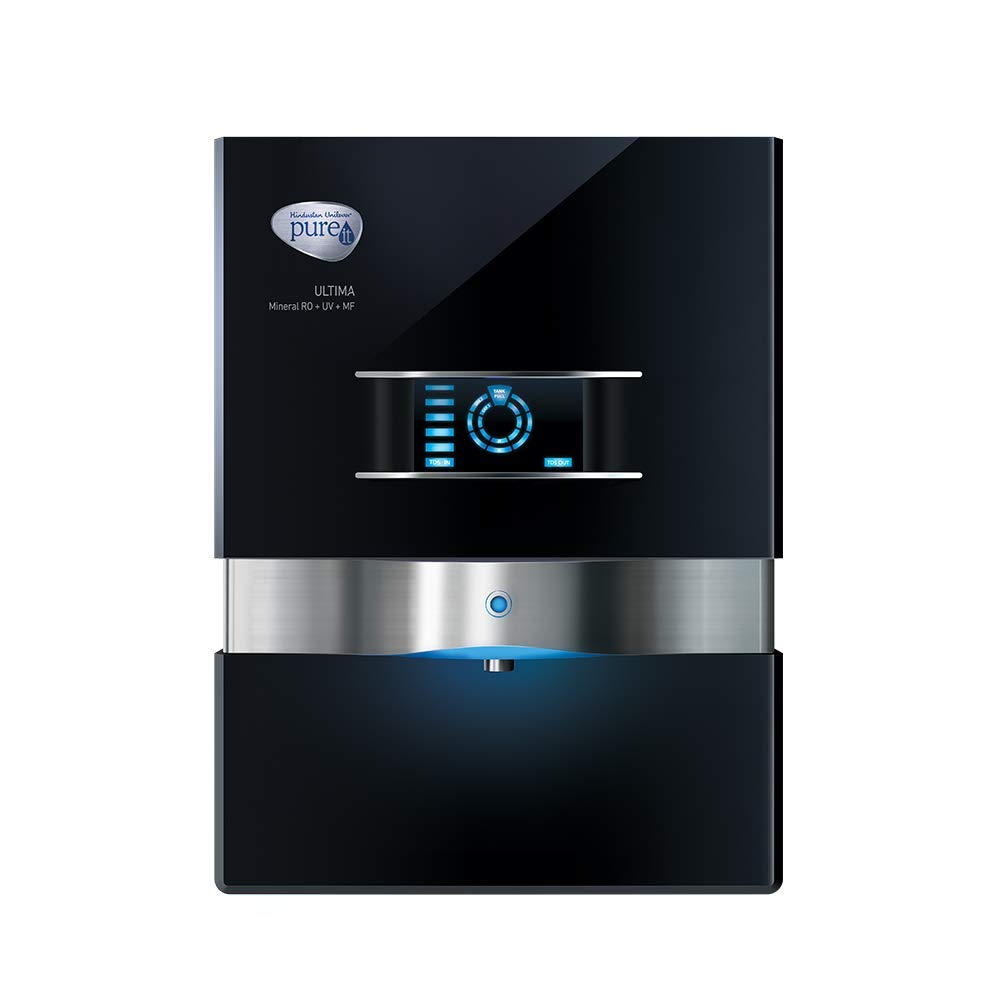
Figure 1: Front view of the HUL Pureit Ultima Eco Mineral RO+UV+MF 10L Water Purifier.
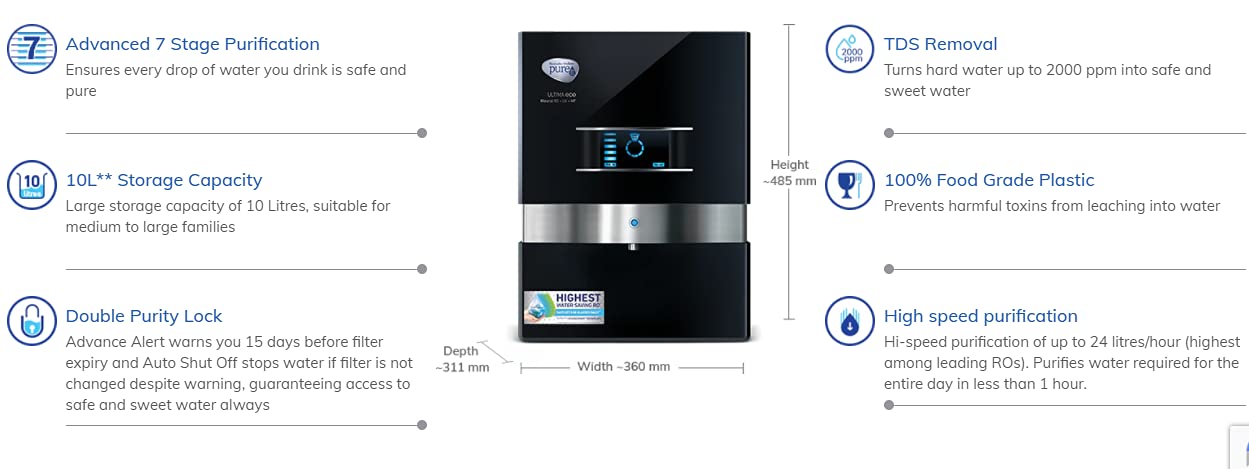
Figure 2: Key features and dimensions of the Pureit Ultima Eco Mineral RO+UV+MF Water Purifier.
4. Setup and Installation
The HUL Pureit Ultima Eco Mineral RO+UV+MF is a freestanding unit. For optimal performance and to ensure proper installation, it is highly recommended to arrange for professional installation by an authorized service technician.
Pre-Installation Checklist:
- Location: Choose a clean, dry, and well-ventilated area, away from direct sunlight and heat sources. Ensure sufficient space around the unit for maintenance.
- Water Source: Ensure a potable water supply connection is available nearby. The purifier is suitable for municipal, borewell, or tank water with TDS levels up to 2000 ppm.
- Power Outlet: A grounded electrical outlet (230V AC, 50Hz) should be within reach of the power cord.
- Drainage: A drainage point is required for the reject water from the RO process.
Installation Steps (Professional Recommended):
- Unpack the unit carefully and inspect for any damage.
- Position the purifier on a flat, stable surface.
- Connect the raw water inlet to the designated water source.
- Connect the reject water outlet to the drainage system.
- Plug the power cord into a grounded electrical outlet.
- Open the water supply valve to allow water to fill the purifier.
- Allow the purifier to run for a few cycles as per technician's instructions to flush out new filters.
5. Operating Instructions
Once installed and flushed, your Pureit Ultima Eco Mineral RO+UV+MF water purifier is ready for use.
Initial Use:
- After initial setup and flushing, the storage tank will fill with purified water.
- The Digital Purity Indicator will display the purity level of the water.
Dispensing Water:
- Place a clean container under the water dispensing tap.
- Operate the tap to dispense purified water.
- Close the tap once the desired amount of water is collected.
Digital Purity Indicator:
The digital display provides real-time information about the water quality. Refer to the indicator for assurance of purity. If the indicator shows a warning or error, refer to the troubleshooting section or contact customer support.
6. Maintenance
Regular maintenance ensures the longevity and efficient performance of your water purifier.
Filter Replacement:
- The purifier features a Double Purity Lock system with an Advance Alert that warns you 15 days before filter expiry.
- When the filter life is exhausted, the system will automatically shut off the water supply to prevent consumption of impure water.
- It is crucial to replace the filters as indicated by the alert system. Contact authorized service personnel for filter replacement. Do not attempt to replace filters yourself.
Cleaning the Exterior:
- Always unplug the appliance before cleaning.
- Wipe the exterior of the purifier with a soft, damp cloth.
- Do not use abrasive cleaners, solvents, or harsh chemicals, as these can damage the surface.
- Ensure no water enters the electrical components.
Storage Tank Cleaning:
The internal storage tank should be cleaned periodically by an authorized service technician during routine maintenance or filter replacement.
7. Troubleshooting
If you encounter issues with your water purifier, refer to the table below for common problems and solutions. If the problem persists, contact customer support.
| Problem | Possible Cause | Solution |
|---|---|---|
| No water dispensing. |
|
|
| Unpleasant taste or odor in purified water. |
|
|
| Slow water flow. |
|
|
| Digital Purity Indicator shows error. |
|
|
8. Specifications
| Feature | Detail |
|---|---|
| Brand | Pureit |
| Model Name | WDRJ400 |
| Purification Method | RO + UV + MF (UF) |
| Capacity | 10 Liters |
| Product Dimensions (L x W x H) | 31.1L x 36W x 48.5H Centimeters |
| Material | Brass (likely internal components, main body is plastic) |
| Installation Type | Freestanding |
| Power Source Type | Electric |
| Supported Water TDS Level Maximum | 2000 PPM |
| Manufacturer | Hindustan Unilever |
Note: Specifications are subject to change without prior notice for product improvement.
9. Warranty Information
Your HUL Pureit Ultima Eco Mineral RO+UV+MF Water Purifier comes with a 1-year brand warranty from the date of purchase. This warranty covers manufacturing defects under normal operating conditions.
Please retain your purchase invoice and the warranty card (included in the box) for any warranty claims. The warranty does not cover consumable parts like filters, damage due to improper installation, misuse, or unauthorized repairs.
For detailed terms and conditions, refer to the warranty card provided with your product.
10. Customer Support
For any queries, service requests, or technical assistance regarding your Pureit water purifier, please contact Pureit customer support.
- Refer to the contact details provided on your warranty card or the official Pureit website.
- When contacting support, please have your product model number (WDRJ400) and purchase details ready.


