
1. Introduction
This manual provides essential information for the safe and efficient operation, installation, and maintenance of your Cool-Living 14,000 BTU Window Air Conditioner, model CL-14CRA1. Please read all instructions carefully before using the appliance and retain this manual for future reference.
2. Safety Information
To reduce the risk of fire, electric shock, or injury when using your air conditioner, follow these basic precautions:
- Read all instructions before using the appliance.
- Plug into a grounded 3-prong outlet; do not remove the grounding prong.
- Do not use an adapter.
- Do not use an extension cord.
- Disconnect power before servicing.
- Use two or more people to move and install the unit.
- Ensure the window opening meets the specified dimensions for safe installation.
- Do not block air vents.
3. Package Contents
Verify that all components are present upon unpacking:
- Cool-Living 14,000 BTU Window Air Conditioner Unit
- Remote Control
- Window Installation Kit (includes side panels, top rail, and mounting hardware)
- User Manual
4. Product Features
The Cool-Living CL-14CRA1 is designed for efficient cooling and user convenience:
- Powerful Cooling: 14,000 BTUs capacity, suitable for rooms up to 700 square feet.
- Digital Display and Remote Control: For easy adjustment of settings.
- Multiple Operating Modes: Three cool modes and three fan speeds.
- Multi-directional Vent: Allows precise control over airflow direction.
- Easy Maintenance: Side-out filter access for simple cleaning.
- Auto-Restart Function: Restores previous settings after a power outage.
- Sleep Mode: Gradually adjusts temperature for comfortable night-time operation.
- Standard Power: Operates on a standard 115V outlet.

Figure 4.1: Key features of the air conditioner, including controls and remote.
5. Setup and Installation
This air conditioner is designed for window mounting. Proper installation is crucial for optimal performance and safety. The unit requires a standard 115V electrical outlet.
5.1 Window Requirements
Ensure your window meets the following dimensions:
- Minimum Window Opening Width: 26 inches
- Maximum Window Opening Width: 36 inches
- Minimum Window Opening Height: 16 inches
- Maximum Window Opening Height: 40 inches
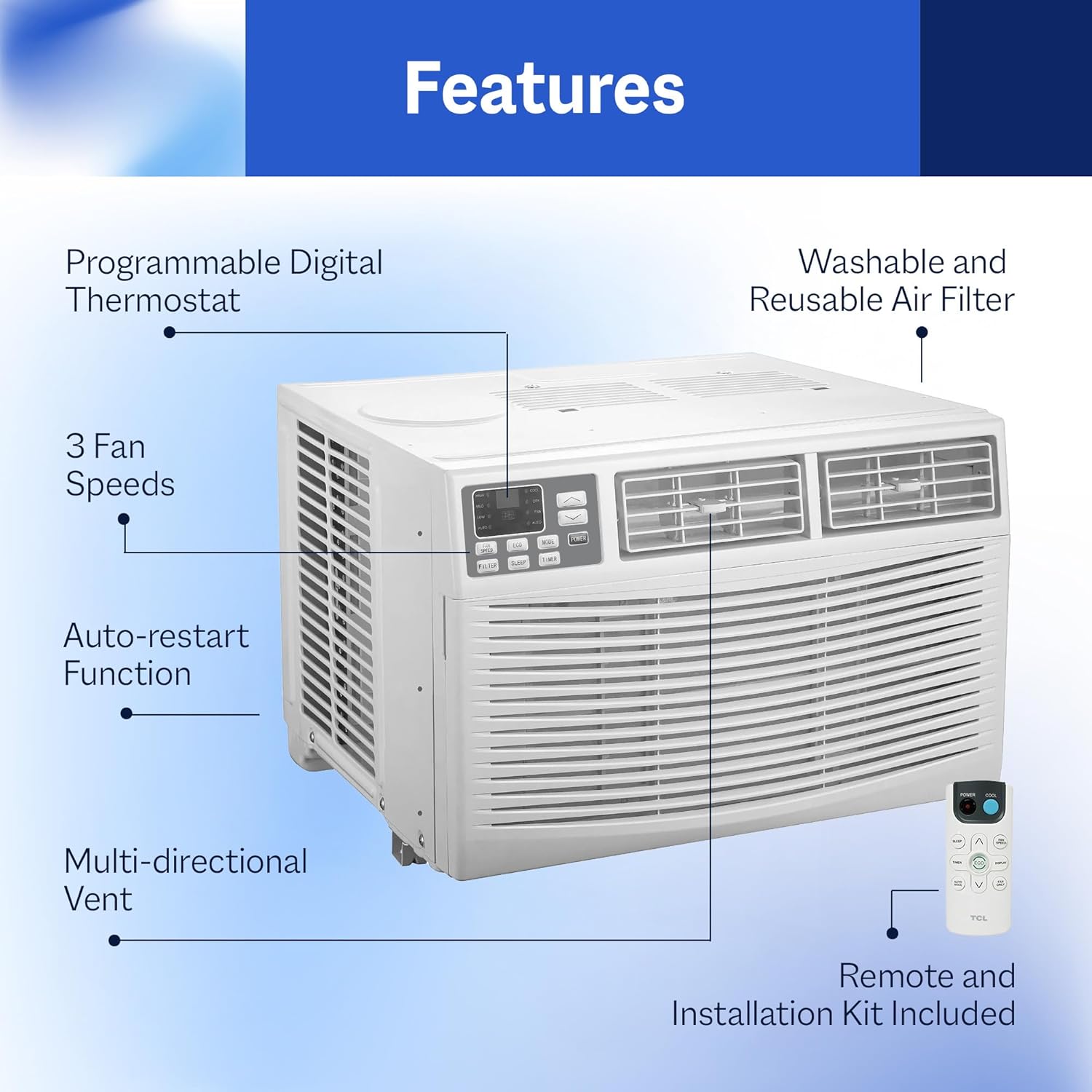
Figure 5.1: Product dimensions for installation planning.
5.2 Installation Steps (Overview)
- Prepare the window by cleaning the sill and frame.
- Attach the top rail to the air conditioner unit.
- Install the accordion side panels to the unit.
- Carefully place the unit into the window opening. This step typically requires two people due to the unit's weight (approximately 71.6 lbs).
- Secure the unit to the window frame using the provided brackets and screws.
- Extend the side panels to fill the window opening and secure them.
- Seal any gaps around the unit with foam insulation or weatherstripping to prevent air leakage.

Figure 5.2: Example of the air conditioner installed in a bedroom window.

Figure 5.3: Example of the air conditioner installed in an office window.
6. Operating Instructions
Your Cool-Living air conditioner can be operated using the control panel on the unit or the included remote control.
6.1 Control Panel and Remote Control
The control panel features a digital display and buttons for various functions. The remote control duplicates these functions for convenience.
6.2 Basic Operation
- Power On/Off: Press the Power button to turn the unit on or off.
- Mode Selection: Cycle through Cool, Fan, and Dry modes using the Mode button.
- Temperature Adjustment: Use the Up/Down arrows to set your desired temperature. The digital display will show the set temperature.
- Fan Speed: Select from Low, Medium, or High fan speeds using the Fan Speed button.
- Sleep Mode: Activate Sleep Mode for quiet operation and gradual temperature adjustment during the night.
- Auto-Restart: In case of a power interruption, the unit will automatically restart with the last settings once power is restored.
6.3 Airflow Direction
Adjust the multi-directional vent louvers manually to direct the airflow horizontally and vertically as needed for optimal room coverage.

Figure 6.1: Air conditioner in operation, demonstrating airflow.
7. Maintenance
Regular maintenance ensures efficient operation and extends the lifespan of your air conditioner.
7.1 Air Filter Cleaning
The air filter should be cleaned every two weeks or more frequently depending on usage and air quality. The unit features convenient side-out filter access.
- Turn off the air conditioner and unplug it from the power outlet.
- Locate the filter access on the side of the unit and slide out the filter.
- Wash the filter with warm, soapy water. Rinse thoroughly.
- Allow the filter to air dry completely before reinserting it. Do not use hot water or dry with direct heat.
- Slide the clean, dry filter back into its position.
7.2 Coil Cleaning
Periodically inspect the evaporator and condenser coils for dirt and dust buildup. If necessary, gently clean them with a soft brush or vacuum cleaner. Ensure the unit is unplugged before cleaning.
7.3 Exterior Cleaning
Wipe the exterior of the unit with a soft, damp cloth. Do not use harsh chemicals or abrasive cleaners.
8. Troubleshooting
Before contacting customer support, refer to the following troubleshooting guide for common issues:
| Problem | Possible Cause | Solution |
|---|---|---|
| Unit does not turn on | No power; circuit breaker tripped; power cord not fully plugged in. | Check power outlet; reset circuit breaker; ensure power cord is securely plugged in. |
| Insufficient cooling | Dirty air filter; blocked air vents; room too large; windows/doors open. | Clean air filter; clear obstructions from vents; ensure room size is within capacity; close windows/doors. |
| Water dripping outside | Normal condensation. | This is normal during high humidity. Ensure unit is slightly tilted outwards for proper drainage. |
| Unit is noisy | Loose installation; fan hitting an obstruction; normal operating sounds. | Check for secure installation; ensure no obstructions near fan; some operational noise is normal. |
9. Specifications
Detailed technical specifications for the Cool-Living CL-14CRA1:
| Specification | Value |
|---|---|
| Model Number | CL-14CRA1 |
| Cooling Power | 14,000 BTU |
| Coverage Area | Up to 700 square feet |
| Voltage | 115 volts |
| Wattage | 1230 watts |
| Noise Level | 60 dB |
| Refrigerant | R-32 |
| Product Dimensions (D x W x H) | 21.5" x 19.76" x 15.16" |
| Weight | 71.6 lbs (approximate) |
| Filter Type | Washable |
| Seasonal Energy Efficiency Ratio (SEER) | 11.3 |
| Annual Energy Consumption | 930 kWh |
| UPC | 079902150014 |

Figure 9.1: Energy Guide for the CL-14CRA1 model.
10. Warranty
This Cool-Living air conditioner comes with a 6-month limited warranty from the date of purchase. This warranty covers defects in materials and workmanship under normal use. For specific terms and conditions, please refer to the warranty card included with your product or contact customer support.
11. Customer Support
If you have any questions, require assistance, or need to report an issue that cannot be resolved using the troubleshooting guide, please contact Cool-Living customer support. Refer to your product packaging or the official Cool-Living website for the most current contact information.


