
1. Introduction and Overview
The HAT600N series ATS controller is designed with a microprocessor core, enabling precise detection of extended-spectrum 2-way-3-phase voltage. It performs accurate judgment and outputs passive control switches in response to abnormal voltage conditions, including over/under voltage, phase loss, and over/under frequency. This controller is versatile and can be directly integrated into various Automatic Transfer Systems (ATS), such as Intelligent ATS, Contactor ATS, and Circuit Breaker ATS. Its compact structure, advanced circuitry, simple wiring, and high reliability make it suitable for a wide range of applications in electric power, telecommunications, petroleum, coal, metallurgy, railways, municipal administration, intelligent buildings, electrical devices, and automatic control and testing systems.
2. Product Features
- System type can be configured for: Mains (1#) & Mains (2#), Mains (1#) & Generator (2#), Generator (1#) & Mains (2#), or Generator (1#) & Generator (2#).
- Features a backlit 128x64 LCD display with optional Chinese and English language support, operated via push-buttons.
- Capable of measuring and displaying active power, apparent power, power factor, and 3-phase current.
- Supports Automatic/Manual operating modes. In manual mode, the switch can be forced to close or open.
- All parameters are configurable on-site. Includes two different password levels to ensure operation by authorized personnel only.
3. Specifications
| Function Item | Parameter |
|---|---|
| Display | LCD (128*64) |
| Language | Chinese/English |
| AC System | 1P2W/2P3W/3P3W/3P4W |
| Alternator Voltage | 50~625V (ph-N) |
| Alternator Frequency | 50/60Hz |
| Monitor Interface | RS485 |
| Programmable Interface | LINK/RS485 |
| RTC (Real Time Clock) | Yes |
| Scheduled Start Genset | Yes |
| Circulate Start Genset | Yes |
| Switch Over Priority | Yes |
| Applicable Switch Type | All types |
| DC Supply | 8~35V DC |
| Case Dimensions (L*W*H) | 209*153*55 mm |
| Panel Cutout | 186*141 mm |
| Operating Temperature | -25~+70°C |
4. Package Contents
Upon opening the package, verify that all components are present and undamaged. The standard package for the Smartgen HAT600N ATS Controller includes:
- Smartgen HAT600N ATS Controller Unit
- Instrument Manual
- Mounting Parts (clips, screws)

Image: Smartgen HAT600N ATS Controller and manual inside its packaging box.

Image: Smartgen HAT600N ATS Controller and manual inside its packaging box, showing the contents from another angle.

Image: The closed packaging box for the Smartgen HAT600N ATS Controller.
Video: An unboxing and overview of the Smartgen HAT600N ATS Controller, demonstrating its physical appearance and included components.
5. Setup and Installation
The HAT600N controller is designed for panel mounting. Ensure the panel cutout dimensions are 186mm x 141mm for proper fit. Before installation, disconnect all power sources to prevent electrical shock or damage to the unit.
5.1 Physical Installation
- Prepare the panel cutout according to the specified dimensions.
- Insert the HAT600N controller into the cutout from the front.
- Secure the controller using the provided mounting clips and screws from the rear of the panel.

Image: Front view of the Smartgen HAT600N ATS Controller, showing the display and control buttons.

Image: Angled front view of the Smartgen HAT600N ATS Controller.
5.2 Electrical Connections
Refer to the detailed wiring diagrams provided in the included Instrument Manual for all electrical connections. Ensure all connections are secure and comply with local electrical codes. Pay close attention to:
- DC Power Supply (8-35V DC)
- AC Voltage Inputs (1# and 2# Mains/Generator)
- Auxiliary Inputs and Outputs
- Load Current Inputs
- RS485 Communication Interface

Image: Rear view of the Smartgen HAT600N ATS Controller, displaying the various wiring terminals and connection points.
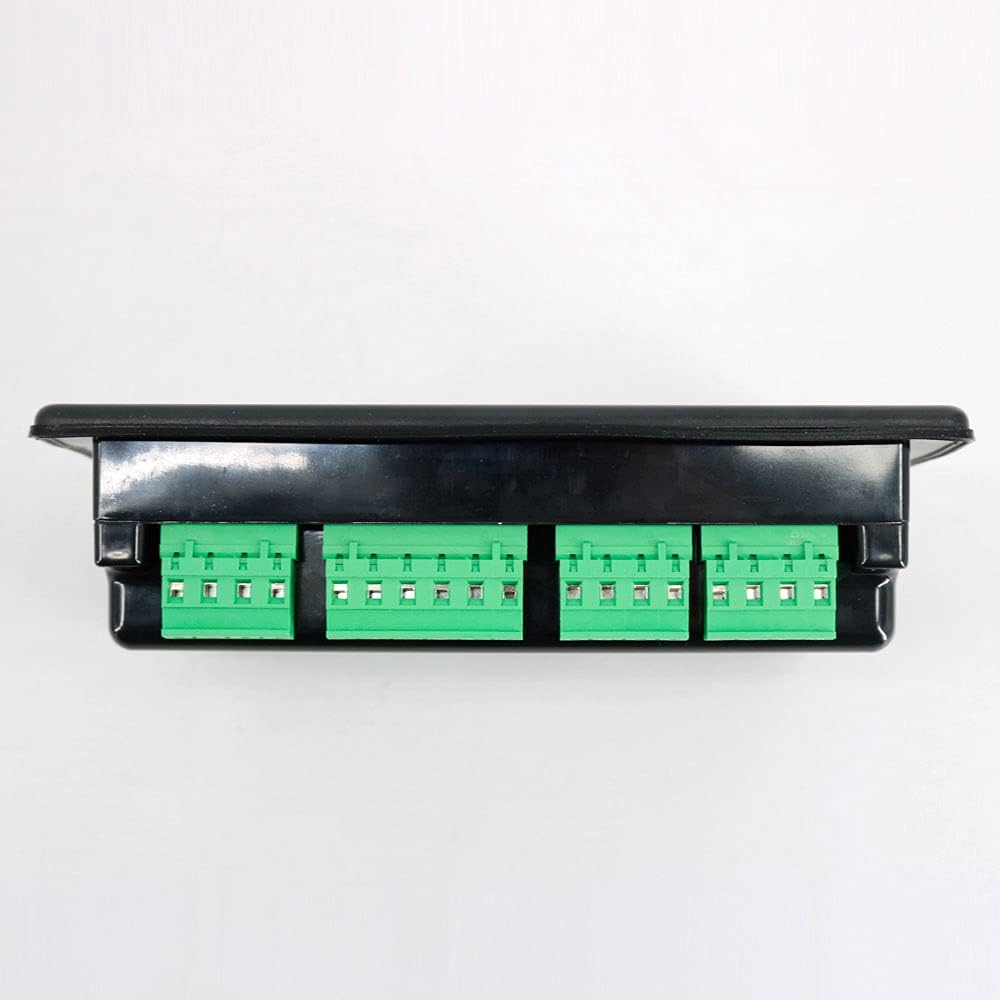
Image: Side view of the Smartgen HAT600N ATS Controller, highlighting the green terminal blocks for electrical connections.
6. Operating Instructions
The HAT600N controller offers both automatic and manual operating modes, accessible via the front panel buttons and LCD display.
6.1 Basic Operation
- Power On: Once correctly wired and powered, the LCD will illuminate, displaying system information.
- Mode Selection: Use the 'Man' (Manual) and 'Auto' (Automatic) buttons to switch between operating modes.
- Manual Control: In Manual mode, use the '1# Close', 'Open', and '2# Close' buttons to manually control the transfer switches.
- Test Function: The 'Test' button can be used to initiate a system test sequence.
6.2 Parameter Configuration
All operational parameters can be configured directly on the unit using the 'Set' button and navigation arrows. Access to certain parameters requires a password to prevent unauthorized changes. Refer to the Instrument Manual for a complete list of configurable parameters and their functions, including:
- System type (Mains/Generator configurations)
- Voltage and frequency thresholds
- Transfer delays
- Scheduled start/stop times for gensets
- Communication settings
7. Maintenance
Regular maintenance ensures the longevity and reliable operation of your HAT600N ATS Controller.
- Cleaning: Periodically clean the controller's exterior with a soft, dry cloth. Do not use abrasive cleaners or solvents.
- Connection Checks: Annually inspect all electrical connections for tightness and signs of corrosion. Re-tighten if necessary.
- Firmware Updates: Check the manufacturer's website for any available firmware updates that may improve performance or add features.
- Environmental Conditions: Ensure the operating environment remains within the specified temperature range (-25°C to +70°C) and humidity levels to prevent damage.
8. Troubleshooting
If you encounter issues with your HAT600N ATS Controller, refer to the following basic troubleshooting steps. For complex problems, consult the detailed troubleshooting guide in the Instrument Manual or contact technical support.
- No Display/Power: Check the DC power supply connections and ensure the voltage is within the 8-35V range. Verify the power source is active.
- Incorrect Readings: Ensure all voltage and current input connections are correct and secure. Verify sensor calibration if applicable.
- ATS Not Transferring: Check the configured system type and transfer parameters. Verify that both power sources (Mains/Generator) are available and within acceptable limits. Inspect the physical connections to the transfer switch.
- Communication Issues (RS485): Verify RS485 wiring polarity and termination. Ensure the communication settings (baud rate, address) match the connected device.
- Alarm Indication: If the 'Alarm' indicator is active, check the LCD display for specific alarm messages and refer to the manual for their meaning and corrective actions.
9. Warranty and Support
For warranty information, technical support, or service inquiries regarding your Smartgen HAT600N ATS Controller, please contact Graigar customer service or refer to the warranty section in your Instrument Manual. Keep your purchase receipt as proof of purchase for warranty claims.
Contact Information: Please refer to the contact details provided in your product packaging or on the official Graigar website for the most up-to-date support information.

